
Tuta Calendar
Tuta Calendar helps organize appointments, business meetings, and repeating tasks, with apps for Android and iOS and access on web, Windows, Linux, and macOS.
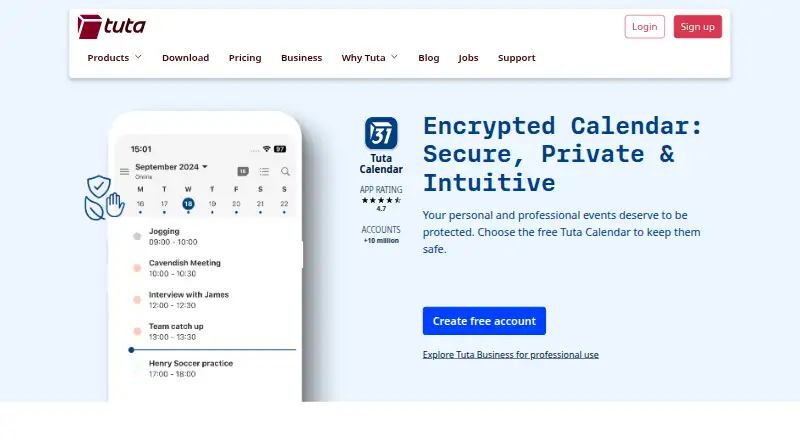
What Tuta Calendar is
Tuta Calendar helps organize appointments, business meetings, and repeating tasks, with apps for Android and iOS and access on web, Windows, Linux, and macOS. It supports shared calendars with read-only, read-and-write, or write-and-manage-sharing access. Calendar sync is one-way. Users can send and receive invitations, including invitations to external users encrypted with a shared password, and import calendars through settings for automatic syncing across devices. Tuta says events, invitations, sharing, and push reminders are end-to-end encrypted; reminders are hidden from the phone operating system and can arrive offline. The calendar is integrated with Tuta email and contacts. Security features include two-factor authentication; Tuta describes its clients as open source and its calendar as using zero-knowledge architecture. Its Free plan includes one calendar. Paid plans start at €3/user/mo and include unlimited calendars. Tuta says its data is stored on its own servers in ISO 27001 certified data centers in Germany.
Good
- Calendar sharing offers three access levels.
- Invitations can be encrypted for external users.
- Reminders can arrive while offline.
- Available on mobile, desktop, and web.
- Two-factor authentication is supported.
Watch out
- Calendar sync is one-way.
- Free plan is limited to one calendar.
- External invitation encryption uses a shared password.
Who it suits
It suits people who want a privacy-focused calendar for personal or business use, including organizations, journalists, and activists. Shared access levels and email-and-contact integration may also suit people coordinating calendars with others.
Verdict
Tuta Calendar combines event organization and sharing with privacy and security features. Consider the one-way sync and the Free plan’s one-calendar limit when choosing a plan.
Plans and prices
From Tuta Calendar's own pricing page, checked 11 Oct 2026.
| Plan | Price | What it gives you |
|---|---|---|
| Free | Free | 1 GB storage · 1 calendar · 3 labels |
| Legend | — | 500 GB storage · Unlimited calendars · 30 extra email addresses · 10 custom domains · Priority email support · Paid yearly; price not visible in the opened page text |
| Revolutionary | — | 20 GB storage · Unlimited calendars · 15 extra email addresses · 3 custom domains · Email support · Paid yearly; price not visible in the opened page text |
The facts
Each one read from Tuta Calendar's own pages, with the date it was checked.
What it does
- Business and GDPR
- Tuta describes its business products as end-to-end encrypted and aligned with GDPR data protection requirements.checked 11 Oct 2026
- Calendar purpose
- Tuta Calendar lets users organize appointments, business meetings, and repeating tasks.checked 11 Oct 2026
- Calendar sharing
- Shared calendars can grant read-only, read-and-write, or write-and-manage-sharing access.checked 11 Oct 2026
- Calendar sync
- one_waychecked 20 Sep 2026
- Data location
- Tuta says its data is stored on its own servers in ISO 27001 certified data centers in Germany.checked 11 Oct 2026
- Encryption
- Tuta says events, invitations, calendar sharing, and push reminders are end-to-end encrypted.checked 11 Oct 2026
- Import and sync
- Users can import calendars through settings, after which they sync automatically across devices.checked 11 Oct 2026
- Integrated products
- Tuta Calendar is integrated with Tuta email and contacts so users can handle communications in one place.checked 11 Oct 2026
- Intended audience
- Tuta presents its service for personal use, businesses, journalists, activists, and organizations seeking privacy-focused communication.checked 11 Oct 2026
- Invitations
- Users can send and receive calendar invitations, with an option to encrypt invitations to external users using a shared password.checked 11 Oct 2026
- Reminders
- Tuta says reminders are hidden from the phone operating system and can arrive even when offline.checked 11 Oct 2026
- Security controls
- Tuta Calendar supports two-factor authentication, and Tuta says its clients are open source and its calendar uses zero-knowledge architecture.checked 11 Oct 2026
- Shared calendars
- Yeschecked 20 Sep 2026
- Support
- The pricing page lists email support for Revolutionary and priority email support for Legend, with a one-business-day reply target for priority requests.checked 11 Oct 2026
The company
- Company
- The company is Tutao GmbH, located in Hanover, Germany; Tuta says its secure email service started in 2011.checked 11 Oct 2026
- Founded
- 2011checked 28 Sep 2026
- Headquarters
- Hannover, Germanychecked 28 Sep 2026
Money
- Free plan
- Yeschecked 20 Sep 2026
- Free tier limit
- The Free plan includes one calendar, while the Revolutionary and Legend plans include unlimited calendars.checked 11 Oct 2026
Where it runs
- Mobile apps
- ios and androidchecked 20 Sep 2026
The full review of Tuta Calendar
Overview
Tuta Calendar is a calendar for organizing appointments, business meetings and repeating tasks, with versions for mobile, desktop and web. It is best suited to people who prioritize privacy, particularly those already using Tuta email and contacts. Its security-focused sharing and reminders are compelling, though one-way sync and a single calendar on the free plan limit its flexibility.
Key features
Tuta says events, invitations, shared calendars and push reminders are end-to-end encrypted. Calendar sharing has separate read-only, read-and-write, and write-and-manage-sharing permissions, which lets owners give collaborators access suited to their role. For outside invitees, users can encrypt invitations with a shared password.
Users can import calendars through settings, and imported calendars then sync automatically across devices. That convenience comes with an important qualification: sync is one-way. Anyone who needs changes to pass back and forth between calendars should choose another service.
Tuta says reminders are concealed from the phone operating system and can still arrive offline. That design favors privacy over exposing event details through system notifications. Integration with Tuta email and contacts also keeps calendar-related communication in the same service, a practical advantage for existing Tuta users.
Two-factor authentication, open-source clients and a zero-knowledge architecture add to Tuta's privacy credentials. The company says data is held on its own servers in ISO 27001-certified data centers in Germany, and describes its business products as end-to-end encrypted and aligned with GDPR requirements. These assurances will matter to privacy-conscious individuals and organizations, though the one-way sync remains a drawback for workflows that depend on two-way updates.
Pricing
Tuta offers a free plan and two paid monthly plans. The free tier costs nothing and includes 1 GB of storage, one calendar and three labels. It is a reasonable starting point for an individual with simple needs, but the one-calendar cap is restrictive for separating work, personal and other schedules.
Revolutionary costs €3 a month, billed monthly. It raises storage to 20 GB and includes unlimited calendars, 15 extra email addresses and three custom domains. This is the more suitable tier for users who need multiple calendars or want to bring more email use into the same service. Email support is included.
Legend costs €8 a month, billed monthly, and provides 500 GB of storage, unlimited calendars, 30 extra email addresses and 10 custom domains. It is aimed at users with greater storage and address needs, rather than someone upgrading solely for calendar access. Legend includes priority email support, with a one-business-day reply target for priority requests.
The paid plans expand storage and email allowances as well as calendar capacity; the free plan gives up unlimited calendars and the additional email and domain allowances. The paid prices are monthly, not annual rates.
Platforms
Tuta Calendar is available on Android, iOS, Linux, macOS, Windows and the web. Mobile apps are available for iOS and Android, giving users options across major desktop systems as well as browsers.
Who it's for
Privacy-conscious individuals, journalists, activists and organizations are the clearest fit, especially when they also use Tuta email and contacts. Businesses may value the encrypted service and Germany-based data centers. The free plan can suit a single-calendar personal setup; people who need multiple calendars must move to a paid plan. Users who rely on two-way calendar sync should look elsewhere.
Pros and cons
- Pros: End-to-end encryption covers events, invitations, sharing and push reminders, addressing privacy across more than just stored calendar data.
- Pros: Three sharing permission levels and password-encrypted invitations give users more control over collaboration, including with external invitees.
- Pros: Integration with Tuta email and contacts helps existing users keep communications and scheduling together.
- Cons: One-way sync cannot support workflows that require calendar changes to propagate in both directions.
- Cons: The free plan is limited to one calendar, making it a poor fit for people who separate schedules by context.
- Cons: The higher Legend price is difficult to justify for calendar needs alone when its main listed advantages are larger storage, more email addresses and more custom domains.
Alternatives
For a broader comparison, browse Calendar apps. Choose Lark if its free Starter plan's 20-user allowance, 100 GB storage, 18 months of message history and 1,000 monthly automations better suit a team workflow. Consider Microsoft Outlook Calendar if you want a free calendar option across Android, iOS, macOS and web, or a one-month Microsoft 365 trial.
Zoho Calendar is another free option for individuals and teams, including up to one appointment booking link. Calendar.com may suit individuals looking for its free-forever plan or a Standard tier starting at $20 per month. Proton Calendar is worth considering if three calendars on a free account meet your needs.
Pick Teamup if its free allowance of five sub-calendars and five users fits a small shared-calendar setup. Cozi is an alternative for families seeking a shared calendar alongside grocery and to-do lists and a recipe library. TimeTree is another freemium calendar option.
Verdict
Tuta Calendar is a strong choice for privacy-minded users who want encrypted scheduling integrated with Tuta email and contacts. Its sharing controls and privacy-focused reminders make it more capable than a basic personal calendar, but the free tier's one-calendar limit and one-way sync are real constraints. Choose it for privacy and Tuta integration; look elsewhere if two-way synchronization is essential.
Getting started
- Visit https://tuta.com/calendar.
- Choose the Free plan or a paid plan: Revolutionary at €3 a month or Legend at €8 a month.
- Use the Android or iOS app, or access Tuta Calendar on web, Linux, macOS, or Windows.
- Import calendars through settings; imported calendars sync automatically across devices.
- Share calendars with read-only, read-and-write, or write-and-manage-sharing access.
Limits worth knowing
The Free plan includes 1 GB storage, one calendar, and three labels. Revolutionary and Legend include unlimited calendars; Revolutionary includes 20 GB storage and Legend includes 500 GB.
Questions
Is Tuta Calendar free?
Yes. The Free plan costs nothing and includes 1 GB storage, one calendar, and three labels.
What do the paid plans cost?
Revolutionary costs €3 a month, billed monthly. Legend costs €8 a month, billed monthly.
Which platforms are supported?
Tuta Calendar is available on Android, iOS, Linux, macOS, web, and Windows.
Does it support shared calendars?
Yes. Access can be read-only, read-and-write, or write-and-manage-sharing.
Is calendar sync two-way?
The listed sync is one-way. Calendars imported through settings sync automatically across devices.
Who makes Tuta Calendar?
The maker is Tuta Calendar. The company, Tutao GmbH, is based in Hannover, Germany, and Tuta says its secure email service began in 2011.
Alternatives to Tuta Calendar
- 1

Lark
Free planAndroidiOSWebAPI9.2From $6 a month - 2
EGroupware
Free planOpen sourceAndroidiOSWebAPI9.2From €21.90 a month - 3
Teamup
Free planAndroidiOSWebAPI9.0From $12 a month - 4
Twake Calendar
Open sourceAndroidiOSWebAPI9.0From €4 a month - 5
TimeFinder
Free planAndroidiOSWebmacOS8.9$119.99 one-time - 6

7shifts
Free planAndroidiOSWebAPI8.9From $39.99 a month