
TimeTree
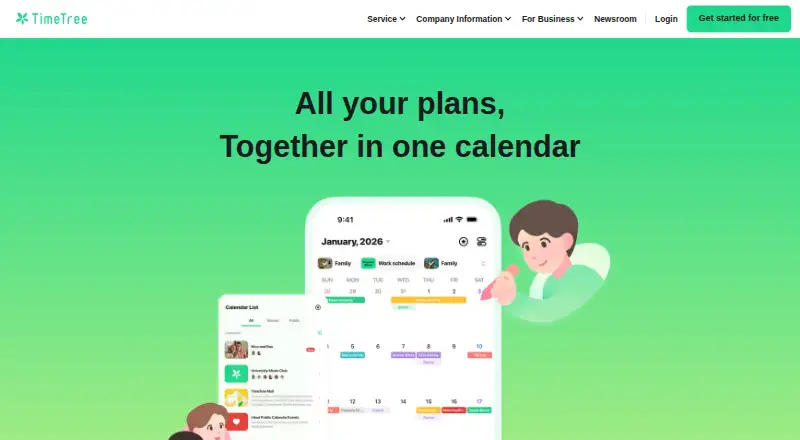
TimeTree is a calendar app for Android and iOS, with shared calendars, multiple calendars, comments, and photos available in its free plan.
What TimeTree is
TimeTree is a calendar app for Android and iOS, with shared calendars, multiple calendars, comments, and photos available in its free plan. Calendar sync is one-way. TimeTree was founded in 2014 and is based in Tokyo, Japan. Its Premium subscription costs $4.49 a month and renews monthly from the subscription date. Premium adds an ad-free experience, file attachments, a vertical event view, event priority, and dedicated support. The free plan covers basic calendar functions and lets people use shared and multiple calendars, while Premium adds options for handling event details and support. TimeTree's listed features center on shared calendar use and collaboration through comments and photos, with the one-way sync behavior worth noting if you are choosing it to coordinate calendar information across services.
Good
- Free plan includes shared and multiple calendars
- Comments and photos are included in Free
- Premium adds file attachments and event priority
- Available on Android and iOS
Watch out
- Calendar sync is one-way
- Premium costs $4.49 a month
- Premium renews monthly from the subscription date
Who it suits
TimeTree may suit people who want shared calendars with comments and photos on a mobile device. Premium may appeal to users who want file attachments, event priority, or an ad-free experience.
Verdict
TimeTree offers shared calendars and basic collaboration features in its free plan, with Premium adding event and support extras. Note that calendar sync is one-way and Premium renews monthly at 4.49 USD.
Plans and prices
From TimeTree's own pricing page, checked 7 Oct 2026.
| Plan | Price | What it gives you |
|---|---|---|
| Free | Free | Basic calendar functions · create and share multiple calendars · comments and photos · import other calendars · public calendars |
| Premium | $4.49 a month | Ad-free experience · File attachments · Vertical event view · Event priority · Dedicated support · Renewed monthly from the subscription date |
| TimeTree Premium | $4.49 a month | Ad-free · attach files to events · vertical view · pin important events · dedicated support · 4.49 USD/month; first month free |
| TimeTree Premium | $44.99 a year | Ad-free · attach files to events · vertical view · pin important events · dedicated support · 44.99 USD/annual; first month free, 2 months off |
The facts
Each one read from TimeTree's own pages, with the date it was checked.
What it does
- Attachments
- Premium supports attaching PDFs, Word documents, and photos to events; free users can post photos in event comments.checked 7 Oct 2026
- Calendar filters
- Users can view multiple calendars together with filters or switch between calendars.checked 7 Oct 2026
- Calendar sync
- one_waychecked 20 Sep 2026
- External calendars
- The app can display iOS or Android native calendars, including external calendars such as Google Calendar synced with the device calendar; external calendar events cannot be used on the web version.checked 7 Oct 2026
- Import limitation
- Imported external calendar events do not automatically sync back from TimeTree, and TimeTree events cannot be exported to external calendars.checked 7 Oct 2026
- Privacy
- The privacy policy says TimeTree does not share or sell user information to third parties without prior user consent, subject to listed exceptions.checked 7 Oct 2026
- Public calendars
- Public calendar events are published on the web and can be viewed by anyone, and an account can manage up to 20 public calendars.checked 7 Oct 2026
- Purpose
- TimeTree is a shared calendar app for coordinating schedules and plans with groups.checked 7 Oct 2026
- Security
- TimeTree says it uses encrypted internet communication and encryption at rest, along with access controls and regular vulnerability inspections.checked 7 Oct 2026
- Shared calendars
- Users can create calendars, invite a group, and maintain as many shared calendars as they need.checked 7 Oct 2026
- Subscription limits
- Premium is optional, applies per account, and has no shared subscription plan; the subscription is non-refundable but can be ended at any time.checked 7 Oct 2026
- Support
- TimeTree provides a help center with product guides and an inquiry form, while Premium includes dedicated support.checked 7 Oct 2026
- Web support
- TimeTree has a web version for PC and tablets, with Chrome, Safari, Firefox, and Edge listed as recommended browsers.checked 7 Oct 2026
The company
- Founded
- 2014checked 28 Sep 2026
- Headquarters
- Tokyo, Japanchecked 28 Sep 2026
Money
- Free features
- The free plan includes calendar creation and sharing, multiple calendars, comments and photos, calendar imports, and public calendars.checked 7 Oct 2026
- Free plan
- Yeschecked 20 Sep 2026
- Premium trial
- A one-month free Premium trial is available only to first-time Premium users; it converts to a paid subscription unless canceled at least 24 hours before it ends.checked 7 Oct 2026
Where it runs
- Mobile apps
- ios and androidchecked 20 Sep 2026
The full review of TimeTree
TimeTree is a shared scheduling workspace for households, clubs, and other groups that need more than a private calendar. It suits people who want event discussion and photos built into planning, while users demanding true two-way synchronization with Google Calendar or another service should look elsewhere.
Overview
You can create and share multiple calendars, view them together with filters, or switch between them. Comments and photos attached to event discussions keep coordination alongside the date, rather than scattering it across messages. The free tier includes those core collaboration tools, making it a credible starting point for groups that do not need premium extras.
TimeTree can display calendars from a phone's native calendar app, including external calendars such as Google Calendar when that service is synced to the device calendar. This connection is display-only: imported events do not flow back from TimeTree, and TimeTree events cannot be exported to external calendars. External-calendar events are also unavailable in the web version, which weakens the experience for groups working mainly from a computer or tablet.
Key features
Shared planning and conversation
Multiple shared calendars allow separate schedules for family members, projects, or activities, while combined views and filters help users focus on the calendars that matter at a given moment. Comments and photos in events are useful when a plan needs context or a quick visual reference. Free users can post photos in event comments, but attaching files directly to events is reserved for Premium.
Public calendars
Public-calendar events are published on the web for anyone to view. An account can manage up to 20 public calendars, making the feature suitable for organisations or communities publishing schedules, but it is inappropriate for private plans that should remain restricted.
External calendar display
Phone-native calendars can be shown inside the app, including external calendars available through device synchronization. Because the relationship is one-way and external events cannot be used on the web version, TimeTree is a companion view rather than a replacement for a multi-service calendar hub.
Security and support
TimeTree says it encrypts internet communication and stored data, controls access, and performs regular vulnerability inspections. Its help centre and inquiry form cover general assistance; Premium adds dedicated support. The privacy policy says user information is not shared or sold without prior consent, subject to stated exceptions.
Pricing
| Plan | Price | What you get |
|---|---|---|
| Free | free | Basic calendar functions, multiple shared calendars, comments and photos, calendar imports, and public calendars. |
| Premium | $4.49 a month | Ad-free use, file attachments, vertical event view, event priority, and dedicated support. |
The free plan is the sensible choice for groups focused on shared dates and event discussion. Premium is aimed at users who need PDFs, Word documents, or photos attached directly to events, a vertical event layout, pinned or prioritised events, and dedicated help. It is an account-level subscription with no shared subscription option, so each account that needs Premium must subscribe separately. The subscription renews monthly from the subscription date, is non-refundable, and can be ended at any time.
First-time Premium users receive a one-month free trial. It converts to a paid subscription unless canceled at least 24 hours before the trial ends, so the cancellation deadline matters for anyone evaluating the paid features.
Platforms
TimeTree provides Android and iOS mobile apps plus a web version for PCs and tablets. Chrome, Safari, Firefox, and Edge are recommended browsers. The web client is useful for larger screens, but it cannot use events from external calendars, limiting its value for mixed-calendar workflows.
Who it's for
TimeTree is a strong fit for families, friends, and small groups that want shared calendars with in-event conversation and photos at no cost. Premium makes sense for organisers who regularly attach documents or need priority marking and dedicated support. Choose another tool if your essential requirement is automatic two-way exchange with external calendars, or if your group needs one subscription shared across several accounts.
Pros and cons
Pros
- Free plan includes multiple shared calendars, comments, photos, imports, and public calendars.
- Filters and combined views make several group schedules manageable in one place.
- Mobile apps and a browser version cover phones, tablets, and computers.
- Premium adds event attachments, vertical viewing, priority marking, and dedicated support.
- Published security measures include encryption in transit and at rest, access controls, and vulnerability inspections.
Cons
- External-calendar integration is one-way; TimeTree events cannot be exported back.
- External events cannot be used in the web version.
- Premium is charged per account, with no shared subscription plan.
- The Premium trial renews into a paid monthly subscription unless canceled at least 24 hours before expiry.
- Public-calendar events are visible to anyone on the web, so they are unsuitable for confidential schedules.
Alternatives
For a wider comparison, see Family Calendar Apps and Calendar apps.
Cozi is the better pick when a shared family calendar should sit alongside grocery lists, to-do lists, automatic notifications, and recipes.
FamilyWall suits families that also want shopping lists, tasks, messaging, and a contact book.
Famnest is worth considering for chores, routines, meal planning, and recipes in addition to a family calendar.
OpenFamily is an option for users seeking a self-hosted family-calendar setup.
Ahenora provides a family-oriented combination of tasks, calendar, shared lists, chat, and reminders.
Cozyla Calendar is an alternative for iOS and Android users wanting a shared family calendar with dashboard and third-party app support.
Fami combines a shared calendar with chores, shopping, budgeting, and family places.
FamilyHQ is another family-planning option with email allowances, archive periods, digests, and AI email summaries.
Verdict
Choose TimeTree if your priority is free, group-based calendar coordination with comments and photos, and consider Premium when event files or dedicated support justify $4.49 a month. Look elsewhere if two-way external-calendar synchronization, web access to imported events, or a shared household subscription is essential.
Alternatives to TimeTree
- 1

Lark
Free planAndroidiOSWebAPI9.2From $6 a month - 2
EGroupware
Free planOpen sourceAndroidiOSWebAPI9.2From €21.90 a month - 3
Teamup
Free planAndroidiOSWebAPI9.0From $12 a month - 4
Twake Calendar
Open sourceAndroidiOSWebAPI9.0From €4 a month - 5
TimeFinder
Free planAndroidiOSWebmacOS8.9$119.99 one-time - 6

7shifts
Free planAndroidiOSWebAPI8.9From $39.99 a month