
Ahenora
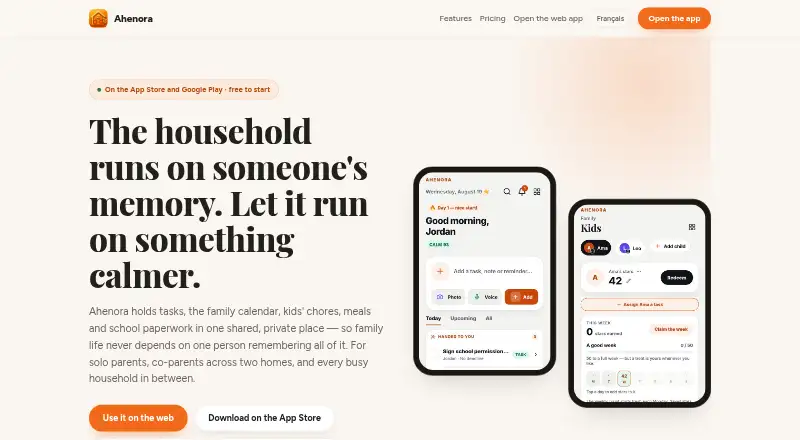
Ahenora brings household tasks, a shared family calendar, meals, children’s chores and school paperwork into one place.
What Ahenora is
Ahenora brings household tasks, a shared family calendar, meals, children’s chores and school paperwork into one place. Tasks can have reminders and recurring routines, and the calendar can import Google or Outlook events. Families can plan dinners, request AI recipe ideas, share shopping lists and track shopping costs by month and shop. Scanned school letters or appointment cards can become tasks or saved documents, which can be organized in a private vault. Family messaging includes a parent in every private conversation, and optional private accounts are available for ages 13–17. Co-parents can set alternating-week custody schedules, add hand-off notes and continue tasks started by the other parent. Tasks, shopping lists, meals and household membership can be viewed offline; completed offline tasks sync when the connection returns. Ahenora is available on Android, iOS and web, in English, French, Spanish and German. The free plan includes two adults, basic household tools and three scans a month.
Good
- Tasks support reminders and recurring routines.
- Calendar imports Google or Outlook events.
- Households can share shopping lists and track costs.
- Offline task completions sync when connection returns.
- Free plan includes two adults and three monthly scans.
Watch out
- Children under 13 cannot hold accounts.
- Free plan limits scans to three per month.
- Duo has no children’s section.
- Reminders are not guaranteed to arrive.
Who it suits
Ahenora is for solo parents, co-parents and busy households coordinating schedules, chores, meals and documents. Household adds access for helpers such as grandparents, childminders and nannies, without access to documents or money.
Verdict
Ahenora combines household scheduling, tasks, meals and paperwork, with features for co-parenting and offline access. Check which plan includes the child and helper features your household needs.
Plans and prices
From Ahenora's own pricing page, checked 3 Oct 2026.
| Plan | Price | What it gives you |
|---|---|---|
| Free | Free | Two adults · tasks, calendar and shared lists · family chat and reminders · three scans a month · 25 MB document vault · children are on Family · Free for good after the 14-day free period |
| Duo | €1.99 a month | Two adults · meal planner and recipe AI · unlimited scans · Sunday brief and weekly report · gift pot · 500 MB document vault · no children’s section · Monthly; cancel any time |
| Family | €4.99 a month | Everything in Duo · up to 5 children · chores, stars and rewards · pocket money · carpool schedule · Monthly; cancel any time |
| Household | €9.99 a month | Everything in Family · up to 10 children and 20 people · helper and nanny accounts · 10 GB document vault · Monthly; cancel any time |
The facts
Each one read from Ahenora's own pages, with the date it was checked.
What it does
- Availability
- The maker says the service may be unavailable during maintenance or infrastructure incidents and does not guarantee uninterrupted availability or that reminders will always arrive.checked 3 Oct 2026
- Co-parenting
- Co-parents can set an alternating-week custody schedule, add hand-off notes and pick up tasks started by the other parent.checked 3 Oct 2026
- Intended users and access
- The maker describes Ahenora for solo parents, co-parents and busy households; helpers such as grandparents, childminders and nannies can be added on Household with access to schedules, tasks and chat, but not documents or money.checked 3 Oct 2026
- Languages
- The maker says Ahenora is available in English, French, Spanish and German.checked 3 Oct 2026
- Meals and shopping
- Families can plan dinners, ask AI for a recipe, create a shared shopping list and track shopping costs by month and shop.checked 3 Oct 2026
- Messages and teen accounts
- The app offers family messaging with a parent included in every private conversation, plus optional private accounts for ages 13–17.checked 3 Oct 2026
- Offline use
- Tasks, shopping lists, meals and household membership are kept on the phone for viewing offline, and offline completions are sent when the connection returns.checked 3 Oct 2026
- Paperwork and documents
- Users can scan a school letter or appointment card into a task or saved document and organise household documents in a private vault.checked 3 Oct 2026
- Privacy
- The maker says household content is not read by Ahenora staff, sold or used to train models, and says individual items can be made private from other household members.checked 3 Oct 2026
- Purpose
- Ahenora brings household tasks, a family calendar, children’s chores, meals and school paperwork into one shared place for solo parents, co-parents and busy households.checked 3 Oct 2026
- Support
- The terms page directs support requests to [email protected] and privacy, data-protection or deletion requests to [email protected].checked 3 Oct 2026
- Tasks and calendar
- Tasks support reminders and recurring routines, and the shared calendar can import Google or Outlook events.checked 3 Oct 2026
- Usage terms
- A household creator must be 18 or older, children under 13 cannot hold accounts, and the terms say users should review scanned or AI-assisted results before relying on them.checked 3 Oct 2026
The company
- Headquarters
- Bondy, Francechecked 28 Sep 2026
The full review of Ahenora
Ahenora is a family-organising app for households that need more than a calendar, particularly solo parents and co-parents managing recurring responsibilities. It brings routines, meals, shopping and paperwork into one shared workspace, with its best differentiation in custody hand-offs and household documents.
Overview
Tasks support reminders and recurring routines, while the shared calendar imports Google or Outlook events. That combination reduces duplicate entry for families already using either service and gives repeating chores a defined place. Ahenora also covers dinner planning, shopping and school administration, so it is a broader household system than a calendar-only app.
Co-parents can create an alternating-week custody schedule, leave hand-off notes and take over tasks started by the other parent. Family messaging keeps a parent in every private conversation, and optional private accounts are available for ages 13–17. Children under 13 cannot have accounts, and the household creator must be 18 or older.
Key features
Routines and shared planning
Recurring tasks and reminders suit ongoing household work such as weekly chores or regular appointments. Calendar imports are useful when adults already maintain schedules elsewhere. Ahenora does not guarantee that reminders will arrive, so urgent deadlines still need a backup method.
Meals and shopping
Families can plan dinners, ask AI for a recipe, maintain a shared shopping list and review spending by month and shop. This makes the app practical for households that want meal decisions and grocery coordination beside their calendar rather than in separate tools. AI-assisted results should be reviewed before anyone relies on them.
Paperwork, privacy and offline access
A scan of a school letter or appointment card can become a task or saved document, and the private vault provides a dedicated place for household records. Tasks, meals, shopping lists and household membership remain viewable offline; completions made offline are sent after reconnection. Ahenora says staff do not read household content, sell it or use it to train models, and individual items can be hidden from other household members.
Helpers and communication
Grandparents, childminders and nannies can be added on Household with access to schedules, tasks and chat, but not documents or money. That access boundary is sensible for outside help, though larger households must pay for the Household tier.
Pricing
Ahenora is freemium, with a 14-day free period before the Free plan continues at no charge. Free includes two adults, tasks, calendar, shared lists, family chat, reminders, three scans per month and a 25 MB document vault; children are on Family. It is a reasonable trial for couples or adults who mainly need coordination, but the scan and storage caps are tight for paperwork-heavy homes.
Duo costs €1.99 a month, billed monthly and cancellable at any time. It adds meal planning, recipe AI, unlimited scans, a Sunday brief, weekly report, gift pot and a 500 MB vault, but has no children’s section. Choose it when adults want the food and paperwork tools without child accounts.
Family costs €4.99 a month, billed monthly and cancellable at any time. It includes Duo plus up to five children, chores, stars and rewards, pocket money and a carpool schedule. This is the practical choice for families who need children’s participation and incentives.
Household costs €9.99 a month, billed monthly and cancellable at any time. It includes Family, up to 10 children and 20 people, helper and nanny accounts, and a 10 GB vault. The extra capacity is aimed at larger families or households involving paid and extended-family support.
Platforms
Ahenora runs on Android, iOS and the web. It is offered in English, French, Spanish and German. Support requests go to [email protected]; privacy, data-protection and deletion requests go to [email protected].
Who it's for
Ahenora is best for solo parents, co-parents and busy households that want custody logistics, chores, meals and school paperwork connected. Family suits homes with children, while Household is the fit for helpers or many members. Adults seeking only a simple shared calendar may find its broader system unnecessary.
Pros and cons
- Pro: Alternating-week custody, hand-off notes and task takeover address co-parenting logistics directly.
- Pro: Scanning, a document vault, meals and shopping extend household coordination beyond events.
- Pro: Offline viewing and queued completions help when connectivity is unreliable.
- Con: Children’s tools are unavailable on Free and Duo, requiring Family or Household.
- Con: Free storage is only 25 MB and limited to three scans monthly.
- Con: Reminders are not guaranteed, and service interruptions can occur during maintenance or infrastructure incidents.
Alternatives
For a calendar-first family setup, Cozi offers shared calendars, notifications, grocery and to-do lists, and a recipe library. FamilyWall is a straightforward option for shared calendars, shopping, tasks and messaging. Famnest suits families wanting chores, routines, basic meal planning and recipes across a wider platform range.
OpenFamily is the choice for users who want self-hosting and control over where data stays. TimeTree focuses on multiple shared calendars, comments, photos and calendar imports. Cozyla Calendar is an Android and iOS calendar option with a customizable dashboard and third-party support. Fami combines calendar, chores, shopping, budget and family places. FamilyHQ is aimed at households organising email alongside calendars and digests. Browse Family Calendar Apps for a wider category comparison.
Verdict
Choose Ahenora if co-parenting hand-offs, children’s routines and household paperwork need to live beside meals and shopping. Its main reason to look elsewhere is the plan structure: child features, helper access and meaningful document capacity quickly require a paid tier, while reminders should not be your only safeguard for critical events.
Alternatives to Ahenora
- 1

Cozyla Calendar
Free planAndroidiOSmacOS7.8Free plan - 2

Cozi
Free planAndroidiOSWeb7.6From $39 a year - 3

Equal House
Free planAndroidiOSAPI7.6From £29.90 a year - 4

FamilyWall
Free planAndroidiOSWeb7.6From $44.99 a year - 5

TimeTree
Free planAndroidiOSWeb7.6From $44.99 a year - 6

Famnest
Free planAndroidiOSWebmacOS7.3From $6.99 a month