
Cozyla Calendar
Cozyla Calendar brings household schedules and tasks into a shared family hub.
What Cozyla Calendar is
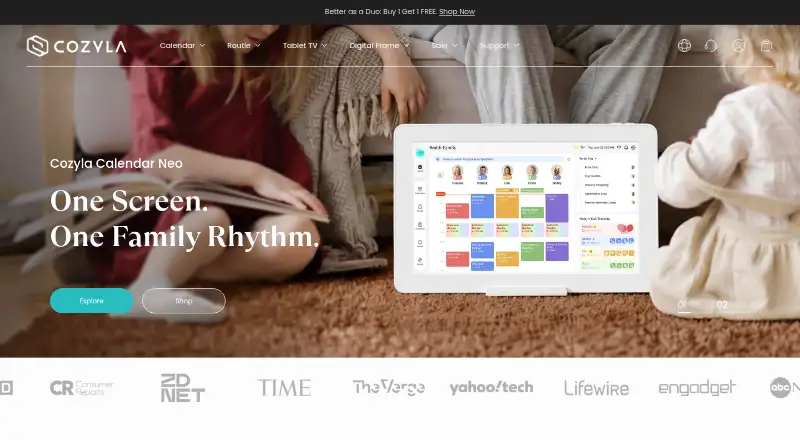
Cozyla Calendar brings household schedules and tasks into a shared family hub. Users can create events, connect supported calendars, and configure event and reminder displays. Calendar Plus 2 offers day, week, and month views for personal or group schedules, with up to eight color-coded family profiles. Families can assign chores, set recurring routines and one-time to-dos, and use points-based rewards. Meal features include planning, grocery lists, recipes, and pantry tracking with expiration reminders. Google Calendar, Apple Calendar, Outlook Calendar, and CalDAV can sync in both directions; Cozi events are read-only in Cozyla and do not sync back. Calendar Plus 2 combines a digital calendar with an Android tablet that can access Google Play apps. Its parental controls can manage screen time, lock selected apps, and restrict changes to events, chores, or rewards. Cozyla AI is described as early access and supports voice actions for chores, routines, some events, and meal plans. Free plans are included with a device. Paid plans have 30-day free trials; one membership can be shared across devices linked to the same Cozyla ID.
Good
- Supports up to eight color-coded family profiles
- Includes chores, recurring routines, and meal planning
- Google, Apple, Outlook, and CalDAV support two-way sync
- Free plans are included with a device
Watch out
- Cozi events are read-only in Cozyla
- Paid memberships cannot transfer to another Cozyla ID
- Cozyla AI is described as early access
Who it suits
Cozyla Calendar suits families who want to coordinate schedules, chores, routines, and meals in one shared hub. It may be especially useful for households using supported calendars or wanting controls over children’s device use.
Verdict
Cozyla Calendar combines family scheduling with chores, meals, and household controls. Check the calendar sync direction you need and the device-included plan options before choosing a membership.
Plans and prices
From Cozyla Calendar's own pricing page, checked 7 Oct 2026.
| Plan | Price | What it gives you |
|---|---|---|
| Calendar Neo Free | Free | Calendar · To-do lists · Basic chores and routines · Notes · Free forever; included with device |
| Routie Free | Free | Chores and routines · Child calendar · Sunrise alarm · Nightlight and sounds · Weather · Meal plan · Cozyla device sync · Free forever; included with device |
| Calendar Plus Free | Free | Shared family calendar · Customizable dashboard · Third-party app support · Chores and to-do lists · Meals · Free forever; included with device |
| Calendar Super Monthly | $6.99 a month | Apple in-app purchase |
| Routie Super | $59.99 a year | Voice companion · Rewards · Guided morning and bedtime · Stories by You · Voice reminders · Habits and milestones · 30-day free trial, then renews at $59.99/year |
| Calendar Super | $69.99 a year | Calendar Plus/Neo · unlimited Cozyla Agent · Art Gallery · Weekly Recap · 30-day free trial, then renews at $69.99/year |
| Calendar Essential | $79.99 a year | Calendar Neo · rewards · habits · meal planning · photo screensaver · Smart Import · limited Cozyla Agent · 30-day free trial, then renews at $79.99/year |
| 15.6" Calendar Neo | $199.99, paid once | calendar syncing · chores · routines · notes |
| 15.6" Cozyla Calendar Plus 2 | $349.99, paid once | CalendarOS/Android · customizable dashboard · third-party apps |
| 24" Calendar Neo | $499.99, paid once | calendar syncing · chores · routines · notes |
| 24" Cozyla Calendar Plus 2 | $699.99, paid once | CalendarOS/Android · customizable dashboard · third-party apps |
| 32" Cozyla Calendar Plus 2 | $899.99, paid once | CalendarOS/Android · customizable dashboard · third-party apps · From $899.99 |
| 32" Cozyla Calendar Plus Go | $1,099.99, paid once | rolling battery stand · CalendarOS/Android · third-party apps · From $1,099.99 |
| 55" Cozyla Calendar Max Go | $2,499.99, paid once | large display · rolling battery stand · $2,499.99 (was $2,999.99) |
The facts
Each one read from Cozyla Calendar's own pages, with the date it was checked.
What it does
- AI feature
- The CalendarOS 1.2 release notes describe Cozyla AI as early access, with voice actions for chores, routines, events excluding third-party calendars, and meal plans.checked 7 Oct 2026
- AI features
- Cozyla Agent supports voice or conversational actions for events, chores, tasks and meals, with photo and voice inputs handled by AI services.checked 15 Oct 2026
- Calendar integrations
- Official setup documentation covers Google Calendar, Apple Calendar, Outlook, CalDAV and Cozi Calendar connections.checked 15 Oct 2026
- Calendar views
- The Calendar Plus 2 product page says users can switch between day, week, and month views and view personal or group schedules.checked 7 Oct 2026
- Family controls
- Calendar Plus 2 includes parental controls to manage screen time, lock selected apps, and restrict children from changing events, chores, or rewards.checked 7 Oct 2026
- Family profiles
- The calendar supports up to eight user profiles, with unlimited calendar accounts per profile.checked 15 Oct 2026
- Integrations
- The support guide lists Google Calendar, Apple Calendar, Outlook Calendar, CalDAV, and Cozi as connectable calendars; Cozi uses one-way sync.checked 7 Oct 2026
- Intended users
- Cozyla describes its products as smart home solutions and presents Calendar Plus as a shared family hub for organizing household schedules and tasks.checked 7 Oct 2026
- License
- The software is proprietary and licensed rather than sold; copying, modification, distribution, reverse engineering and sublicensing are restricted, although components may include separately licensed open-source software.checked 15 Oct 2026
- Limit: entry-level hardware
- Android Central described the 15.6-inch model's Rockchip processor and 4GB RAM as dated but adequate for calendar use.checked 15 Oct 2026
- Limit: hardware quality
- T3 said the matte display looked less premium than Skylight and the rolling stand's small wheels worked better on hard floors than carpet.checked 15 Oct 2026
- Limit: setup effort
- Bob Vila found setup time-consuming, requiring hours to sync calendars, download apps and configure the system.checked 15 Oct 2026
- Limit: sync reliability
- T3 observed that some invited events failed to appear until the reviewer opened the Cozyla phone app to force synchronization.checked 15 Oct 2026
- Meals
- Calendar Plus 2 includes meal planning, grocery lists, a recipe library, and pantry tracking with expiration reminders.checked 7 Oct 2026
- News: AI launch
- Cozyla announced its Calendar Plus 2 AI feature suite on September 23, 2025, including voice scheduling, meal planning and chore organization.checked 15 Oct 2026
Where it runs
- Android extensibility
- Calendar Plus hardware uses an Android-based system with Google Play access for streaming, productivity and other third-party apps.checked 15 Oct 2026
- Device and apps
- Calendar Plus 2 combines a digital calendar with an Android tablet, and the product page says it can access apps from Google Play.checked 7 Oct 2026
- Mobile apps
- The Cozyla+ companion app is available for iPhone, iPad, Android and Apple-silicon Mac, with iOS/iPadOS 15 or later and macOS 12 or later requirements.checked 15 Oct 2026
The company
- Company funding
- Crunchbase shows two funding rounds and lists ZWC Partners among investors, but monetary amounts are obscured.checked 15 Oct 2026
- Company headquarters
- The privacy policy lists 2025 Production Drive, Apex, North Carolina, USA.checked 15 Oct 2026
- Company origin
- Cozyla's own timeline places the beginning of its family-connection idea in 2021 during the pandemic.checked 15 Oct 2026
- Company size
- Crunchbase lists Cozyla in the 11–50 employee range and names Yao Li as CEO and founder.checked 15 Oct 2026
- Maker identity
- The legal entity identifies itself as Cozyla US Corp., doing business as Cozyla.checked 15 Oct 2026
Money
- Meal planning
- The meal feature includes weekly planning, more than 5,000 recipes, Smart Import from photos or URLs, grocery lists and pantry tracking.checked 15 Oct 2026
Alternatives to Cozyla Calendar
- 1

Cozi
Free planAndroidiOSWeb7.6From $39 a year - 2

Equal House
Free planAndroidiOSAPI7.6From £29.90 a year - 3

FamilyWall
Free planAndroidiOSWeb7.6From $44.99 a year - 4

TimeTree
Free planAndroidiOSWeb7.6From $44.99 a year - 5
Ahenora
Free planAndroidiOSWeb7.3From €1.99 a month - 6

Famnest
Free planAndroidiOSWebmacOS7.3From $6.99 a month