Triform
Triform is a visual platform for building, running, and monitoring AI-powered systems from agents, flows, and actions.
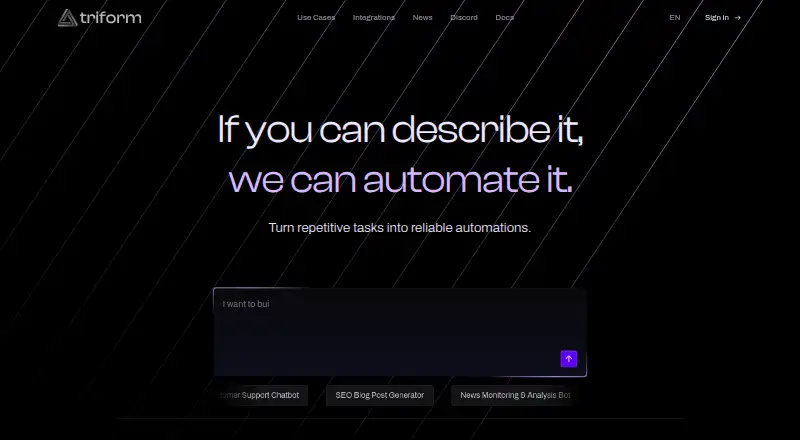
What Triform is
Triform is a visual platform for building, running, and monitoring AI-powered systems from agents, flows, and actions. Users compose logic on a Canvas and can work with agents in a Chat interface. Its Triton assistant helps build, modify, and debug projects through natural conversation, and the maker says simple automations can be created without a developer. Components include tool-using agents, multi-step flows, Python actions, APIs, and scheduled jobs. Projects can run from webhook, scheduled, or manual triggers, deploy to staging or production, and expose API endpoints; logs, traces, and metrics track executions. Listed integrations include Slack, Salesforce, Stripe, HubSpot, Google Sheets, Shopify, Jira, GitHub, Microsoft Teams, Notion, and others, with access through OAuth or API keys. Triform says users control granted scopes and permissions and that actions run in isolated environments with limited network access and resource quotas. The free Community Version makes projects public by default, and de-identified execution data may be used to improve and train Triform’s systems. Only pure-Python packages are supported; packages requiring binary installs are unavailable.
Good
- Builds agents, flows, Python actions, APIs, and scheduled jobs.
- Supports webhook, scheduled, and manual triggers.
- Deploys projects to staging or production.
- Provides execution logs, traces, and metrics.
- Users control integration scopes and permissions.
Watch out
- Community projects are public by default.
- De-identified execution data may be used for training.
- Packages requiring binary installs are unavailable.
- Community Version is provided as-is without an SLA.
Who it suits
Triform is aimed at non-technical users, engineers building agentic workflows, and product teams prototyping automations. It may also suit teams automating repetitive business tasks.
Verdict
Triform brings visual workflow building, deployment, and execution monitoring into one platform, with a conversational assistant and listed integrations. Before using the free Community Version, consider public project visibility, execution-data use, and its pure-Python package limit.
Plans and prices
From Triform's own pricing page, checked 4 Oct 2026.
| Plan | Price | What it gives you |
|---|---|---|
| Community Version | Free | Free community version · projects are public by default · execution data retained 7 days · provided as-is without SLA |
The facts
Each one read from Triform's own pages, with the date it was checked.
What it does
- AI assistant
- Triton helps users build, modify, and debug projects through natural conversation.checked 4 Oct 2026
- Audience
- Triform lists non-technical users, engineers building end-to-end agentic workflows, and product teams prototyping automations as intended users.checked 4 Oct 2026
- Authentication
- Users can sign in with email, Discord, or GitHub.checked 4 Oct 2026
- Build components
- Users can build tool-using agents, multi-step flows, Python actions, APIs, and scheduled jobs.checked 4 Oct 2026
- Community visibility
- In the Community Version, creations including source code and non-secret assets are public by default, while execution data and secret data are not publicly disclosed.checked 4 Oct 2026
- Compliance
- The compliance page lists GDPR and CCPA as compliant, while SOC 2 Type II and ISO 27001 are marked planned for 2026.checked 4 Oct 2026
- Data location
- Triform states that standard data storage uses EU-based data centers and customer data stays in the EU.checked 4 Oct 2026
- Data use and visibility
- The community-version policy says projects are public by default and execution data may be de-identified and used to improve and train Triform's systems.checked 4 Oct 2026
- Deployment
- Projects can be deployed to staging or production and expose API endpoints.checked 4 Oct 2026
- Execution isolation
- Actions run in isolated environments with separate containers per execution, limited network access, and resource quotas.checked 4 Oct 2026
- Integration access
- Integrations can be authorized through OAuth or API keys, and Triform says users control the scopes and permissions they grant.checked 4 Oct 2026
- Integrations
- The integrations page lists Slack, Salesforce, Stripe, HubSpot, Google Sheets, Shopify, Jira, GitHub, Microsoft Teams, Notion, Xero, Linear, Asana, QuickBooks, Airtable, Gmail, and Google Drive.checked 4 Oct 2026
- No-code building
- The maker says users can build simple automations themselves without a developer.checked 4 Oct 2026
- Product
- Triform is a visual platform for building, running, and monitoring AI-powered systems by composing logic on a Canvas and using agents in a Chat interface.checked 4 Oct 2026
- Retention
- The community-version policy says logs and traces are retained for 90 days and backups may persist for up to 90 days after account deletion.checked 4 Oct 2026
- Security
- Triform says stored data is encrypted with AES-256 and communications use TLS 1.2 or higher.checked 4 Oct 2026
- Support
- The maker offers enterprise services with dedicated support and SLA guarantees, and its documentation directs users to Discord for community support.checked 4 Oct 2026
- Technical limit
- Triform's quotas documentation says only pure-Python packages are supported; packages requiring binary installs are unavailable.checked 4 Oct 2026
- Training data
- Triform may use de-identified execution data from the Community Version to operate, improve, and train its systems and models.checked 4 Oct 2026
- Triggers and monitoring
- The platform supports webhook, scheduled, and manual triggers, and tracks executions with logs, traces, and metrics.checked 4 Oct 2026
- What it does
- Triform is a visual platform for building, running, and monitoring AI-powered systems made from agents, flows, and actions.checked 4 Oct 2026
- Who it is for
- The maker presents the platform for teams that want to automate repetitive business tasks, and its services for organizations seeking help building and maintaining complex workflows.checked 4 Oct 2026
The company
- Headquarters
- Stockholm, Swedenchecked 28 Sep 2026
- Maker entity
- The Community Version terms identify the entity as Triform AB and give its address as Götgatan 23, 116 46 Stockholm, Sweden.checked 4 Oct 2026
The full review of Triform
Overview
Triform is a visual platform for building, deploying, and monitoring AI workflows, from simple business automations to multi-step agent systems. It is best suited to teams that want to design and operate workflows in one place, though the free Community Version’s public-by-default projects make it a poor fit for private work.
Its strongest appeal is the route from building blocks to deployed projects with execution visibility. The trade-off is that teams must weigh its community data terms and Python package constraint before committing to it.
Key features
Workflows are assembled on a Canvas, with a Chat interface for working with agents. Users can create tool-using agents, multi-step flows, Python actions, APIs, and scheduled jobs. Triton, the conversational assistant, can help build, modify, and debug projects. The no-code approach is aimed at simple automations; more involved workflows will appeal to engineers and product teams prototyping agentic systems.
Projects can be deployed to staging or production and expose API endpoints. Webhook, scheduled, and manual triggers cover common execution patterns, while logs, traces, and metrics provide ways to follow runs. This makes Triform more useful to teams operating workflows than a builder that stops at a visual prototype.
Integrations include Slack, Salesforce, Stripe, HubSpot, Google Sheets, Shopify, Jira, GitHub, Microsoft Teams, Notion, Xero, Linear, Asana, QuickBooks, Airtable, Gmail, and Google Drive. Connections use OAuth or API keys, and users control the scopes and permissions they grant. Actions run in isolated containers per execution, with limited network access and resource quotas. One technical constraint is significant for Python-heavy teams: packages that require binary installs are unsupported.
Triform describes TLS/HTTPS in transit, encryption at rest for sensitive data, role-based access controls, and secure storage for secret variables. Standard storage uses EU-based data centers, and the company says customer data stays in the EU. Those safeguards do not remove the Community Version’s visibility and data-use trade-offs: projects, source code, and non-secret assets are public by default, and de-identified execution data may be used to operate, improve, and train Triform’s systems and models. Logs and traces are retained for 7 days on the Community Version; backups may persist for up to 90 days after account deletion.
The compliance page lists GDPR and CCPA as compliant; SOC 2 Type II and ISO 27001 are marked planned for 2026. The Community Version is provided without an SLA. Community support is directed to Discord, while enterprise services include dedicated support and SLA guarantees.
Pricing
Community Version: free. It provides a no-cost way to build and run projects, but projects are public by default, execution data may be used to improve and train Triform’s systems, and the plan is provided as-is without an SLA. Its 7-day log and trace retention and pure-Python package limit are relevant constraints for ongoing use. It suits experimentation and workflows whose code and non-secret assets can be public; teams needing private project visibility or contractual service guarantees should look elsewhere.
Platforms
Triform is available on web and through an API. Users can sign in with email, Discord, or GitHub.
Who it's for
Triform targets non-technical users automating repetitive business tasks, engineers building end-to-end agentic workflows, and product teams prototyping automations. Its visual builder and conversational assistant lower the barrier for simple projects, while deployment, triggers, and execution monitoring serve teams that need to run workflows after prototyping. Organizations seeking help building and maintaining complex workflows can also turn to Triform’s enterprise services.
It is less suitable for teams that require private-by-default Community projects, need binary-dependent Python packages, or cannot accept the Community Version’s execution-data use and lack of an SLA.
Pros and cons
- Pros: Projects can move from visual construction to staging or production deployment with API endpoints, triggers, and logs, traces, and metrics for monitoring.
- Pros: The integration catalogue spans business, collaboration, and development tools, with OAuth or API-key authorization and user-controlled scopes.
- Pros: A free Community Version makes it possible to explore the workflow builder without a subscription charge.
- Cons: Community projects, source code, and non-secret assets are public by default, and de-identified execution data may be used to train and improve systems.
- Cons: Only pure-Python packages are supported, excluding packages that require binary installation.
- Cons: The Community Version has no SLA and retains logs and traces for 7 days.
Alternatives
For meeting-focused action tracking, action item tracking software is a relevant category to compare. HyNote is a better fit for readers seeking a cross-platform meeting recorder and transcriber: its free plan includes audio recording, transcription, and professional templates, with up to 120 minutes per session. Route5 AI may suit readers who want a commitments-focused tool across desktop and mobile; its free tier is view-only and capped at three commitments, while capture, agents, and enforcement require the 24.99 USD Classic plan.
ActFlux is another web-based meeting option, with a free plan capped at five meetings per month and a Pro plan with higher usage limits. imeetly may be preferable for meeting notes with a defined free quota: five meetings monthly, 100 MB maximum files, and five AI memory searches per day. Insolla Meeting Notes Analyzer is a web-based alternative for extracting meeting information into rows, with a free allowance of 25 rows per month across its tools.
Notepik is worth considering for API and web meeting workflows: its free plan includes one hour of meetings per month for up to three seats, with every feature included. VeriAct offers a free web plan for transcript extraction, capped at five extractions per month and limited to TXT/DOCX transcripts, without audio or video upload. 4Minitz is a free, open-source, MIT-licensed, self-hosted option for teams that want to host meeting management software themselves.
Verdict
Triform is a strong fit for teams that want to build, deploy, and observe AI workflows in a visual platform, especially when a free starting point and broad integrations matter. Choose it when Community projects can be public and pure-Python actions cover your needs. Look elsewhere if project privacy, training-data restrictions, longer execution-log retention, binary-dependent packages, or an SLA are essential.
Alternatives to Triform
- 1

HyNote
Free planAndroidiOSWebExtension8.2From $6.66 a month - 2
Knowtworthy
Free planAndroidiOSWeb7.9From $24 a month - 3

AfterTheCall
Free planWebExtension7.2From $9 a month - 4

BoardPro
AndroidiOSWeb7.2From $1,650 a year - 5

Harmony
WebAPImacOSSelf-hosted7.2From $29 a month - 6
Route5 AI
Free planAndroidiOSWebmacOS7.2From $24.99 a month