Knowtworthy
Knowtworthy is meeting software for shared minutes, agendas, action items, and transcription.
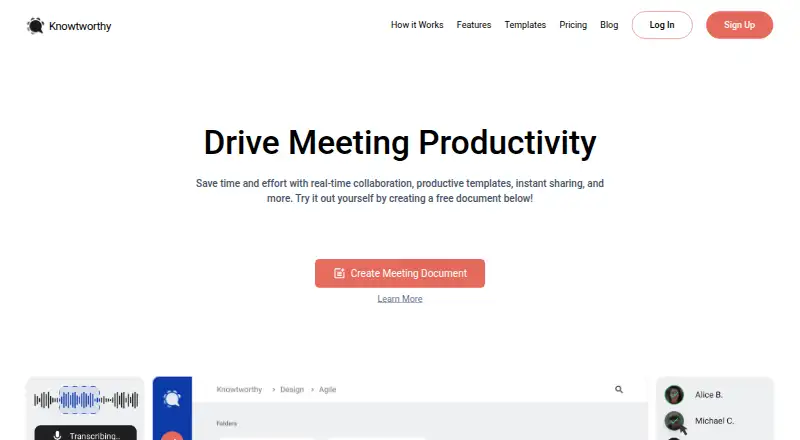
What Knowtworthy is
Knowtworthy is meeting software for shared minutes, agendas, action items, and transcription. Meeting documents synchronize in real time so participants can edit them together. Users can create, assign, and track action items, with personalized lists available across devices. Transcription is available during meetings and for uploaded audio or video files. The listed languages are English, Cantonese, Mandarin, French, Portuguese, Spanish, German, Italian, Dutch, and Russian. Recordings from tools such as Zoom, Teams, and Google Meet can be uploaded; a direct integration is not described. The no-account Free option supports a quick meeting, real-time sharing and editing, and PDF download. Meeting documents can also be created from the homepage at no charge, but organizations cannot be created for free. Basic is $24.00 per month, billed per user, per month; Pro is $919.00 per month, billed per user, per month; and Business is $3079.00 per month, billed per user, per month. The web application can be used on phones and tablets. The company is based in Toronto, Ontario, Canada.
Good
- Shared minutes and agendas synchronize in real time.
- Users can assign and track action items.
- Transcribes live meetings and uploaded recordings.
- Free option includes sharing, editing, and PDF download.
- Meeting history remains unless users delete items.
Watch out
- Organizations cannot be created for free.
- No free trial is listed.
- Recordings are uploaded; direct integrations are not described.
- Paid plans are billed per user, per month.
Who it suits
Knowtworthy may suit freelancers, startups, small businesses, agencies, and enterprise teams that need shared meeting notes, tracked actions, or transcription. Its web app also works on phones and tablets.
Verdict
Knowtworthy combines collaborative meeting documents, action tracking, and transcription, with a no-account option for quick meetings. Check the organization restriction and per-user paid plans if you need team administration or transcription at scale.
Plans and prices
From Knowtworthy's own pricing page, checked 15 Oct 2026.
| Plan | Price | What it gives you |
|---|---|---|
| Free | Free | No account needed · real-time sharing/editing · PDF download |
| Basic | $24 a month | Unlimited meeting minutes · search all meetings · 3 teams · tracked action items · PDF download · file attachments · per user, per month |
| Pro | $919 a month | 50 transcription hours per month per organization · 10 transcription languages · audio/video transcription · 10 teams · organization management · generative AI summaries · per user, per month |
| Business | $3,079 a month | 500 or more transcription hours per month per organization · unlimited teams · full white-label branding · custom CNAME · agency/collaboration features · generative AI summaries · per user, per month |
The facts
Each one read from Knowtworthy's own pages, with the date it was checked.
What it does
- Action items
- Users can create, assign, and track action items, with personalized lists accessible across devices.checked 8 Oct 2026
- Action-item tracking
- Action items can be assigned to team members with due dates and are collected in personal inboxes.checked 15 Oct 2026
- AI summaries
- Generative-AI summaries can be produced from Knowtworthy transcripts on Pro and higher plans.checked 15 Oct 2026
- Changelog: January 2025
- A January 9, 2025 release added generative-AI meeting summaries, custom templates, folder moving and Apple Pay/Google Pay support.checked 15 Oct 2026
- Changelog: September 2023
- A September 28, 2023 release added profile pictures, moving meetings between organizations and complete Business-tier white labeling.checked 15 Oct 2026
- Cloud storage
- Meeting minutes are stored in an organized cloud file system accessible from devices.checked 15 Oct 2026
- Collaboration
- Meeting documents synchronize in real time so teams can edit shared minutes and agendas together.checked 8 Oct 2026
- Data residency
- Personal information may be processed or stored on servers outside Canada, including the United States.checked 15 Oct 2026
- Data retention
- The pricing FAQ says there is no limit on stored meeting-minute documents and meeting history remains unless the user deletes items.checked 8 Oct 2026
- Documentation
- The Guide contains FAQ, getting-started, organization/team, and release-notes sections.checked 15 Oct 2026
- G2 reviewer profile
- The displayed G2 reviews were from small-business users and were validated through business email accounts.checked 15 Oct 2026
- Integrations
- The pricing FAQ describes uploaded recordings from conferencing software such as Zoom, Teams, and Google Meet; it does not describe a direct integration.checked 8 Oct 2026
- Intended users
- The site presents the product for solo-preneurs and freelancers, startups and small businesses, agencies, and enterprise teams.checked 8 Oct 2026
- Languages
- The pricing FAQ lists transcription in English, Cantonese, Mandarin, French, Portuguese, Spanish, German, Italian, Dutch, and Russian.checked 8 Oct 2026
- Licence
- The terms grant only a limited, non-exclusive, non-transferable and revocable right to use the platform and prohibit reverse engineering.checked 15 Oct 2026
- Limit: lack of integrations
- A G2 reviewer said the product adds another tool and wished it were a plugin or extension for calendar, email and task applications.checked 15 Oct 2026
- Limit: loading speed
- A G2 reviewer reported that loading meeting minutes could be faster.checked 15 Oct 2026
- Limits
- The maker says organizations cannot be created for free, although users can create meeting documents from the homepage at no charge.checked 8 Oct 2026
- Mobile access
- The product is delivered through its web application and is intended to work on phones and tablets through app.knowtworthy.com.checked 15 Oct 2026
- Praise: all-in-one meeting capture
- A G2 reviewer praised having the agenda, real-time transcription, meeting notes and action items together for meetings with many participants.checked 15 Oct 2026
The company
- Company address
- The privacy policy gives 55 St. George St., Toronto, Ontario, M5S 1A4 as the company address.checked 15 Oct 2026
- Company funding/news
- The press kit says Knowtworthy won $10,000 at the Entrepreneurship Hatchery NEST Demo Day and placed second in that 2018 competition.checked 15 Oct 2026
- Company legal name
- The privacy policy identifies the company as Knowtworthy Inc.checked 15 Oct 2026
- Headquarters
- Toronto, Ontario, Canadachecked 28 Sep 2026
The full review of Knowtworthy
Overview
Knowtworthy combines shared agendas and minutes with action tracking, transcription and mobile access. It is best suited to freelancers and small teams that need a shared meeting record and clear ownership of follow-up work. Its no-account option is useful for quick meetings, while ongoing organization work requires a paid plan.
Key features
Meeting documents synchronize in real time, letting participants edit agendas and minutes together. That shared record helps teams keep decisions in one place; action items can be created, assigned and tracked, with personal lists accessible across devices. Those features make Knowtworthy more useful for follow-through than a notes-only tool.
Transcription is available for live meetings and uploaded audio or video. The pricing FAQ names ten supported languages: English, Cantonese, Mandarin, French, Portuguese, Spanish, German, Italian, Dutch and Russian. Teams can upload recordings made with Zoom, Teams or Google Meet, but Knowtworthy does not describe direct integrations with those services. That distinction matters if you need meetings captured automatically.
Meeting history remains until users delete it, and there is no limit on stored meeting-minute documents. Knowtworthy describes physical, electronic, technological and organizational safeguards; data may be processed outside Canada, including in the United States. Support is available through real-time in-app chat and the community page.
Pricing
The Free plan costs nothing and requires no account for a quick meeting. It includes real-time sharing and editing and PDF downloads, making it suitable for occasional collaboration. Users can create meeting documents from the homepage at no charge, but organizations cannot be created for free.
Basic costs $24 a month, billed per user, per month. It includes unlimited meeting minutes, search across meetings, three teams, tracked action items, PDF downloads and file attachments. This plan suits individuals or small groups that need organized meeting records and task tracking; its per-user billing can add up as a team grows, and it does not include the transcription hours specified in the higher plans.
Pro costs $919 a month, billed per user, per month. It includes 50 transcription hours per month per organization, ten transcription languages, uploaded audio or video transcription, ten teams, organization management and AI transcription summaries. It fits organizations that need transcription and team administration, but the stated rate makes it a substantial commitment.
Business costs $3,079 a month, billed per user, per month. It raises the transcription allowance to 500 or more hours per month per organization and adds unlimited teams, white-label branding, a custom CNAME, agency and collaboration features, and AI transcription summaries. This is aimed at agencies or large teams with high transcription volume and branding needs. The listed paid plans are billed per user, per month, while transcription quotas are per organization.
Knowtworthy has no free trial. Its pricing note says paid plans start at 4 /user/mo, though the named plan prices are considerably higher. The free plan's organization restriction and the paid plans' per-user billing are central considerations for teams comparing costs.
Platforms
Knowtworthy is available on Android, iOS and the web. Its web application can also be used on phones and tablets through app.knowtworthy.com, giving mobile users a browser option alongside the mobile platforms.
Who it's for
Freelancers and small businesses that want collaborative minutes, assigned actions and searchable meeting history can get practical value from Basic. The free option works for quick, occasional meetings when an organization workspace is unnecessary. Startups, agencies and enterprise teams that need transcription or organization management should weigh Pro or Business against the cost per user and organization-level transcription quotas.
Knowtworthy is a weaker fit for teams that require automatic capture through a direct conferencing integration, or for groups that need to create an organization without paying. Teams handling data across borders should also consider that processing may take place outside Canada, including in the United States.
Pros and cons
- Pros: Real-time shared minutes and agendas keep participants working from the same document.
- Pros: Assigned, tracked action items and personal lists connect meeting notes with follow-up work.
- Pros: Meeting history remains until deleted, with no limit on stored meeting-minute documents.
- Pros: The free quick-meeting option needs no account and includes sharing, editing and PDF download.
- Cons: Free users cannot create organizations, limiting the no-cost option for teams that need a persistent workspace.
- Cons: Pro and Business carry high published per-user monthly prices, even though their transcription quotas are organization-wide.
- Cons: Conferencing recordings are uploaded rather than captured through a described direct integration.
Alternatives
For more options focused on action item tracking software, compare tools in that category.
HyNote is another freemium option, with a free plan offering up to 120 minutes per session, audio recording and transcription, and professional templates. Choose it when session-length limits and those recording features suit your needs.
Route5 AI has a free, view-only tier capped at three commitments; capture, agents and enforcement require its Classic plan. Consider it if a view-only commitment limit is enough.
Triform offers a free community version for web and API use, with public-by-default projects, seven-day execution-data retention and no SLA. It may suit users who can work with those conditions.
ActFlux offers a free plan capped at five meetings per month and paid Pro and Enterprise plans with higher usage limits or enhanced features. It is an option when that monthly meeting allowance fits.
Beagle starts with 1,000 free credits and offers a membership at $49 a month with 5,000 credits added monthly and unlimited integrations. Consider it if a credit-based membership matches your workload.
imeetly offers five free meetings per month, with a 100 MB file limit and five AI memory searches per day; its Pro plan costs $15 a month and raises those limits. It may fit users who need a defined monthly meeting allowance at that price.
Insolla Meeting Notes Analyzer has a free plan capped at 25 rows per month across all tools and a $49 a month Pro plan with 500 rows, priority processing, downloadable results and email support. Choose it when row-based analysis and downloadable results fit the task.
Meetlens has a free plan with 180 minutes per month, a 60-minute recording cap, 1 GB upload and storage limits, and ten AI reports per month; Pro costs $12 a month. It is worth comparing when those recording and report limits suit your use.
Verdict
Knowtworthy is a strong choice for freelancers and small teams that want shared meeting documents, accountable follow-up tasks and lasting meeting history across web and mobile. Its no-account meetings make occasional collaboration easy to start, and paid plans add transcription and organization tools. Look elsewhere if your team needs free organization management, direct conferencing capture or high-volume transcription at a lower per-user cost.
Getting started
- Open knowtworthy.com or the web application
- Start a Free quick meeting without an account
- Share and edit the meeting document in real time
- Use Android or iOS access, or open the web app on a phone or tablet
- Choose Basic, Pro, or Business for organization features
- Upload a Zoom, Teams, or Google Meet recording for transcription
Limits worth knowing
The Free option is limited to quick meetings, real-time sharing and editing, and PDF download, and it cannot create organizations. Basic costs $24 a month per user; transcription hours and organization features are provided in higher plans.
Questions
Is there a free plan?
Yes. Free costs nothing and supports a quick meeting, no-account access, real-time sharing and editing, and PDF download.
How much does Basic cost?
Basic is $24 a month, billed per user, per month.
Which platforms does Knowtworthy support?
It supports Android, iOS, and web. The web application can be used on phones and tablets.
Which languages can it transcribe?
The pricing FAQ lists English, Cantonese, Mandarin, French, Portuguese, Spanish, German, Italian, Dutch, and Russian.
Can free users create organizations?
No. Organizations cannot be created for free, although meeting documents can be created from the homepage at no charge.
Alternatives to Knowtworthy
- 1

HyNote
Free planAndroidiOSWebExtension8.2From $6.66 a month - 2

AfterTheCall
Free planWebExtension7.2From $9 a month - 3

BoardPro
AndroidiOSWeb7.2From $1,650 a year - 4

Harmony
WebAPImacOSSelf-hosted7.2From $29 a month - 5
Route5 AI
Free planAndroidiOSWebmacOS7.2From $24.99 a month - 6
Doer
AndroidiOSWeb6.8From ₹3,999 a month