
HyNote
HyNote turns meetings and other material—including audio, PDFs, videos, images, websites, and text—into searchable notes.
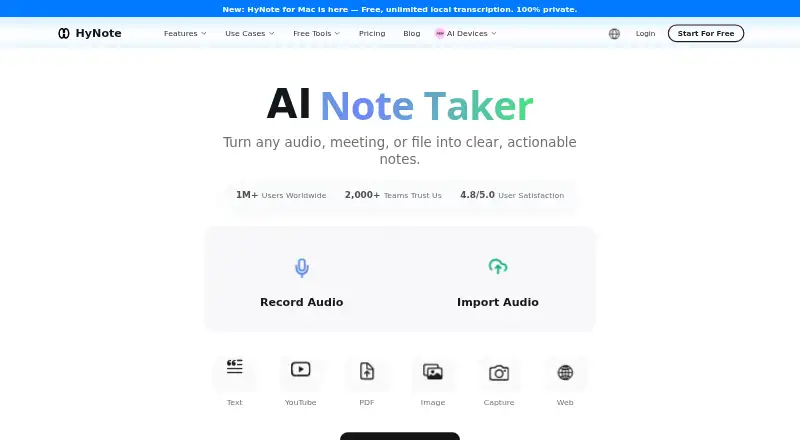
What HyNote is
HyNote turns meetings and other material—including audio, PDFs, videos, images, websites, and text—into searchable notes. It transcribes in more than 50 languages, identifies speakers, and offers live translation. It can create summaries, key points, action items, and meeting notes, with more than 30 professional templates. Study features include flashcards, quizzes, and study plans; publishing tools can produce blog posts, podcasts, slides, and infographics. HyNote exports to Google Docs and Notion, and syncs with Google and Apple Calendar. Its Google Calendar tools include event reminders and a way to join Google Meet and start recording from the Calendar page. The free plan includes recording, transcription, uploads, and calendar integration, with sessions capped at 120 minutes. Pro is $6.66 a month, billed annually, and a 7-day trial is listed. HyNote is available on web, macOS, iOS, Android, and as a Chrome extension. Mobile use requires an active internet connection; the Mac app requires macOS 14 or later.
Good
- Transcribes in more than 50 languages.
- Creates summaries, action items, and meeting notes.
- Offers more than 30 professional templates.
- Syncs with Google and Apple Calendar.
- Free plan includes audio recording and transcription.
Watch out
- Sessions are limited to 120 minutes.
- Mobile app requires an active internet connection.
- Mac app requires macOS 14 or later.
- Pro is $6.66 a month, billed annually.
Who it suits
HyNote suits people who need to turn meetings, files, or web content into searchable notes, including business professionals, researchers, educators, and content creators. Its study tools may also suit learners who want flashcards, quizzes, or study plans.
Verdict
HyNote combines transcription, note organization, study tools, and publishing features across several input types. Check the session cap, mobile internet requirement, and Mac system requirement against your needs.
Plans and prices
From HyNote's own pricing page, checked 14 Oct 2026.
| Plan | Price | What it gives you |
|---|---|---|
| Pro | $6.66 a month | 1,200 transcription minutes/month · 300 one-time podcast/slides/infographic credits · translation · transcript export · 7-day trial · $79.99/year, auto-renews annually |
| Plus | $10.83 a month | 1,200 real-time minutes/month · speaker identification · 400 one-time credits · live translation · Google Docs/Notion transfer · 7-day trial · $129.99/year, auto-renews annually |
| Unlimited | $15.83 a month | unlimited real-time transcription · 600 one-time credits · unlimited private storage · CRM integration · 7-day trial · $189.99/year, auto-renews annually |
| Teams | $15 a month | Unlimited-plan features · team templates · admin controls · priority support · $180/seat/year, auto-renews annually; minimum 2 seats |
| Free | Free | audio recording/transcription · 120-minute maximum session · templates · file uploads · cross-device sync · calendar integration · private storage · $0/month; free forever |
The facts
Each one read from HyNote's own pages, with the date it was checked.
What it does
- API and SDK access
- Terms prohibit access to HyNote's private API except through permitted means, and the public site provides no API or SDK documentation.checked 14 Oct 2026
- Capture and transcription
- The product page describes eight input types and transcription in more than 50 languages, with speaker identification and live translation among its features.checked 30 Sep 2026
- Data control
- The security page says users own their data and can export or delete it, with encrypted storage for uploaded recordings and documents.checked 14 Oct 2026
- Documentation and support
- The Help Center covers setup, recording/import, URL capture, screenshots, summaries/chat, sharing, folders, integrations, languages and billing, with email support listed.checked 14 Oct 2026
- Google Calendar
- HyNote can sync upcoming Google Calendar events, send meeting reminders, and let users join Google Meet and start recording from its Calendar page.checked 30 Sep 2026
- Independent praise
- Rewardio's review says users value multi-source capture, cross-device synchronization, accented or multilingual transcription and chat with notes.checked 14 Oct 2026
- Integrations
- Official integration pages list Google Docs, Google Calendar, Notion, Zoom, Google Meet, Microsoft Teams, YouTube, Todoist, Asana, Pipedrive, Slack and Zapier.checked 14 Oct 2026
- Integrations and exports
- HyNote lists Google Docs and Notion exports, Google and Apple Calendar sync, and a CRM integration on the Unlimited plan.checked 30 Sep 2026
- Intended users
- HyNote describes use cases for business professionals, operations and engineering workers, researchers, educators, public services, and content creators.checked 30 Sep 2026
- Limit: Google Play reliability
- A Google Play reviewer reported lost notes, transcription stopping and difficulty obtaining support.checked 14 Oct 2026
- Limit: Product Hunt users
- Reported weaknesses include speaker-label errors during overlapping speech, limited business templates and at least one poor billing/refund experience.checked 14 Oct 2026
- Limit: transcription caps
- Rewardio reports that Pro and Plus both cap transcription at 1,200 minutes monthly, which users sometimes discover unexpectedly.checked 14 Oct 2026
- Limit: visual customization
- Independent reviewers say HyNote offers few diagram and chart-generation options and less customization than some professional tools.checked 14 Oct 2026
- Meeting transcription
- It records Zoom, Google Meet, Microsoft Teams and Webex without a meeting bot, adding timestamps, speaker labels and 50-plus languages.checked 14 Oct 2026
- Mobile connectivity
- HyNote's mobile app requires an active internet connection; its page says recording, transcription, AI summarization, and cross-device sync are cloud-based.checked 30 Sep 2026
- Multimodal capture
- Inputs include live or uploaded audio, video, PDFs, OCR images, YouTube links, web pages, phone calls and Apple Watch recordings.checked 14 Oct 2026
The company
- Company legal name
- Crunchbase identifies the private company as Turing Intelligence LLC.checked 14 Oct 2026
- Company profile
- LinkedIn lists HyNote as a privately held technology/internet company in Palo Alto with 2–10 employees, founded in 2024.checked 14 Oct 2026
Where it runs
- Cross-device sync
- Real-time synchronization covers web, iPhone, Android, iPad, Apple Watch and Chrome.checked 14 Oct 2026
- Mac availability
- HyNote for Mac requires macOS 14 or later; its page describes local recording and on-device transcription on supported configurations.checked 30 Sep 2026
- Mac version
- The Mac download offers free local on-device transcription without a meeting bot; online AI features are optional upgrades.checked 14 Oct 2026
Money
- Free plan
- Yeschecked 22 Sep 2026
- Limit: Apple billing and organization
- Reviewers reported unexpected transcription caps, non-editable hashtags, no folder sorting, inability to correct transcript words and upload-length limits.checked 14 Oct 2026
- Limit: billing and refunds
- Rewardio summarizes complaints about billing confusion, refund handling and support directing some users to the wrong refund channel.checked 14 Oct 2026
The full review of HyNote
Overview
HyNote is best suited to people who want one workspace for capturing meetings and other source material, then turning it into notes, study aids, or content. Its breadth is appealing, but the 120-minute session ceiling and cloud-dependent mobile app make it a less natural fit for very long recordings or offline work.
Key features
Capture and meeting workflow
HyNote accepts eight input types, including audio, PDFs, videos, images, websites, and text, and makes the resulting notes searchable. Transcription supports more than 50 languages, speaker identification, and live translation. That range can help multilingual teams and people collecting material from varied sources; users who only need to record and transcribe meetings may find the wider toolkit unnecessary.
Meeting outputs include summaries, key points, action items, and formatted notes, with more than 30 professional templates. Google Calendar sync brings upcoming events into HyNote, sends reminders, and allows users to join Google Meet and start recording from its Calendar page. Recordings are capped at 120 minutes per session even on Unlimited, so long interviews or classes may need to be split.
Study, publishing, and privacy
HyNote can turn notes into flashcards, quizzes, and study plans, or produce blog posts, podcasts, slides, and infographics. These tools give students and creators ways to reuse captured material, rather than leaving it as a transcript. Google Docs and Notion exports support moving work elsewhere; Calendar sync covers Google and Apple calendars, while CRM integration is reserved for Unlimited.
HyNote says its data is hosted on Google Cloud Platform, encrypted at rest with AES-256 and in transit with TLS 1.2 or later, and that customer content is not used to train its models. It also describes uploaded audio, recordings, documents, images, and screenshots as end-to-end encrypted across devices and accessible only to the user.
Pricing
HyNote has a free plan and three individually priced paid tiers. The paid monthly figures below are annual-billing rates, and each renews automatically annually.
- Free: free, forever. It includes up to 120 minutes per session, audio recording and transcription, professional templates, file uploads, web/mobile/tablet sync, calendar integration, and private secured storage. There is no monthly transcription-minute quota stated for this tier, but the session cap still applies.
- Pro: $6.66 a month, billed $79.99/year. It provides 1,200 transcription minutes per month and 300 one-time credits. This is the lowest-cost paid option for users who want a defined monthly transcription allowance.
- Plus: $10.83 a month, billed $129.99/year. It includes 1,200 real-time transcription minutes per month and 400 one-time credits, making it the step up for users who specifically need real-time transcription.
- Unlimited: $15.83 a month, billed $189.99/year. It offers unlimited real-time transcription and 600 one-time credits, plus CRM integration. The 120-minute session limit remains, so unlimited minutes do not mean unlimited recording length per session.
- Teams: $15 a month, billed annually at $180 per seat per year, with a two-seat minimum. It includes priority support; the minimum purchase is therefore two seats.
A 7-day trial is available. The cheaper paid tiers trade away the larger or unlimited transcription allowance and, compared with Unlimited, CRM integration. Free is a sensible way to try the capture and calendar workflow, while frequent transcribers should weigh the annual commitment against their likely use.
Platforms
HyNote supports web, macOS, iOS, Android, and a Chrome extension. The Mac app requires macOS 14 or later; supported configurations offer local recording and on-device transcription. The mobile app requires an active internet connection because recording, transcription, AI summarization, and cross-device sync are cloud-based. Offline access is not supported, so mobile users who regularly work without connectivity should look elsewhere.
Who it's for
HyNote is a strong fit for business professionals, operations and engineering workers, researchers, educators, public-service teams, and content creators who need to convert varied material into searchable notes and then reuse it. Its study tools and publishing outputs broaden its appeal beyond meeting capture. It is a poor fit for offline-first mobile use or sessions that routinely exceed two hours.
Pros and cons
- Pro: Eight input types, multilingual transcription, speaker identification, and live translation cover more than conventional meeting notes.
- Pro: Summaries, action items, templates, study aids, and publishing outputs make captured material reusable for different purposes.
- Pro: Calendar sync and Google Meet launch-and-record support connect scheduling with capture.
- Con: Every plan is subject to the 120-minute per-session recording cap.
- Con: Mobile recording and AI functions require internet access, and there is no offline mode.
- Con: The Mac app requires macOS 14 or later, excluding older system versions.
- Con: Paid individual pricing renews annually, so the displayed monthly rates are not month-to-month commitments.
Alternatives
Recal is worth considering for users who want meeting and asynchronous recaps across Android, iOS, macOS, web, and Windows; its Pro plan is $14 a month and specifies recap-hour limits, a two-hour cap per recap, and workspace and team-member limits.
Route5 AI may suit readers focused on commitments: its free tier is view-only with a maximum of three commitments, while capture, agents, and enforcement require Route5 Classic at 24.99 USD.
Notepik is a simpler web/API option with a free forever plan covering one hour of meetings per month and up to three seats; its free plan includes every feature.
ActFlux is a web-based alternative with a free plan covering five meetings per month; its Pro and Enterprise plans have enhanced features and higher usage limits at custom pricing.
AfterTheCall offers a free plan for three client calls, one follow-up email per call, Notion and Google Docs integration, and manual recording.
Insolla Meeting Notes Analyzer is a web option priced around row-based usage: its free plan covers 25 rows per month across tools, with Pro at $49 a month for 500 rows and Business at $199 a month.
Triform is a free web and API alternative.
imeetly is a web-based freemium alternative.
For category-specific comparisons, see Action Item Tracking Software, AI Note-Taking Apps, and AI Presentation Makers.
Verdict
Choose HyNote if you want a single tool to capture varied material, transcribe it, and reshape it into meeting notes, study resources, or publishable content. Its breadth and multilingual workflow are the clearest reasons to choose it; look elsewhere if you need offline mobile work, long uninterrupted sessions, or a paid plan without annual renewal.
Getting started
- Visit the HyNote website and choose the free plan or a paid plan.
- Start the listed 7-day trial if you want to try a trial plan.
- Use HyNote on web, iOS, Android, macOS, or its Chrome extension.
- Connect Google or Apple Calendar to sync calendar events.
- On Mac, use macOS 14 or later; keep an internet connection active for mobile app use.
Limits worth knowing
The free plan allows up to 120 minutes per session. The same 120-minute maximum applies to the Unlimited plan; Pro includes 1,200 transcription minutes per month, and Plus includes 1,200 real-time transcription minutes per month.
Questions
Is HyNote free?
Yes. The Free plan is free, billed free forever.
What do the paid plans cost?
Pro is $6.66 a month, Plus is $10.83 a month, and Unlimited is $15.83 a month; each price is billed annually. Teams is $15 a month, billed annually, starting from two seats.
Which platforms does HyNote support?
It supports web, macOS, iOS, Android, and a Chrome extension. The Mac app requires macOS 14 or later.
Does HyNote work offline on mobile?
No. The mobile app requires an active internet connection.
What integrations and exports are listed?
HyNote lists Google Docs and Notion exports, Google and Apple Calendar sync, and a CRM integration on the Unlimited plan.
How long can a recording session be?
The maximum is 120 minutes per session, including for the Unlimited plan.
Alternatives to HyNote
- 1
Knowtworthy
Free planAndroidiOSWeb7.9From $24 a month - 2

AfterTheCall
Free planWebExtension7.2From $9 a month - 3

BoardPro
AndroidiOSWeb7.2From $1,650 a year - 4

Harmony
WebAPImacOSSelf-hosted7.2From $29 a month - 5
Route5 AI
Free planAndroidiOSWebmacOS7.2From $24.99 a month - 6
Doer
AndroidiOSWeb6.8From ₹3,999 a month