TeamViewer RMM
TeamViewer RMM brings remote access, device management, monitoring, automation, and support into a centralized platform for in-house IT teams and managed ser…
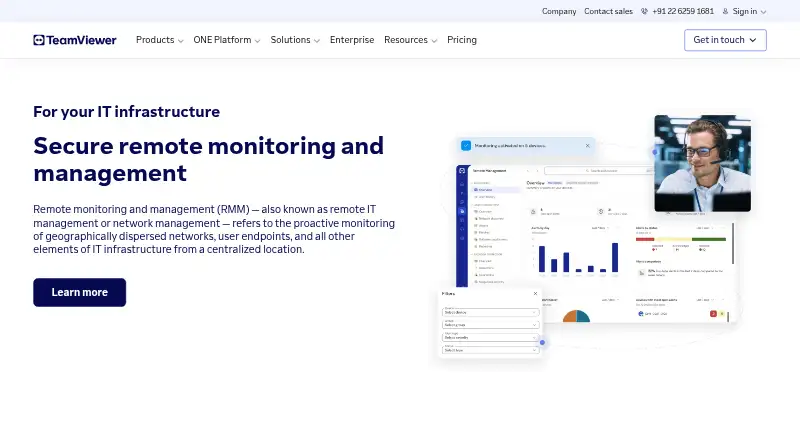
What TeamViewer RMM is
TeamViewer RMM brings remote access, device management, monitoring, automation, and support into a centralized platform for in-house IT teams and managed service providers. Device Monitoring checks disk space and health, CPU and memory use, event logs, status changes, and online availability, sending notifications when checks fail. Remote Task Manager and Remote Scripting let technicians manage processes and services or automate repeated tasks on remote devices. Asset Management can scan connected and hidden equipment, from computers and mobile devices to printers, routers, switches, UPS devices, and network-attached storage. Technicians can assist users through video, chat, screen sharing, and dynamic assistance. Administrators can set backup schedules and content, check adherence, and intervene remotely in the management console. The cloud service supports Windows, macOS, Linux, Android, and iOS. Pricing is available on request; the Device Monitoring and Asset Management trial lasts 14 days. Licenses are based on managed devices and start at five endpoints.
Good
- Monitors device health, usage, logs, and online status.
- Can automate repetitive remote tasks and manage services.
- Scans connected and hidden network equipment.
- Remote support includes video, chat, and screen sharing.
- Supports Windows, macOS, Linux, Android, and iOS.
Watch out
- Pricing is available on request.
- Device-based licensing starts at five endpoints.
- The 14-day trial is listed for two product areas.
Who it suits
It suits in-house IT teams and managed service providers supporting business users or external customers. Teams needing remote monitoring, asset visibility, automation, and support across the listed operating systems may find its tools relevant.
Verdict
TeamViewer RMM combines monitoring, asset management, automation, backup, and remote assistance in a cloud platform. Buyers should account for device-based licensing and request pricing; a 14-day trial is listed for Device Monitoring and Asset Management.
Plans and prices
From TeamViewer RMM's own pricing page, checked 30 Sep 2026.
| Plan | Price | What it gives you |
|---|---|---|
| Monitoring & Asset Management | Priced on request | Device-based license · starts from 5 endpoint devices |
The facts
Each one read from TeamViewer RMM's own pages, with the date it was checked.
What it does
- Asset management
- Asset Management can scan connected and hidden devices, including computers, mobile devices, printers, routers, switches, UPS devices, and network-attached storage.checked 30 Sep 2026
- Automation
- Remote Task Manager and Remote Scripting let technicians manage processes and services and automate repetitive tasks across remote devices.checked 30 Sep 2026
- Backup
- TeamViewer Backup lets administrators specify what to back up and when, monitor adherence, and intervene remotely through the management console.checked 30 Sep 2026
- Integrations
- TeamViewer offers a REST API using OAuth 2.0 for functions including user management, connection reports, session management, and monitoring and patch management.checked 30 Sep 2026
- Intended users
- TeamViewer presents RMM as suitable for in-house IT teams and managed service providers supporting business users and external customers.checked 30 Sep 2026
- License limit
- The Remote Management product description says device-based licenses count each designated managed device and start at five endpoint devices.checked 30 Sep 2026
- Monitoring
- Device Monitoring checks items such as disk space and health, CPU and memory usage, status updates, event logs, and online status, and sends instant notifications when checks fail.checked 30 Sep 2026
- Purpose
- TeamViewer RMM provides remote access, remote control, device management, network visibility, automated responses, and scheduled routine tasks from a centralized platform.checked 30 Sep 2026
- Remote support
- Technicians can connect to managed devices and use video, chat, screen sharing, and dynamic assistance to diagnose issues and guide users.checked 30 Sep 2026
- Security
- TeamViewer states that its connections use 4096-bit RSA key exchange and 256-bit session encryption, and lists ISO/IEC 27001 certification and SOC 2 and SOC 3 audits.checked 30 Sep 2026
- Support
- TeamViewer directs customers to its contact and support pages for sales and product support.checked 30 Sep 2026
The company
- Founded
- 2005checked 28 Sep 2026
- Headquarters
- Göppingen, Germanychecked 28 Sep 2026
Where it runs
- Platforms
- The RMM page gives setup instructions for Windows, Mac, Chrome, Android, iOS, and Linux, and says license holders can connect directly from a browser.checked 30 Sep 2026
Money
- Trial
- The US pricing overview lists a 14-day free trial for Device Monitoring and Asset Management.checked 30 Sep 2026
The full review of TeamViewer RMM
Overview
TeamViewer RMM is a cloud platform for monitoring, managing, and supporting business devices remotely. It suits in-house IT teams and managed service providers that need to oversee a fleet as well as help its users. Its mix of monitoring, automation, inventory, backup, and support is useful, but device-based licensing starts at five endpoints and pricing is custom.
Key features
Device Monitoring checks disk health and capacity, CPU and memory use, event logs, status updates, and whether devices are online; failed checks trigger instant notifications. Endpoint, application, and network monitoring, along with automated remediation, broaden that coverage. This gives technicians several signals to follow up on, though the specific remediation actions are not defined.
Remote Task Manager and Remote Scripting let technicians manage processes and services and automate recurring tasks across remote devices. That makes the platform more than a monitoring dashboard for teams handling routine work across multiple endpoints.
Asset Management scans connected and hidden equipment, including computers, mobile devices, printers, routers, switches, UPS devices, and network-attached storage. The breadth is valuable when an organization needs an inventory that extends beyond user computers.
Technicians can connect to managed devices and use video, chat, screen sharing, and dynamic assistance to diagnose problems and guide users. TeamViewer Backup lets administrators choose what to back up and when, monitor whether backups are being carried out, and intervene remotely through the management console.
A REST API using OAuth 2.0 covers functions such as user management, connection reports, session management, monitoring, and patch management. TeamViewer states that connections use 4096-bit RSA key exchange and 256-bit session encryption, and cites ISO/IEC 27001 certification and SOC 2 and SOC 3 audits.
Pricing
TeamViewer RMM is paid, with custom pricing. The Monitoring & Asset Management plan uses device-based licensing, starting at five endpoint devices. The price is not published, so buyers should request a quote and check how the device count fits their fleet before choosing it.
A 14-day free trial is available for Device Monitoring and Asset Management. It provides a time-limited way to assess those capabilities, but the trial scope does not establish access to every RMM function.
Platforms
The cloud deployment supports Windows, macOS, Linux, Android, and iOS devices. Web access is also supported, giving teams a browser-based option alongside device operating systems.
Who it's for
TeamViewer positions RMM for in-house IT teams and managed service providers supporting business users or external customers. It is a stronger fit for teams that want remote support and device oversight together, including visibility into network equipment. The five-endpoint minimum and custom pricing make it less suitable for a buyer managing only a handful of devices or one who needs a known price before engaging sales.
Pros and cons
- Broad monitoring: Checks cover endpoint, application, and network monitoring, with instant notifications for failed device checks.
- Inventory beyond endpoints: Asset scans include hidden devices and network equipment such as routers, switches, and storage.
- Support and automation in one platform: Remote assistance, scripting, task management, and backup administration address more than monitoring alone.
- Five-device starting point: Device-based licensing begins at five endpoints, which may be more than a very small setup needs.
- Custom pricing: Buyers must request a quote rather than compare a published price upfront.
Alternatives
For a broader category comparison, see Digital Experience Monitoring Software.
Zscaler Private Access is another paid option, with a ZPA Standard plan limited to private access for 5% of users and a separate ZPA Platform plan; consider it when that private-access offering matches your need.
Nexthink Adopt is a paid option with additional licensing potentially required depending on the licensing model, so it may suit buyers already evaluating that model with Nexthink.
Riverbed Aternity is a paid enterprise digital experience management offering, making it an alternative for buyers seeking an enterprise offering in that category.
FlexxClient is a paid alternative with pricing available upon request.
Almaden Collective IQ is a paid alternative with Essential and Business editions.
HP Workforce Experience Platform offers a Pro plan with employee engagement, remediations, AI remediation, smart device refresh, limited natural-language search, and HP Remote Connect.
TeamDynamix DEX is a paid alternative that requires a pricing inquiry.
Citrix Remote Browser Isolation is a paid alternative with pooled-user licensing and subscriptions that include 5,000 pooled user hours.
Verdict
Choose TeamViewer RMM if your IT team or MSP wants device and network monitoring, asset inventory, remote support, and routine-task automation in one cloud platform. Its broad coverage is the main reason to choose it; the five-endpoint minimum and custom pricing are the reasons to look elsewhere if your needs are small or you require upfront cost clarity.
Alternatives to TeamViewer RMM
- 1

ManageEngine DEX Manager Plus
WebLinuxmacOSSelf-hosted6.9From $495 a year - 2
Exoprise
WebAPIExtensionLinux6.8From $100 a month - 3
Riverbed Aternity
AndroidiOSWebAPI6.8 - 4
ControlUp ONE
AndroidiOSWebAPI6.5 - 5
Martello Vantage DX
WebWindows6.4From $20,000 a year - 6
CapaOne Experience Monitor
WebWindows6.2From €1 a month