
TargetFPS
TargetFPS is a free web tool that recommends graphics settings for individual games based on a player’s hardware and desired framerate.
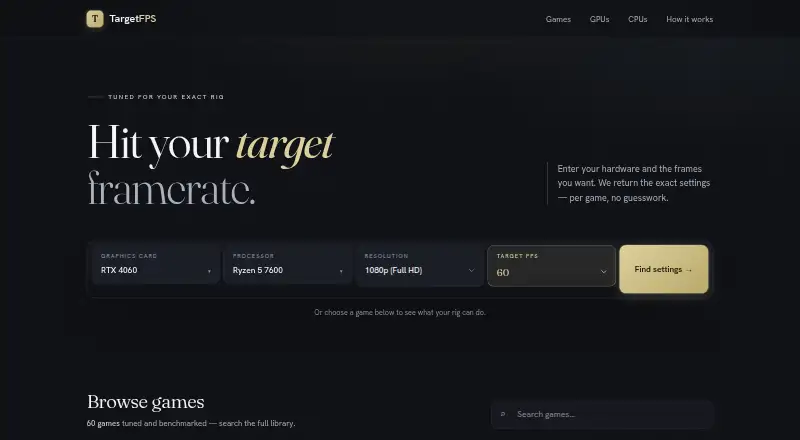
What TargetFPS is
TargetFPS is a free web tool that recommends graphics settings for individual games based on a player’s hardware and desired framerate. Users enter their GPU, CPU, RAM, resolution, and target FPS to receive suggested settings, FPS estimates, explanations, impact tags, and a callout of the largest performance gains. The optimizer starts from a high-quality preset and adjusts settings to meet the target while weighing visual quality against each setting’s estimated FPS cost. It treats DLSS, FSR, and XeSS as primary settings and handles frame generation separately, noting its latency trade-off. The game directory provides per-setting recommendations for 60 games, including estimated costs, results across five hardware tiers, and data-quality notes. Estimates use published benchmark points and interpolation; some titles instead rely on engine-family modelling, which TargetFPS says has a wider confidence range. JavaScript is required for the interactive optimizer, while static guides remain available without it. The service is free, and optional contributions do not unlock features.
Good
- Free to use; contributions do not unlock features.
- Recommendations account for GPU, CPU, RAM, and resolution.
- Covers 60 games with per-setting guidance.
- Static guides work without JavaScript.
- Explains estimates and data quality.
Watch out
- Interactive optimizer requires JavaScript.
- Some games rely on engine-family estimates.
- FPS results may differ from actual performance.
- The service provides estimates without a warranty.
Who it suits
TargetFPS is for PC players looking for game settings tailored to their hardware and target framerate. It also offers static recommendations for readers who do not use the interactive optimizer.
Verdict
TargetFPS offers tailored settings suggestions and explains their estimated performance trade-offs. Treat FPS figures as estimates, especially where the game uses engine-family modelling rather than direct benchmark data.
Plans and prices
From TargetFPS's own pricing page, checked 4 Oct 2026.
| Plan | Price | What it gives you |
|---|---|---|
| Free | Free | Free tool; optional contributions do not unlock or gate features |
The facts
Each one read from TargetFPS's own pages, with the date it was checked.
What it does
- Benchmark sources
- The maker says anchor benchmarks primarily come from TechPowerUp, Digital Foundry, Hardware Unboxed, and DSO Gaming.checked 3 Oct 2026
- Data quality
- The site distinguishes estimates based on real benchmarks from engine-family modelling when direct benchmark data is unavailable.checked 4 Oct 2026
- Data updates
- Game data records an update date and patch version, and the maker says it updates benchmark and cost data after significant optimization patches.checked 4 Oct 2026
- Disclaimers
- The terms say FPS estimates and recommendations are provided as-is without warranty, and actual performance may vary.checked 3 Oct 2026
- Estimation limits
- Some games use engine-family modelling when direct benchmark data is unavailable, and the maker says estimates have a wider confidence band in those cases.checked 3 Oct 2026
- FPS estimates
- The optimizer estimates performance from published benchmark anchor points and interpolates for hardware without a direct measurement.checked 4 Oct 2026
- Game coverage
- The games directory lists per-setting recommendations for 60 games, including FPS costs and expected performance across five hardware tiers.checked 4 Oct 2026
- Game guides
- The games directory lists per-setting graphics recommendations for 60 games.checked 3 Oct 2026
- Guide details
- Game pages describe recommended values, each setting's FPS cost, major performance wins, expected results across five hardware tiers, and data quality.checked 3 Oct 2026
- Independence
- TargetFPS says it is built and maintained by an independent developer and is not affiliated with game publishers, GPU manufacturers, or hardware retailers.checked 3 Oct 2026
- Inputs
- The optimizer uses GPU, CPU, RAM, resolution, and target framerate to produce settings with FPS estimates and rationale.checked 3 Oct 2026
- Integrations
- The maker’s pages describe no third-party software integrations; they name DLSS, FSR, and XeSS as graphics upscaling technologies considered by the optimizer.checked 4 Oct 2026
- Intended users
- The product is described as a free PC gaming graphics settings optimizer for players seeking settings tailored to their hardware and target framerate.checked 4 Oct 2026
- Limitations
- TargetFPS says its FPS figures are estimates, actual results vary, and recommendations are provided without a warranty of accuracy or completeness.checked 4 Oct 2026
- Monetization
- The maker says the free service is ad-light, optional contributions do not unlock features, and relevant hardware links may earn affiliate commissions.checked 3 Oct 2026
- Optimization method
- The optimizer adjusts settings from a high-quality preset until its estimated configuration meets the target framerate, prioritizing visual quality per FPS cost.checked 3 Oct 2026
- Privacy and security
- The privacy page could not be opened, and the pages reviewed make no specific security or compliance claim.checked 4 Oct 2026
- Purpose
- TargetFPS recommends per-game graphics settings based on a user’s GPU, CPU, RAM, resolution, and target framerate.checked 4 Oct 2026
- Recommendations
- Results include estimated FPS, a biggest-wins callout, setting impact tags, and explanations for recommended values.checked 4 Oct 2026
- Settings optimization
- It adjusts individual settings to find a high-quality configuration that meets the selected framerate target.checked 4 Oct 2026
- Support
- Support is by email, with an expected response within 2–3 business days and verified data corrections typically applied within a week.checked 4 Oct 2026
- Upscaling
- The optimizer considers DLSS, FSR, and XeSS as settings and surfaces frame generation where supported, with a latency caveat.checked 4 Oct 2026
- Use requirements
- JavaScript is required for the interactive optimizer; static settings guides are available without it.checked 3 Oct 2026
The company
- Maker
- TargetFPS says it is built and maintained by an independent developer; the page does not identify the developer, headquarters, or founding date.checked 4 Oct 2026
The full review of TargetFPS
TargetFPS is a web-based tool that recommends PC game graphics settings using your hardware and desired framerate. It suits players who want a tailored starting point without paying for an optimizer. Its value lies in explaining the trade-offs behind its recommendations, though estimated FPS is not a performance guarantee.
Overview
Enter your GPU, CPU, RAM, resolution and target framerate, and TargetFPS builds a configuration by adjusting individual settings from a high-quality preset. It aims to preserve visual quality while reducing the settings with the highest FPS cost. Results include estimated FPS, a callout for the biggest performance gains, impact tags and explanations for recommended values.
The accompanying directory covers 60 games. For each, it describes setting recommendations and their FPS costs, major performance gains, expected results across five hardware tiers and data quality. That makes the guides useful for understanding why a setting matters, not just copying a preset.
Key features
Recommendations and estimates
TargetFPS estimates performance from published benchmark anchor points and interpolates for hardware without a direct measurement. The maker says its anchors primarily draw on TechPowerUp, Digital Foundry, Hardware Unboxed and DSO Gaming. For some games, it uses engine-family modelling instead of direct benchmark data, with a wider confidence band. Treat those results as a rough guide, particularly when direct data is unavailable.
The optimizer treats DLSS, FSR and XeSS as primary settings and handles frame generation separately, noting its latency trade-off. It also tracks patches and updates its benchmark anchors and cost models when significant optimization patches affect performance. Actual results can still vary; recommendations and estimates are provided as-is, without a warranty of accuracy or completeness.
Coverage and access
The static guides work without JavaScript, but the interactive optimizer requires it. TargetFPS describes no third-party software integrations, and it offers no cloud profile sync. The maker says the service is ad-light, optional contributions do not unlock features, and relevant hardware links may earn affiliate commissions. It is built and maintained by an independent developer and says it is unaffiliated with game publishers, GPU manufacturers and hardware retailers.
Support is by email at [email protected]; replies are expected within 2–3 business days, and verified data corrections typically within a week. The privacy policy could not be confirmed, so players who need to assess privacy or security practices should review it before using the service.
Pricing
Free — free. This is a free tool with automatic recommendations and per-game profiles; optional contributions do not gate features. There is no free trial because the service is free. There are no paid plans to compare. For players who want tailored settings and explanatory guides without a subscription, the lack of a feature-gated tier is a clear advantage.
Platforms
TargetFPS runs on the web. Use a browser with JavaScript enabled for the optimizer; static game guides remain accessible without it. It does not offer cloud profile sync.
Who it's for
TargetFPS is best for PC players who want a free, hardware-aware starting point for game settings and care about the performance cost of individual options. Its game guides also suit readers who want recommendations across hardware tiers. It is a weaker fit for anyone who needs guaranteed frame rates, direct measurements for every game and hardware combination, or a desktop optimizer.
Pros and cons
Pros
- Free recommendations and profiles: contributions do not unlock features, so the core tool is not split across paid tiers.
- Trade-offs are visible: setting costs, expected results across five hardware tiers and explanations help players make their own visual-quality choices.
- Data quality is distinguished: the site separates real-benchmark estimates from engine-family modelling, making uncertainty easier to weigh.
- Guides remain accessible without JavaScript: the interactive optimizer is not required to read the static recommendations.
Cons
- FPS is an estimate: interpolation and engine-family modelling cannot promise the result on a particular system.
- Browser-only optimizer: players seeking a Windows desktop app or cloud profile sync will need another option.
- Privacy practices are unclear: players who need to evaluate data handling should confirm those practices before use.
Alternatives
For a broader category comparison, browse Game Graphics Optimization Software.
- Choose FrameCoach if you want a Windows desktop app alongside its web optimizer and settings guides; it is also free and built by one person.
- Choose Gaming Optimizer if you prefer a Windows tool whose public repository carries an MIT license.
- Choose Intel VTune Profiler if you need a standalone or Intel oneAPI Toolkit profiler for Windows or Linux, with commercial and non-commercial use permitted.
- Choose NVIDIA ShadowPlay if you want NVIDIA's free Windows app and have a supported GPU, Windows 10 or 11, and GeForce 551.52 or later.
- Choose PULSE if you want Windows monitoring for CPU, GPU and RAM, plus FPS and frametime via RTSS; its free plan is billed Forever.
- SteelSeries Moments is another free Windows option.
- GameShift is another free Windows option.
Verdict
TargetFPS is a sensible pick for PC players who want free, per-game graphics suggestions tied to their hardware and target framerate. Its combination of setting-level explanations and visible data-quality distinctions is more useful than a bare preset. Look elsewhere if you need a desktop app, cloud sync, or dependable FPS guarantees: its recommendations are estimates, not promises.
Getting started
- Open https://targetfps.com/ in a web browser.
- Enable JavaScript to use the interactive optimizer.
- Enter your GPU, CPU, RAM, resolution, and target framerate.
- Review the recommended settings, estimated FPS, and explanations.
- Open a static game guide if you want recommendations without JavaScript.
Limits worth knowing
The service is free, and optional contributions do not unlock or gate features. FPS figures and recommendations are estimates provided without a warranty; actual performance may vary, and some games use modelling with a wider confidence band.
Questions
How much does TargetFPS cost?
The Free plan costs nothing. Optional contributions do not unlock features.
What does the optimizer use to make recommendations?
It uses GPU, CPU, RAM, resolution, and target framerate. Results include estimated FPS and explanations for recommended settings.
How many games have guides?
The games directory lists per-setting recommendations for 60 games, with FPS costs and expected results across five hardware tiers.
Does TargetFPS work without JavaScript?
JavaScript is required for the interactive optimizer. Static settings guides are available without it.
Does TargetFPS integrate with other software?
The maker’s pages describe no third-party software integrations. The optimizer considers DLSS, FSR, and XeSS graphics technologies.
Who maintains TargetFPS?
TargetFPS says it is built and maintained by an independent developer.
Alternatives to TargetFPS
- 1
ARC Raiders Config Tuner
Free planOpen sourceLinuxSelf-hostedWindows7.9Free plan - 2
Razer Game Clips
Free planAndroidiOSAPIWindows7.6Free plan - 3
Smart Game Booster
Free planWindows7.5From $17.99 a year - 4
Gaming Optimizer
Free planWindows7.4Free plan - 5

NVIDIA ShadowPlay
Free planWindows7.4Free plan - 6
Magpie
Free planWindows7.3Free plan