GameShift
GameShift detects when games launch on Windows, applies system-level optimizations for each title, and aims to restore settings when the game closes.
What GameShift is
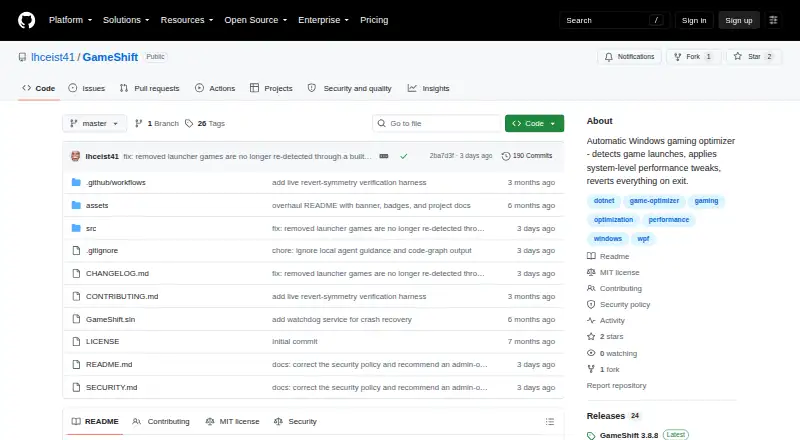
GameShift detects when games launch on Windows, applies system-level optimizations for each title, and aims to restore settings when the game closes. It can find games in Steam, Epic Games, GOG Galaxy, and Xbox/Game Pass directories, with a built-in database of more than 80 game executables. The project lists 19 built-in profiles, hardware-specific tuning, anti-cheat metadata, and controls for individual games. Its optimization options cover process priority, service and task suppression, memory management, timer resolution, power plans, CPU scheduling, network tuning, and GPU driver settings. Monitoring includes CPU, GPU, RAM, VRAM, and network telemetry, temperature checks, DPC latency tools, session history, driver advisories, and frame-time benchmarking. GameShift records original settings and verifies and reverts changes at session end. Recovery after a crash or blue screen is still being developed and is not enabled in the current build. It is free under the MIT License. The maker says it stores data locally and makes no network calls except GitHub update checks. Administrator privileges are required for several controls.
Good
- Detects games from four listed launchers or directories
- Provides 19 built-in profiles and per-game controls
- Monitors CPU, GPU, memory, network, and temperatures
- Records original settings and reverts changes after sessions
Watch out
- Crash and blue-screen recovery is not enabled
- Requires administrator privileges
- Windows only; minimum 8 GB RAM
Who it suits
GameShift is for Windows users who want per-game system tuning and session monitoring. It requires a 64-bit Windows 10 21H2 or later, or Windows 11 22H2 or later, at least 8 GB RAM, and administrator privileges.
Verdict
GameShift combines per-game tuning with broad system monitoring and says it reverses changes when a session ends. Its current build does not provide automatic recovery after a crash or blue screen.
Plans and prices
From GameShift's own pricing page, checked 29 Sep 2026.
| Plan | Price | What it gives you |
|---|---|---|
| GameShift | Free | No paid plans or pricing stated on the maker’s page |
The facts
Each one read from GameShift's own pages, with the date it was checked.
What it does
- Anti cheat
- GameShift says it does not inject into game processes, modify game files, or hook game memory, and describes automatic compatibility adjustments for several anti cheat systems.checked 29 Sep 2026
- Crash recovery limit
- Automatic recovery after an app crash or blue screen is in development and is not enabled in the current build.checked 29 Sep 2026
- Download
- The maker directs users to download GameShift.App.exe from the GitHub Releases page.checked 29 Sep 2026
- Game detection
- It detects games from Steam, Epic Games, GOG Galaxy, and Xbox/Game Pass directories, with a built in database of over 80 game executables.checked 29 Sep 2026
- Game profiles
- The project lists 19 built in profiles with hardware specific tuning and anti cheat metadata, plus per game optimization controls.checked 29 Sep 2026
- License
- The repository states that GameShift is licensed under the MIT License.checked 29 Sep 2026
- Monitoring
- The app lists live CPU, GPU, RAM, VRAM, and network telemetry, temperature monitoring, DPC latency tools, session history, driver advisories, and frame time benchmarking.checked 29 Sep 2026
- Optimization features
- Listed optimizations include process priority, service and task suppression, memory management, timer resolution, power plans, CPU scheduling, network tuning, and GPU driver settings.checked 29 Sep 2026
- Permissions
- Administrator privileges are required for service control, registry access, timer resolution, and power plan management.checked 29 Sep 2026
- Privacy
- The maker says the app makes no network calls except to check for GitHub updates, collects no telemetry, and stores data locally.checked 29 Sep 2026
- Purpose
- GameShift detects game launches, applies system level optimizations for each title, and restores changes when the game exits.checked 29 Sep 2026
- Requirements
- The stated requirements are 64 bit Windows 10 21H2 or later or Windows 11 22H2 or later, 8 GB RAM minimum, and administrator privileges.checked 29 Sep 2026
- Reversibility
- The project says it records original values in an atomic state journal and verifies and reverts changes when a game exits.checked 29 Sep 2026
The company
- Maker and support
- The README describes GameShift as a solo project and invites bug reports, fixes, and ideas through GitHub issues.checked 29 Sep 2026
The full review of GameShift
GameShift is a free Windows utility that applies system-level optimizations when a game launches and restores its settings when the session ends. It suits players who want per-game tuning alongside system telemetry. Its broad controls are a strength, but its lack of crash recovery makes it a less reassuring choice for unattended changes.
Overview
GameShift scans libraries from Steam, Epic Games, GOG Galaxy, and Xbox/Game Pass, and includes a database of more than 80 game executables. It pairs that detection with 19 built-in profiles and controls for tailoring optimizations by title, making it more useful to players with varied libraries than a one-setting-for-every-game booster.
The project says it records original settings in an atomic journal, then verifies and restores them when a game exits. That rollback design matters because the app can change services, tasks, registry-related settings, and power behavior. But automatic recovery after an app crash or blue screen is still in development, so a session ending abnormally is a meaningful caveat.
Key features
Optimization controls cover process priority, service and task suppression, memory management, timer resolution, power plans, CPU scheduling, network tuning, and GPU driver settings. Per-game controls let players apply different choices to different titles; the tradeoff is that this much system-level reach requires administrator privileges and care about which changes are appropriate.
Monitoring combines live CPU, GPU, RAM, VRAM, and network telemetry with temperature readings, DPC latency tools, session history, driver advisories, and frame-time benchmarking. That makes GameShift useful not just for applying a profile but for observing system behavior around a gaming session.
GameShift says it does not inject into game processes, modify game files, or hook game memory, and describes automatic compatibility adjustments for several anti-cheat systems. The maker also says the app makes no network calls beyond checking for GitHub updates, collects no telemetry, and stores data locally. The source is available under the MIT License, and the solo maker invites bug reports and ideas through GitHub issues.
Pricing
GameShift costs nothing, with no paid plans stated. The free plan includes the app’s per-game profiles, automatic recommendations, and game-library scanning; there is no trial or paid tier to compare. The absence of a paid upgrade keeps the choice simple, though users should weigh the recovery limitation and administrator requirement before letting it make system changes.
Platforms
GameShift supports Windows 10/11 x64. Its stated minimums are Windows 10 21H2 or later or Windows 11 22H2 or later, 8 GB RAM, and administrator privileges. The maker directs users to download GameShift.App.exe from the GitHub Releases page.
Who it's for
GameShift is best for Windows players who maintain several game libraries, want distinct optimization settings by title, and value system and frame-time monitoring in the same utility. It is less suitable for anyone who needs automatic rollback after a crash or blue screen, or who does not want to grant administrator privileges for service, registry, timer-resolution, and power-plan controls.
Pros and cons
- Pros: Broad library detection and 19 built-in profiles reduce the setup burden for multi-game libraries.
- Pros: Optimization controls and live telemetry span system tuning and session monitoring, rather than focusing on graphics settings alone.
- Pros: The project says it records, verifies, and reverses settings when a game exits, and says it avoids game-process injection and telemetry collection.
- Cons: Automatic recovery after a crash or blue screen is not enabled, leaving an important gap in its rollback story.
- Cons: Administrator privileges are required for several core controls, which may be a poor fit for users wary of system-level changes.
- Cons: Windows is the only supported platform, and the minimum requirements exclude older Windows versions and systems below 8 GB RAM.
Alternatives
For other options, browse Game Graphics Optimization Software. Hone is worth considering if a freemium optimizer with a defined free allowance is preferable: Hone Free includes 10 optimizations, one extra per referral up to 15, Balanced Game Mode, standard Boost-Ups, and ads.
PULSE may suit players who want a free tier and a trial; its free plan includes real-time CPU, GPU, and RAM monitoring plus FPS and frametime via RTSS. FrameCoach is another free option, with an optimizer, settings guides, and a Windows desktop app, and also has a web platform.
TargetFPS is a free web-based alternative. PC Game Booster may be a fit for players seeking automatic boosting on launch, game management, and basic optimizations in its free Windows plan. Smart Game Booster offers a free Windows tier with core features and basic, manual system boosting.
BDO Optimizer is a free option for players seeking support across Linux, macOS, and Windows. Settings For Games is another free choice, with web and Windows platforms.
Verdict
Choose GameShift if you want a free Windows tool that combines per-game system tuning, broad game detection, and substantial monitoring in one place. Its rollback on normal game exit is a useful safeguard, but the missing crash recovery is the central reason to look elsewhere if you need system changes to be restored even when a session ends unexpectedly.
Alternatives to GameShift
- 1
ARC Raiders Config Tuner
Free planOpen sourceLinuxSelf-hostedWindows7.9Free plan - 2
Razer Game Clips
Free planAndroidiOSAPIWindows7.6Free plan - 3
Smart Game Booster
Free planWindows7.5From $17.99 a year - 4
Gaming Optimizer
Free planWindows7.4Free plan - 5

NVIDIA ShadowPlay
Free planWindows7.4Free plan - 6

TargetFPS
Free planWeb7.4Free plan