Gaming Optimizer
Gaming Optimizer is a free, open-source Windows app that manages CPU affinity for games and background processes.
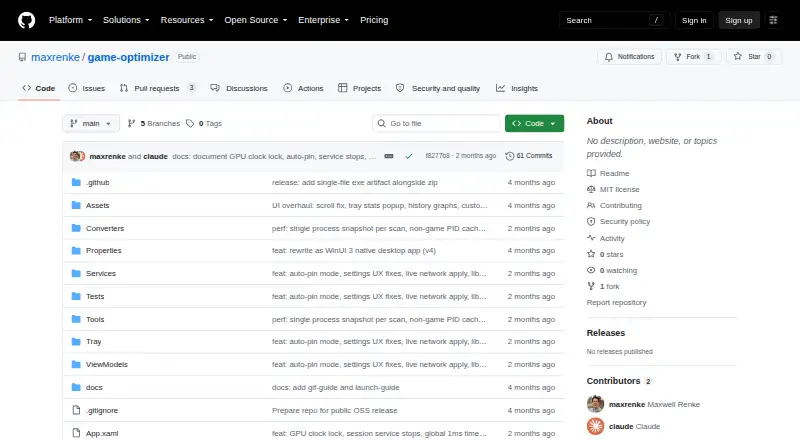
What Gaming Optimizer is
Gaming Optimizer is a free, open-source Windows app that manages CPU affinity for games and background processes. It can assign games to fast cores and lower the priority of background activity. CPU pinning is off by default, and process changes do not occur until a user enables it. The app says it restores changed processes and system settings when a game closes. Its dashboard displays CPU and GPU measures, network traffic, ping and jitter, bottleneck classifications, and process zones. It detects game launches through WMI and can scan Steam, Epic Games, GOG, Ubisoft Connect, and EA App libraries. Session reports include average and peak CPU and GPU measures and bottleneck breakdowns, with a cumulative `sessions.csv` file. An optional setting can lock NVIDIA graphics clocks while a game runs and reset them afterward. The maker says there is no telemetry, analytics, or update checking; the only outbound connection is a configurable latency ping. The app requires Windows 10 version 1809 or Windows 11, an x64 processor, and administrator rights. The README describes ZIP distribution without an installer, while the Releases page lists no releases.
Good
- CPU pinning is off by default.
- Restores changed processes and settings when a game closes.
- Tracks CPU, GPU, network, ping, and jitter.
- No telemetry, analytics, or update checks, according to its maker.
- MIT-licensed and open source.
Watch out
- Requires administrator rights at launch.
- Supports Windows 10 version 1809 or Windows 11 only.
- The opened Releases page lists no releases.
- NVIDIA clock locking requires an NVIDIA graphics card.
Who it suits
This Windows-only tool is aimed at gamers, particularly those using Intel hybrid CPUs or systems where background activity causes frame-time spikes. It requires an x64 processor and administrator rights.
Verdict
Gaming Optimizer offers opt-in CPU management and system monitoring for Windows games, with the maker describing limited outbound communication. Note the administrator requirement and the absence of releases on the opened Releases page.
Plans and prices
From Gaming Optimizer's own pricing page, checked 4 Oct 2026.
| Plan | Price | What it gives you |
|---|---|---|
| Gaming Optimizer | Free | No pricing or paid plans stated |
The facts
Each one read from Gaming Optimizer's own pages, with the date it was checked.
What it does
- Administrator access
- The app requests administrator privileges at launch because affinity and priority changes require them.checked 4 Oct 2026
- Dashboard
- The dashboard displays per-zone CPU use, GPU metrics, network activity, latency and jitter, bottleneck classification, and process lists.checked 4 Oct 2026
- Distribution
- The README describes a ZIP download with no installer, but the GitHub releases page currently says there are no releases.checked 4 Oct 2026
- Game detection
- It detects game launches through WMI and can scan Steam, Epic Games, GOG, Ubisoft Connect, and EA App libraries.checked 4 Oct 2026
- Game library detection
- The app scans Steam, Epic Games, GOG, Ubisoft Connect, and EA App for installed games.checked 3 Oct 2026
- GPU control
- An optional setting can lock NVIDIA graphics clocks while a game runs and reset them when it exits.checked 4 Oct 2026
- GPU support
- Optional GPU clock locking is available for NVIDIA graphics cards through nvidia-smi.checked 3 Oct 2026
- Intended users
- The maker describes it as a Windows-only tool for gamers, with particular potential benefit on Intel hybrid CPUs and systems where background activity causes frame-time spikes.checked 4 Oct 2026
- License
- The repository identifies the project as MIT licensed.checked 3 Oct 2026
- Monitoring
- The dashboard tracks CPU and GPU metrics, network traffic, ping and jitter, bottlenecks, and process zones.checked 3 Oct 2026
- Network and privacy
- The maker says the only outbound connection is a configurable latency ping; the app sends no telemetry, analytics, or update checks.checked 3 Oct 2026
- Open source
- The repository is public and carries an MIT license.checked 4 Oct 2026
- Opt-in pinning
- CPU pinning is off by default, and the app says it makes no process modifications until pinning is enabled.checked 4 Oct 2026
- Privacy
- The maker states the app has no telemetry, analytics, or update checks; its only outbound connection is a configurable latency ping.checked 4 Oct 2026
- Purpose
- Gaming Optimizer automatically manages CPU affinity for Windows games, pinning games to faster cores and demoting background processes.checked 4 Oct 2026
- Release availability
- The GitHub Releases page opened for this research says there are no releases.checked 3 Oct 2026
- Reversible changes
- When a game closes, the app says it reverts process changes and restores system settings to Windows defaults.checked 4 Oct 2026
- Security reporting
- The security policy directs vulnerability reports to GitHub private reporting or the listed email and says reporters should receive a response within 72 hours.checked 3 Oct 2026
- Security support
- The security policy says vulnerability reports receive a response within 72 hours and should be submitted privately or by email.checked 4 Oct 2026
- Session reports
- Per-game session reports include average and peak CPU and GPU metrics, bottleneck breakdowns, and a cumulative sessions.csv file.checked 4 Oct 2026
- Supported versions
- Only the latest release is actively maintained, according to the security policy.checked 3 Oct 2026
Where it runs
- Platform requirements
- The app requires Windows 10 version 1809 or Windows 11, an x64 processor, and administrator rights.checked 4 Oct 2026
The full review of Gaming Optimizer
Gaming Optimizer is a Windows utility for managing CPU affinity and monitoring game sessions. It suits PC gamers who want explicit process controls and performance records, especially on Intel hybrid CPUs or systems affected by background activity. Its opt-in approach is a useful safeguard, but administrator access and ZIP distribution make adoption less straightforward.
Overview
The app combines CPU management with a dashboard for tracking performance, rather than limiting itself to a single boost control. It is free, public-source software under the MIT license, with no paid plan described. The trade-off is a Windows-only setup that requires elevation and a compatible system.
Key features
CPU and process management
Gaming Optimizer can assign games to fast CPU cores and demote background processes. CPU pinning is off by default, and process changes do not begin until it is enabled. The app says it restores changed processes and system settings when a game closes. This opt-in, session-oriented approach gives users a choice about when management applies, but affinity and priority changes require administrator rights at launch.
Monitoring and session records
The dashboard brings together per-zone CPU use, GPU metrics, network activity, ping and jitter, process lists, and bottleneck classification. Game launches are detected through WMI, and the app can scan libraries from Steam, Epic Games, GOG, Ubisoft Connect, and EA App. Per-game reports include average and peak CPU and GPU metrics and bottleneck breakdowns, while a cumulative sessions.csv file records sessions over time. That is useful for spotting patterns across play sessions, though the dashboard does not remove the need to interpret the measurements.
Optional GPU control
For NVIDIA graphics cards, an optional setting can lock graphics clocks while a game runs and reset them on exit, using nvidia-smi. This adds a specific control for NVIDIA owners; it does not extend to other GPU brands.
Privacy and security
The maker says the only outbound connection is a configurable latency ping, with no telemetry, analytics, or update checks. That may suit users who want monitoring without routine data collection, though the ping is still an outbound connection when configured. Vulnerability reports can be sent privately through GitHub or by email, and the security policy says reporters should receive a response within 72 hours. Only the latest release is actively maintained.
Pricing
Gaming Optimizer is free at no cost. The project is open source, with an MIT license; there is no trial or paid tier described. There are no paid-plan trade-offs to weigh, but the free software still requires Windows, an x64 processor, and administrator rights.
Platforms
Gaming Optimizer runs on Windows 10 version 1809 or Windows 11, on an x64 processor. The README describes a ZIP download rather than an installer, and the app requires administrator rights. The opened Releases page shows no releases, so the listed distribution approach may require more manual setup than an installer-based app.
Who it's for
This is a sensible fit for Windows gamers who want to control CPU affinity themselves, inspect process activity, and keep per-game performance records. Its potential benefit is clearest on Intel hybrid CPUs and systems where background activity contributes to frame-time spikes. It is a poor fit for anyone needing macOS support, a non-administrator setup, or NVIDIA clock controls on a different GPU brand.
Pros and cons
- Opt-in CPU pinning: process modifications stay off until enabled, giving users control over whether optimization runs.
- Useful session history: per-game metrics and a cumulative CSV can help compare performance patterns over time.
- Broad game-library scanning: detection covers five named storefronts, reducing the need to add every game manually.
- Elevation required: administrator rights are a prerequisite for CPU affinity and priority changes.
- Limited GPU control: clock locking is restricted to NVIDIA cards through nvidia-smi.
- Manual distribution: the ZIP approach and lack of releases on the opened page make getting started less direct.
Alternatives
For a different Windows game-booster approach, consider PC Game Booster: its free tier includes basic game optimizations, suspension of unnecessary system features, game management, automatic boost on launch, and hard-drive defragmentation, and it offers a free trial. Choose it over Gaming Optimizer if those broader system optimizations matter more than opt-in CPU affinity management and session metrics.
PotatoBoost offers a free-forever Windows plan with hardware detection and PC health tools, a memory optimizer, privacy scanning and cleanup, and startup and process tools. It may suit readers seeking general PC maintenance alongside gaming-related process tools rather than Gaming Optimizer's game-session focus.
Smart Game Booster has a free tier for basic boosting and manual driver updates, with a VIP tier billed for one year. Choose it if those functions are a better match than CPU affinity and session reporting.
CorePin is another free Windows option for readers comparing CPU-core management tools; its stated license terms allow personal, hobby, educational, research, and internal business use, while prohibiting commercial resale and paid redistribution.
Wise Game Booster is a free Windows alternative. OpenGameBoost is also a free Windows alternative.
See the Game Booster Software list for more options. Readers focused on graphics settings can browse Game Graphics Optimization Software, while general system tools are collected in PC Optimization Software.
Verdict
Choose Gaming Optimizer if you want a free, open-source Windows tool that makes CPU pinning optional and pairs process management with per-game session records. Its clearest strengths are user control and useful performance history; look elsewhere if administrator access, ZIP-based distribution, or its NVIDIA-only clock control are deal-breakers.
Getting started
- Visit the public GitHub project page.
- Use the ZIP distribution described in the README; it has no installer.
- Check that the system runs Windows 10 version 1809 or Windows 11 and has an x64 processor.
- Launch the app with administrator rights.
- Scan supported game libraries or allow game launches to be detected through WMI.
- Enable CPU pinning if you want the app to modify process settings.
Questions
Is Gaming Optimizer free and open source?
Yes. The listed plan is free, and the public repository carries an MIT license.
Which Windows versions does it require?
The listed requirements are Windows 10 version 1809 or Windows 11, an x64 processor, and administrator rights.
Which game libraries can it scan?
It can scan Steam, Epic Games, GOG, Ubisoft Connect, and EA App for installed games.
Does it change processes automatically?
CPU pinning is off by default, and the README says process modifications do not occur until pinning is enabled. The app says it restores changed processes and system settings when a game closes.
Does Gaming Optimizer send telemetry?
The maker says there is no telemetry, analytics, or update checking. Its only outbound connection is a configurable latency ping.
Can it lock GPU clocks?
An optional setting can lock NVIDIA graphics clocks while a game runs and reset them when it exits.
Alternatives to Gaming Optimizer
- 1
ARC Raiders Config Tuner
Free planOpen sourceLinuxSelf-hostedWindows7.9Free plan - 2
Razer Game Clips
Free planAndroidiOSAPIWindows7.6Free plan - 3
Smart Game Booster
Free planWindows7.5From $17.99 a year - 4

NVIDIA ShadowPlay
Free planWindows7.4Free plan - 5

TargetFPS
Free planWeb7.4Free plan - 6
Magpie
Free planWindows7.3Free plan