CorePin
CorePin is a free utility for adjusting CPU behavior separately for Windows games.
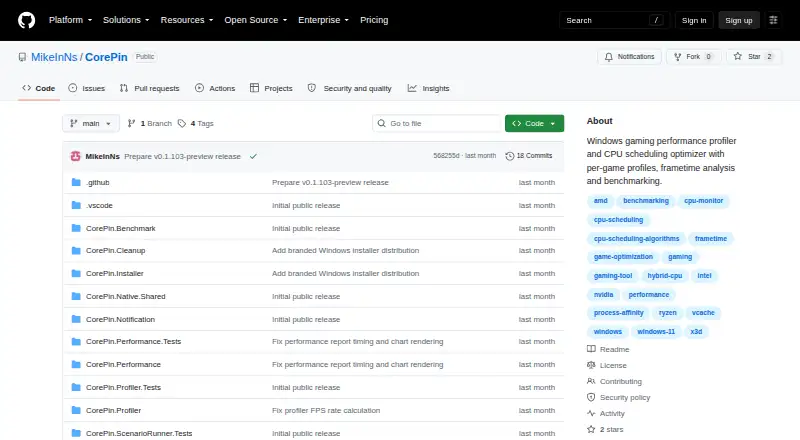
What CorePin is
CorePin is a free utility for adjusting CPU behavior separately for Windows games. It can control core placement, scheduling, process priority, power behavior, and background workloads. The utility detects processor topology and provides V-Cache, frequency, hybrid-core, cache-group, no-SMT, and manual profiles. Its Windows service watches for configured games, applies saved settings when they start, and restores temporary changes after they close. The game library can discover titles across a range of launchers, including Steam, Xbox app/Microsoft Store, Epic Games Store, GOG Galaxy, and others. CorePin also supports supported VR companion placement and OpenXR launch behavior. Gameplay recording reports FPS, frame time, CPU/GPU behavior, memory, storage, and available hardware telemetry; System Benchmark offers Quick, Full, and Demo modes with repeatable CPU and DirectX workloads. CorePin runs locally without an account, cloud backend, inbound connection, or usage telemetry collection. Its interface may make outbound HTTPS requests for release checks, artwork, and provider metadata. It supports Windows 10 and 11. Performance gains are not guaranteed, and results depend on the game and system.
Good
- Applies saved settings when configured games launch.
- Offers several processor-specific profiles.
- Discovers games from multiple launchers.
- Includes gameplay recording and benchmarks.
- Operates without an account or cloud backend.
Watch out
- Performance improvements are not guaranteed.
- Results depend on the game and system.
- No guaranteed support or update schedule.
Who it suits
CorePin suits Windows 10 or 11 users who want per-game CPU controls and local operation. It may also interest users who want gameplay metrics or repeatable CPU and DirectX benchmarks.
Verdict
CorePin offers per-game CPU configuration, automation, and performance reporting without requiring an account or cloud service. Its lack of guaranteed gains or support makes it a better fit for users comfortable managing a hobby project.
Plans and prices
From CorePin's own pricing page, checked 30 Sep 2026.
| Plan | Price | What it gives you |
|---|---|---|
| Free | Free | 64-bit Windows 10/11 · personal, hobby, educational, research, and internal business use · commercial resale and paid redistribution prohibited |
The facts
Each one read from CorePin's own pages, with the date it was checked.
Where it runs
- Automatic application
- Its Windows service watches for configured game processes, applies saved settings at launch, and restores temporary changes after exit.checked 30 Sep 2026
What it does
- Benchmarking
- System Benchmark provides Quick, Full, and Demo modes using repeatable CPU and DirectX workloads.checked 30 Sep 2026
- CPU controls
- It controls CPU core placement, scheduling, process priority, power behavior, and background workloads per game.checked 30 Sep 2026
- Game integrations
- The library can discover games from Steam, Xbox app/Microsoft Store, Epic Games Store, GOG Galaxy, EA app, Ubisoft Connect, Battle.net, Amazon Games App, and Meta PC VR.checked 30 Sep 2026
- Installation
- The recommended setup installer installs the application and required .NET Desktop Runtime when needed, while the standalone ZIP requires the .NET 10 Desktop Runtime separately.checked 30 Sep 2026
- Limitations
- CorePin does not guarantee performance improvements, and results depend on the game, hardware, drivers, cooling, launchers, and other software.checked 30 Sep 2026
- Local operation
- CorePin requires no account, cloud backend, inbound network connection, web server, remote-control API, or product-usage telemetry collection.checked 30 Sep 2026
- Network activity
- The UI may make outbound HTTPS requests for release checks, game artwork, and provider metadata, while profile editing and service operation remain available offline.checked 30 Sep 2026
- Performance profiling
- It records gameplay and reports FPS, frame-time, CPU/GPU behavior, memory, storage, and available hardware telemetry.checked 30 Sep 2026
- Profiles
- It detects processor topology and provides V-Cache, frequency, hybrid-core, cache-group, no-SMT, and manual CPU profiles.checked 30 Sep 2026
- Purpose
- CorePin is a per-game CPU optimization utility for Windows games.checked 30 Sep 2026
- Security model
- The local service can monitor process starts and apply affinity, priority, power-plan, and core-isolation behavior, but exposes no HTTP, TCP, UDP, named-pipe, or remote-management endpoint.checked 30 Sep 2026
- Support
- It is a personal spare-time project with no guaranteed support response time, release schedule, compatibility updates, feature delivery, or bug-fix timeline.checked 30 Sep 2026
- VR support
- CorePin supports supported VR companion placement and OpenXR launch behavior.checked 30 Sep 2026
The full review of CorePin
CorePin is a free Windows utility for setting CPU behavior separately for each game. It suits players who want that control automated and prefer local operation over an account or cloud service. Its capabilities are unusually broad, but performance gains are not guaranteed and support is not assured.
Overview
CorePin combines game-specific CPU settings with automatic launch handling and performance reporting. It can manage core placement, scheduling, process priority, power behavior, and background workloads, then restore temporary changes when a game exits. That automation is useful for players who would otherwise revisit system settings for each title; it is less compelling if you want a guaranteed frame-rate boost or a supported, predictable product roadmap.
The utility operates locally without an account, cloud backend, inbound network connection, or product-usage telemetry collection. Its service can monitor process starts and make system changes, but it exposes no remote-management endpoint. The UI may use outbound HTTPS for release checks, artwork, and provider metadata; profile editing and service operation remain available offline.
Key features
Profiles and automation
CorePin detects processor topology and offers V-Cache, frequency, hybrid-core, cache-group, no-SMT, and manual profiles. Its Windows service watches for configured game processes, applies saved settings at launch, and restores temporary changes at exit. Automatic handling removes repetitive setup, while the range of controls is best suited to users comfortable making and managing system-level choices.
The library can discover games from Steam, Xbox app and Microsoft Store, Epic Games Store, GOG Galaxy, EA app, Ubisoft Connect, Battle.net, Amazon Games App, and Meta PC VR. Supported VR companion placement and OpenXR launch behavior extend the per-game approach to compatible VR setups.
Performance reports and benchmarks
Gameplay profiling reports FPS, frame time, CPU and GPU behavior, memory, storage, and available hardware telemetry. System Benchmark offers Quick, Full, and Demo modes built around repeatable CPU and DirectX workloads. These tools provide a way to inspect behavior and compare repeatable workloads, not a promise that a particular profile will improve a game. Results vary with the game, hardware, drivers, cooling, launchers, and other software.
Pricing
Free — free. The plan covers 64-bit Windows 10 and 11 and permits personal, hobby, educational, research, and internal business use. Commercial resale and paid redistribution are prohibited. There are no paid tiers to trade off against the free plan; users seeking commercial redistribution rights should not treat this license as permission to do so.
Platforms
CorePin supports Windows 10 and Windows 11. The recommended setup installer installs the application and required .NET Desktop Runtime when needed. The standalone ZIP requires the .NET 10 Desktop Runtime separately, so the installer is the simpler route for users who do not already manage that dependency.
Who it's for
CorePin is a good fit for Windows players who want per-game CPU profiles, launch automation, and telemetry in one local utility, especially those willing to tune settings themselves. It is a poor fit for anyone relying on guaranteed gains, prompt support, or a firm schedule for compatibility updates, features, and fixes: this is a personal spare-time project with no guaranteed response time or delivery timeline.
Pros and cons
Pros
- Per-game control spans core placement, scheduling, priority, power behavior, and background workloads, with automatic application and restoration.
- Topology-aware profiles and manual controls accommodate different CPU layouts and tuning preferences.
- Performance reporting and repeatable benchmark modes help examine system behavior rather than relying on a boost claim alone.
- Local operation needs no account or cloud service, and the service exposes no remote-management endpoint.
- The free plan allows internal business use as well as personal, educational, research, and hobby use.
Cons
- Performance improvements are not guaranteed, and outcomes depend on several factors beyond CorePin's control.
- Its many system-level controls are better suited to users willing to manage profiles than to those seeking a hands-off fix.
- Support responses, updates, compatibility work, feature delivery, and bug fixes have no guaranteed timeline.
- The standalone ZIP requires a separate .NET 10 Desktop Runtime; commercial resale and paid redistribution are prohibited.
Alternatives
- PC Game Booster is another Windows option with a free plan and trial; choose it if basic game optimizations, suspending unnecessary system features, game management, and automatic boost on launch better match your needs.
- Gaming Optimizer is a free Windows alternative with a public repository under the MIT license; consider it if an open-source project is your priority.
- Wise Game Booster is a free Windows download supporting Windows 7 through 11, including 32-bit systems; choose it if that broader listed Windows compatibility is important.
- PotatoBoost offers a free-forever Windows plan with hardware detection, PC health, memory optimization, privacy scanning and cleanup, and startup and process tools; consider it for that broader utility mix.
- Smart Game Booster has a free Windows plan for basic boosting and manual driver updates, with a separate VIP plan; choose it if those are the features you need.
- OpenGameBoost is another free Windows option.
- Feral GameMode is a free Linux daemon and library under the BSD 3-Clause License; choose it for a Linux setup rather than CorePin's Windows environment.
- w0a is another freemium Windows option.
For broader category comparisons, see Game Booster Software and Game Graphics Optimization Software.
Verdict
Choose CorePin if you want free, automated per-game CPU configuration and local performance reporting on Windows, and are comfortable managing the settings yourself. Its standout reason to choose it is the combination of detailed profiles, launch automation, and local operation. Look elsewhere if you need dependable performance gains or guaranteed support and updates.
Alternatives to CorePin
- 1

PotatoBoost
Free planWindows7.2Free plan - 2

PC Game Booster
Free planWindows6.8From $18.95 a year - 3
Gaming Optimizer
Free planWindows6.6Free plan - 4

w0a
Free planWindows6.6From $2.99 a month - 5
GameGain
Windows6.3 - 6

SageTweaks
Windows6.1From $49.99 a year