
NVIDIA ShadowPlay
NVIDIA ShadowPlay is a free Windows companion app for PC gamers and creators.
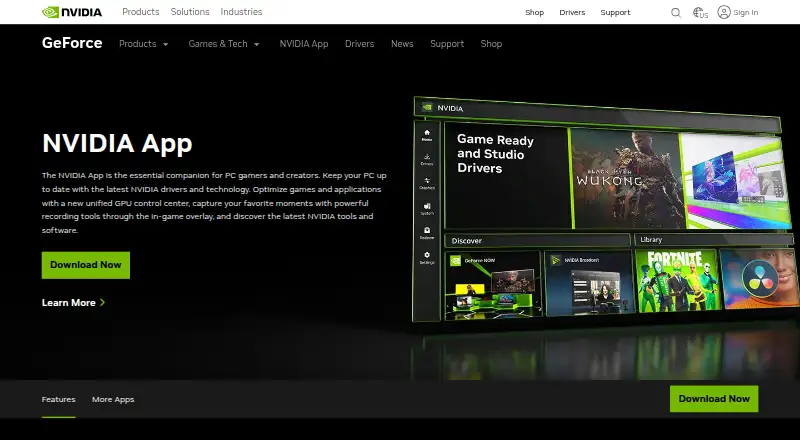
What NVIDIA ShadowPlay is
NVIDIA ShadowPlay is a free Windows companion app for PC gamers and creators. It combines driver updates and game and application optimization with recording tools in an in-game overlay. Manual recording supports up to 8K HDR at 30 fps or 4K HDR at 120 fps, and the product page describes the performance impact as minimal. Automatic Highlights captures key moments, while overlay metrics include FPS, GPU and CPU utilization, FPS 1% Low, and system latency. Owners of GeForce RTX 40-series GPUs can record in AV1 for higher-fidelity video using less disk space. The app also provides a GPU control center for graphics settings and tuning, plus Freestyle filters for supported games. It offers ways to discover and launch GeForce NOW, Project G-Assist, NVIDIA Broadcast, and NVIDIA RTX Remix. Requirements include Windows 10 or 11, a GeForce RTX 20, 30, 40, or 50 Series GPU, GeForce driver 551.52 or later, 2 GB of system memory, and 600 MB of disk space. Signing in is optional.
Good
- Manual recording supports up to 8K HDR at 30 fps.
- Automatic Highlights captures key gameplay moments.
- Overlay displays FPS, GPU and CPU use, and system latency.
- Login is optional.
Watch out
- Requires a GeForce RTX 20, 30, 40, or 50 Series GPU.
- Requires Windows 10 or 11.
- Requires GeForce driver 551.52 or later.
Who it suits
ShadowPlay suits Windows PC gamers and creators who want recording, automatic highlights, and system metrics in an in-game overlay. It requires a supported GeForce RTX GPU and the listed driver version.
Verdict
ShadowPlay brings recording, highlights, game-related controls, and performance metrics into one free Windows companion app. Confirm that the PC meets its GPU, operating system, and driver requirements before choosing it.
Plans and prices
From NVIDIA ShadowPlay's own pricing page, checked 29 Sep 2026.
| Plan | Price | What it gives you |
|---|---|---|
| NVIDIA App | Free | Windows 10 or 11 · GeForce 551.52 driver or later · Supported GPU required |
The facts
Each one read from NVIDIA ShadowPlay's own pages, with the date it was checked.
What it does
- Automatic highlights
- NVIDIA Highlights automatically captures key moments, clutch kills, and match-winning plays.checked 29 Sep 2026
- AV1 encoding
- The product page says GeForce RTX 40-series GPU owners can record in AV1 for higher fidelity video using less disk space.checked 29 Sep 2026
- Capture resolution
- 8kchecked 20 Sep 2026
- GPU encoding
- Yeschecked 20 Sep 2026
- Hardware requirements
- The system requirements page lists GeForce RTX 20, 30, 40, and 50 Series GPUs, 2 GB system memory, 600 MB disk space, and GeForce 551.52 driver or later.checked 29 Sep 2026
- Instant replay
- Yeschecked 20 Sep 2026
- Instant Replay
- ShadowPlay Instant Replay can save the last 30 seconds of gameplay.checked 29 Sep 2026
- Optional login
- NVIDIA says login is optional and lets users redeem GPU bundles and rewards.checked 29 Sep 2026
- Other overlay tools
- The in-game overlay can show FPS, GPU and CPU utilization, FPS 1% Low, and system latency metrics.checked 29 Sep 2026
- Recording modes
- multi-modechecked 20 Sep 2026
- Recording quality
- The product page says manual recording supports up to 8K HDR at 30 fps or 4K HDR at 120 fps with minimal performance impact.checked 29 Sep 2026
- Security
- NVIDIA says it evaluates reported security concerns and provides corrective actions, and publishes security bulletins and notices.checked 29 Sep 2026
- Supported operating systems
- The system requirements page lists Windows 10 and Windows 11.checked 29 Sep 2026
- What it does
- NVIDIA describes the app as a companion for PC gamers and creators that updates drivers, optimizes games and applications, and provides recording tools through an in-game overlay.checked 29 Sep 2026
Where it runs
- Discoverable apps
- The app offers a way to discover and launch GeForce NOW, Project G-Assist, NVIDIA Broadcast, and NVIDIA RTX Remix.checked 29 Sep 2026
- Other app features
- The app includes a GPU control center for graphics settings and GPU tuning, and Freestyle filters for supported games.checked 29 Sep 2026
- Supported platforms
- Windowschecked 20 Sep 2026
The company
- Founded
- 1993checked 28 Sep 2026
- Headquarters
- Santa Clara, California, United Stateschecked 28 Sep 2026
Money
- Free plan
- Yeschecked 20 Sep 2026
The full review of NVIDIA ShadowPlay
NVIDIA ShadowPlay is the capture and monitoring feature set in NVIDIA’s companion app for PC gamers and creators. It is best for Windows users with a supported GeForce RTX GPU who want recording tools and game-related controls in the same overlay. Its capture options are unusually ambitious, but the hardware and driver requirements make it a poor fit for older PCs or other platforms.
Overview
The app combines driver updates and game and application optimization with in-game recording and monitoring. That makes ShadowPlay a practical choice for players who want to save clips and check performance without switching between separate utilities. The compromise is a Windows-only experience that depends on a recent GeForce RTX card.
Key features
Manual recording supports up to 8K HDR at 30 fps or 4K HDR at 120 fps, with NVIDIA describing performance impact as minimal. Those modes give creators room to capture high-resolution footage, though players who only save occasional clips may not need such high ceilings. GeForce RTX 40-series owners can use AV1 encoding for higher-fidelity video while using less disk space.
Instant replay preserves recent gameplay, and NVIDIA Highlights can automatically capture moments such as clutch kills and match-winning plays. These options suit players who want to keep memorable footage without recording every session. The overlay also displays FPS, FPS 1% Low, GPU and CPU utilization, and system latency, useful signals for checking how a game is running.
Beyond capture, the app includes a GPU control center for graphics settings and tuning, plus Freestyle filters for supported games. It also provides a way to discover and launch GeForce NOW, Project G-Assist, NVIDIA Broadcast, and NVIDIA RTX Remix. This breadth is convenient for NVIDIA users, but it does not turn the app into a cross-platform gaming utility.
Pricing
NVIDIA App costs nothing. The free plan includes the app for Windows 10 or 11, provided the PC has a supported GPU and GeForce 551.52 driver or later. Login is optional; signing in lets users redeem GPU bundles and rewards. There is no paid ShadowPlay plan to weigh against the free option.
Platforms
ShadowPlay runs on Windows 10 and Windows 11. The system requirements call for a GeForce RTX 20, 30, 40, or 50 Series GPU, at least 2 GB of system memory, 600 MB of disk space, and GeForce 551.52 or later. That excludes non-Windows devices and PCs without a supported RTX GPU, even though NVIDIA’s broader supported-device ecosystem spans other platforms.
Who it's for
Choose ShadowPlay if you have a supported GeForce RTX PC and want high-resolution recording, automatic highlights, replay, and performance metrics alongside NVIDIA’s game controls. It is less suitable if you need software that works across operating systems or hardware outside the supported RTX range.
Pros and cons
- Pro: High-resolution HDR capture, including 4K at 120 fps, gives creators flexible recording headroom.
- Pro: Instant replay and automatic Highlights can save notable gameplay without requiring a full-session recording.
- Pro: Performance metrics and GPU controls share the same in-game overlay as capture tools.
- Con: Windows 10 or 11 and a GeForce RTX 20 Series or newer GPU are required, sharply limiting hardware compatibility.
- Con: AV1 recording is limited to GeForce RTX 40-series owners, so not every supported GPU gets that encoding option.
Alternatives
For a broader comparison of capture tools, browse Game recording software. Choose SteelSeries Moments as another free Windows option for game recording. For sound-focused needs instead, Audio Enhancement Software and AI Noise Cancellation Software cover different categories; neither is a like-for-like capture choice.
Verdict
ShadowPlay is a strong free choice for Windows gamers with a supported GeForce RTX card who want capture, replay, highlights, and performance controls in one NVIDIA companion app. Its main reason to choose it is the combination of high-end recording options and game-focused overlay tools; look elsewhere if your PC lacks the required RTX hardware or you need cross-platform support.
Alternatives to NVIDIA ShadowPlay
- 1
ARC Raiders Config Tuner
Free planOpen sourceLinuxSelf-hostedWindows7.1Free plan - 2

PC Game Booster
Free planWindows6.8From $18.95 a year - 3

PULSE
Free planWindows6.7From $29.99 a year - 4
Smart Game Booster
Free planWindows6.7From $17.99 a year - 5

TargetFPS
Free planWeb6.7Free plan - 6
Gaming Optimizer
Free planWindows6.6Free plan