Razer Game Clips
Razer Game Clips is a gameplay recording feature built into Razer Cortex for capturing and viewing highlights.
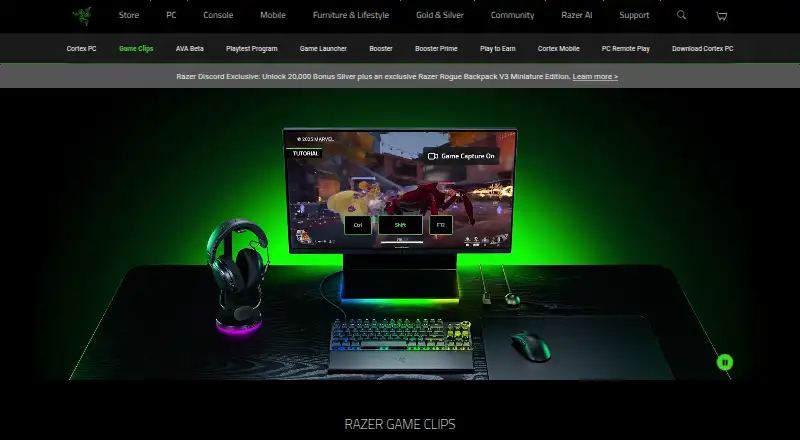
What Razer Game Clips is
Razer Game Clips is a gameplay recording feature built into Razer Cortex for capturing and viewing highlights. It supports manual clipping with a hotkey and automatic highlight detection for selected titles, and saves gameplay moments in HD. Clips can be viewed on a PC, synced to cloud storage at no extra cost, organized in a game clips library, and shared to social platforms. Recording modes are described as multi-mode, and instant replay is supported. Razer says recording runs in the background with minimal system impact alongside Cortex performance boosting. The listed games include Battlefield 6, Overwatch, Counter-Strike 2, DOTA 2, VALORANT, League of Legends, Delta Force, and Street Fighter 6. Game Clips is free and supports Windows 10 (64-bit) and Windows 11. To enable capture, users need to download Razer Cortex and sign in with or create a Razer ID. The maker’s headquarters are listed in Irvine, California, and Singapore, and its founding year is 2005.
Good
- Supports hotkey clipping and automatic highlight detection.
- Saves clips in HD.
- Cloud storage sync costs no extra.
- Clips can be shared to social platforms.
- Available for Windows 10 (64-bit) and Windows 11.
Watch out
- Requires Razer Cortex.
- Requires a Razer ID.
- Automatic highlight detection is for selected titles.
Who it suits
Razer Game Clips suits Windows players who want to save gameplay highlights manually or through automatic detection for selected titles. It also fits users who want to organize, sync, or share saved clips.
Verdict
Razer Game Clips offers free highlight capture, clip organization, and cloud sync through Razer Cortex. It requires Cortex and a Razer ID, and is listed for Windows 10 (64-bit) and Windows 11.
Plans and prices
From Razer Game Clips's own pricing page, checked 7 Oct 2026.
| Plan | Price | What it gives you |
|---|---|---|
| Free | Free | Free cloud storage at no extra cost · Requires Razer Cortex and a Razer ID · Windows 10 (64-bit) or Windows 11 |
| Razer Game Clips | Free | Windows 10 64-bit or Windows 11 · Razer ID required · automatic clipping limited to supported games · Free download; no payment required |
The facts
Each one read from Razer Game Clips's own pages, with the date it was checked.
What it does
- API and SDK scope
- The opened Razer developer portal describes APIs and developer resources for Razer services and immersive technologies, but does not document a Game Clips API or SDK.checked 15 Oct 2026
- Automatic highlights
- Auto-Clipping detects supported events such as eliminations, multi-kills, clutch wins and victories.checked 15 Oct 2026
- Background operation
- Game Clips runs in the background while the game is played and Razer says it has minimal system impact.checked 15 Oct 2026
- Clip library
- Captured clips are available in a Game Clips library for viewing and sharing.checked 15 Oct 2026
- Cloud storage
- Razer advertises free cloud storage that keeps clips accessible on PC and saves local disk space.checked 15 Oct 2026
- Content licence
- Uploading clips grants Razer a worldwide, royalty-free, transferable and sublicensable licence to use and modify the content, including for service improvement and AI development.checked 15 Oct 2026
- Data collection
- Cortex terms say the service processes email address, IP address, installed games, device type, operating system, interaction patterns and game-performance metrics.checked 15 Oct 2026
- Developer portal
- Razer's developer portal documents services such as Razer ID, Razer Gold, Razer Silver, Chroma RGB, haptics and audio technologies.checked 15 Oct 2026
- Documentation
- Razer provides installation instructions and a Cortex support knowledge base, while the product page includes a short FAQ rather than developer-level technical documentation.checked 15 Oct 2026
- Gameplay metadata
- For some titles, Cortex may attach timestamped action labels such as Jump, Reload or Use Ability without storing raw controller or keyboard inputs.checked 15 Oct 2026
- HD capture
- Razer says Game Clips saves gameplay moments in HD.checked 15 Oct 2026
- Instant replay
- Yeschecked 20 Sep 2026
- Integrations
- Automatic clipping can be triggered by in-game events, supported integrations or AI-based detection methods.checked 15 Oct 2026
- Library and sharing
- Clips are available in a game clips library and can be shared to social platforms.checked 7 Oct 2026
- Limit: beta retention
- During the 2025 Game Clips beta, cloud videos were automatically deleted after 30 days unless downloaded locally.checked 15 Oct 2026
- Limit: feature breadth
- TechRadar found Cortex limited in features, with scan results lacking detail and no real-time monitoring.checked 15 Oct 2026
- Limit: support
- TechRadar reported that Cortex had no live support and relied on basic FAQs and community forums.checked 15 Oct 2026
The company
- Company founded and headquarters
- Razer says it was founded in 2005 and is dual-headquartered in Irvine, California and Singapore.checked 15 Oct 2026
- Company identity
- Razer's LinkedIn profile describes the business as privately held computer and electronics manufacturing with 1,001–5,000 employees.checked 15 Oct 2026
- Company software scale
- Razer's LinkedIn profile says its software platform has more than 70 million users and includes Razer Cortex.checked 15 Oct 2026
- Founded
- 2005checked 28 Sep 2026
- Headquarters
- Irvine, California, and Singaporechecked 28 Sep 2026
Money
- Free plan
- Yeschecked 20 Sep 2026
Where it runs
- iOS availability
- Razer Cortex Mobile is a free iPhone and iPad app that includes Game Clips synchronization.checked 15 Oct 2026
Alternatives to Razer Game Clips
- 1
ARC Raiders Config Tuner
Free planOpen sourceLinuxSelf-hostedWindows7.9Free plan - 2
Smart Game Booster
Free planWindows7.5From $17.99 a year - 3
Gaming Optimizer
Free planWindows7.4Free plan - 4

NVIDIA ShadowPlay
Free planWindows7.4Free plan - 5

TargetFPS
Free planWeb7.4Free plan - 6
Magpie
Free planWindows7.3Free plan