
FrameCoach
FrameCoach recommends game graphics settings using a user's GPU, CPU, game, and target frame rate, and estimates how each setting affects FPS.
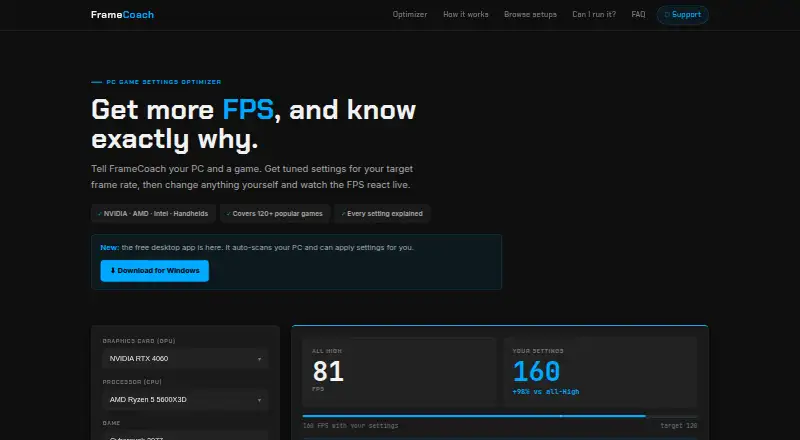
What FrameCoach is
FrameCoach recommends game graphics settings using a user's GPU, CPU, game, and target frame rate, and estimates how each setting affects FPS. Users can edit recommendations and see the estimated FPS update. Its web optimizer covers 160+ GPUs, 250+ CPUs, and 180+ games, including Steam Deck, and says it supports NVIDIA, AMD, Intel, and handhelds. The estimates come from a generalized model rather than live benchmarks, so they can vary with the scene, drivers, and game version. A free Windows desktop app scans hardware and recommends settings for 180+ games, working offline on the PC. Its beta can apply settings to supported Unreal Engine games while closed, backing up configuration first and offering one-click undo. The app requires Windows 10/11, 64-bit, and no account. The maker says desktop hardware information stays on the PC and the app uploads nothing. The web optimizer also needs no account, though its privacy policy describes analytics, optional user submissions, and advertising cookies. FrameCoach is a free project built by one person.
Good
- Free optimizer and Windows desktop app.
- Desktop app works offline.
- Desktop app backs up settings before applying changes.
- One-click undo is available in the beta app.
- No account is required.
Watch out
- FPS estimates are model-based, not live benchmarks.
- Desktop app requires Windows 10/11, 64-bit.
- Beta setting changes are limited to supported Unreal Engine games.
- Web privacy policy describes analytics and advertising cookies.
Who it suits
FrameCoach suits PC and handheld players who want graphics-setting recommendations tied to their hardware and a target frame rate. The desktop app suits Windows users who want offline recommendations or beta configuration changes for supported Unreal Engine games.
Verdict
FrameCoach provides hardware-based guidance and a separate offline Windows app, but its FPS figures are estimates rather than live benchmarks. Check the app's operating-system and supported-game limits before relying on its setting changes.
Plans and prices
From FrameCoach's own pricing page, checked 3 Oct 2026.
| Plan | Price | What it gives you |
|---|---|---|
| Free | Free | Optimizer, settings guides and Windows desktop app |
The facts
Each one read from FrameCoach's own pages, with the date it was checked.
Where it runs
- Applying settings
- The beta app can apply settings to supported Unreal Engine games while the game is closed, backs up the config first and provides one-click undo.checked 3 Oct 2026
- Desktop app
- The free Windows app scans hardware and offers settings recommendations for 180+ games; it runs offline on the PC.checked 3 Oct 2026
What it does
- Cross-vendor support
- FrameCoach says it supports NVIDIA, AMD, Intel and handhelds.checked 3 Oct 2026
- Desktop requirements
- The download page lists Windows 10/11, 64-bit, an approximately 80 MB download and no account requirement.checked 3 Oct 2026
- FPS estimate limits
- FPS figures come from a generalized model rather than live benchmarks and may vary with the scene, drivers and game version.checked 3 Oct 2026
- Hardware and game coverage
- The site says its optimizer covers 160+ GPUs, 250+ CPUs and 180+ games, including the Steam Deck.checked 3 Oct 2026
- Security and privacy
- The download page says desktop hardware information stays on the PC and the app uploads nothing.checked 3 Oct 2026
- Settings controls
- Users can edit recommendations and see the estimated FPS update live.checked 3 Oct 2026
- Support
- Users can contact the maker by email, send questions through the FAQ page, or report bugs and request games through the optimizer or GitHub.checked 3 Oct 2026
- Web integrations
- The privacy policy names Vercel for hosting and cookieless analytics, Supabase for form submissions, Google Analytics for usage analytics and Google AdSense for ads.checked 3 Oct 2026
- Web privacy
- The privacy policy says the optimizer requires no account and describes analytics, optional user submissions and advertising cookies.checked 3 Oct 2026
- What it does
- FrameCoach recommends game graphics settings based on a user's GPU, CPU, game and target frame rate, and explains each setting's estimated FPS impact.checked 3 Oct 2026
The company
- Maker
- The support page describes FrameCoach as a free project built by one person.checked 3 Oct 2026
The full review of FrameCoach
FrameCoach is a free game-settings optimizer for players who want recommendations matched to their hardware and a target frame rate. It is best suited to people tuning supported games on the web or Windows, rather than anyone seeking measured, real-time performance data.
Overview
FrameCoach pairs suggested graphics settings with an estimated FPS impact for each setting, so players can weigh visual quality against a chosen frame-rate target. Recommendations are editable, and the estimate updates as settings change. That makes it a useful planning aid, but the generalized model is not a substitute for benchmarking: results can vary by scene, driver and game version.
Key features
The web optimizer covers 160+ GPUs, 250+ CPUs and 180+ games, including Steam Deck, and supports NVIDIA, AMD, Intel and handhelds. That breadth gives players with different hardware a starting point without requiring a Windows install. Its value depends on treating FPS figures as directional estimates rather than guarantees.
The free Windows app scans hardware and recommends settings for 180+ games. It runs offline, needs no account, and requires Windows 10/11, 64-bit; the download is approximately 80 MB. FrameCoach says desktop hardware information stays on the PC and the app uploads nothing, a clear privacy advantage for users who prefer local tools.
A beta feature can apply settings to supported Unreal Engine games while they are closed. It backs up the configuration and offers one-click undo, which reduces the risk of an unwanted change. Its scope is limited to supported Unreal Engine titles, so it should not be mistaken for a universal settings manager.
The web optimizer also requires no account, but its privacy policy describes analytics, optional user submissions and advertising cookies. It names Vercel for hosting and cookieless analytics, Supabase for form submissions, Google Analytics for usage analytics and Google AdSense for ads. Players who want to avoid those web integrations can use the offline Windows app instead.
Support is available by email, through the FAQ page, or via bug reports and game requests in the optimizer or on GitHub. FrameCoach is a free project built by one person, so it suits users comfortable with a small independent project rather than those expecting a large vendor support operation.
Pricing
FrameCoach has one plan: Free — free. It includes the optimizer, settings guides and Windows desktop app. There is no free trial because the product is free, and no paid tier or plan-based feature split is described. For players who want recommendations without a subscription, that is straightforward; those who need cloud profile sync will not find it, as sync is not supported.
Platforms
FrameCoach is available on the web and Windows. The web optimizer supports a broad mix of GPUs, CPUs and handhelds, while the desktop app is specifically for Windows 10/11 64-bit PCs. Cloud profile sync is not supported, so recommendations are not presented as a synced profile across devices.
Who it's for
FrameCoach is a good fit for players who want a free, hardware-aware starting point for game graphics settings, especially those comparing trade-offs against a target FPS or tuning a Windows PC offline. It is less suitable for players who need live benchmark accuracy, support for every game, or settings changes across all titles.
Pros and cons
- Pros: Free access includes both the web optimizer and Windows app, with no account required for either.
- Pros: Broad stated hardware and game coverage gives many players a relevant starting point, including Steam Deck users.
- Pros: The desktop app runs offline and keeps hardware information on the PC, according to FrameCoach.
- Cons: FPS impact is estimated by a generalized model, so it cannot promise the result a specific scene, driver or game version will produce.
- Cons: Automatic application is beta and limited to supported Unreal Engine games.
- Cons: Web privacy includes analytics and advertising cookies, while cloud profile sync is unavailable.
Alternatives
Game Graphics Optimization Software is the broader category directory for comparing tools in this area.
Choose TargetFPS if a web-only alternative from an independent developer better fits your needs. Gaming Optimizer is worth considering if you want a free Windows tool whose repository is public under an MIT license. Hone may suit players who prefer a freemium Windows optimizer with a capped free plan and a paid premium tier.
Intel VTune Profiler is a free option for users seeking a profiling tool available on Windows, Linux or self-hosted setups. NVIDIA ShadowPlay is a free Windows alternative for users with a supported GPU and the required GeForce driver. PULSE is another freemium Windows choice, with a free plan that includes real-time CPU, GPU and RAM monitoring plus FPS and frametime via RTSS.
SteelSeries Moments is another free Windows option. GameShift is a free Windows alternative with no paid plans stated on the maker’s page.
Verdict
Choose FrameCoach if you want free, hardware-aware recommendations, editable settings and an offline Windows app without an account. Its breadth and local desktop operation are compelling for initial tuning, but players who need reliable per-scene FPS results or universal settings application should look elsewhere.
Alternatives to FrameCoach
- 1
ARC Raiders Config Tuner
Free planOpen sourceLinuxSelf-hostedWindows7.9Free plan - 2
Razer Game Clips
Free planAndroidiOSAPIWindows7.6Free plan - 3
Smart Game Booster
Free planWindows7.5From $17.99 a year - 4
Gaming Optimizer
Free planWindows7.4Free plan - 5

NVIDIA ShadowPlay
Free planWindows7.4Free plan - 6

TargetFPS
Free planWeb7.4Free plan