Settings For Games
Settings For Games is a web service and portable Windows app for browsing, copying, and sharing community graphics configurations for PC games.
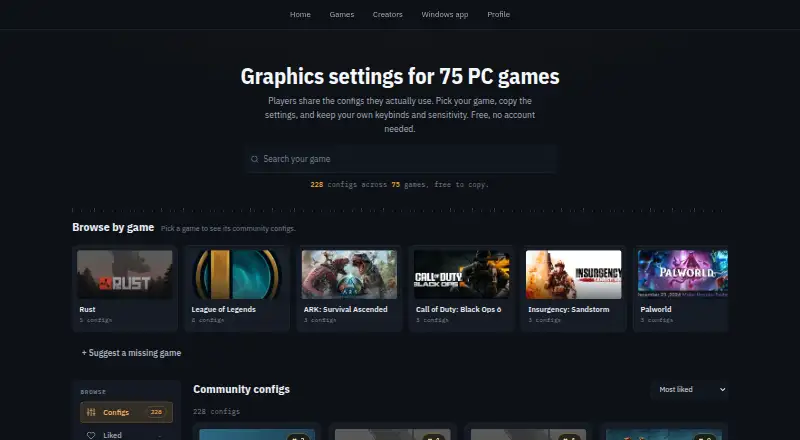
What Settings For Games is
Settings For Games is a web service and portable Windows app for browsing, copying, and sharing community graphics configurations for PC games. Its catalog covers 75 games, and copying does not require an account. A merge dialog preserves personal settings such as keybinds, mouse sensitivity, audio levels, and crosshair colors while applying graphics and performance values from a community configuration. The Windows app runs directly from an EXE without installation, switches configurations, and creates automatic backups. It can automatically apply settings for Rust, ARC Raiders, Valorant, and League of Legends, and read Counter-Strike 2 settings. Before changes are written, the app previews them and backs up files, modifying only official settings or exposed configuration files. Players can publish configs as public, unlisted, or private. Browsing, copying, publishing, and the Windows app are free.
Good
- Free browsing, copying, and publishing
- Covers 75 PC games
- Portable Windows app needs no installer
- Automatic backups before changes
- Public, unlisted, or private sharing
Watch out
- Identified as version 0.1.0 Beta
- Automatic application covers four listed games
- Windows and web only
Who it suits
It suits PC players who want community graphics configurations without creating an account. Windows users who want previews, backups, and automatic switching for supported games may find it useful.
Verdict
Settings For Games offers free community configurations with personal-setting preservation and backup safeguards. Its beta status and specific automatic-support list are important considerations.
Plans and prices
From Settings For Games's own pricing page, checked 4 Oct 2026.
| Plan | Price | What it gives you |
|---|---|---|
| Settings For Games | Free | Browsing, copying, publishing configs, and the Windows app are free |
The facts
Each one read from Settings For Games's own pages, with the date it was checked.
Where it runs
- App safeguards
- The app previews changes before writing, creates an automatic backup, and modifies only official settings or config files exposed by each game.checked 4 Oct 2026
- Windows app
- The portable Windows app runs from an EXE without an installer and can switch configs with automatic backups.checked 4 Oct 2026
What it does
- Automatic support
- The app can automatically apply settings for Rust, ARC Raiders, Valorant, and League of Legends, and can read Counter-Strike 2 settings.checked 4 Oct 2026
- Build status
- The site identifies the product as version 0.1.0 Beta.checked 4 Oct 2026
- Donation
- The site says an optional donation link is available to support the project.checked 4 Oct 2026
- Game catalog
- The site says it covers 75 PC games and lets players browse and copy community configs.checked 4 Oct 2026
- Merge behavior
- The copy and merge dialog keeps personal settings such as keybinds, mouse sensitivity, audio levels, and crosshair colors while taking graphics and performance values from a community config.checked 4 Oct 2026
- No account to copy
- Players can browse and copy configs without an account.checked 4 Oct 2026
- Purpose
- Settings For Games provides community graphics settings and configs for PC games.checked 4 Oct 2026
- Sharing
- Players can publish configs through the website or desktop app, and choose public, unlisted, or private visibility.checked 4 Oct 2026
- Support
- The site provides options to report a bug, request a feature, and support the project.checked 4 Oct 2026
The company
- Headquarters
- Cologne, Germanychecked 28 Sep 2026
- Maker
- The Impressum identifies Mattias Schmidt as the provider and lists Köln, Germany as the address.checked 4 Oct 2026
Alternatives to Settings For Games
- 1
ARC Raiders Config Tuner
Free planOpen sourceLinuxSelf-hostedWindows7.1Free plan - 2

PC Game Booster
Free planWindows6.8From $18.95 a year - 3

NVIDIA ShadowPlay
Free planWindows6.7Free plan - 4

PULSE
Free planWindows6.7From $29.99 a year - 5
Smart Game Booster
Free planWindows6.7From $17.99 a year - 6

TargetFPS
Free planWeb6.7Free plan