Tanium Deploy
Tanium Deploy manages software installation, updates and removal across an organization's endpoints.
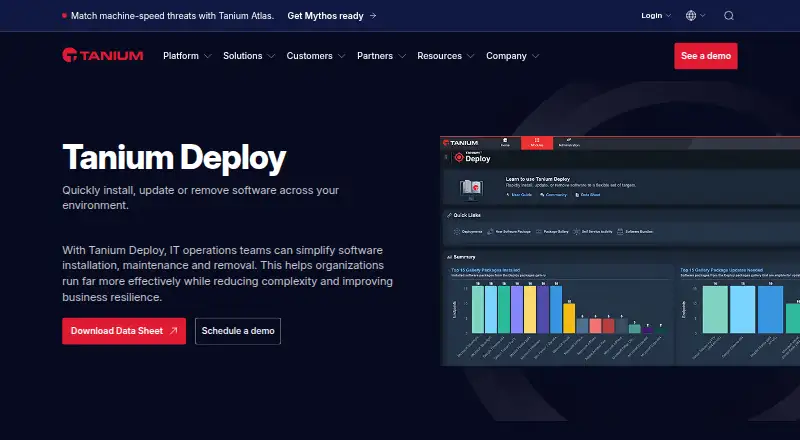
What Tanium Deploy is
Tanium Deploy manages software installation, updates and removal across an organization's endpoints. Administrators can target deployments to computer or user groups, departments, locations, or individual devices and users, and schedule them for maintenance windows. Deployments can run once, recur, or start automatically when rules are met. A package workbench supports building and maintaining software packages, while a predefined gallery offers templates for importing third-party software. Administrators can also make approved or assigned applications available for users to install, update or remove through Self-Service Profiles and Client Applications. Tanium says its architecture can support hundreds of thousands of endpoints on one Tanium server without additional agents or infrastructure for Deploy. The product requires a Tanium license that includes Deploy, Tanium Core Platform servers and a supported Tanium Client. Supported endpoint systems include Windows, macOS and Linux, and each endpoint needs at least 2 GB of free disk space. Pricing is available on request.
Good
- Targets devices, users, departments and locations
- Supports scheduled and rule-triggered deployments
- Includes third-party software package templates
- Offers user self-service for approved software
- Supports Windows, macOS and Linux endpoints
Watch out
- Requires a Tanium license and Core Platform servers
- Endpoints need at least 2 GB free disk space
- Bundles cannot mix packages for different platforms
- Pricing is available on request
Who it suits
Tanium Deploy is aimed at organizations managing software across large endpoint fleets. It may fit IT administrators who need targeting, scheduled or rule-triggered deployments, and user self-service.
Verdict
Tanium Deploy brings package management, deployment controls and user self-service into a Tanium-managed environment. Organizations should account for its licensing and endpoint requirements before adopting it.
Plans and prices
From Tanium Deploy's own pricing page, checked 4 Oct 2026.
| Plan | Price | What it gives you |
|---|---|---|
| Tanium Deploy | Priced on request | Requires a Tanium license that includes Deploy and Tanium Core Platform servers |
The facts
Each one read from Tanium Deploy's own pages, with the date it was checked.
What it does
- API
- Tanium Gateway can be used to access the Deploy API and extend Deploy functionality with queries and mutations.checked 4 Oct 2026
- Bundling limitation
- A software bundle manages packages for a single platform; deploying a bundle containing packages for different operating systems is unsupported.checked 4 Oct 2026
- Certifications
- Tanium’s security page lists ISO/IEC 27001, ISO 27018, FedRAMP authorization, StateRAMP authorization, and a SOC 2 Type II report for Tanium Cloud Commercial.checked 4 Oct 2026
- Deployment controls
- Deploy supports one-time or ongoing deployments, maintenance windows, and automatic deployments triggered by rules.checked 4 Oct 2026
- Endpoint disk space
- Endpoints must have at least 2 GB of free disk space.checked 4 Oct 2026
- Integrations
- Tanium's integrations page names Microsoft, ServiceNow, and ScreenMeet and describes integrations with SIEM, SOAR, ITSM, data lakes, and cloud platforms.checked 4 Oct 2026
- Package gallery
- The Predefined Package Gallery provides templates with required information to import and deploy third-party software.checked 4 Oct 2026
- Package management
- Its package management workbench helps build, maintain, and distribute software packages.checked 4 Oct 2026
- Purpose
- Tanium Deploy installs, updates, and removes software across an organization’s environment.checked 4 Oct 2026
- Required license
- Deploy requires a Tanium license that includes Deploy, Tanium Core Platform servers, and a supported Tanium Client.checked 4 Oct 2026
- Scale and infrastructure
- Tanium says its architecture can maintain performance across hundreds of thousands of endpoints on a single Tanium server, with no extra agents or infrastructure for Deploy.checked 4 Oct 2026
- Security capabilities
- Tanium lists SAML-based SSO, REST and SOAP APIs, role-based access control, four-eyes action approvals, HSM key storage, granular event logging, and air-gapped network support.checked 4 Oct 2026
- Security certifications and reports
- Tanium's security page lists ISO/IEC 27001, ISO 27018, FedRAMP authorization, StateRAMP authorization, and a SOC 2 Type II report for Tanium Cloud Commercial.checked 4 Oct 2026
- Self service
- Administrators can let users install, update, and remove approved or assigned software through Self-Service Profiles and Client Applications.checked 4 Oct 2026
- Software packages
- Software packages combine source files, metadata, detection logic, and commands to detect, install, update, or remove software on Tanium Client devices.checked 4 Oct 2026
- Support
- Tanium directs customers who need support to sign in to the Tanium Customer Community.checked 4 Oct 2026
- Supported endpoint systems
- The requirements list supported Windows Server and workstation, macOS, and Linux endpoint operating systems.checked 4 Oct 2026
- Supported operating systems
- Deploy requirements list Windows, macOS, and Linux endpoint operating systems, including Windows 7 SP1 or later, macOS 10.13.6 or later, and several Linux distributions.checked 4 Oct 2026
- Support resources
- Tanium links customers to its Resource Center and Tanium Account for support resources and account access.checked 4 Oct 2026
- Targeting and schedules
- Deployments can target computer groups, user groups, departments, locations, individual computers, or individual users, and can run during a maintenance window.checked 4 Oct 2026
The company
- Company
- Tanium describes itself as an Autonomous IT company and says its founders are David and Orion Hindawi.checked 4 Oct 2026
- Founded
- 2007checked 28 Sep 2026
- Headquarters
- Kirkland, Washington, USAchecked 28 Sep 2026
Where it runs
- Platform requirement
- Deploy requires a Tanium license that includes Deploy, Tanium Core Platform servers, and a supported Tanium Client.checked 4 Oct 2026
The full review of Tanium Deploy
Overview
Tanium Deploy is a software-management module for installing, updating and removing software across an organization’s Tanium-managed endpoints. It best suits IT teams that need to target deployments precisely and coordinate them across large fleets. Its controls and self-service options are substantial, but adoption depends on Tanium’s platform and client requirements.
Key features
Deployments can target computer or user groups, departments, locations, or individual users and computers, and run once, on an ongoing basis, during maintenance windows, or when rules trigger them. That range gives administrators practical control over who receives software and when; automatic deployment rules can reduce routine work, while approval steps and reboot deferral help manage operational risk.
The package workbench combines source files, metadata, detection logic and commands used to detect, install, update or remove software. Predefined Package Gallery templates help teams import third-party software, and Deploy supports third-party patching and remote app removal. A key constraint: each software bundle can manage packages for only one platform, so a cross-operating-system bundle is unsupported.
Self-Service Profiles and Client Applications let administrators offer approved or assigned software for users to install, update or remove. Tanium Gateway provides access to the Deploy API for queries and mutations, enabling extensions to the module. Tanium says its architecture can maintain performance across hundreds of thousands of endpoints on one Tanium server without extra agents or infrastructure for Deploy; however, the deployment method is agent-based and requires a supported Tanium Client.
Pricing
Tanium Deploy: custom pricing. The plan requires a Tanium license that includes Deploy and Tanium Core Platform servers, so it is not a standalone purchase. There is no free plan. Organizations should evaluate the broader Tanium licensing requirement alongside the module’s fit for their endpoint estate.
Platforms
Deploy supports Windows, macOS and Linux endpoints, with requirements including Windows 7 SP1 or later and macOS 10.13.6 or later, as well as supported Linux distributions. Endpoints need at least 2 GB of free disk space. The wider deployment model is described as hybrid, and Tanium lists API access; the supported endpoint requirements and Tanium Client dependency matter more than a general platform label when planning rollout.
Security capabilities include SAML-based SSO, role-based access control, four-eyes action approvals, granular event logging, HSM key storage, REST and SOAP APIs, and air-gapped network support. Tanium lists ISO/IEC 27001, ISO 27018, FedRAMP and StateRAMP authorizations, plus a SOC 2 Type II report for Tanium Cloud Commercial. Its integrations page names Microsoft, ServiceNow and ScreenMeet and describes integrations across SIEM, SOAR, ITSM, data lakes and cloud platforms.
Who it's for
Deploy is a strong fit for organizations already operating Tanium Core Platform servers and supported Tanium Clients that need policy-driven software distribution, third-party updates and user self-service at scale. Teams seeking a standalone deployment tool, an agentless approach, or bundles spanning multiple operating systems should look elsewhere. Tanium directs customers to its Resource Center, Tanium Account and Customer Community for support resources and account access.
Pros and cons
- Pros: Precise targeting, maintenance windows, rule-triggered deployments and approval controls suit complex enterprise rollouts.
- Pros: Package templates and self-service cover both administrator-managed updates and user-requested software.
- Pros: Tanium says the architecture scales across hundreds of thousands of endpoints on one server without added Deploy infrastructure.
- Cons: Deploy requires a Tanium license, Core Platform servers and a supported client, making it a poor fit for organizations outside that environment.
- Cons: Bundles cannot combine packages for different operating systems, limiting cross-platform packaging workflows.
- Cons: The product is agent-based and requires at least 2 GB of free endpoint disk space.
Alternatives
For adjacent automation needs, Runbook Automation Software is a relevant category. Readers comparing configuration and patch controls can also browse Security Configuration Management Software and Patch Management Software; vulnerability-focused work may call for Vulnerability Management Software, Vulnerability Scanning Software or File Integrity Monitoring Software.
Rundeck is worth considering for teams looking for runbook automation with a free Community plan and a free trial. Shuffle offers a free Scale plan with a hard limit of 2,000 app runs, a better fit for teams whose usage fits that cap. Tines has a free edition limited to three live workflows, which may suit small workflow needs. StackStorm is free and open source for teams seeking that model. Tracecat offers a self-hosted open-source plan with unlimited workflows, cases and agents, with monthly executions self-managed. Azure Automation is a freemium option for Windows and Linux environments, with 500 minutes per month included for process automation job run time. For other paid options, consider Palo Alto Networks Cortex Cloud API Security or Torq Case Management.
Verdict
Choose Tanium Deploy if your organization already has the required Tanium platform and needs controlled, targeted software deployment with third-party updates and user self-service. Its combination of rollout controls and scale is compelling in that setting. Look elsewhere if you need a standalone or agentless tool, or if your packaging process must bundle software across operating systems.
Alternatives to Tanium Deploy
- 1
Fleet
Free planOpen sourceAndroidiOSWebAPI8.6From $7 a month - 2

OPSI
Free planOpen sourceWebAPILinuxmacOS8.4From €4.99 a year - 3

FileWave
Free planAndroidiOSWebAPI8.3Free plan - 4

ManageEngine Patch Manager Plus
Free planAndroidiOSWebAPI8.2From $245 a year - 5

Patch My PC
Free planWebmacOSSelf-hostedWindows7.7From $3.50 a year - 6

Uyuni
Free planOpen sourceWebAPILinuxSelf-hosted7.4Free plan