
Tines
Tines 3B is an AI-native workflow platform for creating, running, and monitoring AI agents, apps, and automations.
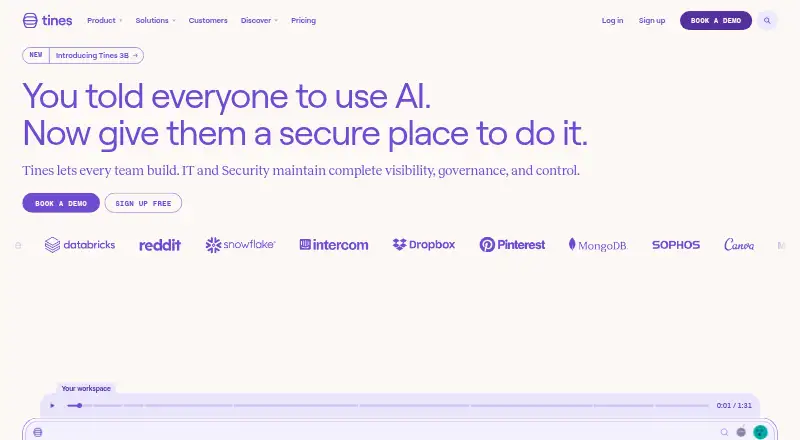
What Tines is
Tines 3B is an AI-native workflow platform for creating, running, and monitoring AI agents, apps, and automations. Builders can assemble multi-step workflows with natural language or code, add Git integration and branching, and use conditional logic or webhook triggers. The platform supports connected LLM chat and AI skills, as well as coding assistants such as Claude Code and Codex. Tines says workflows can connect to any API or Model Context Protocol service; examples include Slack, VirusTotal, Jira Software, Microsoft Graph, Gmail, CrowdStrike, GitHub, Okta, OpenAI, and PagerDuty.
Workflows can run in self-hosted, on-premises, or hybrid deployments. Each step executes in an isolated sandbox, while connector credentials are injected at runtime rather than exposed to builders or placed in code. Monitoring includes AI spend, access, duplicate efforts, workflow savings, frontend routes, and package dependencies. Tines positions the platform for builders across business teams, with Security and IT governing the work. It states that it maintains SOC 2 Type II compliance and is audited annually. The Free edition costs nothing and allows three live workflows; paid editions have no listed price.
Good
- Build workflows with natural language, code, and Git integration.
- Includes conditional logic, branching, and webhook triggers.
- Connects to APIs and MCP services, with named product examples.
- Isolated workflow-step sandboxes keep credentials out of code.
- SSO/SAML is available across all plans.
Watch out
- The Free edition is limited to three live workflows.
- Business Edition starts at one licensed team and three apps.
Who it suits
Tines 3B suits business-team builders who need to create AI-assisted workflows and connect them to APIs or MCP services. It may also suit organizations where Security and IT need controls for governing that work and options for self-hosted, on-premises, or hybrid deployment.
Verdict
Choose Tines 3B if your teams need flexible workflow building, AI tools, and deployment options alongside governance controls. Look elsewhere if three live workflows are too restrictive and you need a published price for paid editions before evaluating them.
Plans and prices
From Tines's own pricing page, checked 14 Oct 2026.
| Plan | Price | What it gives you |
|---|---|---|
| Free edition | Free | Unlimited users, spaces, and connectors · 3 live workflows · one-time $50 AI allowance |
| Business Edition | — | Starting at 30 flows · Starting at 1 licensed team · 100 users · 1.5M daily events · 3 apps |
| Enterprise Edition | — | Contact Tines for flow limit · Contact Tines for licensed teams · Contact Tines for user limit · Contact Tines for event limit · 5 apps |
| Explore (Free edition) | Free | Unlimited users, spaces, and connectors · 3 live workflows · One time $50 AI allowance |
| Paid editions | Priced on request | Unlimited users, spaces, and connectors · unlimited workflows · flexible deployment · bring your own AI model |
The facts
Each one read from Tines's own pages, with the date it was checked.
What it does
- AI Agent
- AI Agent actions can reason and execute inside workflows while Tines says model input and output are not trained on, logged, inspected, or stored by Tines.checked 14 Oct 2026
- AI tools
- Tines 3B supports connected LLM chat, AI skills, and connections to coding assistants such as Claude Code or Codex.checked 8 Oct 2026
- API authentication
- API requests support API-key authentication through X-User-Token or Bearer tokens, with personal, service, tenant-owner, and team key types.checked 14 Oct 2026
- API extensibility
- The API includes endpoints for listing AI providers and models available to an authenticated user.checked 14 Oct 2026
- Automatic mode
- Automatic mode uses build-time AI to generate locked Python transformation code from plain-English guidance.checked 14 Oct 2026
- Case management
- Cases provides automation-first incident management with records, dashboards, runbooks, collaboration, and audit trails.checked 14 Oct 2026
- Compliance
- Tines states that it maintains SOC 2 Type II compliance and is audited annually.checked 8 Oct 2026
- Conditional logic
- Yeschecked 20 Sep 2026
- Deployment
- Tines 3B can run self-hosted, on-premises, or in a hybrid deployment.checked 8 Oct 2026
- Documentation
- Documentation covers API, self-hosting, deployment prerequisites, environment variables, architecture, actions, and release notes.checked 14 Oct 2026
- Example integrations
- The product page displays AWS CLI, Slack, Gmail, Microsoft Teams, Jira Software, VirusTotal, CrowdStrike, GitHub, and GitLab among popular products.checked 14 Oct 2026
- Execution security
- Each workflow step executes in an isolated sandbox, and connector credentials are injected at runtime so they are not visible to builders or AI and are not stored in code.checked 8 Oct 2026
- Funding news
- Tines announced a $125 million Series C on February 11, 2025, valuing the company at $1.125 billion and bringing total capital raised to $272 million.checked 14 Oct 2026
- Integrations
- Tines says Stories can connect to any service that exposes an API, including internal tools and niche systems.checked 14 Oct 2026
- Intended users
- Tines 3B is for builders across business teams, with Security and IT responsible for governing the work.checked 8 Oct 2026
- Legal entity
- The data-processing agreement identifies Tines Security Services Limited as the Irish Tines entity.checked 14 Oct 2026
- Licence
- Tines commercial terms grant a limited, non-exclusive, non-transferable subscription license, so the product is not open source.checked 14 Oct 2026
- Limit: documentation clarity
- A Gartner Peer Insights critical review lists insufficient documentation clarity as a dislike.checked 14 Oct 2026
- Limit: learning curve and pricing
- G2 reviewers report an initial learning curve, complex debugging or a blank-canvas feeling, and pricing concerns as deployments grow.checked 14 Oct 2026
The company
- Company history
- Tines says its founders started building the company in 2018 after working as senior security operators.checked 8 Oct 2026
- Company size
- LinkedIn lists Tines as a privately held software-development company with 201–500 employees.checked 14 Oct 2026
- Founded
- Tines says its founders started building the company in 2018 after working as security operators.checked 14 Oct 2026
- Headquarters
- Tines lists European headquarters in Dublin and US headquarters in Boston.checked 14 Oct 2026
Money
- Free plan
- Yeschecked 20 Sep 2026
The full review of Tines
Overview
Tines 3B brings workflow automation, AI agents, and app building into one platform, with room for both business-team builders and the Security or IT teams governing their work. It stands out for flexible workflow construction and deployment, but its free editions’ three-live-workflow limit may be too tight for sustained use.
Key features
Workflows can be built with natural language, code, Git integration, and native branching. Multi-step workflows, conditional logic, and webhook triggers make Tines a better fit for event-driven processes with several possible paths than for simple, fixed sequences.
Rather than confining teams to a fixed catalog of integrations, Tines connects to APIs and MCP. Examples include Slack, VirusTotal, Jira Software, Microsoft Graph, Gmail, CrowdStrike, GitHub, Okta, OpenAI, and PagerDuty. That flexibility can accommodate varied tool stacks, although teams need to make sure the APIs or MCP connections their processes require will work for them.
AI features include connected LLM chat, AI skills, and connections to coding assistants such as Claude Code and Codex. Monitoring covers AI spend and access, duplicate efforts, workflow savings, frontend routes, and package dependencies. Those views give teams a way to oversee AI and workflow use beyond simply tracking executions.
Each workflow step runs in an isolated sandbox. Connector credentials are injected at runtime, kept out of code, and hidden from builders and AI. For teams handling sensitive credentials, that is a meaningful safeguard. Deployment can be self-hosted, on-premises, or hybrid, which gives organizations options beyond a web-only service.
Tines states that it maintains SOC 2 Type II compliance and undergoes annual audits. Its controls include SSO/SAML on all plans, configurable session timeouts, data-retention controls, audit logs through the UI and API, and team-based separation of users and resources. Users can also turn to the Tines community to connect with other users or the company team.
Pricing
The free offers both cost nothing, but their stated allowances differ. The Free edition permits 3 live workflows. Explore (Free edition) adds unlimited users, spaces, and connectors and a one-time $50 AI allowance, while retaining the same 3-live-workflow cap. That can be enough to explore the platform, but the workflow ceiling limits how much a team can keep running without moving to a paid edition.
Business Edition has custom pricing and starts at 30 flows, 1 licensed team, 100 users, 1.5M daily events, and 3 apps. It is the clearest fit for teams that need more than the free workflow allowance and can work within those stated starting limits. Enterprise Edition also has custom pricing; teams contact Tines for flow, licensed-team, user, and event limits, and it includes 5 apps. That makes it the option to discuss when those limits or the three-app Business allowance do not fit.
Paid editions offer unlimited users, spaces, and connectors, unlimited workflows, flexible deployment, and the option to bring your own AI model. The free plans give up unlimited workflows and paid deployment options; the $50 AI allowance on Explore is one-time, not a recurring allocation.
Platforms
Tines supports web, API, and self-hosted access. Its self-hosted, on-premises, and hybrid deployment choices make it a stronger candidate for organizations with deployment requirements that a web-only platform may not meet.
Who it's for
Tines suits builders across business teams who need to create branching workflows, connect varied systems, or incorporate AI tools, while Security and IT retain governance controls. It is less suitable for a small team that needs more than three live workflows but is not ready to evaluate a custom-priced paid edition.
Pros and cons
- Pros: Multiple building approaches, branching, API and MCP connectivity, and AI tools support varied workflow needs.
- Pros: Isolated execution and runtime credential injection help protect connector secrets from builders and AI.
- Pros: Self-hosted, on-premises, and hybrid deployment options pair with governance controls such as SSO/SAML and audit logs.
- Cons: Both free editions cap teams at 3 live workflows, even though Explore includes unlimited users, spaces, and connectors.
- Cons: Paid editions use custom pricing, and Enterprise limits for flows, teams, users, and events require contacting Tines.
Alternatives
For self-hosted security workflows with an open-source free plan, consider Tracecat, which offers unlimited workflows, cases, and agents, with monthly executions self-managed. OpenSOAR may suit readers seeking a free, Apache 2.0-licensed, self-hosted option without feature gates or per-action billing.
Sumo Logic is worth considering for web-based log, metric, and trace monitoring: its free plan allows 20 daily credits, 7-day log retention, and up to 3 users. Wildbox is another free option for readers comparing software across its supported platforms.
Readers evaluating other security and automation products can also compare CrowdStrike Falcon Surface, Palo Alto Networks Cortex Cloud API Security, Swimlane Turbine, and Cyware Security Orchestration and Automation. For broader category comparisons, see SOAR Software, Runbook Automation Software, and Workflow automation tools.
Verdict
Choose Tines 3B if your teams need flexible workflow building, AI tools, and deployment options alongside governance controls. Look elsewhere if three live workflows are too restrictive and you need a published price for paid editions before evaluating them.
Getting started
- Visit the Tines website.
- Choose the Free edition or explore paid editions.
- Select web, API, or self-hosted use according to your deployment needs.
- Build workflows with natural language, code, or Git integration.
- Connect the APIs or MCP services your workflows need.
Limits worth knowing
The Free edition provides three live workflows. Explore (Free edition) also lists a one-time $50 AI allowance; paid editions list unlimited workflows.
Questions
Is Tines 3B free?
Yes. The Free edition costs nothing and includes three live workflows. Explore (Free edition) also costs nothing and includes a one-time $50 AI allowance.
Which deployment options are available?
Tines 3B can run self-hosted, on-premises, or in a hybrid deployment. Its platforms include API, self-hosted, and web.
What can Tines connect to?
Tines says it can connect to any API or Model Context Protocol service. Examples include Slack, Jira Software, Gmail, GitHub, OpenAI, and PagerDuty.
What security controls does it include?
Tines lists SSO/SAML across all plans, configurable session timeouts, data retention controls, audit logs through the UI and API, and team-based separation of users and resources.
Who makes Tines, and when was it founded?
Tines is the maker, and the company was founded in 2018.
Alternatives to Tines
- 1
 7.2Free plan
 - 2

Rundeck
Free planWebAPILinuxmacOS6.8Free plan - 3

StackStorm
Free planWebAPILinuxSelf-hosted6.4Free plan - 4
Parachute
WebAPI6.3From $49 a month - 5
Shuffle
Free planWebAPILinuxSelf-hosted6.3Free plan - 6
Tracecat
Free planWebAPISelf-hosted6.3Free plan