
srelens
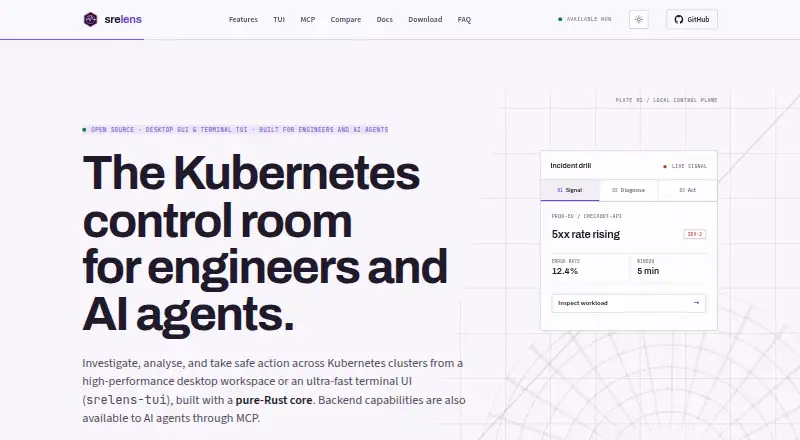
srelens is a desktop workspace for browsing, inspecting, and operating Kubernetes clusters.
What srelens is
srelens is a desktop workspace for browsing, inspecting, and operating Kubernetes clusters. It covers more than 40 resource kinds, including workloads, networking, storage, RBAC, admission, autoscaling, and custom resources. For investigation, it offers live watches, log streaming, in-pod terminals, port forwarding, Helm release views, and a schema-aware YAML editor. Node and pod CPU and memory metrics come from Kubernetes Metrics Server. Users can scale or restart workloads and cordon, drain, or evict nodes; destructive actions require confirmation.
The desktop app connects to Kubernetes API servers using local kubeconfig credentials, without an intermediary srelens cloud service. Available actions depend on the selected context’s credentials and RBAC permissions. Added kubeconfig files stay local, and pasted configurations are stored in the application directory. Secret values are masked by default and can be revealed per key. The built-in MCP server connects to compatible clients over stdio or loopback HTTP. srelens is free, open source under the MIT license, and requires no account or license key.
Good
- Browses more than 40 Kubernetes resource kinds
- Includes live watches, logs, terminals, and port forwarding
- Provides node and pod CPU and memory metrics
- Free, MIT-licensed, and requires no account
- Kubeconfig files and credentials stay local
Watch out
- Available actions depend on Kubernetes credentials and RBAC
- Windows code signing is on the roadmap
- Web deployment requires authentication and TLS termination in production
Who it suits
srelens suits SREs, platform engineers, DevOps engineers, and other engineers who need to inspect or operate Kubernetes clusters. Its MCP server also supports workflows involving AI agents.
Verdict
srelens combines cluster inspection, operational actions, and MCP connectivity in a free desktop workspace. Its access follows the selected Kubernetes context’s permissions, and production web deployments have additional security requirements.
Plans and prices
From srelens's own pricing page, checked 15 Oct 2026.
| Plan | Price | What it gives you |
|---|---|---|
| Free | Free | No account · No license key · Desktop, terminal UI and MCP access |
The facts
Each one read from srelens's own pages, with the date it was checked.
What it does
- AI assistant
- The built-in assistant supports Anthropic, OpenAI, Google and local Ollama models.checked 15 Oct 2026
- Architecture
- The application uses Tauri v2, React and a pure-Rust core built around kube-rs and tokio.checked 15 Oct 2026
- Authorization
- Available operations are governed by the selected context’s Kubernetes credentials and RBAC permissions.checked 30 Sep 2026
- Build requirements
- Building from source requires stable Rust, Node.js 22 or newer, pnpm 9 or newer and platform-specific Tauri v2 prerequisites.checked 15 Oct 2026
- Cluster actions
- Users can scale and restart workloads and cordon, drain, or evict nodes; destructive actions require confirmation.checked 30 Sep 2026
- Credential handling
- Desktop builds read local kubeconfig files and connect directly to Kubernetes APIs without an intermediary srelens cloud service.checked 15 Oct 2026
- Development status
- The GitHub organization describes the project as early and actively developed, with contributions welcome.checked 15 Oct 2026
- Documentation
- Official documentation includes quick-start, usage, terminal UI, MCP, security, architecture, installation and SRE troubleshooting guides.checked 15 Oct 2026
- Extensions
- The GitHub organization publishes native Flux and Argo CD extensions plus an extension discovery catalog.checked 15 Oct 2026
- Helm
- Helm releases can be inspected, upgraded, rolled back or uninstalled with rendered-diff previews.checked 15 Oct 2026
- Integrations
- The built-in MCP server connects to MCP clients such as Claude Code, Claude Desktop, Cursor, and Codex over stdio or loopback HTTP.checked 30 Sep 2026
- Intended users
- The project describes srelens as built for engineers and AI agents, and its repository names SREs, platform engineers, and DevOps engineers as users.checked 30 Sep 2026
- Investigation tools
- The workspace includes live watches, log streaming, in-pod terminals, port forwarding, Helm release views, and a schema-aware YAML editor.checked 30 Sep 2026
- Kubernetes resources
- The desktop interface covers 35 built-in Kubernetes resource kinds and arbitrary CRDs.checked 15 Oct 2026
- License
- The source repository and project documentation identify srelens as MIT licensed.checked 15 Oct 2026
- Limit: dependency advisories
- The repository reports Linux-only transitive advisories involving glib and the unmaintained GTK3 stack used by Tauri.checked 15 Oct 2026
- Limit: metrics availability
- Metrics are unavailable when a cluster lacks an accessible Metrics Server or the required RBAC permissions.checked 15 Oct 2026
- Limit: production web setup
- The optional shared web deployment has additional authentication, TLS, key-management and tmpfs requirements that do not apply to the desktop path.checked 15 Oct 2026
- Live watches
- Resource tables update through streaming Kubernetes watch connections rather than polling.checked 15 Oct 2026
- Local access
- The desktop app connects directly to Kubernetes API servers using credentials from local kubeconfig files, with no intermediary srelens cloud service.checked 30 Sep 2026
- Logs
- Pod and workload logs support streaming, previous-container output, timestamps, filtering and export.checked 15 Oct 2026
- MCP client integrations
- The documentation provides configurations for Claude Code, Claude Desktop, Cursor and other MCP clients.checked 15 Oct 2026
Where it runs
- Limit: Windows trust prompt
- Windows installers may trigger SmartScreen because Windows code signing remains on the roadmap.checked 15 Oct 2026
- Linux dependency
- Linux desktop packages require a WebKitGTK runtime, which Debian and RPM packages install automatically.checked 15 Oct 2026
The full review of srelens
srelens brings Kubernetes browsing, investigation, and operational controls together in a desktop workspace. It is best suited to SREs, platform engineers, and DevOps engineers who want to work from local kubeconfig credentials, including alongside AI agents. Its broad cluster coverage and free, open-source model make it a strong fit for local work, while production web deployments call for more security planning.
Overview
srelens connects directly to Kubernetes API servers using credentials in local kubeconfig files, with no intermediary srelens cloud service. The selected context’s credentials and RBAC permissions determine what users can do, so the interface does not grant more access than the Kubernetes account allows. Added kubeconfig files remain local; pasted configurations are stored in the application directory.
More than 40 resource kinds are in scope, including workloads, networking, storage, RBAC, admission, autoscaling, and custom resources. That breadth can make srelens a useful everyday view across different parts of a cluster, rather than a tool limited to workload status. CPU and memory metrics for nodes and pods rely on Kubernetes Metrics Server.
Key features
Live watches, log streaming, in-pod terminals, port forwarding, Helm release views, and a schema-aware YAML editor bring inspection and troubleshooting tasks into one workspace. Users can also scale or restart workloads and cordon, drain, or evict nodes. These controls make srelens more than a viewer, and requiring confirmation for destructive actions adds a practical check before consequential changes.
The built-in MCP server connects to clients such as Claude Code, Claude Desktop, Cursor, and Codex over stdio or loopback HTTP. Mutating MCP tools require an explicit confirmation argument, and the desktop HTTP server binds to loopback rather than external interfaces. That suits engineers who want AI-assisted workflows without making the desktop server externally reachable by default.
Secret values are masked by default and can be revealed per key. macOS builds are Developer ID signed and notarized; Linux assets include Tauri updater signatures. Windows code signing is on the roadmap, a consideration for organizations that require signed installers today.
Pricing
srelens is free: the Free plan costs nothing, is free to download, and has no paid tier. It is open source under the MIT license and requires neither an account nor a license key. There is no paid upgrade to unlock additional capacity or features; the trade-off is that teams seeking a paid support tier or account-based administration will need to look elsewhere.
Platforms
The desktop app supports macOS, Windows, and Linux, and supports multi-node clusters through a graphical interface. The platform coverage also includes API, web, and self-hosted deployments. For a multi-user web server, production use requires authentication, TLS termination, a stable master key, and RAM-backed storage for decrypted runtime material. That is a meaningful operational burden compared with using the desktop app, and organizations should plan for it before exposing a web deployment to a team.
Who it's for
srelens is a good match for SREs, platform engineers, DevOps engineers, and developers who want a graphical workspace for cluster inspection and operations. Its local kubeconfig access is particularly relevant to people who want cluster permissions to remain governed by Kubernetes credentials and RBAC. Teams looking for a lightweight cluster browser or operational console may value the combination of resource coverage, investigation tools, and workload actions; production web deployments suit teams prepared to manage the required security controls.
For reproducible bugs, support guidance directs users to open a GitHub issue with application log details that can be shared safely. That provides a clear route for reporting problems, though it is community issue-based rather than a paid support channel.
Pros and cons
- Pros: More than 40 resource kinds and a broad set of investigation tools make it useful across varied cluster work.
- Pros: Direct API connections use local kubeconfig credentials, while RBAC governs available actions and configuration files stay on the device.
- Pros: Workload and node operations extend beyond read-only browsing, with confirmations for destructive actions and mutating MCP calls.
- Pros: The free MIT-licensed plan has no account, license key, paid tier, or stated seat cap.
- Cons: CPU and memory metrics depend on Kubernetes Metrics Server, so they are not self-contained.
- Cons: Production multi-user web deployments require several security components and secure handling of decrypted runtime material.
- Cons: Windows code signing is not yet in place, which may matter to teams with installer-signing requirements.
Alternatives
For another free Kubernetes desktop client, compare Rancher Desktop, an open-source desktop application from SUSE's Rancher Engineering group. Choose ctlptl if a free, Apache-2.0-licensed option for Linux, macOS, or Windows better fits your needs; no usage limits or paid plans are stated for it.
Kubeterm offers a free desktop plan across macOS, Windows, and Linux without an account, trial period, or feature gates, and also supports Android and iOS. Kubeli is another free, MIT-licensed option for Linux, macOS, and Windows. Kubus is a free alternative available on Linux, macOS, Windows, and the web.
If container runtimes on macOS or Linux are the priority rather than a Kubernetes cluster workspace, consider Colima, a free MIT-licensed project. Kunobi has a free tier for up to three simultaneous clusters with community support and no sign-up, as well as a Pro plan. Kube Inspector is free and open source, with no paid tier, account, or sign-in.
See the Local Kubernetes Tools directory for more options.
Verdict
Choose srelens if you want a free, local-credential Kubernetes workspace that combines broad inspection, operational actions, and MCP connectivity. Its most compelling advantage is bringing those workflows together without routing desktop cluster access through a vendor cloud. Look elsewhere if your priority is a production multi-user web deployment without additional security operations, or if Windows code signing is a firm requirement.
Alternatives to srelens
- 1

vCluster Platform
Free planOpen sourceWebAPILinuxmacOS7.7Free plan - 2
Talos Linux
Free planAPILinuxmacOSSelf-hosted6.8From $1,000 a year - 3
Kunobi
Free planLinuxmacOSWindows6.7From $912 a month - 4
Rancher Desktop
Free planAPILinuxmacOSWindows6.7Free plan - 5
kind
Free planLinuxmacOSSelf-hostedWindows6.6Free plan - 6

Kubeterm
Free planAndroidiOSLinuxmacOS6.6Free plan