Slack
Slack is a team collaboration platform built around channels, messages, and connected apps.
What Slack is
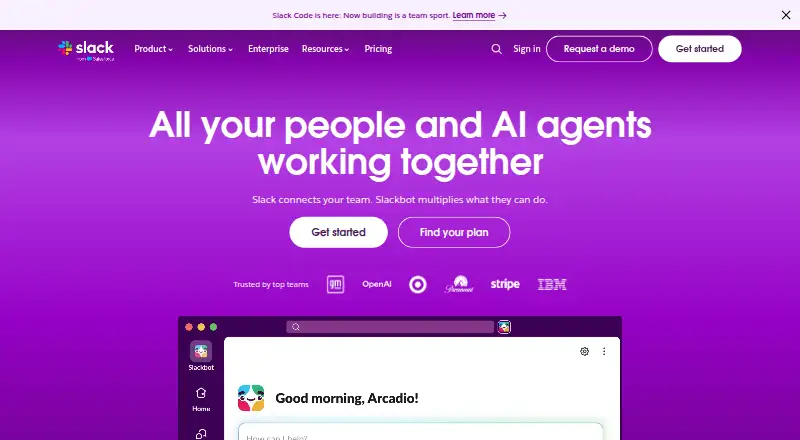
Slack is a team collaboration platform built around channels, messages, and connected apps. It runs on the web, Windows, macOS, Linux, iOS, and Android, and supports an API. Integrations include Salesforce, Jira, Google Drive, Asana, Zoom, GitHub, Notion, and other services; the App Directory offers over 2,600 apps. Free workspaces retain and search messages for 90 days and allow up to ten apps. The free plan is ₹0 and free forever. It includes one-to-one audio and video meetings with screen sharing, plus one-to-one external messages through Slack Connect. Paid plans provide unlimited message history and allow group external messaging with up to 250 organizations. Workflow Builder automates routine tasks directly in Slack without coding. AI features include summaries, search, daily recaps, file summaries, Slackbot, and workflow generation. Slack encrypts data at rest and in transit by default. Its security controls include two-factor authentication, access logs, SSO, device management, and data loss prevention.
Good
- Runs on desktop, mobile, and web platforms.
- Free includes one-to-one meetings with screen sharing.
- Free includes one-to-one Slack Connect messages.
- Workflow Builder automates tasks without coding.
- Data is encrypted at rest and in transit.
Watch out
- Free message history is limited to 90 days.
- The Free plan allows up to ten apps.
- Paid plans are needed for unlimited message history.
Who it suits
Slack suits teams that coordinate through channels and connected apps, or need guest and external messaging options. Free workspaces fit users who can work within the 90-day history and ten-app limits.
Verdict
Slack combines channel-based communication with app integrations, workflow automation, and external messaging. The Free plan has clear history and app limits, while paid plans provide unlimited message history.
Plans and prices
From Slack's own pricing page, checked 27 Sep 2026.
| Plan | Price | What it gives you |
|---|---|---|
| Free | Free | Basic chat and collaboration with limits including 90 days of message history and up to ten apps. · 90 days of message history · 10 apps · 1:1 meetings · 1:1 external messages · free forever |
| Pro | $8.75 a month | Paid subscription for productivity and collaboration. · Unlimited message history · Unlimited app integrations · Group external messages with up to 250 orgs · when paying monthly |
| Business+ | $18 a month | Best-value plan with AI-powered work and advanced AI features. · Unlimited message history · Unlimited app integrations · Group external messages with up to 250 orgs · when paying monthly |
| Enterprise+ | Priced on request | Enterprise plan with enterprise-grade AI and expanded administration and compliance features. · Unlimited message history · Unlimited app integrations · Group external messages with up to 250 orgs · Contact sales for pricing |
The facts
Each one read from Slack's own pages, with the date it was checked.
Where it runs
- App directory size
- Slack Marketplace and the App Directory offer over 2,600 apps.checked 27 Sep 2026
- Supported devices
- Slack provides native device management for mobile and desktop.checked 27 Sep 2026
- Supported platforms
- web,windows,macos,linux,ios,android,apichecked 20 Sep 2026
What it does
- Built-in AI
- Slack offers AI summaries, Slackbot, AI search, daily recaps, file summaries, and workflow generation.checked 27 Sep 2026
- Channels
- Yeschecked 20 Sep 2026
- Customer support
- Slack provides a Help Centre and customer support resources.checked 27 Sep 2026
- Daily message volume
- 700 million messages are sent daily on Slack.checked 27 Sep 2026
- Data encryption
- Slack encrypts data at rest and in transit by default.checked 27 Sep 2026
- Data retention
- Free deletes data after one year; paid subscriptions keep it for life by default with adjustable settings.checked 27 Sep 2026
- External messaging
- Free includes one-to-one external messages through Slack Connect.checked 27 Sep 2026
- Guest access
- Yeschecked 20 Sep 2026
- Guest collaboration
- Paid plans support external partners through DMs, group chats, or dedicated channels with up to 250 organizations.checked 27 Sep 2026
- Integrations
- Salesforce,Jira,Google Drive,ChatGPT,Asana,Miro,Notion,Zoom,GitHub,GitLab,PagerDuty,Box,Dropbox,Zendesk,Freshdesk,HubSpotchecked 20 Sep 2026
- Message history
- limitedchecked 20 Sep 2026
- Paid from
- 7.25checked 20 Sep 2026
- Paid history
- Paid plans provide unlimited message history.checked 27 Sep 2026
- Security controls
- Security features include two-factor authentication, access logs, SSO, device management, and data loss prevention.checked 27 Sep 2026
- SSO options
- Slack supports 12 SSO options, including Okta, Google, and Azure.checked 27 Sep 2026
The company
- Company ownership
- Slack Technologies, LLC is a Salesforce company.checked 27 Sep 2026
Money
- Free app limit
- The Free plan allows up to ten apps.checked 27 Sep 2026
- Free history limit
- Free workspaces retain and search messages for 90 days.checked 27 Sep 2026
- Free huddle limit
- Free users can hold one-to-one audio and video meetings with screen sharing.checked 27 Sep 2026
- Free plan
- Yeschecked 20 Sep 2026
- Free tier price
- ₹0 and free forever.checked 27 Sep 2026
The full review of Slack
Overview
Slack is a channel-based messaging and collaboration service for teams that want work conversations alongside connected tools. It is strongest when a team needs integrations, automated workflows, or structured collaboration with outside organizations; its free tier is workable for small-scale use but short message retention and a ten-app ceiling make it a limited long-term archive.
Key features
Channels and external collaboration
Channels give teams a shared place for conversations, and guest access supports work with people outside the organization. On the Free plan, Slack Connect supports one-to-one external messages. Paid plans widen that collaboration to direct messages, group chats, or dedicated channels spanning up to 250 organizations, a meaningful upgrade for teams working across company boundaries.
Apps and workflows
Slack connects with services including Salesforce, Jira, Google Drive, ChatGPT, Asana, Miro, Notion, Zoom, GitHub, GitLab, PagerDuty, Box, Dropbox, Zendesk, Freshdesk, and HubSpot. Its Marketplace and App Directory offer over 2,600 apps. That breadth can keep work tools close to team conversations, but Free users can connect only ten apps; paid plans remove that cap with unlimited app integrations.
Workflow Builder automates routine tasks and processes inside Slack without coding. Built-in AI includes summaries, AI search, daily recaps, file summaries, workflow generation, and Slackbot. These features make Slack more than a messaging layer for teams that want routine work and information retrieval to happen in the same place.
Calls, history, and security
Free users can hold one-to-one audio and video meetings with screen sharing. Free workspaces retain and search messages for 90 days, then delete data after one year. That is a consequential limit for teams that rely on old discussions as reference; paid plans provide unlimited message history and keep data for life by default, with adjustable retention settings.
Slack encrypts data at rest and in transit by default. Security controls include two-factor authentication, access logs, SSO, device management, and data loss prevention. It supports 12 SSO options, including Okta, Google, and Azure, and provides native device management for mobile and desktop. Those controls suit organizations with stronger administration needs, though the plan descriptions position expanded administration and compliance features at Enterprise+.
Pricing
Slack is freemium. The Free plan costs ₹0 and is free forever; it includes 90 days of searchable history, up to ten apps, one-to-one meetings, and one-to-one external messaging. Its limits are manageable for teams with modest integration needs and little need to consult older messages, but they make Free a poor fit as a lasting knowledge archive.
Pro costs $8.75 a month when billed monthly, or $7.25/user/mo on the annual pricing note. It adds unlimited message history and app integrations, plus group external messaging with up to 250 organizations. Pro is the practical step up for teams that outgrow Free's history or app caps.
Business+ costs $18 a month when billed monthly. It includes unlimited history and integrations, group external messaging with up to 250 organizations, and is described as the plan for AI-powered work and advanced AI features. It is aimed at teams seeking those capabilities beyond Pro, though the monthly plan details do not distinguish additional feature quotas.
Enterprise+ has custom pricing through sales and includes unlimited history and integrations, group external messaging with up to 250 organizations, enterprise-grade AI, and expanded administration and compliance features. It is the fit for organizations that need those enterprise controls rather than a published self-serve price.
Platforms
Slack supports web, Windows, macOS, Linux, iOS, Android, and API access, making it available across desktop, mobile, browser, and software integrations.
Who it's for
Slack suits teams that organize work in channels, depend on a broad range of connected apps, or collaborate with external partners. Paid plans make the most sense when history must remain searchable, app use exceeds ten integrations, or group external messaging is necessary. Teams that need only lightweight chat and can live with 90-day searchable history may stay on Free; those needing a durable archive should budget for paid service.
Pros and cons
- Pro: More than 2,600 apps and unlimited integrations on paid plans let teams bring many services into their communication workflow.
- Pro: Workflow Builder automates routine processes without coding, while AI features cover summaries, search, recaps, files, and workflow generation.
- Pro: Paid external collaboration supports DMs, group chats, or dedicated channels with up to 250 organizations.
- Con: Free searchable history stops at 90 days and data is deleted after one year, limiting its usefulness as a long-term record.
- Con: Free's ten-app ceiling can force an upgrade for teams whose workflow depends on more connected tools.
- Con: Business+ is substantially more expensive than Pro at monthly billing, while its listed plan inclusions do not specify extra quotas.
Alternatives
For an employee directory rather than a team messaging hub, compare Employee Directory Software. For broader category comparisons, browse Team chat apps or Team Collaboration Software.
Business in a Box is another freemium option available on desktop, mobile, and web. Connecteam is a freemium option with a free trial and Android, iOS, API, and web support. Names & Faces offers a freemium option across desktop, mobile, and web. Workleap Pingboard is a freemium directory option with annual Standard and Pro plans. MangoApps is a paid option with a free trial and desktop, mobile, web, and self-hosted support. GoProfiles is a freemium option for web and iOS. HourSquare offers a free plan for teams of up to 10 employees. Openbook is a freemium web-based daily stand-up option.
Verdict
Choose Slack if your team needs channels, extensive integrations, workflow automation, or structured external collaboration in one communication service. Its breadth is the main reason to pay; the main reason to look elsewhere is that Free is not a durable message archive, while preserving history and removing app limits requires a subscription.
Getting started
- Visit slack.com to get started
- Choose the Free plan or review the paid plans
- Use Slack on the web or on Windows, macOS, Linux, iOS or Android
- Connect apps from the Slack Marketplace and App Directory
Limits worth knowing
The Free plan retains searchable messages for 90 days and allows up to ten apps. Free huddles and Slack Connect external messages are limited to one-to-one; paid plans provide unlimited message history and group external messaging with up to 250 organizations.
Questions
Is Slack free?
Yes. The Free plan costs ₹0 and is free forever.
What does the Free plan limit?
Free workspaces retain searchable messages for 90 days and can use up to ten apps. Free meetings and external Slack Connect messages are one-to-one.
Which platforms does Slack support?
Slack supports web, Windows, macOS, Linux, iOS, Android and an API.
How much do paid plans cost?
Monthly Pro costs $8.75 per month; monthly Business+ costs $18.00 per month.
Does Slack support integrations?
Yes. Examples include Salesforce, Jira, Google Drive, ChatGPT, Asana, Zoom, GitHub and Notion, and its App Directory offers over 2,600 apps.
Who owns Slack?
Slack Technologies, LLC is a Salesforce company.
Alternatives to Slack
- 1
Zulip
Free planOpen sourceAndroidiOSWebAPI9.4From $3.50 a month - 2

Lark
Free planAndroidiOSWebAPI9.1From $6 a month - 3
Microsoft Teams
Free planAndroidiOSWebLinux9.0Free plan - 4

Rocket.Chat
Free planOpen sourceAndroidiOSWebAPI8.9Free plan - 5

Wire
Free planAndroidiOSWebLinux8.6From €7.45 a month - 6

Whaller
Free planAndroidiOSWebAPI8.6From €3 a month