QZ Tray
QZ Tray links a web client to local printers and attached devices, so browser-based software can print and communicate with hardware through its JavaScript c…
What QZ Tray is
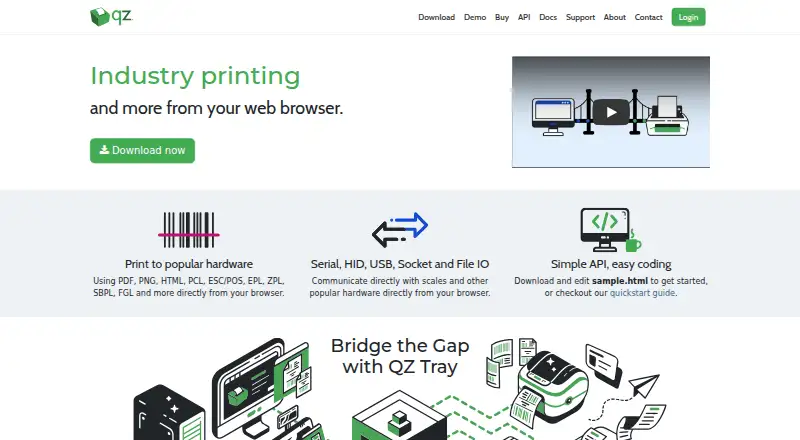
QZ Tray links a web client to local printers and attached devices, so browser-based software can print and communicate with hardware through its JavaScript connector. It supports PDF, PNG, HTML, PCL, ESC/POS, EPL, ZPL, SBPL, and FGL printing, and communicates over serial, HID, USB, socket, and file I/O. Compatible printer brands listed include Zebra, SATO, Epson, Citizen, Star, Boca, and Dymo. The desktop software is available for Windows, macOS, and Linux, including Intel and ARM or Apple Silicon systems; supported platforms also include iOS, Android, and ChromeOS. QZ Tray can be downloaded and used for free with warnings, and a free demonstration is available with warnings. Removing print dialogue warnings and enabling silent printing requires message signing with a certificate and private key. QZ says signing keys are generated in the customer's browser and that it never receives a copy of the private key. Only one QZ Tray instance can run on a machine because it uses a localhost WebSocket connection to a single port. Founded in 2013, QZ Industries, LLC describes itself as a small software development company based in Canastota, New York.
Good
- Connects web clients with local printers and attached devices.
- Supports nine listed print formats.
- Communicates over serial, HID, USB, socket, and file I/O.
- Available for Windows, macOS, and Linux desktop systems.
- Free use and demonstrations are available with warnings.
Watch out
- Silent printing requires message signing with a certificate and private key.
- Only one QZ Tray instance can run per machine.
- Free public community support is best-effort.
Who it suits
QZ Tray suits developers and organizations that need a web client to print to local printers or communicate with attached devices. Its broad format, hardware connection, and operating-system support can serve varied printing setups, while signed messages are required for silent printing without warnings.
Verdict
Pick QZ Tray if you need browser-based printing or hardware communication through a JavaScript connector across its supported formats and platforms. Look elsewhere if your machine must run multiple QZ Tray instances at once; silent printing also requires message signing.
Plans and prices
From QZ Tray's own pricing page, checked 7 Oct 2026.
| Plan | Price | What it gives you |
|---|---|---|
| Sponsored Support | Free | Special qualifications required · 1 year trusted key pair · critical bug fix support · 48-hour email support · software updates · phone support by appointment · Annual renewal at reduced rate |
| Premium Support | $749 a year | 1 year trusted key pair · critical bug fix support · 48-hour developer email support · software updates · phone support by appointment · Annual renewal at reduced rate |
| Company Branded + Premium Support | $3,499 a year | 1 year critical bug fix support · 48-hour email support · software updates · trusted key pair · phone support by appointment · custom build portal · Annual renewal at reduced rate |
The facts
Each one read from QZ Tray's own pages, with the date it was checked.
What it does
- API
- The JavaScript connector enables printing and device communication from JavaScript.checked 7 Oct 2026
- Compatibility limit
- Only one QZ Tray instance can run at a time on a machine because it uses a localhost WebSocket connection to a single port.checked 7 Oct 2026
- Printer support
- The site lists Zebra, SATO, Epson, Citizen, Star, Boca and Dymo among compatible printer brands.checked 7 Oct 2026
- Print formats
- It supports PDF, PNG, HTML, PCL, ESC/POS, EPL, ZPL, SBPL and FGL printing from a browser.checked 7 Oct 2026
- Private key handling
- The maker says signing keys are generated in the customer's browser and QZ never receives a copy of the private key.checked 7 Oct 2026
- Security signing
- Message signing with a certificate and private key is required to remove print dialogue warnings and enable silent printing.checked 7 Oct 2026
- Support
- The maker offers free public community support on a best-effort basis and premium support with a two-business-day response.checked 7 Oct 2026
- What it does
- QZ Tray connects a web client to local printers and attached devices for printing and device communication.checked 7 Oct 2026
The company
- Company
- QZ Industries, LLC describes itself as a small software development company operating from Canastota, New York.checked 7 Oct 2026
- Founded
- 2013checked 28 Sep 2026
- Headquarters
- Canastota, New York, United Stateschecked 28 Sep 2026
Where it runs
- Desktop platforms
- QZ Tray is available for Windows, macOS and Linux and supports Intel and ARM or Apple Silicon systems.checked 7 Oct 2026
- Device communication
- It communicates with hardware over serial, HID, USB, socket and file I/O.checked 7 Oct 2026
Money
- Free use and demo
- QZ Tray can be downloaded and used for free, and the maker says it can be demonstrated free with warnings.checked 7 Oct 2026
The full review of QZ Tray
Overview
QZ Tray is a connector that lets web clients print to local printers and communicate with attached hardware. It is best suited to teams building browser-based workflows that need access to nearby devices, not organizations seeking a broad print-management suite.
Its range of print formats and hardware connections is a strong fit for specialized workflows, and basic use is free. The main constraints are that silent printing requires message signing and only one instance can run on a machine.
Key features
From a browser, QZ Tray prints PDF, PNG, HTML, PCL, ESC/POS, EPL, ZPL, SBPL and FGL. That covers ordinary documents alongside formats used for labels and other device-specific output. Compatible printer brands include Zebra, SATO, Epson, Citizen, Star, Boca and Dymo.
QZ Tray also communicates with hardware over serial, HID, USB, socket and file I/O. Its JavaScript connector lets web developers invoke printing and device communication from JavaScript, making it useful when a browser-based application needs to work with equipment attached to the computer.
Free use and demonstrations come with warnings. To remove print-dialogue warnings and enable silent printing, message signing with a certificate and private key is required. QZ says the signing keys are generated in the customer's browser and it never receives a copy of the private key. This keeps key generation on the customer's side, but silent printing still requires signing to be set up.
Only one QZ Tray instance can run at a time on a machine because it uses a localhost WebSocket connection to a single port. That is a meaningful deployment limit for environments that need multiple instances on one computer.
Pricing
QZ Tray is freemium: it can be downloaded and used free, and a free trial is offered. Free use suits developers who can work with warnings; it does not provide the trusted key and support package offered by paid plans.
- Sponsored Support: free, billed annual renewal at reduced rate. Special qualifications are required. It includes a 1 year trusted key pair, critical bug fix support, 48-hour email support, software updates, and phone support by appointment. This is the support option for qualifying users who need a trusted key without a listed annual charge.
- Premium Support: $749 a year, billed annual renewal at reduced rate. It includes a 1 year trusted key pair, critical bug fix support, 48-hour developer email support, software updates, and phone support by appointment. This is the paid fit for teams that need signing credentials and developer support.
- Company Branded + Premium Support: $3,499 a year, billed annual renewal at reduced rate. It adds a custom build portal alongside a trusted key pair, critical bug fix support, 48-hour email support, software updates, and phone support by appointment. It suits organizations that need a branded build as well as support.
All three plans specify annual renewal at a reduced rate; only Sponsored Support has special qualifications. The plans do not change the single-instance-per-machine limit.
Platforms
The desktop software is available for Windows, macOS and Linux, with support for Intel and ARM or Apple Silicon systems. The supported-platform range also includes web, API, iOS and Android; mobile printing is supported. QZ Tray is deployed on-premises, which fits workflows centered on local printers and attached devices rather than a cloud-only setup.
Who it's for
QZ Tray is a good choice for developers and teams whose web applications need to print to local devices or communicate with connected hardware. It is particularly compelling when the workflow depends on several print formats or interfaces such as USB, HID or serial. Teams that need a wider print-management system or multiple QZ Tray instances on one machine should look elsewhere.
Pros and cons
- Pro: Broad browser-printing format support, including ESC/POS, EPL and ZPL, serves workflows beyond standard documents.
- Pro: Serial, HID, USB, socket and file I/O communication extends its role beyond printing to attached hardware.
- Pro: Free use and demonstrations make it possible to use or evaluate the connector without a paid plan, with warnings.
- Pro: The maker says private signing keys are generated in the customer's browser and are not received by QZ.
- Con: Silent printing depends on certificate and private-key signing, so free use with warnings is not equivalent to an unattended print workflow.
- Con: The single-instance limit rules it out for machines that must run multiple QZ Tray instances.
Alternatives
For a broader view of the category, browse Print Management Software.
- ezeep is another freemium option with a free plan and trial across desktop, mobile, web and extension platforms. Its Personal (Free) plan supports up to 10 users, one connector, unlimited user print jobs and 50 API pages per month per organization; choose it when those user and API limits fit better than QZ Tray's local-device connector model.
- PrintNode offers a free tier with 50 prints per month and one computer, with no charge or card details, as well as paid plans. Choose it when a defined monthly print quota and computer limit match the need.
- LRS VPSX is a paid alternative for readers comparing print software across desktop, mobile, web and self-hosted platforms.
- Pharos Uniprint is an on-premises print-management option for colleges and universities; choose it when that institutional focus is the priority.
- PrinterLogic is a paid option with usage-based pricing by print-queue band; it may suit readers comparing queue-based pricing.
- Synappx Cloud Print uses a pay-as-you-go subscription with pricing by quote; it is an alternative for readers seeking that billing approach.
- YSoft SAFEQ Platform is a paid modular print-management alternative for readers comparing broader print-management products.
- MyQ X has a free plan and a paid Enterprise tier; consider it when comparing freemium print-management options.
Verdict
Choose QZ Tray when a web application needs a JavaScript route to local printing or connected hardware, especially across specialized print formats and device interfaces. Free use lowers the barrier, while paid plans pair trusted keys with support. Look elsewhere if you need multiple instances on one machine or want silent printing without managing message signing.
Getting started
- Visit the QZ Tray website.
- Download QZ Tray for a supported desktop platform or use a supported platform.
- Connect the web client through the JavaScript connector.
- Use the free version with warnings, or request a free demonstration with warnings.
- Set up message signing with a certificate and private key to remove print dialogue warnings and enable silent printing.
Limits worth knowing
Free use and demonstrations include warnings. Only one QZ Tray instance can run at a time on a machine; premium support costs $749 a year, while company-branded support costs $3,499 a year.
Questions
Can QZ Tray be used for free?
Yes. It can be downloaded and used for free, with warnings; a free demonstration with warnings is also available.
What does Premium Support cost?
Premium Support costs $749 a year, billed with annual renewal at a reduced rate.
What is required for silent printing?
Message signing with a certificate and private key is required to remove print dialogue warnings and enable silent printing.
Which platforms are supported?
Supported platforms include Windows, macOS, Linux, iOS, Android, and ChromeOS.
Can more than one instance run on a machine?
No. Only one QZ Tray instance can run at a time on a machine because it uses a localhost WebSocket connection to a single port.
Who makes QZ Tray?
QZ Industries, LLC describes itself as a small software development company operating from Canastota, New York. It was founded in 2013.
Alternatives to QZ Tray
- 1
Print Manager Plus
Free planAndroidiOSWebAPI8.0Free plan - 2

ezeep
Free planAndroidiOSWebAPI7.4From €3.45 a month - 3
PrintNode
Free planWebAPILinuxmacOS7.0From $90 a year - 4

Printix
AndroidiOSWebLinux6.9From $2.09 a month - 5
Microsoft Universal Print
AndroidiOSWebAPI6.8From $90 a month - 6
Print Manager
WebLinuxmacOSWindows6.6$495 one-time