PrintNode
PrintNode is a hosted printing service that sends print jobs remotely from applications to printers through a JSON API and client software.
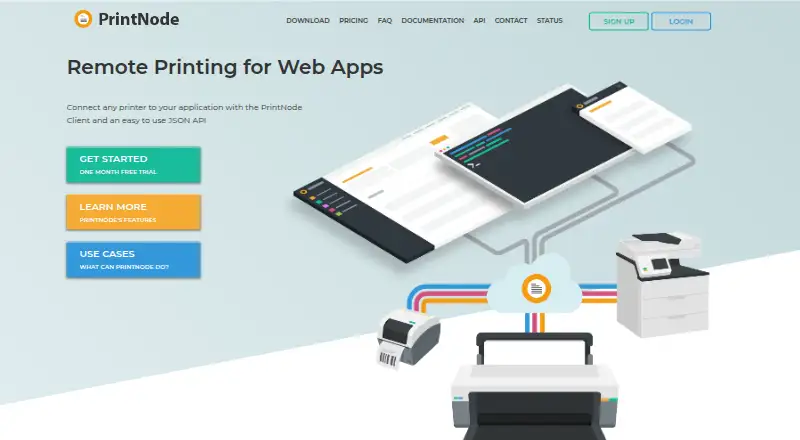
What PrintNode is
PrintNode is a hosted printing service that sends print jobs remotely from applications to printers through a JSON API and client software. It supports PDF and RAW output, including printer-native formats such as ZPL and EPL. The client detects printers installed on its computer through the operating system, provided they have appropriate drivers. It does not search a local network for printers, so a printer must be configured on a computer running the client. PrintNode also supports USB HID and serial weighing scales, with scale data available through its API or WebSockets. Developer features include a RESTful API, webhooks, WebSockets, account management by API, and delegated authentication integrations. Its client is available for Windows, macOS, Linux, and Raspberry Pi OS; mobile phones and tablets are not supported. A free Lite plan allows 50 prints per month on one computer. Essential costs $9.00 per month for 5,000 prints monthly across three computers. A Standalone Server is available for private deployments, with pricing and license options available by contacting PrintNode.
Good
- Supports PDF and RAW printing.
- Offers API, webhook, and WebSocket integrations.
- Lite includes 50 prints per month at no charge.
- Private deployment is available through Standalone Server.
- Telephone and email support are offered.
Watch out
- Does not search a local network for printers.
- Printers must be configured on a computer running its client.
- Mobile phones and tablets are not supported.
- Lite is limited to 50 prints per month.
Who it suits
PrintNode suits applications and organizations that need automated printing, including warehouses, shipping and logistics, pharmacies, restaurants, and point-of-sale systems. It may also suit teams that need API access to print jobs or scale data.
Verdict
PrintNode connects applications to configured printers and also exposes data from supported weighing scales. Check printer setup requirements and monthly print allowances when deciding whether it fits your workflow.
Plans and prices
From PrintNode's own pricing page, checked 9 Oct 2026.
| Plan | Price | What it gives you |
|---|---|---|
| Lite | Free | 50 prints per month · 1 computer · no charge or card details |
| Essential | $9 a month | 5,000 prints per month · 3 computers · $1.80 per extra 1000 prints · per month |
| Standard | $29 a month | 25,000 prints per month · 5 computers · $1.16 per extra 1000 prints · per month |
| Standard Integrator | $60 a month | 100,000 prints per month · 20 sub-accounts · unlimited computers · $3.00 per extra account · $0.60 per extra 1000 prints · per month |
| Essential yearly | $90 a year | 60,000 prints per year · 3 computers · excess usage charged at end of year · per year; main payment up front |
| Premium | $99 a month | 200,000 prints per month · unlimited computers · $0.49 per extra 1000 prints · per month |
| Standard yearly | $290 a year | 300,000 prints per year · 5 computers · excess usage charged at end of year · per year; main payment up front |
| Large Integrator | $500 a month | 500,000 prints per month · 200 sub-accounts · unlimited computers · $2.50 per extra account · $0.50 per extra 1000 prints · per month |
| Premium yearly | $990 a year | 2,400,000 prints per year · unlimited computers · excess usage charged at end of year · per year; main payment up front |
| Standalone Server | Priced on request | Private deployment using PrintNode server software · Contact PrintNode for pricing and licence options |
The facts
Each one read from PrintNode's own pages, with the date it was checked.
What it does
- Branding
- Integrator Account holders can use a custom-branded client with their own name and logo and host its download links on their website.checked 9 Oct 2026
- Hardware
- The client detects printers installed on its computer through the operating system and works with printers that are set up with appropriate drivers.checked 9 Oct 2026
- Important limitation
- PrintNode does not search a local network for printers; the printer must be configured on a computer running its client.checked 9 Oct 2026
- Integrations
- The service provides a RESTful API, webhooks, WebSockets, account management via API, and integrations with existing authentication systems through delegated authentication.checked 9 Oct 2026
- Intended users
- PrintNode describes use in warehouses, shipping and logistics, pharmacies, restaurants, point-of-sale systems, and web applications that need automated printing.checked 9 Oct 2026
- Print formats
- It supports PDF and RAW printing, including printer-native formats such as ZPL and EPL.checked 9 Oct 2026
- Private deployment
- PrintNode offers a Standalone Server for private deployments, and says documents can be self-hosted so they do not leave the customer's network.checked 9 Oct 2026
- Product
- PrintNode is a hosted printing service with a JSON API and client software for sending print jobs remotely from applications to printers.checked 9 Oct 2026
- Scales
- PrintNode supports USB HID and serial weighing scales and exposes scale data through its API or WebSockets.checked 9 Oct 2026
- Security
- PrintNode says all communication uses TLS, documents are not read, and Base64-submitted documents are deleted after printing.checked 9 Oct 2026
- Support
- PrintNode says support is handled by its engineering team and offers telephone and email support.checked 9 Oct 2026
Where it runs
- Client platforms
- The client is available for Windows, macOS, Linux, and Raspberry Pi OS; mobile phones and tablets are not currently supported.checked 9 Oct 2026
The company
- Headquarters
- Milton Keynes, Buckinghamshire, Englandchecked 28 Sep 2026
The full review of PrintNode
Overview
PrintNode is a hosted service for routing print jobs from applications through an API and software running on a computer connected to configured printers. It is best suited to developers and operations teams automating printing in business workflows, rather than people looking for a direct mobile printing app. Its broad integration options and scalable print allowances are compelling, provided you can keep a client-equipped computer in the workflow.
Key features
A RESTful JSON API sends PDF and RAW jobs, including printer-native formats such as ZPL and EPL. That makes PrintNode useful for applications producing ordinary documents as well as labels. The client finds printers installed through the host computer’s operating system and uses their drivers; it does not scan the local network. A network-connected printer must still be configured on a computer running the client, which adds a deployment dependency for distributed or unattended workflows.
PrintNode also supports USB HID and serial weighing scales, exposing readings through its API or WebSockets. Webhooks, WebSockets, API-based account management, and delegated authentication provide integration routes for systems that need event-driven updates or established sign-in arrangements. Software vendors can use a custom-branded client with their own name and logo and host its download links, but that option is for Integrator Account holders.
PrintNode says communications use TLS, documents are not read, and Base64-submitted documents are deleted after printing. For organizations that need private deployment, its Standalone Server can be deployed privately, with documents self-hosted so they remain within the customer’s network. Support comes from the engineering team by telephone and email.
Pricing
The free Lite plan costs nothing and includes 50 prints per month on one computer, without a charge or card details. It is a low-risk fit for a small-volume workflow, but the cap makes it unsuitable for sustained business printing.
Essential costs $9 a month, billed monthly, for 5,000 prints and three computers; extra prints cost $1.80 per 1000. Standard is $29 a month, billed monthly, for 25,000 prints and five computers, with excess at $1.16 per 1000. These plans suit growing workflows that need predictable monthly allowances, though both limit the number of client computers.
The annual options require the main payment up front, with excess usage charged at year end. Essential yearly costs $90 a year for 60,000 prints and three computers; Standard yearly costs $290 a year for 300,000 prints and five computers. Their annual allowances suit users able to forecast demand, but the upfront term is less flexible than monthly billing.
Premium costs $99 a month, billed monthly, and covers 200,000 prints with unlimited computers; extra prints cost $0.49 per 1000. Premium yearly costs $990 a year for 2,400,000 prints and unlimited computers, with excess charged at year end. These are better suited to high-volume operations where the larger allowance and unrestricted computer count matter.
Standard Integrator costs $60 a month, billed monthly, and includes 100,000 prints, 20 sub-accounts, and unlimited computers. Extra accounts cost $3.00 each and excess printing $0.60 per 1000. Large Integrator is $500 a month for 500,000 prints, 200 sub-accounts, and unlimited computers; extra accounts cost $2.50 each and excess prints $0.50 per 1000. These plans target software providers or other organizations serving multiple accounts, with the included account count and add-on charges shaping the total cost. The Standalone Server has custom pricing; contact PrintNode for pricing and licence options.
Platforms
The client runs on Windows, macOS, Linux, and Raspberry Pi OS. The service also supports API, web, and self-hosted environments. Mobile phones and tablets are not supported, so PrintNode is not the right choice for workflows that depend on printing directly from mobile devices.
Who it's for
PrintNode is aimed at warehouses, shipping and logistics operations, pharmacies, restaurants, point-of-sale systems, and web applications that need automated printing. It is especially relevant where applications need to trigger document or label output, or where weighing data belongs in the same workflow. Teams without a suitable computer to run the client, or those needing mobile printing, should look elsewhere.
Pros and cons
- Pros: PDF and RAW support, including ZPL and EPL, accommodates both document and label workflows.
- Pros: Scale readings through API or WebSockets can connect weighing to operational software.
- Pros: Integrator branding, delegated authentication, and API account management support embedding the service into other products.
- Pros: Annual and monthly plans span small allowances to high-volume use, with unlimited computers on Premium and integrator tiers.
- Cons: A printer must be installed and configured on a computer running the client; network discovery is not automatic.
- Cons: There is no mobile phone or tablet client, limiting mobile-first use.
- Cons: Free use is capped at 50 prints per month and one computer.
Alternatives
ezeep is worth considering if broader device coverage, including Android and iOS, matters; its free Personal plan includes up to 10 users, one connector, unlimited user print jobs, and 50 API pages per month per organization.
QZ Tray offers a free Sponsored Support option for users who meet its special qualifications and need a one-year trusted key pair.
LRS VPSX, Pharos Uniprint, PrinterLogic, Synappx Cloud Print, YSoft SAFEQ Platform, and MyQ X are other print-management options to compare.
Browse the Print Management Software category for more options.
Verdict
Choose PrintNode if you need applications to trigger printing at configured computers, especially for PDF or label output, scale-connected workflows, or branded integrations. Its API and range of print allowances make it adaptable from small pilots to substantial volume. Look elsewhere if mobile printing or automatic network printer discovery is essential, and match the plan carefully to your print quota, computer count, and any sub-account needs.
Getting started
- Open the PrintNode website
- Choose the free Lite plan or a paid plan
- Create an account; Lite requires no charge or card details
- Install the client on Windows, macOS, Linux, or Raspberry Pi OS
- Configure printers with their appropriate operating-system drivers
- Connect your application through the JSON or RESTful API
Limits worth knowing
Lite permits 50 prints per month on one computer. Essential permits 5,000 prints monthly on three computers for $9 a month, with extra usage charged at $1.80 per additional 1,000 prints; other plans set their own print, computer, or sub-account limits.
Questions
Is there a free plan?
Yes. Lite costs nothing and includes 50 prints per month on one computer, with no charge or card details.
Which platforms have clients?
Clients are available for Windows, macOS, Linux, and Raspberry Pi OS. Mobile phones and tablets are not supported.
Can PrintNode print ZPL or EPL?
Yes. It supports RAW printing, including printer-native formats such as ZPL and EPL, as well as PDF.
Does it support private deployment?
Yes. PrintNode offers a Standalone Server, and documents can be self-hosted so they remain within the customer’s network.
What does Essential cost?
Essential costs $9 a month, billed monthly, for 5,000 prints per month and three computers. Extra prints cost $1.80 per additional 1,000.
Alternatives to PrintNode
- 1
Print Manager Plus
Free planAndroidiOSWebAPI8.0Free plan - 2

ezeep
Free planAndroidiOSWebAPI7.4From €3.45 a month - 3
QZ Tray
Free planAndroidiOSWebAPI7.3From $749 a year - 4

Printix
AndroidiOSWebLinux6.9From $2.09 a month - 5
Microsoft Universal Print
AndroidiOSWebAPI6.8From $90 a month - 6
Print Manager
WebLinuxmacOSWindows6.6$495 one-time