
QualiVault
It includes revision history, approval workflows and an audit trail, along with electronic signatures and role-based access.
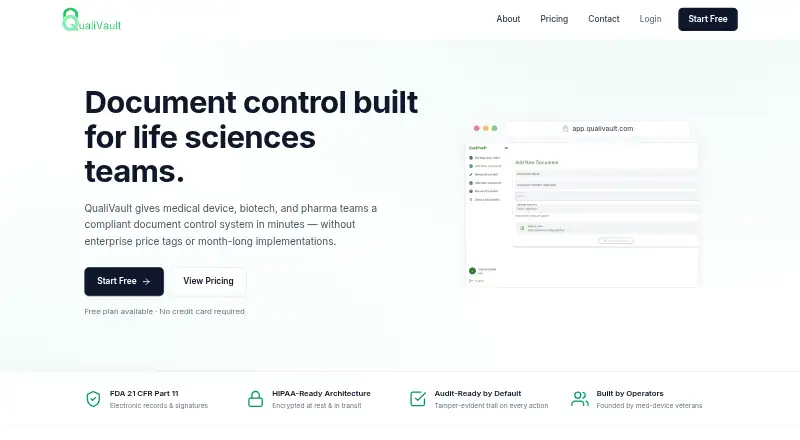
What QualiVault is
It includes revision history, approval workflows and an audit trail, along with electronic signatures and role-based access. These capabilities bring document changes, review steps, records and signing into one service. Revision history helps keep a record of changes, while approval workflows support structured review. Audit trails record activity, and role-based access allows access to be assigned by role. QualiVault may suit teams that need several of these controls in their document processes. It is available on the web, and the listed pricing model is freemium. The available facts do not specify plan limits or how the individual features are allocated across plans, so readers should check those details before choosing a plan.
Good
- Includes revision history.
- Supports approval workflows.
- Provides an audit trail.
- Includes electronic signatures and role-based access.
- Has a free plan.
Watch out
- Available on web only.
- Feature allocation by plan is unspecified.
Who it suits
QualiVault suits teams that manage document revisions and approvals and need audit trails, electronic signatures or role-based access. It is for people looking for a web-based service with a free plan.
Verdict
QualiVault brings revision history, approvals, audit trails, electronic signatures and role-based access together in a web-based product. The free plan gives teams an option to start, while paid plans begin at $9.99/mo.
Plans and prices
From QualiVault's own pricing page, checked 14 Oct 2026.
| Plan | Price | What it gives you |
|---|---|---|
| Free | Free | 2 seats hard cap · 50 KB document storage · document control · audit trail · basic reporting · 21 CFR Part 11 · Perpetual free tier · No credit card |
| Basic | $9.99 a month | 2 seats hard cap · 5 GB storage · Free features · email support · Billed monthly · Cancel anytime |
| Plus | $29.99 a month | 3 seats included · 25 GB storage · role-based access · advanced reporting · compliance reports · email notifications · phone support · Billed monthly · $6.99 per additional seat |
| Pro | $49.99 a month | 5 seats included · 100 GB storage · advanced analytics · training management · supplier management · priority support · dedicated account manager · Billed monthly · $6.99 per additional seat |
| Enterprise | Priced on request | Over 50 seats · dedicated tenancy · custom DPAs · invoiced annual billing · Contact for Enterprise pricing |
The facts
Each one read from QualiVault's own pages, with the date it was checked.
What it does
- Access controls
- Role-based permissions are available for authors, reviewers, approvers, and observers.checked 5 Oct 2026
- API and SDK availability
- The official pages opened describe integrations but provide no public API reference, SDK download or developer portal.checked 14 Oct 2026
- Audit trail
- Every action is recorded in a signed, tamper-evident audit trail.checked 14 Oct 2026
- Compliance
- The product states that it supports 21 CFR Part 11 compliant electronic records and signatures, with tamper-evident audit trails and verified user identities.checked 5 Oct 2026
- Compliance positioning
- QualiVault markets every plan, including Free, as 21 CFR Part 11 compliant and describes its architecture as HIPAA-ready and ISO 13485 friendly.checked 14 Oct 2026
- Documentation depth
- The official site contains marketing pages, pricing FAQs and contact support but no linked technical documentation or help center was shown.checked 14 Oct 2026
- Document control
- The system provides document versioning, review cycles and effective dates.checked 14 Oct 2026
- Electronic signatures
- Electronic approvals are presented as compliant with FDA 21 CFR Part 11 and require no plug-in.checked 14 Oct 2026
- Founder background
- The About page says the founders previously built and shipped an FDA-regulated medical device.checked 14 Oct 2026
- Getting started
- The company says teams commonly upload their first controlled document within an hour of signup.checked 14 Oct 2026
- Independent-review coverage
- The opened G2, TrustRadius, Gartner and Capterra directory pages do not show a QualiVault product profile, so repeated independent praise or complaints could not be verified there.checked 14 Oct 2026
- Integrations
- QualiVault says it connects to customer document sources and identity providers and can build requested integrations during onboarding.checked 14 Oct 2026
- Licence
- The official pages opened do not state an open-source licence or publish source code.checked 14 Oct 2026
- Limit: enterprise pricing
- Organizations needing more than 50 seats, dedicated tenancy or custom DPAs must request Enterprise pricing.checked 14 Oct 2026
- Limit: entry seats
- Free and Basic accounts cannot exceed two seats without moving to Plus or Pro.checked 14 Oct 2026
- Limit: entry storage
- The Free plan allows only 50 KB of document storage, while Basic allows 5 GB.checked 14 Oct 2026
- Limit: feature gating
- Role-based access and one-click compliance reports begin at Plus, while training and supplier management begin at Pro.checked 14 Oct 2026
- Migration
- The maker says it performs hands-on migration while retaining legacy document structure.checked 14 Oct 2026
- News
- No dated QualiVault press release or launch announcement was found in the opened web results; the site itself is copyright-marked 2026.checked 14 Oct 2026
Where it runs
- Approval workflow
- Controlled documents can move through author, reviewer, approver and observer roles.checked 14 Oct 2026
The company
- Company background
- The founders say they previously built and shipped an FDA-regulated medical device.checked 5 Oct 2026
- Company legal name
- The website footer identifies the business as QualiVault LLC.checked 14 Oct 2026
- Headquarters and founding year
- The About page does not state a headquarters or founding year.checked 5 Oct 2026
Money
- Free-tier behavior
- The Free tier is permanent, has no trial countdown or automatic upgrade, and keeps data accessible after cancellation within its limits.checked 14 Oct 2026
The full review of QualiVault
QualiVault is a web-based document-control product for medical device, biotech and pharma teams. It suits regulated teams that need approvals, signatures and audit trails in one place; its free tier makes a small-scale start possible, but strict seat and storage caps quickly narrow its reach.
Overview
QualiVault brings document versioning, review cycles and effective dates together with approval workflows, electronic signatures and role-based access. Its focus on regulated life-sciences work is a strength for teams managing controlled documents, rather than a reason to choose it for general-purpose file storage.
The product states that it supports 21 CFR Part 11 compliant electronic records and signatures, with verified user identities and tamper-evident audit trails. It also says documents are encrypted at rest and in transit, actions are recorded in an immutable audit trail, and its infrastructure uses isolated tenancy. These safeguards speak to compliance and traceability needs, though the stated support should not be mistaken for a blanket compliance guarantee.
Key features
- Document control: Versioning, review cycles and effective-dating help teams maintain controlled document lifecycles instead of relying on informal file handoffs.
- Approvals and training: Automated notifications cover approvals, periodic reviews and training, which can help teams keep recurring responsibilities visible.
- Audit and reporting: One-click compliance reports assemble inspection-ready packets for FDA inspections and ISO audits. That is a practical fit for teams preparing records, while the product’s audit trail records actions for traceability.
- Permissions: Separate roles for authors, reviewers, approvers and observers support a clearer division of responsibility than undifferentiated access.
- Integrations and migration: QualiVault says it connects with customers’ document sources and identity providers, with specific integrations buildable during standard onboarding.
Pricing
QualiVault uses a freemium model, with monthly paid plans and no free trial. The free tier is perpetual and requires no credit card, but its 2-seat hard cap and 50 KB of document storage make it more suitable for a very limited evaluation or tiny document set than ongoing team use. Community support is the included support option.
- Free — free: 2 seats (hard cap) and 50 KB storage. Choose it to start without a subscription; the storage ceiling is the main constraint.
- Basic — $9.99 a month: 2 seats (hard cap), 5 GB storage and email support. It adds meaningful storage over Free without expanding the team beyond two people, so it fits a small operation that can work within that cap. It is billed monthly and can be cancelled anytime.
- Plus — $29.99 a month: 3 seats included and 25 GB storage, with additional seats at + $6.99 per seat and phone support. This is the first tier that gives a small team more than two seats.
- Pro — $49.99 a month: 5 seats included and 100 GB storage, with additional seats at + $6.99 per seat and priority support with an account manager. It is the stronger fit for teams needing more room and a higher-touch support channel.
- Enterprise — custom pricing: For teams over 50 seats or organizations needing dedicated tenancy, custom DPAs or invoiced annual billing. It addresses larger or more specialized deployments, but requires a pricing conversation.
All named paid plans are billed monthly. The important trade-off is that Free and Basic remain capped at two seats; growing beyond that means stepping up to Plus or Pro, or paying per additional seat on those plans.
Platforms
QualiVault is available on the web. Teams looking specifically for a native mobile or desktop platform should consider that limitation before choosing it.
Who it's for
QualiVault is aimed at life-sciences teams in medical device, biotech and pharma companies that need controlled documentation, defined approval roles and inspection-oriented records. Its founders say they previously built and shipped an FDA-regulated medical device, a background aligned with the product’s regulated-industry focus.
Pros and cons
- Pro: Versioning, review cycles, effective dates, signatures and audit trails are brought together for controlled-document workflows.
- Pro: One-click compliance reports target FDA inspection and ISO audit preparation, reducing the need to assemble packets manually.
- Pro: A perpetual free tier with no credit card gives teams a low-commitment way to begin.
- Con: Free and Basic both stop at 2 seats, making them poor fits for even modestly larger teams.
- Con: Free’s 50 KB storage cap is exceptionally restrictive for a document-control product; meaningful document use calls for a paid tier.
- Con: Web is the only supported platform, and no free trial is offered.
Alternatives
For a broader category comparison, see Document Control Software.
- GatesFlow QMS is worth considering if a free trial or API access matters; its free plan is described as having generous usage limits for individuals or small teams, with paid plans starting at $20 a month.
- Ketryx offers a free plan and web access, with Startup for organizations under 200 people and a Business tier for scaling companies; consider it when that company-size framing suits your needs.
- AssurX Document Management is a paid option with web, mobile, API and self-hosted platforms; consider it if those deployment choices matter more than a free plan.
- IQVIA SmartSolve Complaint Management is a paid web and mobile product; consider it if complaint management is the specific need.
- Qontiv is a paid option with API, Linux, web and Windows platforms and a $1,000/mo platform fee plus graduated per-line monthly rates; its stated pricing makes it a substantially different cost model.
- QT9 QMS offers a free trial, annual licensing and cloud or self-hosted deployment; consider it if those terms or deployment options are a priority.
- TrackWise Digital has a QuickTrack offering designed for startups and small and medium businesses, alongside a QMS Suite; consider it if you want to compare those two product scopes.
- Veeva Network MDM is positioned for enterprise pharma, biotech, animal health and consumer health, with 100+ customers; consider it for that enterprise MDM context.
Verdict
QualiVault is a sensible choice for a life-sciences team that needs web-based document control with approvals, signatures, traceable actions and inspection-oriented reporting. Its regulated-workflow focus is the central reason to choose it. Look elsewhere if your team needs mobile or desktop access, or if the two-seat entry plans and small free storage cap do not match your scale.
Getting started
- Open the QualiVault website in a web browser.
- Choose the perpetual Free tier or a paid plan.
- Start Free without a credit card, or select a monthly paid plan.
- Contact QualiVault for Enterprise pricing if your team exceeds 50 seats or needs dedicated tenancy, custom DPAs, or invoiced annual billing.
- Arrange onboarding for specific integrations or document migration if needed.
Limits worth knowing
Free has a hard cap of two seats and 50 KB of document storage. Basic allows two seats and 5 GB; Plus includes three seats and 25 GB, while Pro includes five seats and 100 GB, with additional seats costing $6.99 each on Plus and Pro.
Questions
What does QualiVault cost?
The Free tier is perpetual. Basic costs $9.99 per month, Plus $29.99 per month, and Pro $49.99 per month; Enterprise pricing is by contact.
Is there a free plan or trial?
There is a perpetual Free tier with no credit card required. No free trial is offered.
Which platforms does QualiVault support?
QualiVault is available on the web.
Does QualiVault support electronic signatures and audit trails?
Yes. The product lists electronic signatures and audit trails, and states that it supports 21 CFR Part 11 compliant records and signatures with verified identities and tamper-evident trails.
What integrations are available?
QualiVault says it integrates with customers’ document sources and identity providers. Specific integrations can be built during standard onboarding.
Who makes QualiVault?
The founders say they previously built and shipped an FDA-regulated medical device.
Alternatives to QualiVault
- 1
1factory
Free planAndroidiOSWebAPI8.0From $20 a month - 2
GatesFlow QMS
Free planiOSWebAPI7.7From $20 a month - 3
DocControl
AndroidiOSWeb7.6From $49 a month - 4
ComplianceQuest
AndroidiOSWebAPI7.3From $30 a month - 5
OnPolicy
WebmacOSWindows7.1 - 6
QT9 QMS
AndroidiOSWebAPI7.1