
Pyrus
Pyrus combines real-time team messaging, task management, and workflow automation.
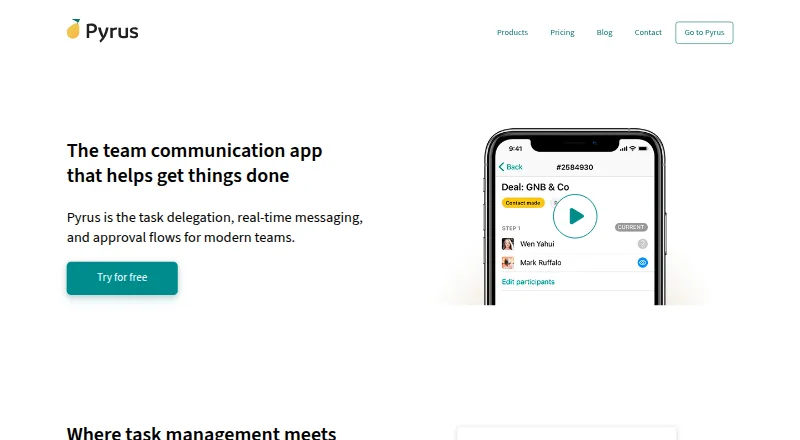
What Pyrus is
Pyrus combines real-time team messaging, task management, and workflow automation. Teams can organize work with due dates, kanban boards, and subtasks, then use forms and workflow rules to route tasks, assign approvers, and trigger actions from field values. A dashboard reports opened and closed tasks, employee performance, and completion times to help identify delays and bottlenecks. Its knowledge base supports formatted articles, search, links between articles, concurrent editing, comments, and access controls. Pyrus also has accounts payable workflows covering invoice capture through payment, with approvals available on mobile. Listed integrations include messaging, video meeting, project management, file storage, directory, and finance tools such as Telegram, Zoom, Jira, Dropbox, Active Directory, and Oracle NetSuite. API v4 supports custom connections using calls and webhooks. Pyrus says data is replicated across geographically distributed data centers, backed up daily, and protected with TLS 1.2 in transit; it also states that its data centers meet ISO 27001 and ISO 9001 standards. The free plan is billed at no cost forever and includes unlimited users and tasks, 1 GB storage, and up to 50 form tasks. Form Pro costs $15 a month per user, billed quarterly or annually.
Good
- Free plan includes unlimited users and tasks
- Tasks support due dates, kanban boards, and subtasks
- Workflow tools include forms and approvers
- Knowledge base allows concurrent editing and comments
- API v4 supports custom integrations
Watch out
- Free plan includes 1 GB file storage
- Free plan allows up to 50 form tasks
- Form Pro costs $15 a month per user
Who it suits
Pyrus suits teams that want messaging alongside task coordination and customizable workflows. It may also suit teams managing shared knowledge or accounts payable approvals.
Verdict
Pyrus brings task coordination, communication, and workflow configuration together, with separate tools for knowledge management and accounts payable. The free plan has storage and form-task limits, while Form Pro adds unlimited form fills and up to 100 GB of free storage.
Plans and prices
From Pyrus's own pricing page, checked 15 Oct 2026.
| Plan | Price | What it gives you |
|---|---|---|
| Free | Free | Unlimited users · Unlimited tasks · 1GB file storage · Up to 50 form tasks · iOS and Android apps · Custom form and workflow builder · Free, forever |
| Form Pro | $15 a month | Unlimited form fills · Up to 100GB free storage · Secure API access · Downloadable backup · OCR Invoice Reader · ERP/accounting integration · Priority phone and email support · $15 per user/month billed quarterly; $12 per user/month billed annually (20% saving) |
| Enterprise | Priced on request | All Form Pro features · Unlimited storage · Optional on-premises installation · Active Directory and SSO · SAML · CRM integration · Custom integrations · Software customizations · Dedicated Customer Success Manager · Contact sales |
The facts
Each one read from Pyrus's own pages, with the date it was checked.
What it does
- Accounts payable
- The accounts-payable workflow covers invoice capture through payment, including purchase-order and receipt checks and bottleneck reporting.checked 15 Oct 2026
- API
- Pyrus API v4 supports REST-style calls and webhooks for two-way integrations and can be used from any programming language.checked 15 Oct 2026
- API documentation depth
- The API help index documents authorization, endpoints for forms, tasks, files, catalogs, members, bots, webhooks, models, errors and limits, plus libraries.checked 15 Oct 2026
- Business users
- Pyrus says customers use it in sales, marketing, procurement, finance, and HR.checked 29 Sep 2026
- Compliance
- Pyrus says its EU and Swiss privacy policy complies with GDPR, its data centers meet ISO 27001 and ISO 9001 standards, and it undergoes annual independent security assessment.checked 15 Oct 2026
- Data synchronization
- Pyrus Sync exchanges catalog and transaction data with accounting, ERP, CRM and database systems and can download a complete company backup.checked 15 Oct 2026
- Documentation and support
- The help center covers tasks, workflows, permissions, SSO, integrations, scripts, reports, mobile apps, Datacenter deployment and accounts-payable integrations.checked 15 Oct 2026
- File sharing
- Tasks and forms can contain files from Google Drive, Dropbox, Box and OneDrive by pasting a file URL.checked 15 Oct 2026
- Founder
- Crunchbase lists Max Nalsky as Pyrus's founder and CEO.checked 15 Oct 2026
- Integrations
- Official integrations include Active Directory, Google Apps, Google Drive, Dropbox, Box, Telegram and Zoiper.checked 15 Oct 2026
- Knowledge base
- The knowledge base supports formatted articles, quick search, linked articles, simultaneous editing, comments, and access controls.checked 29 Sep 2026
- Licence
- Pyrus is proprietary software distributed as SaaS rather than open-source software.checked 15 Oct 2026
- Limit: data extraction
- A Capterra reviewer reported occasional missing invoice images or extracted data and room for improvement in check processing.checked 15 Oct 2026
- Limit: form customization
- A Capterra reviewer said the look, feel and layout of forms needed more customization.checked 15 Oct 2026
- Limit: integrations
- A Capterra reviewer wanted a direct Datev integration, which was not available as an out-of-the-box connector.checked 15 Oct 2026
- Notable news
- Pyrus's blog announced new kanban filters, mobile reminders and an integrations catalog on February 18, 2021.checked 15 Oct 2026
Where it runs
- Browser extensions
- Chrome and Firefox extensions display the number of unread Smart Inbox tasks.checked 15 Oct 2026
- GetApp feature ratings
- GetApp shows feature scores of 5.0 for file sharing and real-time chat, 4.0 for task management and 3.0 for discussions/forums, each based on one review.checked 15 Oct 2026
- Google Play app capabilities
- The Android app supports task delegation, document approvals, multi-step workflows, offline synchronization, email-to-task conversion, subtasks, calendar events and push notifications.checked 15 Oct 2026
The company
- Company facts
- LinkedIn lists Pyrus as privately held, founded in 2011, headquartered in Redwood City, California, with 11–50 employees.checked 15 Oct 2026
- Company headquarters
- The company lists its mailing address as 490 Post St, Suite 526, San Francisco, California 94102, United States.checked 29 Sep 2026
- Company legal name
- Crunchbase identifies the legal entity as Simply Good Software Inc.checked 15 Oct 2026
- Headquarters
- San Francisco, California, United Stateschecked 23 Sep 2026
Money
- Free plan
- Yeschecked 19 Sep 2026
The full review of Pyrus
Overview
Pyrus is a team work platform for organizations that need to coordinate requests, approvals, and everyday tasks. It is most compelling for teams that want task management and configurable workflows alongside communication, knowledge management, or invoice processing.
Its breadth is an advantage for connected internal processes, but teams seeking only a lightweight form builder or a narrowly focused automation tool may find a more specialized fit elsewhere.
Key features
Tasks and workflow automation
Tasks support due dates, kanban boards, subtasks, dependencies, and recurring work, while real-time messaging keeps team communication close to the work. Forms can collect requests and create tasks; rules route those tasks, and approvers and field triggers can be configured. This makes Pyrus a stronger fit for multi-step work than a simple task list, especially when requests need consistent handling.
The workflow dashboard reports opened and closed tasks, employee performance, and completion time, which can help managers identify delays and bottlenecks. Reporting is custom, so organizations should account for that when deciding whether the analytics match their needs.
Knowledge and accounts payable
The knowledge base supports formatted articles, quick search, linked content, simultaneous editing, comments, and access controls. That gives teams a place to maintain shared guidance as well as move work through processes. Accounts payable extends the platform into invoice capture through payment, with mobile approvals—a useful fit for finance workflows rather than a feature every team will need.
Integrations and security
The integration marketplace includes Telegram, WhatsApp, Viber, Zoom, Jira, Google Meet, Dropbox, Google Drive, OneDrive, Box, Active Directory, and Oracle NetSuite. Pyrus API v4 also supports custom integrations through API calls and webhooks, giving teams another route to connect their systems.
Pyrus says data is replicated across geographically distributed data centers, backed up daily, and protected in transit with TLS 1.2. It states that its data centers meet ISO 27001 and ISO 9001 standards, and that its privacy policy for EU and Swiss residents complies with GDPR requirements.
Pricing
Pyrus uses a freemium model. The Free plan costs nothing, billed free forever, and includes unlimited users and tasks, 1Gb file storage, and up to 50 form tasks. It is a practical starting point for teams that need the core task and workflow approach, but the form-task cap and small storage allowance may constrain sustained use.
Form Pro costs $15 a month, billed per month per user; it is billed quarterly or annually, with annual payment saving 20%. It includes unlimited form fills, up to 100 Gb free storage, and priority phone and email support. Extra storage costs $80/month/100Gb. This plan suits teams whose intake volume exceeds the free cap or who need priority support, though its per-user billing makes the cost scale with the team.
Enterprise has custom pricing and offers optional on-premises installation, unlimited storage, Active Directory and SSO, SAML authentication, CRM integration, and custom integrations. It is the relevant tier for organizations that need those deployment or identity options; teams without such requirements can start with Free or Form Pro.
Free includes email and in-app support. Form Pro includes priority phone and email support.
Platforms
Pyrus is available on Android, iOS, macOS, Windows, and the web, with an API, extension, and self-hosted option. That range accommodates teams working across desktop and mobile environments and organizations that want a self-hosted deployment option.
Who it's for
Pyrus is suited to teams that handle repeatable intake and approvals across functions such as sales, marketing, procurement, finance, and HR. Its combination of forms, routing, task coordination, and analytics is especially relevant when work needs an accountable path from submission to completion. The knowledge base and accounts payable tools broaden its appeal to organizations that want those workflows alongside task management.
It is less compelling for buyers who need only one narrow function, or for teams that cannot work within the Free plan's 50-form-task and 1Gb storage limits and do not want per-user paid pricing.
Pros and cons
Pros
- Tasks and configurable workflows are connected. Forms, routing rules, approvers, field triggers, dependencies, and recurring work can support processes beyond basic task assignment.
- It covers adjacent team needs. A searchable, collaborative knowledge base and invoice-to-payment automation add capabilities for teams that would otherwise manage separate processes.
- Free allows unlimited users and tasks. Teams can begin without seat or task limits, although form tasks and storage remain capped.
- Integration options are broad. The marketplace and API v4 with webhooks offer multiple ways to connect Pyrus to other systems.
Cons
- The free tier limits forms and files. Up to 50 form tasks and 1Gb storage can be restrictive for teams using Pyrus as a regular intake hub.
- Form Pro is priced per user. Its monthly rate scales with the number of users, and extra storage costs $80/month/100Gb.
- Enterprise pricing is custom. Buyers needing its deployment, identity, or integration options must seek a tailored price.
Alternatives
For a broad view of the category, compare Workflow Management Software and Workflow automation tools.
- Make is worth considering when a workflow automation tool with a free plan capped at 1,000 credits per month, two active scenarios, and a 15-minute minimum interval better matches the job.
- Bonita may suit teams looking for a process-focused alternative with a free plan limited to 150 process instances per month.
- Jotform is a more focused option when form creation is the priority; its Starter plan is free and includes five forms and 100 monthly submissions.
- Requester is an option for teams centered on request approvals, with a free plan including three approver seats, unlimited submitters, and 50 requests per month.
- Zapier may fit teams seeking web-based app automation with a free plan limited to 100 tasks per month.
- ApprovalRail is another approval-focused option, with a free plan for up to six users and a 30-day audit trail.
- Workato Agent Studio is an alternative for teams interested in AI and agentic capabilities, with a free plan that includes 50,000 one-time credits.
- Decisions is another workflow and process platform to compare.
Verdict
Pyrus is a strong choice for teams that want one platform for task coordination, request routing, approvals, and supporting knowledge or finance workflows. Its unlimited users and tasks on Free make it approachable for an initial rollout, while Form Pro removes the form-fill cap for teams ready to pay per user. Look elsewhere if you need only a specialized form or automation tool, or if the free storage and form limits do not fit and Form Pro's per-user cost is a concern.
Getting started
- Open the Pyrus website
- Choose the Free or Form Pro plan
- Create a workspace for web, Windows, macOS, Android, or iOS use
- Add tasks, due dates, kanban boards, forms, and workflow rules
- Connect marketplace services or use API v4 calls and webhooks
- Invite users and configure knowledge-base access controls
Limits worth knowing
The Free plan includes 1 GB of file storage and up to 50 form tasks, despite unlimited users and tasks. Form Pro includes unlimited form fills and up to 100 GB of free storage; extra storage costs $80 a month per 100 GB.
Questions
What does Pyrus cost?
The Free plan is free, billed free forever. Form Pro is $15 a month per user, billed quarterly or annually, with annual payment saving 20%.
Which platforms are supported?
Pyrus lists Android, API, extension, iOS, macOS, self-hosted, web, and Windows platforms.
What is included in the Free plan?
It includes unlimited users, unlimited tasks, 1 GB of file storage, and up to 50 form tasks, plus email and in-app support.
What does Form Pro add?
Form Pro provides unlimited form fills, up to 100 GB of free storage, and priority phone and email support.
Does Pyrus integrate with other services?
Its marketplace lists Telegram, WhatsApp, Viber, Zoom, Jira, Google Meet, Dropbox, Google Drive, OneDrive, Box, Active Directory, and Oracle NetSuite. API v4 supports custom integrations through API calls and webhooks.
Is an on-premises option available?
The Enterprise plan lists optional on-premises installation, unlimited storage, Active Directory and SSO, SAML authentication, CRM integration, and custom integrations.
Alternatives to Pyrus
- 1
Flowable
Free planOpen sourceAndroidiOSWebAPI9.4From $99 a month - 2

Joget
Free planOpen sourceAndroidiOSWebAPI9.4Free plan - 3

Make
Free planAndroidiOSWebAPI8.9From $9 a month - 4

Taskade AI Agents
Free planAndroidiOSWebAPI8.9From $10 a month - 5

airSlate WorkFlow (now altaFlow)
Free planAndroidiOSWebAPI8.7From $399 a month - 6

Pabbly Connect
Free planWeb8.4Free plan