
pgAdmin
pgAdmin is a graphical tool for PostgreSQL administration, development and monitoring.
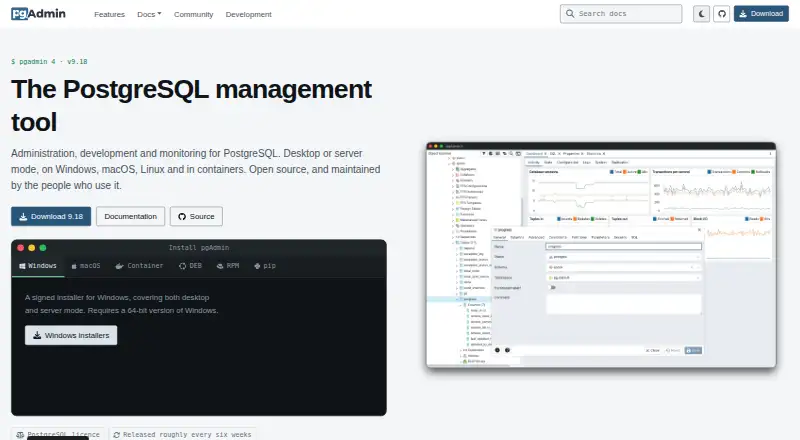
What pgAdmin is
pgAdmin is a graphical tool for PostgreSQL administration, development and monitoring. It can run as a desktop application or in server mode, where multiple users access it over the web. It supports PostgreSQL and EDB Postgres Advanced Server versions supported when each pgAdmin release is issued. Its tools include a syntax-highlighting query tool, data grid, graphical query plans, schema diff, ERD tool and procedural language debugger. Users can create, view and edit common PostgreSQL objects, with SQL definitions, properties, dependencies and statistics shown where available. Maintenance features include a monitoring dashboard, auto-vacuum management and on-demand backup, restore, vacuum and analyze operations. Downloads include Windows and macOS installers, Linux DEB and RPM packages, a Docker container, Python wheel and source code tarball. The Master Password encrypts credentials users choose to save and prevents key data from being stored on disk. pgAdmin is free under the PostgreSQL Licence. Only the latest release is supported; releases are aimed at roughly six-week intervals, with no long-term stable versions. There is no paid support.
Good
- Free to use under the PostgreSQL Licence.
- Offers desktop and multi-user web server modes.
- Includes query, schema, ERD and debugging tools.
- Provides monitoring and database maintenance features.
- Available for Windows, macOS and Linux.
Watch out
- Only the latest release is supported.
- No long-term stable versions are offered.
- No paid support is available.
Who it suits
pgAdmin suits PostgreSQL users who want a graphical tool for database administration, development or monitoring. Its desktop and server modes accommodate individual desktop use and multi-user web access.
Verdict
pgAdmin provides a broad set of graphical tools for PostgreSQL work at no charge. Users should be prepared to follow its latest-release support policy and seek help through its mailing list or public issue tracker.
Plans and prices
From pgAdmin's own pricing page, checked 5 Oct 2026.
| Plan | Price | What it gives you |
|---|---|---|
| pgAdmin 4 | Free | Open source; PostgreSQL licence |
The facts
Each one read from pgAdmin's own pages, with the date it was checked.
What it does
- Database support
- It supports PostgreSQL and EDB Postgres Advanced Server versions that are supported when each pgAdmin version is released.checked 5 Oct 2026
- Deployment
- It can run in desktop mode or in server mode for multiple users over the web.checked 5 Oct 2026
- Downloads
- The site lists Windows and macOS installers, Linux DEB and RPM packages, a Docker container, Python wheel, and source code tarball.checked 5 Oct 2026
- License
- The PostgreSQL Licence permits use, copying, modification, and distribution without a fee, subject to its stated conditions.checked 5 Oct 2026
- Maintenance
- Maintenance features include a monitoring dashboard, auto-vacuum management, and on-demand backup, restore, vacuum, and analyze operations.checked 5 Oct 2026
- Object management
- Users can create, view, and edit common PostgreSQL objects, with SQL definitions, properties, dependencies, and statistics displayed where available.checked 5 Oct 2026
- Purpose
- pgAdmin is a graphical management tool for PostgreSQL administration, development, and monitoring.checked 5 Oct 2026
- Query tools
- Its tools include a syntax highlighting query tool, data grid, graphical query plan display, schema diff, ERD tool, and procedural language debugger.checked 5 Oct 2026
- Release policy
- Only the latest release is supported, with releases aimed at roughly six-week intervals and no long-term stable versions.checked 5 Oct 2026
- Saved credentials
- The Master Password securely encrypts credentials users choose to save, and prevents key data from being stored on disk.checked 5 Oct 2026
- Security updates
- The project recommends running the latest release, which it says includes fixes for the listed security advisories.checked 5 Oct 2026
- Support
- There is no paid support; users can seek help through the support mailing list and public issue tracker.checked 5 Oct 2026
The full review of pgAdmin
Overview
pgAdmin is a graphical tool for administering, developing, and monitoring PostgreSQL databases. It suits PostgreSQL users who want a no-cost workspace for both individual desktop work and shared web access. Its breadth makes it a capable all-rounder, but using it means keeping up with a release policy that supports only the latest version.
Key features
The query tool combines syntax highlighting, query history, data editing, and export to binary, CSV, or text. A graphical query plan display, schema diff, ERD tool, and procedural language debugger add useful ways to inspect queries, database structure, and code. This range should serve developers who want more than a basic query window, though it may be unnecessary for occasional simple queries.
For object work, users can create, view, and edit common PostgreSQL objects, with SQL definitions, properties, dependencies, and statistics displayed where available. The monitoring dashboard and auto-vacuum management sit alongside on-demand backup, restore, vacuum, and analyze operations, giving administrators tools for routine maintenance in the same application. SSH tunneling is supported.
pgAdmin runs in desktop mode or in server mode for multiple users over the web. It supports PostgreSQL and EDB Postgres Advanced Server versions supported when each pgAdmin release is issued. The Master Password encrypts credentials users choose to save and prevents key data from being stored on disk. The project recommends using the latest release, which it says contains fixes for its listed security advisories.
Pricing
pgAdmin 4 costs nothing under the PostgreSQL Licence, which permits use, copying, modification, and distribution without a fee, subject to its conditions. There is no paid support; users can seek help through the support mailing list or public issue tracker.
The trade-off is operational rather than financial: only the latest release is supported, releases are aimed at roughly six-week intervals, and there are no long-term stable versions. Teams that need a supported older release or paid support should look elsewhere.
Platforms
pgAdmin is available for Linux, macOS, Windows, self-hosted, and web use. Downloads include Windows and macOS installers, Linux DEB and RPM packages, a Docker container, a Python wheel, and a source code tarball. Desktop mode fits individual work; server mode supports multiple users through the web.
Who it's for
pgAdmin is a strong fit for PostgreSQL administrators and developers who want query, object, and maintenance tools together without licensing fees. It is less suitable for teams that cannot keep pace with the latest release or require long-term version support and paid assistance.
Pros and cons
- Pros: The free, open-source licence permits modification and distribution, not just use.
- Pros: Query development, object management, and routine maintenance are covered in one tool.
- Pros: Desktop and multi-user web modes accommodate individual and shared workflows.
- Cons: Only the latest release is supported, with no long-term stable versions.
- Cons: There is no paid support, so users must rely on the mailing list or public issue tracker.
Alternatives
For a broader starting point, browse Database Administration Tools or Database Client Software.
- ClusterControl is worth considering if its free Community plan, with deployment, monitoring, performance advisors, and community support, fits your needs; its Self-serve plan costs €250 a month.
- OpenEverest is another free, open-source option for users seeking software they can deploy and customize.
- phpMyAdmin is the relevant alternative for administering MySQL and MariaDB over the web.
- YugabyteDB Anywhere offers an evaluation license for up to 32 consecutive calendar days; production use requires a commercial license.
- Adminer is a free option for commercial and non-commercial use, requiring PHP 5.3+, 7, or 8 with enabled sessions.
- Neo4j offers a free managed graph database plan.
- Trusted Postgres Architect is another free Postgres-focused option.
- Oracle Enterprise Manager is an alternative for readers already using Oracle software licenses or support contracts.
Verdict
Choose pgAdmin if you work with PostgreSQL and want a free graphical tool that covers development, object management, and routine administration in desktop or shared web mode. Look elsewhere if your team needs paid support or stable support for older releases: pgAdmin's latest-release-only policy makes staying current part of the bargain.
Alternatives to pgAdmin
- 1

IBM Db2
Free planWebAPILinuxSelf-hosted7.4From $630 a month - 2

Neo4j
Free planSelf-hosted7.0From $65 a month - 3

ClusterControl
Free planWebAPILinuxSelf-hosted6.8From €250 a month - 4

YugabyteDB Anywhere
Free planWebAPILinuxSelf-hosted6.5Free plan - 5

DbNinja
Free planWebLinuxmacOSSelf-hosted6.4Free plan - 6
Oracle Maestro
Windows6.4$129 one-time