
DbNinja
DbNinja is a self-hosted web application for MySQL database administration and development, including remote access to hosted servers.
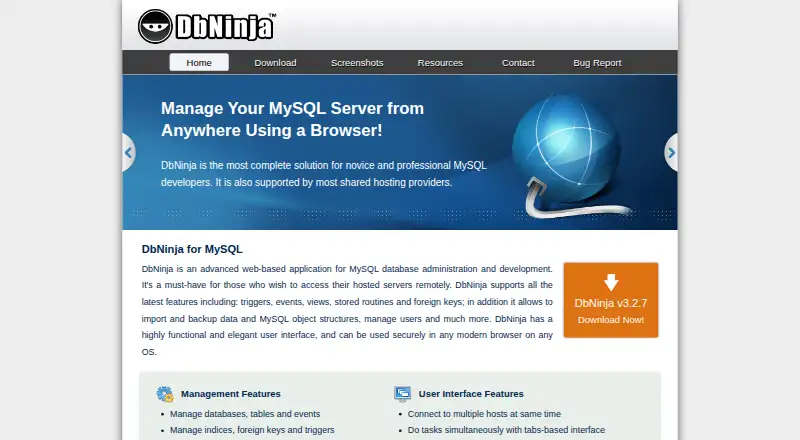
What DbNinja is
DbNinja is a self-hosted web application for MySQL database administration and development, including remote access to hosted servers. It manages database objects such as tables, events, indexes, triggers, procedures, views, users and privileges. For maintenance and migration, it can back up and restore database structure and data, then compare or synchronize databases between hosts. Export formats include CSV, SQL, Excel and JSON. Query tools provide syntax highlighting, saved favorite queries and limits for fetched data and execution time. Users can connect to multiple hosts at once in a tabbed interface. The free Personal use plan is free and is for user-installed copies accessed from one computer at a time. Setup requires a PHP-enabled web server, PHP 5.3 or higher with mysqli, MySQL 4.1 or higher, and a recent major browser with cookies enabled. Installation involves copying the package into a webroot directory and completing setup in a browser. DbNinja lists version 3.2.7, released April 8, 2017. Commercial licensing is available by quote.
Good
- Backs up and restores database structure and data.
- Compares and synchronizes databases between hosts.
- Exports to CSV, SQL, Excel and JSON.
- Connects to multiple hosts in a tabbed interface.
Watch out
- Requires a PHP-enabled web server and mysqli.
- Requires MySQL 4.1 or higher.
- Free personal use is limited to one computer at a time.
- Listed version 3.2.7 was released April 8, 2017.
Who it suits
DbNinja suits users who need browser-based administration and development for MySQL databases and can run the required self-hosted PHP setup. Commercial users should request a quote for licensing terms.
Verdict
DbNinja offers a broad set of MySQL administration, query and migration tools in a self-hosted web application. Its setup requirements and one-computer personal-use limit are important considerations.
Plans and prices
From DbNinja's own pricing page, checked 9 Oct 2026.
| Plan | Price | What it gives you |
|---|---|---|
| Personal use | Free | Free for personal use · must be installed by the user · use from one computer at a time |
| Commercial usage and OEM licenses | Priced on request | Fees vary by number of client users and nature of use · contact sales for a quote |
The facts
Each one read from DbNinja's own pages, with the date it was checked.
What it does
- Backup and migration
- It backs up and restores database structure and data, and compares and synchronizes databases between hosts.checked 9 Oct 2026
- Commercial licensing
- Commercial licensees may provide DbNinja to clients, distribute it on server appliances, or include it in a management package, and may receive expert support and development resources.checked 9 Oct 2026
- Database management
- It manages databases, tables, events, indexes, foreign keys, triggers, procedures, functions, views, users, and privileges.checked 9 Oct 2026
- Data export
- It exports data to CSV, SQL, Excel, and JSON formats.checked 9 Oct 2026
- Deployment
- DbNinja is installed by copying its package into a directory in the user's webroot and completing setup in a browser.checked 9 Oct 2026
- Multiple hosts
- Users can connect to multiple hosts at the same time and work in a tabbed interface.checked 9 Oct 2026
- Purpose
- DbNinja is a web based application for MySQL database administration and development, including remote access to hosted servers.checked 9 Oct 2026
- Query tools
- It offers syntax highlighting, saved favorite queries, and limits for fetched data and query execution time.checked 9 Oct 2026
- Security
- The maker says browser communication is encrypted and advises HTTPS or DbNinja's built in connection encryption; its setup guide also recommends restricting access to installation directories and known IP addresses.checked 9 Oct 2026
- Support
- The contact page lists a technical support email address at [email protected].checked 9 Oct 2026
- Version
- The download page lists version 3.2.7, released April 8, 2017.checked 9 Oct 2026
Where it runs
- Browser and database requirements
- Use requires a recent major browser with cookies enabled and MySQL 4.1 or higher; setup requires a PHP enabled web server and PHP 5.3 or higher with mysqli.checked 9 Oct 2026
The company
- Maker
- The site identifies Vayer Software Ltd. as the company; the pages reviewed do not state its headquarters or founding year.checked 9 Oct 2026
The full review of DbNinja
DbNinja is a browser-based toolkit for managing and developing MySQL databases, including remote servers. It best suits administrators who can host and secure their own PHP application and want database work consolidated in one interface. Its free personal-use option is useful, but the one-computer limit and installation requirements matter.
Overview
DbNinja brings database-object management, query work, backups, exports, and migration tasks together in a self-hosted web application. Multiple host connections can remain open in separate tabs, making it practical for work that moves between databases. That breadth comes with operational responsibility: users provide the web server, configure access, and maintain the deployment rather than relying on a hosted service.
Key features
Database administration and queries
The application manages databases and objects including tables, indexes, events, foreign keys, triggers, procedures, functions, and views, as well as users and privileges. Query syntax highlighting and saved favorite queries help with recurring work; configurable limits on fetched rows and execution time can help contain oversized results or long-running queries.
Backups, migration, and export
DbNinja backs up and restores database structure and data, and compares and synchronizes databases across hosts. Those tools make it a stronger fit for administrators who need both routine maintenance and movement of changes or data between environments. Exports to CSV, SQL, Excel, and JSON cover common handoffs and downstream uses.
Deployment and security
Setup means copying the package into a directory in a webroot and finishing configuration in a browser. The server needs PHP 5.3 or higher with mysqli, and the database must be MySQL 4.1 or higher; users also need a recent major browser with cookies enabled. The maker recommends HTTPS or its built-in connection encryption and advises restricting installation-directory access and allowed IP addresses. This flexibility is appropriate for teams comfortable operating a web server, but less appealing to users seeking a managed, ready-to-use service.
The download page lists version 3.2.7, released April 8, 2017. Users choosing this software should weigh that listed release date when deciding whether it suits their environment.
Pricing
Personal use: free. The free license is for personal use, must be installed by the user, and allows use from one computer at a time. It is a sensible option for an individual administering their own MySQL databases, but the seat restriction makes it a poor fit for shared or multi-computer use.
Commercial usage and OEM licenses: custom pricing. Fees vary with the number of client users and the nature of use, so organizations should contact sales for a quote. Commercial licensees may provide DbNinja to clients, distribute it on server appliances, or include it in a management package; expert support and development resources may also be available.
DbNinja uses a freemium model. Technical support is reachable at [email protected].
Platforms
DbNinja is self-hosted and accessed through the web. It supports Linux, macOS, and Windows environments, with a PHP-enabled web server and compatible browser required. MySQL is its supported database engine; it is not a cross-engine administration tool.
Who it's for
DbNinja is best for individuals who want a broad MySQL administration toolkit, especially those who regularly manage objects, run queries, back up data, or synchronize databases across hosts. It can also suit businesses or OEMs that need to provide the application to clients under a commercial license. It is less suitable for users who cannot manage PHP hosting and access controls, or anyone needing a personal license usable from multiple computers at once.
Pros and cons
- Pro: A single interface handles database objects, users, and privileges alongside query and data-management work, reducing the need to switch between separate tools.
- Pro: Backups, restores, cross-host comparison and synchronization, and four export formats cover several common maintenance and data-transfer tasks.
- Pro: The personal-use license costs nothing, providing a no-cost route for an individual willing to install it.
- Con: Users must supply and secure a PHP-enabled web server, so setup and deployment are part of the cost of using it.
- Con: Personal use is limited to one computer at a time, which constrains workflows spanning multiple workstations or users.
- Con: MySQL is the only supported database engine, and the listed version 3.2.7 release dates to 2017.
Alternatives
For another MySQL administration option, phpMyAdmin is free software for administering MySQL and MariaDB over the web. Adminer is a free alternative for commercial or non-commercial use, with PHP 5.3+, 7, or 8 and enabled sessions.
ClusterControl offers a free Community plan for deployment and monitoring, performance advisors, and community support; its Self-serve plan costs €250 a month. Consider it when those monitoring and advisory capabilities are the priority. OpenEverest is a free, 100% open-source option that users can deploy and customize to their needs.
pgAdmin 4 is a free, open-source PostgreSQL tool, so it is the better fit for PostgreSQL rather than MySQL. YugabyteDB Anywhere has a free evaluation license for up to 32 consecutive calendar days and requires a commercial production license for production use. Neo4j offers a free managed graph database plan; choose it when a graph database is the need instead of MySQL administration. Trusted Postgres Architect is another free PostgreSQL-focused option.
Browse more options in Database Administration Tools.
Verdict
Choose DbNinja if you want a no-cost personal MySQL toolkit with administration, query, backup, export, and cross-host synchronization features, and are prepared to run it on your own server. Look elsewhere if you need managed hosting, support for database engines beyond MySQL, or a personal license that works across more than one computer at a time.
Getting started
- Visit the DbNinja website and obtain the package.
- Set up a PHP-enabled web server with PHP 5.3 or higher and mysqli.
- Confirm MySQL 4.1 or higher and use a recent major browser with cookies enabled.
- Copy the package into a directory in the webroot.
- Complete setup in a browser and connect to a MySQL host.
Limits worth knowing
The free Personal use plan must be installed by the user and allows use from one computer at a time. Commercial usage and OEM license fees vary by client users and type of use; contact sales for a quote.
Questions
Is DbNinja free?
The Personal use plan is free for personal use. The user must install it, and use is limited to one computer at a time.
What database does it support?
DbNinja supports MySQL, with a requirement of MySQL 4.1 or higher.
Which platforms can I use it on?
The listed platforms include Linux, macOS, self-hosted, web, and Windows. It is installed on a PHP-enabled web server and used through a browser.
What does commercial licensing cost?
Commercial usage and OEM license prices are provided by quote. Fees vary according to the number of client users and the nature of use.
Who makes DbNinja?
The site identifies Vayer Software Ltd. as the company behind DbNinja.
What is required to install it?
It requires a PHP-enabled web server, PHP 5.3 or higher with mysqli, MySQL 4.1 or higher, and a recent major browser with cookies enabled. Setup involves copying the package into a webroot directory and completing configuration in a browser.
Alternatives to DbNinja
- 1

IBM Db2
Free planWebAPILinuxSelf-hosted7.4From $630 a month - 2

Neo4j
Free planSelf-hosted7.0From $65 a month - 3

ClusterControl
Free planWebAPILinuxSelf-hosted6.8From €250 a month - 4

YugabyteDB Anywhere
Free planWebAPILinuxSelf-hosted6.5Free plan - 5
Oracle Maestro
Windows6.4$129 one-time - 6

pgAdmin
Free planWebLinuxmacOSSelf-hosted6.4Free plan