napp-it
napp-it is a client-server web GUI for managing storage across a machine or a fleet of servers.
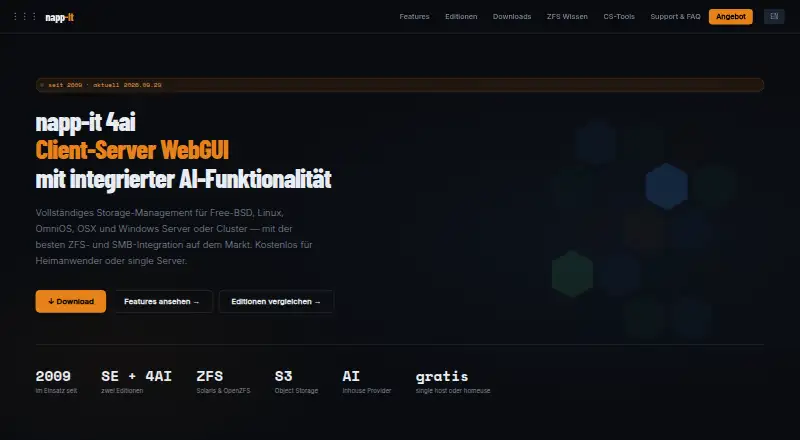
What napp-it is
napp-it is a client-server web GUI for managing storage across a machine or a fleet of servers. It supports in-house storage servers and clusters, S3 cloud servers, and AI providers. Its central interface runs on FreeBSD, Illumos, Linux, macOS, Solaris, and Windows, and can manage servers without an agent or extra virtual machine. Sharing protocols include SMB, NFS, S3, iSCSI, and Fibre Channel. ZFS capabilities include AES-256-GCM encryption, end-to-end checksums, snapshots, automatic healing, and optional real-time deduplication. Replication is incremental, can connect arbitrary servers, and can be encrypted in transfer. The S3-compatible endpoint works with Nextcloud, rclone, backup tools, and MinIO clients. Monitoring covers performance, disk health through S.M.A.R.T., JBOD enclosure maps, and network virtualization. CS Home is free for noncommercial home use, with up to three servers and no support. SE Free is available for commercial and home use but excludes individual support and Pro features. A new installation includes a 30-day evaluation of Pro features.
Good
- Central interface manages fleets without an agent.
- Supports SMB, NFS, S3, iSCSI, and Fibre Channel.
- ZFS replication can be encrypted in transfer.
- S.M.A.R.T. disk health monitoring is included.
- New installations include a 30-day Pro evaluation.
Watch out
- CS Home is limited to noncommercial home use.
- CS Home allows a maximum of three servers.
- CS Home includes no support.
- SE Free excludes Pro features and individual support.
Who it suits
napp-it suits home users, commercial deployments, server clusters, and resellers that need a storage-management interface. Its central management and range of storage protocols may fit operators overseeing multiple servers.
Verdict
napp-it brings storage administration, ZFS features, and monitoring into a central web interface. Review the license distinctions carefully, especially the support and server limits on free plans.
Plans and prices
From napp-it's own pricing page, checked 2 Oct 2026.
| Plan | Price | What it gives you |
|---|---|---|
| CS Home | Free | noncommercial home use · max. 3 servers · no capacity limit · no support |
| SE Free | Free | commercial and home use · no capacity limit · no individual support · no Pro features |
| Pro | Priced on request | commercial use · individual support · bugfix updates · latest-version updates |
| Reseller / Bundling | Priced on request | redistribution · bundling · customer setup · service-provider terms |
The facts
Each one read from napp-it's own pages, with the date it was checked.
What it does
- Central management
- A central web interface can manage one machine or an entire server fleet without an agent or extra VM.checked 2 Oct 2026
- Identity integration
- The Solaris Edition provides Active Directory integration and stores Windows SIDs as native ZFS attributes.checked 2 Oct 2026
- Monitoring
- Monitoring includes real-time performance, disk health through S.M.A.R.T., JBOD enclosure maps and network virtualization.checked 2 Oct 2026
- Operating systems
- The GUI runs on FreeBSD, Illumos, Linux, macOS, Solaris and Windows.checked 2 Oct 2026
- Product type
- napp-it is a client-server web GUI for complete storage management.checked 2 Oct 2026
- Remote backend
- The CS backend service uses approximately 60KB of RAM per remote server.checked 2 Oct 2026
- Replication
- ZFS replication is incremental, can run between arbitrary servers and can be encrypted during transfer.checked 2 Oct 2026
- S3 integrations
- The S3-compatible object-storage endpoint is compatible with Nextcloud, rclone, backup tools and MinIO clients.checked 2 Oct 2026
- Storage protocols
- Supported sharing protocols include SMB, NFS, S3, iSCSI and Fibre Channel.checked 2 Oct 2026
- Support
- Pro licenses include support, bugfixes and updates, while the CS Home plan explicitly includes no support.checked 2 Oct 2026
- Target users
- The product is positioned for home users, commercial deployments, storage servers, server clusters and resellers building branded NAS interfaces.checked 2 Oct 2026
- Use cases
- The product supports in-house storage servers or clusters, in-house S3 cloud servers or clusters, and in-house AI providers or clusters.checked 2 Oct 2026
- ZFS security
- ZFS features native AES-256-GCM encryption, end-to-end checksums, snapshots, automatic healing and optional real-time deduplication.checked 2 Oct 2026
The company
- Founded
- 2009checked 28 Sep 2026
Money
- Trial
- The official napp-in-One guide states that a new installation includes a 30-day evaluation of Pro features.checked 2 Oct 2026
The full review of napp-it
napp-it is a web GUI for managing storage servers and clusters, best suited to administrators who want centralized control across varied in-house deployments. Its broad ZFS and protocol support is compelling, but choosing an edition means balancing commercial rights, Pro features and support.
Overview
One web interface can oversee a single machine or an entire server fleet without an agent or an extra virtual machine. napp-it targets in-house storage servers and clusters, along with in-house S3 and AI infrastructure. That scope favors operators building and maintaining their own systems over people looking for a simple, appliance-style file-sharing setup.
Storage pools, user management, snapshots, containers, virtual machines and cloud sync sit alongside SMB, NFS, S3, iSCSI and Fibre Channel support. This breadth can consolidate administration across different storage workloads, but it also makes napp-it a better fit for infrastructure operators than casual NAS users.
Key features
ZFS brings native AES-256-GCM encryption, end-to-end checksums, snapshots and automatic healing. Optional real-time deduplication adds another tool for appropriate workloads. Incremental replication can connect arbitrary servers and encrypt transfers, which gives administrators flexibility in building distributed storage without limiting replication to a fixed pairing.
The S3-compatible object-storage endpoint works with Nextcloud, rclone, backup tools and MinIO clients, making it easier to connect existing S3-oriented workflows. Solaris Edition adds Active Directory integration and stores Windows SIDs as native ZFS attributes, a specific advantage for environments that need that identity handling.
Monitoring covers real-time performance, disk health through S.M.A.R.T., JBOD enclosure maps and network virtualization. The CS backend uses approximately 60KB of RAM per remote server, a modest stated footprint for fleet management. The GUI runs on FreeBSD, Illumos, Linux, macOS, Solaris and Windows; the broader platform listing also includes web and self-hosted use.
Pricing
napp-it is freemium, with two free plans that make different compromises. CS Home is free for noncommercial home use, allows up to three servers with no capacity limit, and includes no support. It suits a small home deployment, but the server cap and noncommercial restriction rule it out for a commercial fleet.
SE Free is free for commercial or home use, with no capacity limit and no individual support. It also excludes Pro features. This is the more practical free choice for commercial operators who can manage without individual assistance or Pro capabilities.
Pro has custom pricing and includes commercial use, individual support, bugfix updates and updates to the latest version. It is the appropriate step up when support and Pro features matter, but its custom price makes cost comparison harder. Reseller / Bundling also has custom pricing and covers redistribution, bundling, customer setup and service-provider terms, making it the relevant option for businesses building branded NAS interfaces rather than end users.
A new installation includes a 30-day evaluation of Pro features. That offers a time-limited way to assess those capabilities before deciding which license fits.
Platforms
napp-it supports FreeBSD, Illumos, Linux, macOS, Solaris and Windows, with a web interface for central management. The range suits mixed operating-system environments, while the self-hosted model means it is intended for infrastructure you operate yourself.
Who it's for
Choose napp-it if you administer home or commercial storage servers, clusters, in-house S3 or AI infrastructure and want one interface for storage management and monitoring. Resellers can also consider the bundling terms. It is less suitable for someone who wants a turnkey appliance, or for a commercial user who needs individual support but cannot justify custom-priced Pro.
Pros and cons
- Pro: Central management covers one machine or a server fleet without an agent or extra VM, avoiding another component in the deployment.
- Pro: ZFS protection and replication options, plus support for five storage-sharing protocols, accommodate varied workloads.
- Pro: CS Home has no capacity limit, and the remote backend uses approximately 60KB of RAM per server.
- Con: CS Home is limited to three servers, noncommercial use and no support, so it cannot serve as a free commercial fleet license.
- Con: SE Free permits commercial use but excludes Pro features and individual support; users needing either must look at custom-priced Pro.
- Con: Pro and reseller costs are custom, making upfront budget comparisons difficult.
Alternatives
NAS Software is the broader category to compare before settling on a management approach.
- TrueNAS is a free-plan alternative with community support and broad platform coverage, including mobile; choose it if those platforms or its free software download matter more than napp-it's stated fleet-management model.
- OpenNAS is free and open source, with a self-hosted x86_64 beta installer. It may suit readers who specifically want that setup and are comfortable with beta software.
- DPlaneOS offers a free AGPLv3 Community Edition that can be used, modified and distributed on hardware you own; pick it if those licensing freedoms are the priority.
- ZimaOS has a free plan with Core features, a mobile and PC client, Thunderbolt support and Developer Mode; consider it if those client and device features fit your needs better.
- XigmaNAS is a free open-source NAS operating system for 64-bit systems.
- NovaNAS is a free open-source NAS operating system requiring Debian 13, at least 2GB RAM, a 1-core CPU and a 20GB system drive plus data drives.
- openmediavault is free software under GNU GPL v3.
- OSNEXUS QuantaStor offers a free Community Edition capped at 80TB raw capacity and four servers per storage grid for non-commercial, educational and testing use.
Verdict
napp-it is a strong choice for home operators and commercial administrators who need broad ZFS management, multiple storage protocols and centralized oversight of self-hosted infrastructure. Its free plans cover distinct needs, but the support and feature gaps matter: choose SE Free only if you can work without individual support and Pro capabilities, and look elsewhere if a clear Pro price or turnkey simplicity is essential.
Getting started
- Open the napp-it website
- Install the GUI on a supported operating system
- Use the central web interface to connect a machine or server fleet
- Choose storage and sharing protocols for your environment
- Configure ZFS features, replication, and monitoring
- Use the 30-day Pro feature evaluation included with a new installation
Limits worth knowing
CS Home is free for noncommercial home use, allows up to three servers, and has no support. SE Free has no capacity limit but excludes individual support and Pro features.
Questions
Is napp-it free?
Yes. CS Home and SE Free are listed as free under their stated terms.
What operating systems can run the GUI?
The GUI runs on FreeBSD, Illumos, Linux, macOS, Solaris, and Windows.
Which storage protocols are supported?
Supported sharing protocols are SMB, NFS, S3, iSCSI, and Fibre Channel.
Does a new installation include a trial?
Yes. A new installation includes a 30-day evaluation of Pro features.
What are the free-plan restrictions?
CS Home is for noncommercial home use, supports up to three servers, and includes no support. SE Free supports commercial and home use but has no individual support or Pro features.
Alternatives to napp-it
- 1

TrueNAS
Free planOpen sourceAndroidiOSWebAPI7.9Free plan - 2
ZimaOS
Free planAndroidiOSWebAPI7.9$29 one-time - 3

Synology Active Backup for SaaS
Free planSelf-hosted6.7Free plan - 4

KitchenAsty
AndroidiOSWebAPI6.6 - 5
SoftNAS
WebAPILinuxSelf-hosted6.6From $0.13 a month - 6
NovaNAS
Free planWebAPILinuxSelf-hosted6.5Free plan