DPlaneOS
DPlaneOS is a storage operating system for homelab and small-office NAS deployments, built around ZFS.
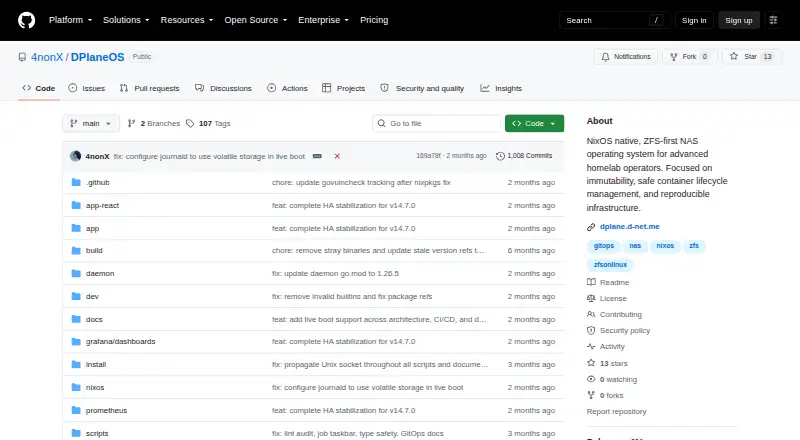
What DPlaneOS is
DPlaneOS is a storage operating system for homelab and small-office NAS deployments, built around ZFS. It manages pools, datasets, snapshots, replication, encryption, quotas, S.M.A.R.T. monitoring and POSIX ACLs, alongside SMB, NFS, iSCSI and NVMe-oF sharing. It can manage Docker and Compose stacks, ZFS-clone sandboxes, atomic updates with rollback, and an in-browser terminal. Identity options include local accounts, LDAP or Active Directory, OIDC single sign-on, TOTP two-factor authentication and API tokens. Cloud sync connects to S3, Backblaze B2, Google Drive, Azure, Dropbox and rclone-supported targets. A React interface and single Go daemon use PostgreSQL state, packaged as a NixOS appliance. Installation supports x86_64 and aarch64, including Raspberry Pi 5, with offline ISOs. The free Community Edition is licensed under AGPLv3. Minimum hardware is a 64-bit CPU and 8 GB RAM; 16 GB is recommended. The project is maintained by one person and offers no vendor support. Several high-availability configurations and NVMe-oF over TCP are experimental.
Good
- Free Community Edition under AGPLv3
- Supports snapshots, replication and native encryption
- Offers SMB, NFS, iSCSI and NVMe-oF sharing
- Cloud sync supports several providers and rclone targets
Watch out
- Minimum hardware requirement is 8 GB RAM
- Project is maintained by one person
- No vendor support or phone number
- Some HA options and NVMe-oF over TCP are experimental
Who it suits
DPlaneOS suits homelab and small-office operators who want ZFS storage, file sharing, containers and cloud sync in one system. It requires a 64-bit CPU and at least 8 GB RAM.
Verdict
DPlaneOS combines ZFS storage, file sharing, container management and cloud sync in a free, self-hosted system. Its hardware requirements, solo maintenance and experimental features are important considerations.
Plans and prices
From DPlaneOS's own pricing page, checked 1 Oct 2026.
| Plan | Price | What it gives you |
|---|---|---|
| Community Edition | Free | AGPLv3 · free to use, modify and distribute · any hardware you own |
The facts
Each one read from DPlaneOS's own pages, with the date it was checked.
What it does
- Architecture
- It uses a single Go daemon, PostgreSQL state, a React UI and a NixOS appliance.checked 1 Oct 2026
- Containers
- It manages Docker and Compose stacks, ZFS-clone sandboxes, atomic updates with rollback and an in-browser terminal.checked 1 Oct 2026
- File sharing
- The system supports SMB with Time Machine support, NFS, iSCSI and NVMe-oF sharing.checked 1 Oct 2026
- GitOps
- GitOps uses state.yaml for declarative pools, datasets, shares, users and stacks, with drift detection and destructive-operation blocking.checked 1 Oct 2026
- Hardware requirements
- Minimum hardware is a 64-bit CPU and 8 GB RAM, with 16 GB recommended and ECC RAM strongly recommended for ZFS.checked 1 Oct 2026
- High availability
- HA is optional and off by default, with shared-SAS and replicated-ZFS topologies.checked 1 Oct 2026
- Identity
- Identity features include local users, LDAP or Active Directory with Winbind NSS, OIDC SSO, TOTP 2FA, SCRAM-SHA-512 and API tokens.checked 1 Oct 2026
- Installation
- The installer supports x86_64 and aarch64, including Raspberry Pi 5, and provides offline installation ISOs.checked 1 Oct 2026
- Integrations
- Cloud synchronization supports S3, Backblaze B2, Google Drive, Azure, Dropbox and any rclone-supported target.checked 1 Oct 2026
- Monitoring
- Prometheus/OpenMetrics exposes ZFS health, dataset usage, scrub progress, HA peer health, replication status and BMC sensor metrics.checked 1 Oct 2026
- Project status
- PostgreSQL HA, replicated-topology HA, shared-SAS HA and NVMe-oF over TCP are marked experimental.checked 1 Oct 2026
- Purpose
- DPlaneOS is a ZFS-first storage operating system for homelab and small-office NAS deployments.checked 1 Oct 2026
- Security
- Security controls include RBAC, an HMAC audit chain, CSRF protection, firewall, TLS, allowlist-validated execution and govulncheck in CI.checked 1 Oct 2026
- Storage
- Storage features include ZFS pools, datasets, snapshots, replication, native encryption, quotas, S.M.A.R.T. and POSIX ACLs.checked 1 Oct 2026
- Support and maturity
- The project is built and maintained by one person and does not provide vendor support or a phone number.checked 1 Oct 2026
The full review of DPlaneOS
DPlaneOS is a self-hosted NAS operating system built around ZFS, with file sharing and container management in the same appliance. It is aimed at technically capable homelab operators and small offices that can administer their own hardware. Its unusually broad free feature set is appealing, but organizations needing vendor-backed support should look elsewhere.
Overview
DPlaneOS brings storage administration and application hosting together through a single Go daemon, PostgreSQL state, a React interface and a NixOS appliance. GitOps support uses state.yaml to declare pools, datasets, shares, users and stacks; drift detection and blocking of destructive operations make repeatable configuration changes more practical than relying only on manual UI work.
The project covers far more than basic network storage, adding identity, cloud synchronization, monitoring and container operations. That concentration can reduce the number of systems a homelab owner must manage. It also makes the operator responsible for deployment, updates and recovery: one person maintains the project, with no vendor support or phone number.
Key features
Storage and file sharing
ZFS pools and datasets, snapshots, replication, native encryption and quotas address the core NAS workload. S.M.A.R.T. monitoring helps track drive health, while POSIX ACLs provide granular permissions. SMB includes Time Machine support; NFS, iSCSI and NVMe-oF cover clients and workloads that need different sharing protocols. This is a strong foundation for mixed home and small-office storage, although NVMe-oF over TCP is experimental.
Containers and recovery
DPlaneOS manages Docker and Compose stacks, so the NAS can also host applications. ZFS-clone sandboxes provide separated environments, while atomic updates with rollback reduce the risk of a failed change leaving the appliance unusable. An in-browser terminal is useful for administration without a separate remote-session tool, but it also places more responsibility on whoever has access to the web interface.
Identity and security
Local users can be supplemented by LDAP or Active Directory through Winbind NSS, and OIDC SSO supports organizations with an existing identity provider. TOTP two-factor authentication, SCRAM-SHA-512 and API tokens cover different access patterns. RBAC, an HMAC audit chain, CSRF protection, firewall and TLS controls provide a serious security baseline, while allowlist-validated execution and govulncheck in CI address risky command execution and dependency exposure.
Cloud, monitoring and availability
Synchronization targets include S3, Backblaze B2, Google Drive, Azure, Dropbox and any destination supported by rclone. Prometheus/OpenMetrics exposes ZFS health, dataset usage, scrub progress, replication status, HA peer health and BMC sensor metrics, making external alerting possible. Optional high availability supports shared-SAS and replicated-ZFS designs, but PostgreSQL HA and the HA topologies are experimental and HA is disabled by default. Treat these capabilities as work in progress rather than a proven foundation for critical service continuity.
Pricing
DPlaneOS has one published plan: Community Edition costs free under AGPLv3. It is free to use, modify and distribute on any hardware you own. Storage pools, user management, snapshots, container support and cloud synchronization are included, with no paid tier described. A free trial is also offered, although no separate trial duration or renewal terms are given. This is an uncomplicated choice for personal labs and small offices; there is no lower-cost plan that trades away features, and no commercial support package to buy when requirements grow.
Platforms
The appliance runs on Linux and is self-hosted, with API and web interfaces. Installation supports x86_64 and aarch64 hardware, including Raspberry Pi 5, and offline installation ISOs are provided. The minimum is a 64-bit CPU and 8 GB of RAM; 16 GB is recommended, and ECC memory is strongly recommended for ZFS. Those requirements make it unsuitable for very small or memory-constrained devices, even though aarch64 broadens hardware options.
Who it's for
Choose DPlaneOS if you want ZFS protection, several sharing protocols, Docker administration and cloud copies in one system, and you are comfortable maintaining a self-hosted appliance. GitOps and Prometheus/OpenMetrics are especially useful for administrators who prefer declarative configuration and external observability. Avoid it for production workloads that require a staffed support channel, a vendor accountability model or mature, non-experimental HA guarantees.
Pros and cons
Pros
- Broad free scope: storage, shares, containers, identity, synchronization and monitoring are included in the Community Edition.
- Strong ZFS toolkit: snapshots, replication, encryption, quotas and health metrics support serious data-management routines.
- Flexible access control: LDAP, Active Directory, OIDC, TOTP, RBAC and API tokens fit mixed environments.
- Reproducible administration: GitOps state, drift detection and rollback-oriented updates help control configuration changes.
Cons
- Single-maintainer risk: one person maintains the project and there is no vendor support or phone number.
- Experimental resilience features: PostgreSQL HA, replicated and shared-SAS HA, and NVMe-oF over TCP are not yet dependable choices for critical continuity.
- Resource floor: 8 GB RAM minimum, 16 GB recommended and ECC strongly recommended narrow the suitable hardware pool.
Alternatives
ZimaOS is the better fit if you want a freemium NAS platform spanning Android, iOS, desktop systems and self-hosted use, with a dedicated mobile and PC client. TrueNAS suits readers seeking a free software download for any x86 hardware with community support. Pick napp-it for noncommercial home use across up to three servers with no capacity limit on its CS Home plan. NovaNAS is a simpler free option requiring Debian 13 and at least 2 GB RAM, a one-core CPU and a 20 GB system drive. OSNEXUS QuantaStor fits noncommercial, educational or testing deployments limited to 80 TB raw and four servers per grid. OpenNAS offers a free, open-source x86_64 beta installer. PetaSAN is a free open-source platform on a self-support model. openmediavault is free GNU GPL v3 software for Linux self-hosting without a free trial. Browse the broader NAS Software category for more choices.
Verdict
DPlaneOS is a compelling free choice for a technically confident homelab owner or small office that wants ZFS, application containers and cloud synchronization under one self-hosted roof. Choose it for breadth, GitOps control and protocol flexibility. Look elsewhere when vendor support, a multi-person maintenance organization or proven high-availability behavior matters more than an expansive feature set at no cost.
Alternatives to DPlaneOS
- 1

TrueNAS
Free planOpen sourceAndroidiOSWebAPI7.9Free plan - 2
ZimaOS
Free planAndroidiOSWebAPI7.9$29 one-time - 3

Synology Active Backup for SaaS
Free planSelf-hosted6.7Free plan - 4

KitchenAsty
AndroidiOSWebAPI6.6 - 5
napp-it
Free planWebAPILinuxmacOS6.6Free plan - 6
SoftNAS
WebAPILinuxSelf-hosted6.6From $0.13 a month