
TrueNAS
TrueNAS Community Edition is free, open storage software that provides file, block, and object storage through one interface.
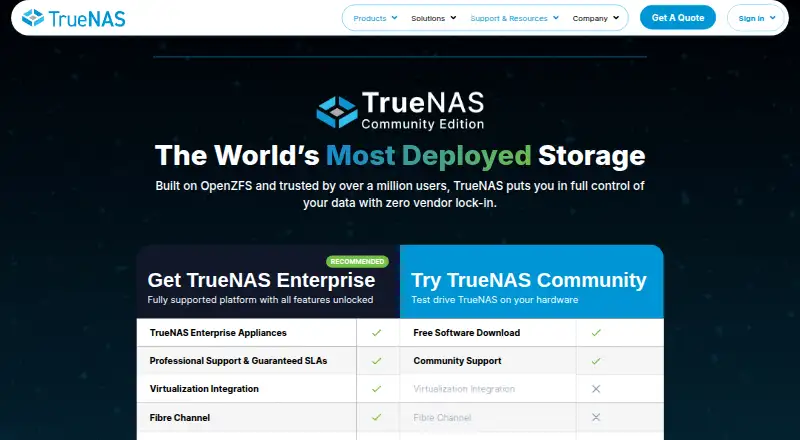
What TrueNAS is
TrueNAS Community Edition is free, open storage software that provides file, block, and object storage through one interface. It is designed to run on x86 hardware and uses ZFS capabilities such as snapshots, replication, RAID-Z, and self-healing checksums to protect storage. Its listed services include SMB, NFS, iSCSI, S3 API compatibility, apps, Docker containers, and virtual machines. Administrators can work through a web interface or CLI and use SNMP, syslog, reporting, and the TrueNAS API. Security options listed include self-encrypted drives, dataset encryption, encrypted replication, WireGuard, OpenVPN, access controls, and IP filtering. The platform also lists integrations or certifications involving Kubernetes CSI, Proxmox, VMware, Red Hat OpenShift, and other systems. Community help is available through forums, documentation, release notes, and bug ticketing; professional support is described for Enterprise customers. TrueNAS publishes security advisories and recommends following its security guidance. Moving from TrueNAS CORE to Community Edition is a one-way upgrade.
Good
- Free software download for x86 hardware.
- Provides snapshots, replication, RAID-Z, and checksums.
- Includes Docker containers and virtual machines.
- Offers multiple management interfaces and an API.
Watch out
- Upgrading from TrueNAS CORE is one-way.
- Community support is through forums and documentation.
Who it suits
TrueNAS Community Edition suits home lab users, individuals, and data centers seeking file, block, or object storage. Its listed workloads include virtualization, surveillance, backup, and AI-related data needs.
Verdict
TrueNAS Community Edition combines several storage protocols with ZFS protection and services for containers and virtual machines. Consider the one-way upgrade warning and the community support model before choosing it.
Plans and prices
From TrueNAS's own pricing page, checked 14 Oct 2026.
| Plan | Price | What it gives you |
|---|---|---|
| TrueNAS Community Edition | Free | Any x86 system · Community support · File, block, object storage · Apps, containers and VMs · Free software download |
| TrueNAS Enterprise | Priced on request | Appliances · Professional support and guaranteed SLAs · Enterprise-only features · Contact sales |
The facts
Each one read from TrueNAS's own pages, with the date it was checked.
What it does
- API
- Current releases use a versioned JSON-RPC 2.0 API over WebSocket; the former REST API was deprecated in 25.04 and removed in 26.checked 14 Oct 2026
- API client
- The TrueNAS API client includes the midclt command-line tool and Python access to local or remote middleware sockets.checked 14 Oct 2026
- API security
- API keys are revocable, may expire, require HTTPS/TLS, are shown only once, and bypass the associated user's two-factor setting.checked 14 Oct 2026
- Community support
- Community Edition support consists of forums, documentation, release notes, bug ticketing and an AI bot; professional 24/7 support is associated with Enterprise.checked 14 Oct 2026
- Directory integration
- Supported identity services include Active Directory, LDAP, Kerberos, local users and groups, and two-factor authentication.checked 14 Oct 2026
- Documentation
- The documentation hub covers stable and development versions, accepts community contributions, and publishes release notes, security advisories and API references.checked 14 Oct 2026
- Enterprise support
- The maker describes professional support with coverage up to 24/7x365 for Enterprise customers.checked 30 Sep 2026
- Installation
- Downloads provide a web-based TrueNAS Connect installer and a classic offline installer requiring direct console access.checked 14 Oct 2026
- Integrations
- The platform lists TrueNAS Connect, TrueCommand, CloudSync, Veeam, vCenter, OpenStack Cinder, Syncthing, Rsync and Fibre Channel integrations.checked 14 Oct 2026
- Intended users
- The maker describes TrueNAS as serving home labs, individuals, and enterprise data centers, including data-intensive workloads such as AI, virtualization, surveillance, and backup.checked 30 Sep 2026
- Licence
- TrueNAS is open source with GPLv3 code for the Web UI, while the product also contains separately licensed open-source components and proprietary extensions.checked 14 Oct 2026
- Limit: administration UI
- TrustRadius reviewers say some ZFS administration still requires the command line and that the interface is less polished than some NAS competitors.checked 14 Oct 2026
- Limit: learning curve
- Independent reviews say initial setup, server concepts, permissions and pool planning can be difficult for newcomers.checked 14 Oct 2026
- Limit: missing capabilities
- Reviewers cite missing desktop backup agents, limited multi-server load balancing, difficult ACL setup and absent storage tiering in some editions.checked 14 Oct 2026
Where it runs
- Applications
- Apps and catalogs support Docker Compose, Docker containers and integrated application deployment.checked 14 Oct 2026
- Limit: application ecosystem
- GetApp reviewers report occasional app lock-ups and describe the application ecosystem as limited in some environments.checked 14 Oct 2026
The company
- Company
- iXsystems developed TrueNAS and has done business as TrueNAS since 2025.checked 30 Sep 2026
- Company founding
- iXsystems states that it was founded in Silicon Valley in 2002.checked 14 Oct 2026
- Company headquarters
- The company lists 541 Division Street, Campbell, California 95008, USA as its address.checked 14 Oct 2026
- Company legal name
- The product footer identifies the maker as iXsystems, Inc. doing business as TrueNAS.checked 14 Oct 2026
- Company ownership
- iXsystems describes itself as profitable, self-funded and operating without outside investors.checked 14 Oct 2026
- Company size
- LinkedIn lists iXsystems as a privately held company with 201–500 employees and headquarters in San Jose, California.checked 14 Oct 2026
- Founded
- 2002checked 23 Sep 2026
- Headquarters
- Campbell, California, USAchecked 23 Sep 2026
The full review of TrueNAS
Overview
TrueNAS Community Edition is a free, self-hosted storage platform for combining file, block, and object storage in one system. It suits people who can manage storage infrastructure—from home-lab operators to data-center teams—better than anyone seeking a turnkey cloud drive. Its strongest case is the breadth of storage and virtualization capabilities alongside ZFS protection; the trade-off is a community support model and a consequential upgrade constraint for existing TrueNAS CORE users.
Developed by iXsystems, which has done business as TrueNAS since 2025, the product serves workloads including AI, virtualization, surveillance, and backup. That range makes it more than a shared-folder appliance, but also means it calls for deliberate administration and hardware planning.
Key features
Storage and protection
TrueNAS brings SMB and NFS file sharing, iSCSI block storage, and S3 API compatibility together. That mix can support different storage workflows under one management layer, rather than requiring a separate product for each protocol. ZFS adds snapshots, replication, RAID-Z, and self-healing checksums; these tools give administrators multiple ways to protect and recover data, though they do not remove the need to plan and operate storage carefully.
Storage pools, user management, snapshots, and cloud sync are included capabilities. The app catalog, Docker containers, and virtual machines extend the system beyond storage, making it a plausible base for services and workloads that belong alongside a NAS.
Administration and security
Management options include a web UI, CLI, SNMP, syslog, reporting, and a TrueNAS API. The breadth is useful for both direct administration and integration into managed environments, but readers who want a simple appliance interface may not need this range.
Security features include self-encrypted drives, dataset encryption, encrypted replication, WireGuard, OpenVPN, ACLs, and IP filtering. TrueNAS also publishes security advisories and recommends following its security best-practices guide; operators remain responsible for keeping deployments configured appropriately.
Listed integrations and certifications include Kubernetes CSI, Proxmox, Asigra, VMware, Veeam, HYCU, Archiware P5, Red Hat OpenShift, and Citrix Hypervisor/XCP-ng. This makes the platform relevant to established virtualization, backup, and orchestration environments.
Pricing
TrueNAS Community Edition: free. The plan is a free software download for any x86 hardware and includes community support. It is the right starting point for individuals and organizations able to rely on forums, documentation, release notes, and bug ticketing. Professional support with coverage up to 24/7x365 is described for Enterprise customers, so organizations that require that level of support should consider the Enterprise route rather than treating the community edition as equivalent.
The download page warns that upgrading from TrueNAS CORE to Community Edition is a one-way operation. CORE users should weigh that limitation before changing systems.
Platforms
TrueNAS is listed for Android, iOS, Linux, macOS, Windows, web, API, and self-hosted environments. Community Edition is described as ready to run on any x86 hardware, making the self-hosted hardware requirement central to the choice.
Who it's for
Choose TrueNAS if you want a self-hosted platform that combines multiple storage protocols, ZFS protection, and services for containers or virtual machines—and you have the capacity to administer it. It can serve home labs and individual users as well as enterprise data centers, particularly for data-intensive workloads such as virtualization, backup, surveillance, and AI.
Look elsewhere if community support is not sufficient or if you need a straightforward cloud-storage app rather than a system to deploy and manage. CORE users should also avoid an unconsidered upgrade because the move to Community Edition is one-way.
Pros and cons
- Pros: File, block, and object storage protocols in one platform reduce the need to split those roles across separate storage systems.
- Pros: ZFS snapshots, replication, RAID-Z, and self-healing checksums provide a substantial set of built-in data-protection capabilities.
- Pros: Apps, Docker containers, and virtual machines let the system host services as well as store data.
- Pros: The free download runs on x86 hardware, giving self-hosters a no-cost way to deploy the platform.
- Cons: Community support relies on forums and documentation rather than the professional support coverage described for Enterprise customers.
- Cons: Upgrading from TrueNAS CORE is one-way, so CORE users face a less reversible migration decision.
- Cons: The feature breadth and self-hosted deployment make this a poor fit for people who want storage without infrastructure administration.
Alternatives
For a free option with a stated storage ceiling, Quobyte offers up to 150 TB in its Free Edition, free forever. Ceph is a free distributed-storage alternative for Linux and self-hosted environments; block storage requires a running Ceph cluster.
MinIO AIStor may suit readers who want a single-node deployment with a full feature set in its free plan, while noting that redistribution is prohibited.
StarWind Virtual SAN is another free choice, with a self-supported plan that has functionality limitations; its Linux KVM version may have no limitations. BeeGFS, openmediavault, and Hitachi Universal Volume Manager are also alternatives to consider.
Browse more options in Storage Management Software and NAS Software.
Verdict
TrueNAS Community Edition is a strong choice for self-hosters and organizations that want broad storage protocols, ZFS protection, and the option to run apps, containers, and virtual machines on x86 hardware without a software charge. Choose it when you can manage the system and accept community support; look elsewhere if professional support is essential or you need an easily reversible move from TrueNAS CORE.
Getting started
- Visit https://www.truenas.com/truenas-community-edition/.
- Download TrueNAS Community Edition for x86 hardware.
- Install it on the x86 system you intend to use.
- Manage it through the web UI or CLI.
- Use forums, documentation, release notes, or bug ticketing for community support.
Limits worth knowing
Community Edition is free software with community support through forums, documentation, release notes, and bug ticketing. Upgrading from TrueNAS CORE to Community Edition is a one-way operation.
Questions
How much does TrueNAS Community Edition cost?
The Community Edition plan is free software.
What hardware is it designed to run on?
The download page says Community Edition is ready to run on any x86 hardware.
What storage types and services does it support?
It provides file, block, and object storage. Listed services include SMB, NFS, iSCSI, S3 API compatibility, apps, Docker containers, and virtual machines.
How can administrators manage TrueNAS?
Management options include a web UI, CLI, SNMP, syslog, reporting, and the TrueNAS API.
What support is available?
Community users can use forums, documentation, release notes, and bug ticketing. Professional support with coverage up to 24/7x365 is described for Enterprise customers.
Can an upgrade from TrueNAS CORE be reversed?
The maker warns that upgrading from TrueNAS CORE to Community Edition is a one-way operation.
Alternatives to TrueNAS
- 1

MinIO AIStor
Free planWebAPILinuxmacOS7.3Free plan - 2
StarWind Virtual SAN
Free planWebAPILinuxSelf-hosted7.2Free plan - 3

Ceph
Free planAPILinuxSelf-hostedWindows6.6Free plan - 4

Quobyte
Free planWebAPILinuxmacOS6.4Free plan - 5

DataCore SANsymphony
WebAPISelf-hostedWindows6.3 - 6
Open-E JovianDSS
LinuxSelf-hosted6.3From $340 a year