
OpenNAS
OpenNAS is a free NAS operating system for managing files, storage, containers, and virtual machines through a browser-based desktop on your own hardware.
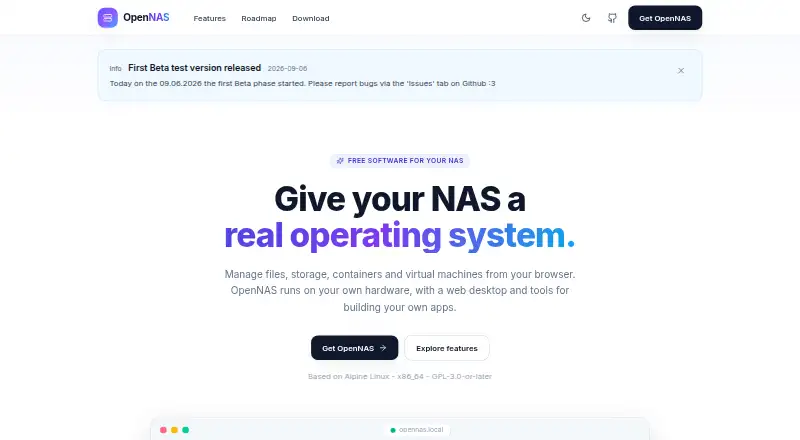
What OpenNAS is
OpenNAS is a free NAS operating system for managing files, storage, containers, and virtual machines through a browser-based desktop on your own hardware. File Station handles uploads and downloads, previews for images, video, audio, and several document types, ZIP operations, recycle-bin recovery, and expiring password-protected public links. Storage tools show S.M.A.R.T. health, RAID status, and per-volume usage, and let administrators initialize disks and configure space for virtual machines and containers. Container Manager works with Docker containers, images, logs, resource statistics, and docker-compose stacks. KVM/QEMU virtual machines support ISO booting, qcow2 disks, and an in-browser noVNC console. Package Center includes one-click self-hosted services such as Jellyfin, Nextcloud, Pi-hole, and Home Assistant. OpenNAS also supports SMB/CIFS, NFS, and AFP sharing, along with Time Machine targets. It is based on Alpine Linux, licensed GPL-3.0-or-later, and targets x86_64. The current installer is version 0.9.0-beta.1; it supports UEFI and BIOS boot. The Free plan is free.
Good
- Browser-based management for files, storage, and virtual machines
- Supports Docker containers and docker-compose stacks
- Includes one-click self-hosted services
- Offers SMB/CIFS, NFS, and AFP sharing
Watch out
- Current x86_64 installer is a beta release
- Installer requires compatible 64-bit x86_64 hardware
- Arm64 images are planned, not listed as available
Who it suits
OpenNAS suits self-hosters who want to manage shared storage, containers, and virtual machines on their own compatible x86_64 hardware. It requires a compatible 64-bit system, at least 2 GB RAM, and an 8 GB or larger USB stick for installation.
Verdict
OpenNAS brings storage management, file sharing, containers, and KVM/QEMU virtual machines into one browser-based system. It is worth considering if you have compatible x86_64 hardware and are comfortable using a beta installer.
Plans and prices
From OpenNAS's own pricing page, checked 2 Oct 2026.
| Plan | Price | What it gives you |
|---|---|---|
| Free | Free | Free and open source · x86_64 beta installer · self-hosted on own hardware |
The facts
Each one read from OpenNAS's own pages, with the date it was checked.
Where it runs
- App development
- The SDK supports sandboxed iframe apps with postMessage capabilities, per-app storage, notifications, files and identity, plus Ed25519 signing and publisher verification.checked 2 Oct 2026
- Included apps
- Package Center offers one-click self-hosted services including Jellyfin, Nextcloud, Pi-hole, Vaultwarden, Gitea, Home Assistant, Portainer and Immich.checked 2 Oct 2026
- Virtual machines
- OpenNAS provides KVM/QEMU virtual machines with ISO booting, qcow2 disks and an in-browser noVNC console.checked 2 Oct 2026
What it does
- Audience and support
- The project describes itself as made for self-hosters, provides GitHub documentation and contribution links, and lists [email protected].checked 2 Oct 2026
- Authentication
- Security features include WebAuthn passkeys, OIDC single sign-on, admin and user roles, signed packages, trusted publishers, an unprivileged backend, decoy routes and automatic IP blocking.checked 2 Oct 2026
- Containers
- Container Manager manages Docker containers and images, streams CPU and memory statistics and logs, and imports docker-compose stacks.checked 2 Oct 2026
- File management
- File Station supports uploads, downloads, previews for images, video, audio, PDF, DOCX, CSV and code, ZIP operations, recycle-bin restoration, and expiring password-protected public links.checked 2 Oct 2026
- Hardware requirements
- The installer requires a compatible 64-bit x86_64 desktop, mini PC or server, at least 2 GB RAM, a system disk plus optional data disks, and an 8 GB or larger USB stick.checked 2 Oct 2026
- Installation limit
- The current download is version 0.9.0-beta.1 for x86_64, and both UEFI and BIOS boot are supported.checked 2 Oct 2026
- License
- OpenNAS is based on Alpine Linux, targets x86_64, and is licensed GPL-3.0-or-later.checked 2 Oct 2026
- Network protocols
- File sharing supports SMB/CIFS, NFS and AFP, with Time Machine targets, per-share recycle bins, Avahi discovery and WS-Discovery.checked 2 Oct 2026
- Purpose
- OpenNAS is a free NAS operating system with a browser-based web desktop for files, storage, containers and virtual machines.checked 2 Oct 2026
- Roadmap
- Arm64 images, LDAP integration, an app store and publishing, PCIe/GPU passthrough, more translations and other additions are planned or under consideration.checked 2 Oct 2026
- Storage
- Storage features include S.M.A.R.T. health monitoring, RAID status, per-volume usage bars, disk initialization and configurable storage for VMs and containers.checked 2 Oct 2026
- System administration
- The web desktop provides SSH and authorized-key management, SMTP test sending, log viewing, TLS certificate management, an opennas CLI, resource monitoring and power controls.checked 2 Oct 2026
Alternatives to OpenNAS
- 1

TrueNAS
Free planOpen sourceAndroidiOSWebAPI7.9Free plan - 2
ZimaOS
Free planAndroidiOSWebAPI7.9$29 one-time - 3

Synology Active Backup for SaaS
Free planSelf-hosted6.7Free plan - 4

KitchenAsty
AndroidiOSWebAPI6.6 - 5
napp-it
Free planWebAPILinuxmacOS6.6Free plan - 6
SoftNAS
WebAPILinuxSelf-hosted6.6From $0.13 a month