
Mocai
Mocai reconstructs a subject’s body, mesh, and motion as markerless motion capture from a single video.
What Mocai is
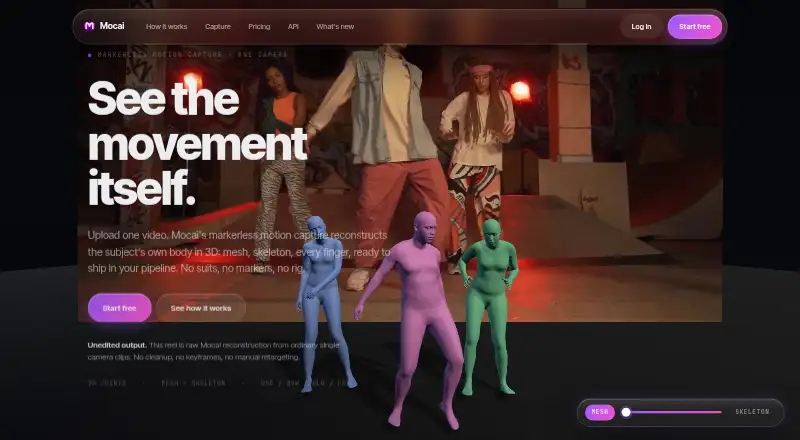
Mocai reconstructs a subject’s body, mesh, and motion as markerless motion capture from a single video. The maker says footage from any single camera, including a phone, can be used without markers, suits, or calibration. Each performer has 70 tracked keypoints, while skeleton exports use a 127-joint rig. Capture features include finger articulation, multi-person capture, root motion, floor grounding, occlusion repair, adjustable smoothing, and synchronized footage review. Exports include FBX, GLB, BVH, USD, and raw keypoints, with optional retargets to Mixamo, UE5 Manny, and MetaHuman rigs. Plugins are available for Blender, Unity, Maya, and Unreal Engine; a public API and MCP server support managing takes and exports. The free plan includes one minute of footage per month, clips up to 15 seconds, and single-person capture. Basic costs $10 per month and includes 10 minutes of footage monthly. Monthly footage is shared between portal and API use, and new uploads pause when the allowance is reached. Mocai is available on web and several desktop and mobile platforms.
Good
- Works from single-camera footage without markers or suits
- Tracks 70 keypoints per performer
- Exports FBX, GLB, BVH, USD, and raw keypoints
- Plugins for Blender, Unity, Maya, and Unreal Engine
- Public API and webhooks are available
Watch out
- Free plan allows one minute of footage monthly
- Free clips are limited to 15 seconds
- Monthly footage allowance is shared by portal and API
- Uploads pause when the footage allowance is reached
Who it suits
Mocai suits people making motion-capture takes for Blender, Maya, Unity, Unreal Engine, or their own tools. Its free plan may suit users with brief, single-person clips.
Verdict
Mocai offers video-based capture with several export formats, editor plugins, and API access. Review the monthly footage and clip limits before choosing a plan.
Plans and prices
From Mocai's own pricing page, checked 30 Sep 2026.
| Plan | Price | What it gives you |
|---|---|---|
| Free | Free | 1 min of footage / mo · Clips up to 15s · Single person · Download all formats · Public API + webhooks · Standard queue · 7-day retention |
| Basic | $10 a month | 10 min of footage / mo · Clips up to 30s · Up to 3 performers · Download all formats · Public API + webhooks · Priority processing · 30-day retention |
| Pro | $39 a month | 60 min of footage / mo · Clips up to 60s · Up to 10 performers · Download all formats · Public API + webhooks · Highest-priority processing · 90-day retention |
| Enterprise | Priced on request | Custom builds, integrations, and usage limits |
The facts
Each one read from Mocai's own pages, with the date it was checked.
What it does
- API and automation
- The public API supports uploads and webhooks, and the maker provides an MCP server that AI agents can use to manage takes and exports.checked 30 Sep 2026
- API limits
- The API documentation states that two-step uploads support files up to 2 GB, while inline multipart uploads stay under about 30 MB.checked 30 Sep 2026
- Body tracking
- Each performer has 70 tracked keypoints from pelvis to fingertips, and skeleton exports use a 127-joint rig.checked 30 Sep 2026
- Camera requirements
- The maker says any single camera works, including phone footage, with no markers, suits, or calibration required.checked 30 Sep 2026
- Capture features
- The product lists finger articulation, multi-person capture, root motion, floor grounding, occlusion repair, adjustable smoothing, and synchronized footage review.checked 30 Sep 2026
- Export formats
- Exports include FBX, GLB, BVH, USD, and raw keypoints, with optional retargets to Mixamo, UE5 Manny, and MetaHuman rigs.checked 30 Sep 2026
- Integrations
- Mocai lists free plugins for Blender, Unity, Maya, and Unreal Engine to upload clips and import takes from those editors.checked 30 Sep 2026
- Intended users
- The maker describes Mocai as a self-serve motion-capture product for people working with Blender, Maya, Unity, Unreal, or their own tools.checked 30 Sep 2026
- Privacy
- Mocai says customers own their footage and reconstructions, uploads are not used to train machine-learning models, and stored takes are automatically deleted after the plan’s retention period.checked 30 Sep 2026
- Security
- The privacy policy says data is encrypted in transit and at rest, stored content uses short-lived signed URLs, and internal access is limited to operational needs.checked 30 Sep 2026
- Support
- The maker invites customers to contact it and says Enterprise plans can include custom builds, integrations, and usage limits.checked 30 Sep 2026
- Usage limits
- The monthly footage allowance is shared between portal and API, and new uploads pause when the allowance is reached.checked 30 Sep 2026
- What it does
- Mocai reconstructs a subject’s body, mesh, and 127-joint skeleton from a single video as markerless motion capture.checked 30 Sep 2026
The company
- Headquarters
- California, United Stateschecked 28 Sep 2026
The full review of Mocai
Overview
Mocai turns a single video into markerless body motion, a mesh, and a 127-joint skeleton, making it a practical fit for creators who already work in 3D or game-development tools. Its broad export and integration options are appealing, but monthly footage and clip-length caps are the main trade-offs to weigh.
It is a video-based workflow, not a real-time capture system. The maker says footage from any single camera, including a phone, can be used without markers, a suit, or calibration.
Compare it with other options in AI Motion Capture Software, Game Motion Capture Software, and Motion Capture Software.
Key features
Tracking and review
Mocai tracks 70 points per performer, from pelvis to fingertips, and builds a 127-joint rig. Finger articulation and hand tracking extend capture to detailed gestures, while multi-person capture, root motion, floor grounding, occlusion repair, adjustable smoothing, and synchronized footage review cover common animation cleanup needs. The number of performers and maximum clip duration still vary by plan, so the feature set does not remove the need to budget footage carefully.
Users can review footage alongside captured motion, and occlusion repair and smoothing offer ways to address imperfect source video. These are useful controls for video capture, but Mocai does not offer real-time capture.
Exports, integrations, and automation
Exports include FBX, GLB, BVH, USD, and raw keypoints, with optional retargeting to Mixamo, UE5 Manny, and MetaHuman rigs. That range makes Mocai flexible for both conventional 3D workflows and engine-based production. Free plugins for Blender, Unity, Maya, and Unreal Engine let users upload clips and import takes in those editors, reducing the need to move between tools manually.
The public API supports uploads and webhooks, and an MCP server lets AI agents manage takes and exports. Two-step API uploads handle files up to 2 GB, while inline multipart uploads stay under about 30 MB. Since portal and API uploads draw from the same monthly footage allowance, automating a workflow does not increase its capture quota.
Privacy and retention
Mocai says customers own their footage and reconstructions, and that uploads are not used to train machine-learning models. Data is encrypted in transit and at rest, stored content uses short-lived signed URLs, and internal access is restricted to operational needs. Takes are automatically deleted after the plan’s retention period, so teams that need longer storage should account for that lifecycle.
Pricing
Mocai has a free tier and paid plans starting at $10 a month. The main differences are monthly footage, clip length, performer count, processing priority, and retention; all plans include downloads in all formats, plus public API and webhooks.
| Plan | Price | Limits and inclusions |
|---|---|---|
| Free | free | 1 minute of footage per month; clips up to 15 seconds; single person; standard queue; 7-day retention. |
| Basic | $10 a month | 10 minutes per month; clips up to 30 seconds; up to 3 performers; priority processing; 30-day retention. |
| Pro | $39 a month | 60 minutes per month; clips up to 60 seconds; up to 10 performers; highest-priority processing; 90-day retention. |
| Enterprise | Custom pricing | Custom builds, integrations, and usage limits. |
Free is useful for short, single-person tests, but one minute monthly and 15-second clips make it unsuitable for sustained production. Basic is the entry point for regular work or small group capture, though 10 minutes monthly may be restrictive for iteration. Pro provides six times Basic’s footage allowance, longer clips, and more performers, which better suits heavier use; its higher monthly price is worthwhile only if those additional limits matter. Enterprise suits organizations needing tailored usage or integrations, with custom pricing.
The footage allowance is shared between portal and API, and new uploads pause when it is exhausted. The maker does not state a paid-plan renewal term here; all three individual plan prices are monthly.
Platforms
Mocai supports web access and API use, with editor plugins for Blender, Maya, Unity, and Unreal Engine. Its platform coverage also includes Android, iOS, Linux, macOS, Windows, browser extensions, and self-hosted deployments. The broad platform list gives users several ways to access the service, while the named editor plugins target common 3D and game-development workflows.
Who it's for
Mocai is best suited to animators, game developers, and technical artists who can provide video footage and want motion data in established 3D formats or directly in Blender, Maya, Unity, or Unreal Engine. API and MCP access also make it relevant to teams building automated take-management workflows. It is a weaker fit for users who need real-time capture, long clips on a tight budget, or more monthly footage than their selected tier allows.
Pros and cons
- Pros: Single-camera capture without markers, suits, or calibration lowers the equipment and setup barrier.
- Pros: Five export formats, optional rig retargets, and free plugins support varied production pipelines.
- Pros: API, webhooks, and an MCP server support both conventional integrations and AI-agent workflows.
- Pros: The maker states that customers own their outputs and uploads are not used for model training.
- Cons: No real-time capture means users must work from recorded video.
- Cons: Monthly footage quotas are shared across portal and API, and uploads stop at the cap.
- Cons: The free plan is limited to one person, 15-second clips, and one minute of footage monthly.
- Cons: Automatic deletion after plan-specific retention may not suit teams that need long-term stored takes.
Alternatives
Choose Move AI if its one-time free allocation of 30 credits for videos up to 30 seconds suits your usage better; its paid Starter plan is $18 a month plus VAT, with 60 credits monthly.
mimem.ai may suit mobile-first users looking for Android, iOS, or web access; its free plan includes 50 daily tokens, 2 GB storage, three cameras, three monthly FBX exports, and commercial use, but retargeting is preview-only.
Choose MocapX if real-time facial capture, offline recording, camera tracking, body tracking, 2D motion tracking, and Wi-Fi or USB support are the priorities; its listed Monthly plan costs $19.99 a month.
PINOC is another freemium option to compare.
Webcam Motion Capture is an alternative with a free tier that allows all tracking features to be tried for free.
XR Animator is a free alternative.
Choose Move One if its one-time 30-credit free tier for 30-second videos better fits occasional use; its Starter plan costs $18 a month plus VAT and includes 60 credits monthly for 60-second videos.
DeepMotion Animate 3D is another freemium web and API option.
Verdict
Mocai is a strong choice for creators who want markerless video capture that can feed familiar 3D editors, formats, and automated workflows. Its broad integrations and export options are the clearest reasons to choose it; the shared footage caps and lack of real-time capture are the reasons to look elsewhere. Start with Free for short single-person trials, move to Basic for modest ongoing use, and consider Pro when longer clips, more performers, or substantially more monthly footage justify the cost.
Getting started
- Visit the Mocai website and choose a plan.
- Upload a video through the portal or use the public API.
- Use a free plugin to upload clips and import takes in Blender, Unity, Maya, or Unreal Engine.
- Download available formats or use an optional retarget to a supported rig.
Limits worth knowing
The free plan allows one minute of footage per month, clips up to 15 seconds, and one performer, with seven-day retention. Basic costs $10 a month and allows ten minutes monthly, clips up to 30 seconds, and up to three performers, with 30-day retention. Footage allowance is shared between the portal and API, and new uploads pause when it is reached.
Questions
Is Mocai free?
Yes. The free plan includes one minute of footage per month, clips up to 15 seconds, and single-person capture.
How much does the Basic plan cost?
Basic costs $10 a month and includes ten minutes of footage per month, clips up to 30 seconds, and up to three performers.
Which export formats does Mocai support?
Exports include FBX, GLB, BVH, USD, and raw keypoints. Optional retargets are available for Mixamo, UE5 Manny, and MetaHuman rigs.
Which software integrations are available?
Mocai lists free plugins for Blender, Unity, Maya, and Unreal Engine. It also provides a public API, webhooks, and an MCP server.
Can Mocai process footage from a phone?
The maker says it can use footage from any single camera, including phone footage, without markers, suits, or calibration.
How does Mocai handle customer footage?
The maker says customers own their footage and reconstructions, uploads are not used to train machine-learning models, and stored takes are deleted after the plan’s retention period.
Alternatives to Mocai
- 1
XR Animator
Free planOpen sourceAndroidWebLinuxmacOS8.5Free plan - 2

Move AI
Free planiOSWebAPILinux8.2From $18 a month - 3

Rokoko Create
Free planAndroidiOSWebAPI8.2From $12 a month - 4

Rokoko Studio
Free planAndroidiOSWebAPI8.2Free plan - 5

Animaze
Free planAndroidiOSAPImacOS8.1From $19.99 a year - 6

Plask Motion
Free planWebAPIExtensionmacOS7.8From $18 a month