PINOC
PINOC converts ordinary video into 3D skeletal animation.
What PINOC is
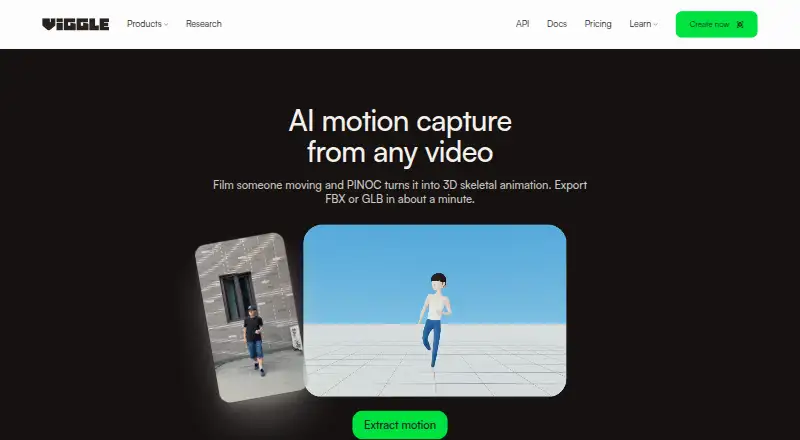
PINOC converts ordinary video into 3D skeletal animation. It can capture one person from phone footage, a webcam, or a screen recording without a mocap suit or sensors. A capture takes about a minute and returns animation on a 65-bone Mixamo-named skeleton, which can be exported as FBX or GLB for 3D pipelines. The maker lists Blender, Unreal Engine, Maya, Unity, Cinema 4D, and Houdini as compatible tools. PINOC also offers image-to-3D characters, text-to-3D motion, and automatic rigging for uploaded models. Its video-to-mocap and text-to-motion APIs and MCP server are described for use with Claude, Cursor, and other MCP-capable agents. The maker recommends recording one unobstructed person, with the full body in frame and adequate lighting. Viggle says face data is not stored or shared with third parties and extracted features are not retained after generation.
Good
- Captures without suits or sensors
- Exports FBX and GLB
- Offers APIs and an MCP server
- Free plan is available
Watch out
- Capture guidance calls for full-body framing
- Free plan stores assets and generations for seven days
- Free plan allows one generation at a time
Who it suits
PINOC suits people who want to turn video into 3D motion for compatible 3D tools. It may also suit developers or agent users seeking video-to-mocap or text-to-motion access through APIs or an MCP server.
Verdict
PINOC brings video-based motion capture together with exports, APIs, and other 3D creation tools. Check the capture conditions and plan limits against your workflow.
Plans and prices
From PINOC's own pricing page, checked 2 Oct 2026.
| Plan | Price | What it gives you |
|---|---|---|
| Free | Free | 5 free videos/day · 1 generation at a time · limited multi-track sessions · 7-day asset and generation storage |
| Pro | $7.99 a month | 80 credits/month · up to 4 generations at once · permanent asset storage · no watermark · larger motion uploads |
| Live | $15.99 a month | 200 credits/month · up to 6 generations at once · 6+ hours Real-Time Swap · permanent storage · no watermark |
| Max | $63.99 a month | 800 credits/month · up to 10 generations at once · unlimited Real-Time Swap · permanent storage · no watermark |
The facts
Each one read from PINOC's own pages, with the date it was checked.
What it does
- API and agents
- The PINOC page describes video-to-mocap and text-to-motion APIs and an MCP server for Claude, Cursor, or other MCP-capable agents.checked 2 Oct 2026
- Capabilities
- PINOC also offers image-to-3D characters, text-to-3D motion, and automatic rigging for uploaded models.checked 2 Oct 2026
- Content use
- Viggle says it may use submitted images and generated content to improve its services, but excludes API content and paid-user content from model training without prior written consent.checked 2 Oct 2026
- Export
- Captured motion can be exported as FBX or GLB for use in 3D pipelines.checked 2 Oct 2026
- Input constraints
- The maker recommends one unobstructed person with the full body in frame and adequate lighting.checked 2 Oct 2026
- Integrations
- The maker lists Blender, Unreal Engine, Maya, Unity, Cinema 4D, and Houdini as compatible tools.checked 2 Oct 2026
- Markerless capture
- A webcam or smartphone can capture one person’s full body without mocap suits or sensors.checked 2 Oct 2026
- Processing
- The product page says a video capture takes about a minute and returns animation on a 65-bone Mixamo-named skeleton.checked 2 Oct 2026
- Purpose
- PINOC extracts 3D skeletal animation from ordinary video, including phone footage, webcam recordings, and screen recordings.checked 2 Oct 2026
- Security and privacy
- Viggle says extracted features used to generate animation are not retained after generation, and users’ face data is not stored or shared with third parties.checked 2 Oct 2026
- Support
- The maker directs PINOC users to its Viggle Discord community to share work.checked 2 Oct 2026
The company
- Company
- Viggle describes itself as a Toronto-based team of researchers and engineers and shows 2023 as its founding year.checked 2 Oct 2026
- Founded
- 2023checked 28 Sep 2026
- Headquarters
- Toronto, Canadachecked 28 Sep 2026
The full review of PINOC
PINOC is a video-based motion-capture service for creators who want to turn phone, webcam, or screen recordings into 3D animation. It is most compelling for workflows that can use a single-person capture and FBX or GLB output; its practical limits are the footage conditions and the free tier’s daily and storage caps.
Overview
PINOC converts ordinary video into skeletal animation without a mocap suit or sensors. The maker says a capture takes about a minute and returns motion on a 65-bone, Mixamo-named skeleton, giving animators a defined output for downstream work. FBX and GLB exports support common 3D pipelines, and the maker lists Blender, Unreal Engine, Maya, Unity, Cinema 4D, and Houdini as compatible tools.
PINOC reaches beyond capture with image-to-3D characters, text-to-3D motion, and automatic rigging for uploaded models. Video-to-mocap and text-to-motion APIs and an MCP server for Claude, Cursor, and other MCP-capable agents also make it relevant to technical and automated workflows. Viggle, the Toronto-based maker, says extracted features used to generate animation are not retained, and that face data is neither stored nor shared with third parties. It may use submitted images and generated content to improve its services, but excludes API content and paid-user content from model training without prior written consent.
Key features
- Markerless video capture: A smartphone or webcam can capture one person’s full body without specialist equipment. That lowers the barrier to trying motion capture, but the maker recommends one unobstructed person, fully in frame and adequately lit; footage outside those conditions is a poor fit.
- Pipeline-ready output: The 65-bone, Mixamo-named skeleton and FBX or GLB exports provide a practical route into listed 3D tools. This makes PINOC useful when those formats fit a pipeline, but the stated export options may not suit workflows that require another format.
- Creation tools and automation: Image-to-3D characters, text-to-3D motion, and automatic rigging extend the product beyond video conversion. APIs and an MCP server can suit users building automated workflows, while users seeking only a simple clip-to-animation tool may not need that breadth.
- Community: Viggle directs users to its Discord community to share work, offering a place for creator interaction.
Pricing
PINOC is freemium. The Free plan costs nothing and allows 5 free videos per day, one generation at a time, limited multi-track sessions, and 7-day asset and generation storage. It is a sensible way to evaluate the workflow, but the daily quota, single concurrent generation, and short retention make it restrictive for sustained production.
The Pro plan is $7.99 a month, with 80 credits per month, up to four concurrent generations, permanent asset storage, no watermark, and larger motion uploads. It suits regular users who want retained assets and more throughput without needing the higher tiers’ stated quotas.
The Live plan is $15.99 a month and includes 200 credits per month, up to six concurrent generations, more than six hours of Real-Time Swap, permanent storage, and no watermark. Choose it when that real-time allowance and extra capacity matter. Max costs $63.99 a month and provides 800 credits per month, up to ten concurrent generations, unlimited Real-Time Swap, permanent storage, and no watermark; its higher ceiling is aimed at heavier use. The pricing note gives a paid starting price of $12.99/mo, which differs from the listed Pro price of $7.99 a month, so confirm the applicable price before subscribing.
Platforms
PINOC supports Android, iOS, web, and API access. The product is also described as browser-based, making web use a fit for creators who want to work through a browser rather than rely solely on a mobile app.
Who it's for
PINOC suits 3D creators who can capture one clearly visible person and want a quick route from everyday video to animation they can export. It is also worth considering for teams that need the stated APIs or MCP access alongside other 3D creation tools. It is less suitable when subjects are often occluded, footage is poorly lit, or the workflow needs more than one person in frame.
Pros and cons
- Pro: Ordinary phone or webcam video avoids the need for suits and sensors, lowering capture setup demands.
- Pro: A named 65-bone skeleton and FBX or GLB exports support a clear handoff into the listed 3D tools.
- Pro: API and MCP options extend the product beyond manual capture for users building automated processes.
- Con: The recommended input is limited to one unobstructed, fully framed, well-lit person, which rules out many challenging capture setups.
- Con: Free storage lasts only 7 days, and the plan allows one generation at a time with limited multi-track sessions.
- Con: The paid starting-price note conflicts with the listed Pro price, so prospective subscribers should verify the rate that applies to them.
Alternatives
For a broader AI Motion Capture Software comparison, consider the category guide. Mocai is worth comparing if broad platform support and a free public API with webhooks matter; its free plan is limited to one minute of footage per month and clips up to 15 seconds. Move AI may suit users who prefer a one-time free allowance of 30 credits for videos up to 30 seconds, while its Starter plan is $18 a month plus VAT for 60 credits per month. mimem.ai is an option for users who value a daily free token allowance and multi-camera support; its free plan includes 50 tokens daily, 2 GB storage, three cameras, and three monthly FBX exports, but retargeting is preview-only.
Rokoko Create is worth considering for users who want unlimited text-to-motion clips on its free Starter plan, though its Vision AI video processing is 30 seconds per month and Studio imports are capped at five monthly. Webcam Motion Capture is another freemium option for users comparing tracking tools. XR Animator is a free option to consider. Move One may fit users who want 30 one-time credits that do not expire and support for 30-second videos on its free plan. Open Mocap is the alternative to consider for an open-source Blender add-on, with compatibility through Blender 4.0.0.
Verdict
PINOC is a strong fit for creators who need markerless capture from ordinary video and can meet its single-person framing and lighting recommendations. Its quick stated processing, 3D-ready exports, and automation options are the main reasons to choose it. Look elsewhere if your capture conditions are less controlled, the free tier’s retention and concurrency limits are too tight, or another tool better matches your required platform or workflow.
Alternatives to PINOC
- 1
XR Animator
Free planOpen sourceAndroidWebLinuxmacOS8.5Free plan - 2

Move AI
Free planiOSWebAPILinux8.2From $18 a month - 3

Rokoko Create
Free planAndroidiOSWebAPI8.2From $12 a month - 4

Plask Motion
Free planWebAPIExtensionmacOS7.8From $18 a month - 5

Mocai
Free planAndroidiOSWebAPI7.6From $10 a month - 6
FreeMoCap
Free planOpen sourceAPILinuxmacOSSelf-hosted7.5Free plan