FreeMoCap
FreeMoCap is free, open-source software for recording and reconstructing full-body movement as 3D motion-capture data.
What FreeMoCap is
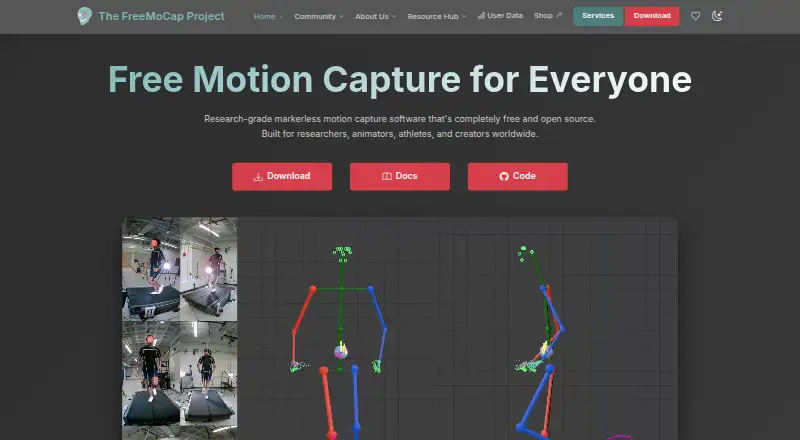
FreeMoCap is free, open-source software for recording and reconstructing full-body movement as 3D motion-capture data. It can use two or more standard webcams, GoPros, or smartphones as cameras. A printed ChArUco board is used to synchronize camera feeds and establish the 3D coordinate system. Users may also record video offline on mobile devices and import it later for processing. Results can be exported in formats including CSV, FBX, and .blend files, and a Blender add-on can load processed recordings as a rigged skeleton. Processing takes place locally, and the homepage says video data does not leave the user's machine. A backend server download is available for headless machines, remote capture rigs, and API use. The download page identifies the current release as alpha and asks users to provide feedback through Discord. Optional anonymous usage pings can include IP address, timestamp, and camera information; users can turn them off in the GUI. The project describes its audience as researchers, animators, athletes, and creators.
Good
- Uses common webcams, GoPros, or smartphones.
- Supports offline mobile recording and later import.
- Exports CSV, FBX, and .blend files.
- Video processing happens locally.
- Open source under AGPL-3.0.
Watch out
- The current release is in alpha.
- Optional usage pings can include IP and camera details.
- RTMPose does not currently have working Blender export.
Who it suits
FreeMoCap is intended for researchers, animators, athletes, and creators who want to reconstruct full-body movement in 3D. It may suit users who can provide multiple cameras and a printed calibration board, or import mobile video for later processing.
Verdict
FreeMoCap offers a local workflow for multi-camera 3D motion capture, with exports and Blender integration. Its alpha status and the RTMPose Blender-export limitation are worth considering for a production workflow.
Plans and prices
From FreeMoCap's own pricing page, checked 30 Sep 2026.
| Plan | Price | What it gives you |
|---|---|---|
| Free | Free | No subscriptions · no licenses · no hidden fees |
| FreeMoCap | Free | Markerless motion capture · local processing · desktop installers · AGPL-3.0 · Free forever; no subscriptions, licenses, or hidden fees |
The facts
Each one read from FreeMoCap's own pages, with the date it was checked.
What it does
- API
- A local REST API exposes camera detection, recording, playback, calibration, mocap processing, realtime pipelines and Blender operations.checked 15 Oct 2026
- Architecture
- FreeMoCap uses a React and TypeScript Electron frontend communicating with a Python backend over REST and WebSocket.checked 15 Oct 2026
- Audience
- The project says it is built for researchers, animators, athletes, and creators worldwide.checked 30 Sep 2026
- Blender integration
- The application can install its Blender add-on, detect Blender, export recordings to .blend files and open them in Blender.checked 15 Oct 2026
- Calibration
- A printed ChArUco board is waved through the camera views to synchronize feeds and establish the 3D coordinate system.checked 15 Oct 2026
- Camera inputs
- The official workflow supports two or more standard webcams, GoPros, smartphones used as cameras, and imported mobile video.checked 15 Oct 2026
- Camera support
- It supports two or more standard webcams, GoPros, or smartphones as cameras.checked 30 Sep 2026
- Current release
- The latest listed release is v2.0.0-alpha.25, published 24 September 2026, with CPU startup, Linux server, Blender export and hand-detection fixes.checked 15 Oct 2026
- Data protection
- The privacy policy says collected data is not sold or distributed to third parties except as required by law and is protected with industry-standard security measures.checked 30 Sep 2026
- Documentation
- Documentation covers installation, camera setup, architecture, API endpoints, development builds and troubleshooting, but the API pages are marked AI-generated and may contain inaccuracies.checked 15 Oct 2026
- Export formats
- Results include CSV, FBX, and .blend files, among other formats.checked 30 Sep 2026
- Funding model
- The project says it is funded through external grants and donations, while labor-intensive setup, support, training and custom work are paid services.checked 15 Oct 2026
- Headless use
- A backend server download is provided for headless machines, remote capture rigs, and API use.checked 30 Sep 2026
- Independent listing
- AlternativeTo lists FreeMoCap as free, open source under AGPL-3.0, supporting Linux, Windows, Mac and Python, with no comments or reviews on that listing.checked 15 Oct 2026
- Licence
- The project is licensed under GNU Affero General Public License version 3 (AGPL-3.0).checked 15 Oct 2026
- License
- The download page identifies FreeMoCap as open source licensed under AGPL-3.0.checked 30 Sep 2026
- Limit: alpha quality
- Release notes warn that the alpha may have rough edges, missing functionality and data-affecting bugs.checked 15 Oct 2026
- Limit: calibration burden
- A peer-reviewed gait study reports that ChArUco calibration takes operator training, about 1–2 minutes of board movement and 5–10 minutes of processing, with repeats if convergence fails.checked 15 Oct 2026
- Limit: maturity and adoption
- An independent technical review describes the project as alpha software and unsuitable for users needing a stable production pipeline or permissive closed-source distribution.checked 15 Oct 2026
- Limit: scale accuracy
- The current release notes warn that reconstructed skeleton scale may be wrong by roughly 10 percent.checked 15 Oct 2026
- Offline import
- Users can record video offline on mobile devices and import the files for processing later.checked 30 Sep 2026
- Offline use
- After MediaPipe and RTMPose models are downloaded, the application is documented to run offline without login.checked 15 Oct 2026
The company
- Company facts
- LinkedIn lists FreeMoCap Foundation as a nonprofit software-development organization founded in 2021, headquartered in Boston, Massachusetts, with 2–10 employees.checked 15 Oct 2026
- Company legal status
- The project is managed by the FreeMoCap Foundation, a Massachusetts 501(c)(3) nonprofit corporation.checked 15 Oct 2026
The full review of FreeMoCap
FreeMoCap is free, open-source software for reconstructing full-body 3D movement from video. It suits researchers, animators, athletes, and creators who want a local workflow built around ordinary cameras. The breadth of capture and export options is compelling, while the alpha release and RTMPose's missing Blender export make it a cautious choice for production-critical work.
Overview
FreeMoCap combines multi-camera recording with markerless 3D reconstruction. It accepts two or more standard webcams, GoPros, or smartphones, so users can build a rig without dedicated motion-capture cameras. A printed ChArUco board synchronizes feeds and establishes the 3D coordinate system; that keeps the hardware accessible, but calibration is an essential setup step rather than an optional convenience.
Mobile devices can record offline and have their video imported later, which separates capture from processing when connectivity or computer access is limited. Processing stays on the user's machine, keeping video local. Optional anonymous usage pings can contain an IP address, timestamp, and camera information, and are switchable in the GUI. The privacy policy says collected data is not sold or distributed to third parties except when required by law, with industry-standard security measures applied.
Key features
- Full-body tracking: Body, face, and hand tracking extend the system beyond a basic body-only solver, while cleanup tools help refine captured movement.
- Real-time output: Live output is useful for interactive workflows and immediate feedback, although the alpha release makes it harder to treat every result as production-stable.
- Interoperable exports: CSV, FBX, and .blend output support data analysis, animation pipelines, and Blender work rather than locking results to one application.
- Blender workflow: The FreeMoCap Blender add-on loads processed recordings as a rigged skeleton, making Blender a practical destination for animation and review.
- Headless operation: A backend download supports headless machines, remote capture rigs, and API use, giving technical teams options beyond a desktop interface.
- RTMPose caveat: RTMPose can produce 3D data, but its current post-hoc workflow does not provide working Blender export. Choose another processing route when Blender delivery is mandatory.
- Open source: The project is released under AGPL-3.0, which is attractive for users who need to inspect or adapt the software, subject to that license's obligations.
Pricing
FreeMoCap has one plan: Free at no cost. It has no subscriptions, licenses, or hidden fees. That removes per-seat and usage-budget concerns for researchers, students, and independent creators, and makes extended capture experimentation practical. Paid setup, support, training, and custom work are offered separately, so organizations needing guided deployment should budget for services rather than expecting a paid software tier.
Platforms
FreeMoCap supports Windows, macOS, and Linux, along with API access and self-hosted deployment. The combination suits desktop operators, Linux-based rigs, and teams integrating capture into their own infrastructure. The headless backend is particularly relevant for remote or automated setups.
Who it's for
Researchers benefit from local processing, CSV export, and an open-source license. Animators and creators get FBX and Blender paths plus support for inexpensive cameras. Athletes can record movement with phones and process it later. It is less suitable for teams that require a mature, production-guaranteed release or an RTMPose-to-Blender pipeline today.
Pros and cons
Pros
- No software charge: The Free plan has no subscription or license fee, so experimentation and recurring use do not consume a service quota.
- Uses familiar cameras: Webcams, GoPros, and smartphones lower the hardware barrier compared with specialized capture systems.
- Local video processing: Footage remains on the user's machine, a strong fit for sensitive research or private creative work.
- Useful export range: CSV, FBX, and .blend files cover analysis and common 3D animation handoffs.
Cons
- Alpha release: The project asks users to provide feedback, so production teams must accept greater release risk.
- Calibration required: A printed ChArUco board and synchronized feeds add setup work before capture.
- RTMPose Blender gap: RTMPose's 3D output cannot currently be exported to Blender through the documented workflow.
- Telemetry is opt-out: Anonymous usage pings can include IP, timestamp, and camera information unless disabled.
Alternatives
Choose Mocai instead if you want a freemium service with Android and iOS support, a public API and webhooks, but can work within one minute of footage per month and 15-second clips on its free plan.
Cascadeur is the better fit for non-commercial animation and rigging, with a free-forever plan that exports only to .casc.
Pick Move AI if a cloud-oriented freemium workflow suits you; its free offer provides 30 credits once for videos up to 30 seconds.
Rokoko Studio offers a free-forever Starter plan with 30 seconds of Vision AI video processing per month and five Studio imports.
Choose Rokoko Create for text-to-motion clips alongside 30 seconds of monthly Vision AI processing and five Studio imports.
NANSENSE Studio is an alternative motion-capture application for iOS and Windows.
DeepMotion Animate 3D suits web and API users who can work within a freemium allowance of 25 credits per month and 20-second clips.
Choose Plask Motion for a browser-based workflow with a 15-second daily limit on its freemium plan.
For broader comparisons, see Game Motion Capture Software, Motion Capture Software, and AI Motion Capture Software.
Verdict
FreeMoCap is a strong recommendation for researchers, animators, athletes, and independent creators who need no-cost, locally processed 3D capture from readily available cameras. Its open-source code, broad exports, Blender add-on, and headless options make it unusually adaptable. Look elsewhere when an alpha release is too risky for a dependable production pipeline or when RTMPose must export directly into Blender.
Alternatives to FreeMoCap
- 1
XR Animator
Free planOpen sourceAndroidWebLinuxmacOS8.5Free plan - 2
Move AI
Free planiOSWebAPILinux8.2From $18 a month - 3

Rokoko Create
Free planAndroidiOSWebAPI8.2From $12 a month - 4

Rokoko Studio
Free planAndroidiOSWebAPI8.2Free plan - 5

Animaze
Free planAndroidiOSAPImacOS8.1From $19.99 a year - 6

Plask Motion
Free planWebAPIExtensionmacOS7.8From $18 a month