
Rokoko Create
Rokoko Create generates 3D motion from video clips or text prompts, then lets users edit the result in Rokoko Studio and export it for a 3D engine.
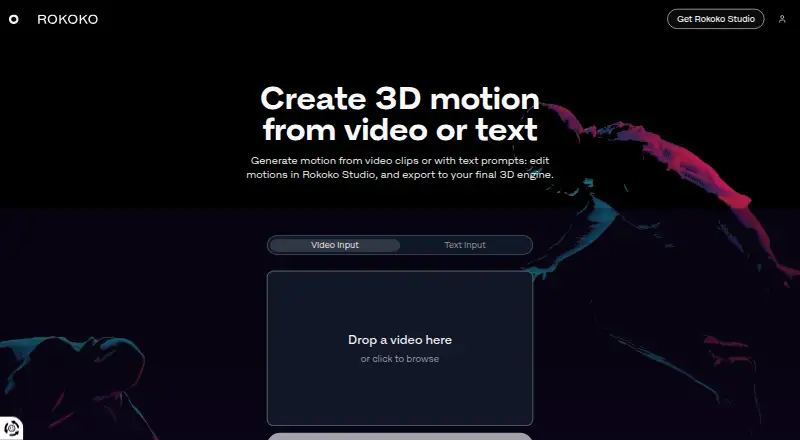
What Rokoko Create is
Rokoko Create generates 3D motion from video clips or text prompts, then lets users edit the result in Rokoko Studio and export it for a 3D engine. Its Vision AI video processing allowance varies by plan. Starter and paid plans include unlimited text-to-motion clips, but Studio imports are capped by plan except on Pro. Motion can be exported as FBX, BVH, or CSV. Rokoko says motion generated from text or video can be used commercially. FBX and BVH exports are described as compatible with skeletons including UE5 Manny, HIK, and Mixamo, and with tools such as Blender, Unreal Engine, Unity, Cinema 4D, Maya, Houdini, MotionBuilder, and iClone. Rokoko Studio also supports real-time plugins for several of those tools. Starter is free forever and includes 30 seconds of Vision AI processing per month, five Studio imports per month, and one month of cloud storage. New accounts can try Plus or Pro free for seven days. Rokoko was founded in 2014 and is headquartered in Copenhagen, Denmark.
Good
- Generates motion from video or text prompts.
- Exports as FBX, BVH, or CSV.
- Text-to-motion clips are unlimited on Starter and paid plans.
- Generated motion data can be used commercially.
- New accounts can try Plus or Pro free for seven days.
Watch out
- Starter includes 30 seconds of video processing monthly.
- Starter limits Studio imports to five per month.
- Studio import limits vary by plan except on Pro.
Who it suits
Rokoko Create suits people making 3D motion for use in a 3D engine, whether starting from video or a text prompt. Its export formats and listed software compatibility may suit motion workflows using Rokoko Studio and external 3D tools.
Verdict
Rokoko Create combines video and text motion generation with Studio editing and multiple export formats. Plan-specific video allowances and Studio import caps are important to consider.
Plans and prices
From Rokoko Create's own pricing page, checked 15 Oct 2026.
| Plan | Price | What it gives you |
|---|---|---|
| Starter | Free | Vision AI 30s/month · unlimited text-to-motion · 5 Studio imports/month · 1-month cloud storage · free forever |
| Basic | $12 a month | Vision AI 600s/month · unlimited text-to-motion · 100 Studio imports/month · unlimited cloud · billed monthly |
| Plus | $28 a month | Vision AI 3000s/month · unlimited text-to-motion · 1000 Studio imports/month · livestreaming · team management · billed monthly |
| Pro | $70 a month | Vision AI 15000s/month · unlimited text-to-motion and imports · Face Capture · advanced Command API · CSV export · billed monthly |
| Enterprise | $150 a month | local storage · extra offline days · custom support hours · onboarding · SLA · starting from; billed monthly |
The facts
Each one read from Rokoko Create's own pages, with the date it was checked.
What it does
- AI model
- The Create model is proprietary and trained on millions of Rokoko motion assets and text pairs.checked 15 Oct 2026
- API
- Studio's HTTP Command API can start or stop recording, calibrate, reset actors, return scene information and attach trackers; its default port is 14053.checked 15 Oct 2026
- Commercial rights
- Rokoko says motion generated by text-to-motion and video-to-motion may be used commercially.checked 15 Oct 2026
- Commercial use
- Rokoko says all motion data generated with text-to-motion and video-to-motion can be used commercially.checked 7 Oct 2026
- Documentation depth
- SDK documentation includes quick start, networking and calibration guides, runnable examples, and RCSP/RGMP protocol references.checked 15 Oct 2026
- Enterprise storage
- Enterprise includes local storage with no cloud sync, extra offline days, custom support hours, custom onboarding, and a custom SLA.checked 7 Oct 2026
- Export compatibility
- The product page says exported FBX or BVH files are compatible with major skeletons including UE5 Manny, HIK, and Mixamo, and work in Blender, Unreal Engine, Unity, Cinema 4D, Maya, Houdini, MotionBuilder, and iClone.checked 7 Oct 2026
- Exports
- Studio exports FBX on all plans, BVH on paid plans and CSV on Pro and Enterprise, with HumanIK, Mixamo and Unreal skeleton presets.checked 15 Oct 2026
- Funding news
- TechCrunch reported on August 17, 2022 that Naver Z made a strategic investment valuing Rokoko above $80 million.checked 15 Oct 2026
- G2 review availability
- G2 says there are not enough Rokoko reviews to provide buying insight.checked 15 Oct 2026
- Google Play listing
- Rokoko Face Capture shows 5K+ downloads but no displayed star rating or review count; the listing says a Rokoko Headcam is required.checked 15 Oct 2026
- Integrations
- Studio provides native real-time integrations for Blender, Unreal Engine, Unity, Maya, Cinema 4D, MotionBuilder, Houdini, iClone and Cartoon Animator 4.checked 15 Oct 2026
- Licence
- The Studio EULA grants a non-exclusive licence and prohibits reproduction, distribution, sublicensing, renting or lending, indicating proprietary software.checked 15 Oct 2026
- Limit: desktop dependency
- CG Channel reported that users need Rokoko Studio desktop software to clean issues such as foot slippage and export Create animations.checked 15 Oct 2026
- Limit: facial calibration
- An Apple reviewer criticized the absence of a neutral-face calibration control, saying facial performances could look poor.checked 15 Oct 2026
- Limit: mobile compatibility
- Apple reviewers reported that Rokoko Remote required legacy Studio, failed to connect on some phones and had iPhone 13 compatibility problems.checked 15 Oct 2026
- Limit: review evidence
- SoftwareWorld reports no approved Rokoko Studio reviews and lists the product as proprietary, cloud hosted and web based.checked 15 Oct 2026
- Limit: shipping and sales
- The sole Trustpilot reviewer alleged undisclosed US import duties, roughly $4,000 shipping on a roughly $5,000 order, and refund difficulties.checked 15 Oct 2026
- Motion scope
- Rokoko positions Create primarily for idles, walks, gestures and other short basic sequences; complex dynamic motion may require retries or cleanup.checked 15 Oct 2026
The company
- Company
- Rokoko says it is headquartered in Copenhagen, Denmark, and was founded in 2014.checked 7 Oct 2026
- Company activities
- LinkedIn says Rokoko builds motion-capture hardware and software for 3D, robotics, teleoperation, research and real-time motion data.checked 15 Oct 2026
- Company profile
- LinkedIn describes Rokoko as a privately held Copenhagen computer-hardware company founded in 2014 with 51–200 employees.checked 15 Oct 2026
- Founded
- 2014checked 28 Sep 2026
- Headquarters
- Copenhagen, Denmarkchecked 28 Sep 2026
The full review of Rokoko Create
Rokoko Create is a motion-generation service that turns video clips or text prompts into 3D animation, with editing handled in Rokoko Studio. It is best suited to animators and game creators who want generated motion in a familiar production pipeline. Its unlimited text-to-motion clips are a strong draw, but video allowances and Studio import caps shape how useful each plan is.
Overview
Create links generation, editing, and export: make motion from video or text, refine it in Studio, then send it to a 3D engine as FBX, BVH, or CSV. Rokoko permits commercial use of motion data generated by either method, making the workflow relevant to production as well as experimentation. The key distinction is that unlimited text generation does not mean unlimited editing: most plans restrict how many clips can be imported into Studio.
Key features
Video and text motion generation
Vision AI video processing is metered monthly, from 30 seconds on Starter to 15,000 seconds on Pro. That gives occasional users a way to try video-driven motion at no cost, while creators processing footage regularly will need a larger allowance. Starter and paid plans all include unlimited text-to-motion clips, but Studio imports are capped on Starter, Basic, and Plus. Pro is the only plan that removes that import limit, so it better fits workflows that generate and refine many clips.
Studio editing and export
Rokoko Studio supports real-time plugins for Blender, Houdini, Unity, Unreal, Maya, Cinema 4D, Reallusion, and MotionBuilder. Exported FBX and BVH files are compatible with skeletons including UE5 Manny, HIK, and Mixamo, and work in Blender, Unreal Engine, Unity, Cinema 4D, Maya, Houdini, MotionBuilder, and iClone. This breadth makes Create more useful for teams already working in those tools; creators seeking a standalone animation editor should look elsewhere.
Pricing
Starter is free forever and includes 30 seconds of Vision AI video processing each month, unlimited text-to-motion clips, five Studio imports monthly, and one month of cloud storage. It is a low-commitment way to explore prompt generation, but the five-import cap makes it a poor fit for sustained editing.
Basic costs $12 a month, billed monthly. It raises video processing to 600 seconds a month and imports to 100, with unlimited cloud storage. This suits individual creators with moderate video use, though frequent motion generation can still run into the import ceiling.
Plus costs $28 a month, billed monthly, and provides 3,000 seconds of video processing, 1,000 Studio imports, and unlimited cloud storage. Unlimited team members and user management make it the more natural choice for a collaborative group, although its import quota remains finite.
Pro costs $70 a month, billed monthly. It includes 15,000 seconds of video processing, unlimited text-to-motion clips and Studio imports, and unlimited cloud storage. Choose it when high video volume or unrestricted Studio use justifies the price; smaller workflows may not need its generous allowances.
Enterprise starts at $100 a month and includes local storage without cloud sync, extra offline days, custom support hours, custom onboarding, and a custom SLA. It is aimed at organizations that need those operational terms rather than simply higher generation quotas. New accounts can try Plus or Pro free for seven days. Rokoko’s support hours are weekdays 09:00–17:00 GMT+2, excluding Greek public holidays.
Rokoko’s pricing summary also gives a paid starting price of $10/mo (annual); the Basic, Plus, and Pro prices above are monthly-billed rates. Compare the billing terms as well as quotas when choosing a tier.
Platforms
Create is available on the web, and Rokoko Studio downloads are offered for Windows and macOS. That split suits users who want browser-based generation followed by desktop editing; it does not provide a Studio download for other operating systems.
Who it's for
Choose Create if you need video- or prompt-generated motion that can move into Rokoko Studio and established 3D tools, particularly when commercial use matters. Starter is suitable for occasional exploration, Basic for an individual with moderate processing needs, and Plus for teams that need shared user management. Pro is the clearest fit for high-throughput creators who cannot work around import caps. If your workflow does not include Studio or compatible 3D tools, much of Create’s pipeline advantage is less relevant.
Pros and cons
- Pro: Unlimited text-to-motion generation is included even on the free plan, so prompt experimentation is not constrained by a clip quota.
- Pro: Commercial use is permitted for motion generated from video and text, and exports cover common formats and production tools.
- Pro: Plus adds unlimited team members and user management, while Enterprise offers local storage and tailored support terms.
- Con: Starter’s five monthly Studio imports and 30 seconds of video processing make it better for sampling than regular production.
- Con: Basic and Plus still cap Studio imports, so unlimited text generation alone does not guarantee an unrestricted editing workflow.
- Con: Studio is limited to Windows and macOS downloads, narrowing the desktop workflow for users on other systems.
Alternatives
Move AI is worth comparing if you want a freemium motion-capture option with a one-time free allowance of 30 credits and support across iOS, desktop, web, API, and self-hosted platforms. DeepMotion Animate 3D offers a freemium web and API option with a 25-credit monthly allowance, 20-second clips, and a two-person limit. Plask Motion is another web-based freemium option, with a 15-second daily limit on its free tier.
Krikey AI is an alternative freemium service. Motion Transfer AI is another option with a free plan and trial. Melted Crayons TV offers a free, image-only Sketch tier with 30 monthly credits and watermarked 1080p comic video export. Storybook Adventures is a free-download option for iOS and macOS, with animation tokens sold separately. Artiroom is a web-based freemium alternative.
For broader category comparisons, browse AI Animation Makers, AI Motion Capture Software, Game Motion Capture Software, Motion Capture Software, and Motion Tracking Software.
Verdict
Rokoko Create is a strong choice for animators and game creators who want motion from video or text, Studio editing, and export into established 3D tools, with commercial use allowed. The main reason to choose it is that connected workflow and the generous text-to-motion allowance; the main reason to look elsewhere is that video processing and Studio imports are quota-bound until Pro. Start with Starter to assess the workflow, and move up only when its limits interrupt regular production.
Alternatives to Rokoko Create
- 1
XR Animator
Free planOpen sourceAndroidWebLinuxmacOS8.5Free plan - 2
Move AI
Free planiOSWebAPILinux8.2From $18 a month - 3

Rokoko Studio
Free planAndroidiOSWebAPI8.2Free plan - 4

Animaze
Free planAndroidiOSAPImacOS8.1From $19.99 a year - 5

Plask Motion
Free planWebAPIExtensionmacOS7.8From $18 a month - 6

Mocai
Free planAndroidiOSWebAPI7.6From $10 a month