
Move AI
Move AI offers markerless motion-capture systems that use AI to produce motion data.
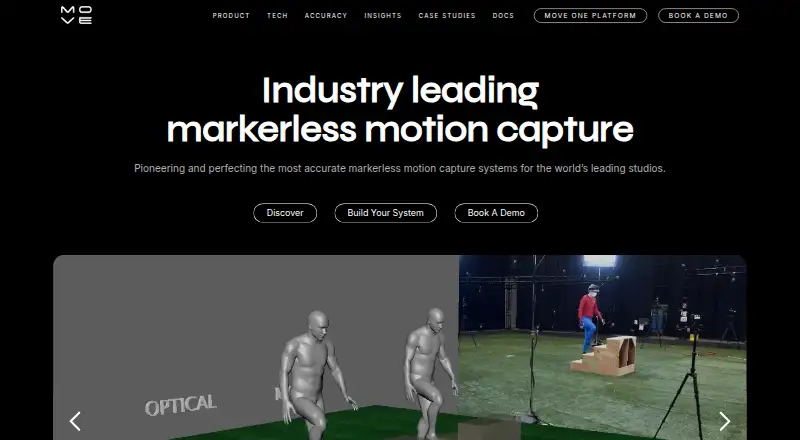
What Move AI is
Move AI offers markerless motion-capture systems that use AI to produce motion data. Move One is an iPhone app that turns video captured with a single camera into 3D animation. The free plan provides 30 credits once, with no expiration, for videos up to 30 seconds. Genesis processes motion data on premises through a desktop application using Nvidia GPUs. It requires one Nvidia GPU and 6–12 Z CAM cameras and lenses; its product page lists capture for 1–8 people in volumes of 4 × 4 meters or 20 × 20 meters. Genesis can process RGB or grayscale feeds from many existing Vicon or OptiTrack motion-capture cameras. It integrates with Peel Capture for camera control, unified start and stop commands, automated file naming, and project management. Output formats include FBX, BVH, GLB, USDZ, Blender, C3D, JSON, and MP4 previews. Move AI says it does not actively try to identify people in video, motion data, or output files.
Good
- Free plan credits do not expire
- Move One uses a single iPhone camera
- Genesis supports several motion-data export formats
- Genesis can use some existing Vicon or OptiTrack feeds
Watch out
- Free videos are limited to 30 seconds
- Monthly credits do not roll over
- Genesis requires an Nvidia GPU and 6–12 Z CAM cameras
- Internet transmissions are not guaranteed completely secure
Who it suits
Move One may suit iPhone users seeking single-camera video-to-animation capture. Genesis is aimed at teams with the required Nvidia GPU and camera setup, or compatible existing Vicon or OptiTrack cameras.
Verdict
Move AI covers both single-camera iPhone capture and an on-premises Genesis workflow with specified hardware requirements. Check the credit limits and Genesis setup needs against the work you plan to do.
Plans and prices
From Move AI's own pricing page, checked 14 Oct 2026.
| Plan | Price | What it gives you |
|---|---|---|
| Move One Free | Free | 30 one-time credits · 30-second videos · credits do not expire · Free account |
| Free | Free | 30 credits once, do not expire · videos up to 30 seconds |
| Move API s1 | $0.01, paid once | Single-camera model · resolution and frame-rate multipliers apply · $0.012 per processed second |
| Move API m1 | $0.02, paid once | Multi-camera model · camera-count multipliers apply · $0.024 per processed second per camera |
| Move API s2 | $0.02, paid once | Single-camera model · resolution and frame-rate multipliers apply · $0.024 per processed second |
| Move API m2 | $0.04, paid once | Multi-camera model · camera-count multipliers apply · $0.043 per processed second per camera |
| Starter | $18 a month | 60 credits/month · videos up to 60 seconds · $18/month + VAT |
| Move One Starter | $18 a month | 60 credits/month · videos up to 60 seconds · $18/month + VAT |
| Move One Standard | $48 a month | 180 credits/month · videos up to 60 seconds · $48/month + VAT |
| Standard | $48 a month | 180 credits/month · videos up to 60 seconds · $48/month + VAT |
| Move One Plus | $225 a month | 240 credits/month · videos up to 60 seconds · $225/month + VAT |
| Plus | $225 a month | 240 credits/month · videos up to 60 seconds · $225/month + VAT |
| Advanced | $490 a month | 700 credits/month · videos up to 60 seconds · $490/month + VAT |
| Move One Advanced | $490 a month | 700 credits/month · videos up to 60 seconds · $490/month + VAT |
The facts
Each one read from Move AI's own pages, with the date it was checked.
What it does
- Acquisition financial context
- Oxford Metrics said Move AI reported £1.1 million of unaudited 2025 revenue and that technology, patents, team and customers transferred to Vicon.checked 14 Oct 2026
- Administration news
- K2 Partners reported that administrators were appointed to Move Ai Ltd on 30 September 2026.checked 14 Oct 2026
- API authentication
- API calls require an Authorization API key; the documented endpoint is https://api.move.ai/ugc/graphql.checked 14 Oct 2026
- API documentation depth
- The developer documentation covers files, takes, jobs, lifecycle states, processing times, webhooks and complete Python workflow code.checked 14 Oct 2026
- API format
- The public single-camera API accepts MP4 video and returns FBX, USDC and USDZ animation data.checked 14 Oct 2026
- API pricing rules
- API pricing applies resolution and frame-rate multipliers, has a $0.10 minimum job charge, and offers custom or on-premise pricing through sales.checked 14 Oct 2026
- API SDKs
- Move documents a Python SDK named move-ugc-python and provides a JavaScript sample application; a Swift SDK is used by the Move One app.checked 14 Oct 2026
- API webhooks
- Job webhooks can report processing events such as completed jobs, and the docs advise webhooks instead of production polling.checked 14 Oct 2026
- Asset acquisition news
- Oxford Metrics announced on 9 October 2026 that it acquired Move AI assets for £525,000 cash plus approximately £200,000 of expenses.checked 14 Oct 2026
- Core market
- The company targets visual-effects, entertainment and gaming studios.checked 14 Oct 2026
- Existing systems
- Genesis can process RGB or grayscale feeds from many existing Vicon or OptiTrack motion-capture cameras.checked 3 Oct 2026
- Exports
- Genesis output formats include FBX, BVH, GLB, USDZ, Blender, C3D, JSON, and MP4 previews.checked 3 Oct 2026
- Funding
- VentureBeat reported a $10 million seed round in October 2023 from Play Ventures, Warner Music Group, RKKVC, Level2 Ventures and Animoca Brands.checked 14 Oct 2026
- Genesis calibration
- Genesis includes checkerboard calibration intended to improve foot placement and reduce jitter.checked 14 Oct 2026
- Genesis cameras
- Genesis requires one NVIDIA GPU together with six to twelve Z-Cams and lenses.checked 14 Oct 2026
- Genesis capacity
- The Genesis product page lists capture for 1–8 people and capture volumes of 4 × 4 meters or 20 × 20 meters.checked 3 Oct 2026
- Genesis capture scale
- Genesis supports one to eight people, 4x4m or 20x20m capture volumes, and permanent or portable deployment.checked 14 Oct 2026
- Genesis hardware
- Genesis requires one Nvidia GPU and 6–12 Z CAM cameras and lenses, and supports capture volumes up to 20 × 20 meters.checked 3 Oct 2026
- Genesis hardware requirements
- The equipment guide specifies Ubuntu 24.04, Intel i7/i9 eighth generation or newer, NVIDIA RTX 40/50 or A-series graphics, 64GB RAM, 80GB NVMe storage, and a 10Gb network.checked 14 Oct 2026
The company
- Company headquarters
- The registered office is International House, 142 Cromwell Road, London SW7 4EF, United Kingdom.checked 14 Oct 2026
- Company history
- Move says it has pioneered markerless motion capture since 2019 and developed patented AI for its motion engine.checked 3 Oct 2026
- Company legal identity
- Companies House identifies the maker as MOVE AI LTD, company 11886662, incorporated in England on 18 March 2019.checked 14 Oct 2026
- Company size
- LinkedIn lists Move AI as privately held with 11–50 employees and London headquarters.checked 14 Oct 2026
- Founded
- 2019checked 4 Oct 2026
The full review of Move AI
Move AI turns video into motion data through Move One, a single-camera iPhone app, and Genesis, an on-premises system for multi-camera capture. Move One best suits people creating short animations without a dedicated camera rig; Genesis is aimed at production teams able to provide specialized cameras and an Nvidia GPU. Its two workflows cover very different needs, so the right fit depends on your capture setup and credit use.
Overview
Move describes its products as markerless motion-capture systems powered by AI that create production-ready motion data. Move One makes 3D animation from iPhone video, while Genesis processes camera feeds on premises. That choice is practical as well as technical: Move One has monthly clip and credit caps, while Genesis requires a substantial dedicated setup.
Key features
Two capture workflows
Move One uses a single iPhone camera and supports clips up to 60 seconds on paid plans. That makes it a fit for short movements and animation tasks, not longer takes. The free plan is more restrictive, with videos capped at 30 seconds. Genesis captures 1–8 people in volumes of either 4 × 4 meters or 20 × 20 meters, but requires one Nvidia GPU and 6–12 Z CAM cameras and lenses. It is better suited to equipped production spaces than to an individual looking for a low-cost entry point.
Production pipeline and exports
Genesis integrates with Peel Capture for camera control, unified start and stop, automated file naming, and project management. It can also process RGB or grayscale feeds from many existing Vicon or OptiTrack motion-capture cameras, which may make it relevant to teams with those systems already in place. Export formats include FBX, BVH, GLB, USDZ, Blender, C3D, JSON, and MP4 previews, giving teams several ways to move results into existing workflows. Move AI also supports hand tracking and motion transfer, but does not offer AI character creation, a scene editor, or image-to-animation.
Privacy and security
Move AI says it does not actively try to identify people in video, motion data, or output files. It says it uses security measures to protect personal data, while also cautioning that internet transmission cannot be guaranteed completely secure. Genesis runs on premises, but that does not change Move AI’s stated limitation for information sent over the internet.
Pricing
Move AI is freemium. Free costs nothing and provides 30 credits once, with no expiry, for videos up to 30 seconds. It is a way to try short clips without a recurring charge, but the one-time credit allowance is not a monthly quota.
Starter costs $18 a month, billed $18/month + VAT, for 60 credits/month and videos up to 60 seconds. Standard is $48 a month, billed $48/month + VAT, for 180 credits/month and the same clip limit. Plus costs $225 a month, billed $225/month + VAT, for 240 credits/month; Advanced costs $490 a month, billed $490/month + VAT, for 700 credits/month. These paid tiers increase monthly credits rather than clip length, so check the volume you expect to process before stepping up. Monthly credits do not roll over, and buying extra credits requires an active monthly subscription. Genesis uses an on-premises workflow; its pricing is custom pricing.
Platforms
Move AI lists iOS, web, macOS, Windows, API, and self-hosted support; Move One is specifically an iPhone app, while Genesis is a desktop application. Its motion-capture platform support also identifies a web platform and Chrome extension.
Who it's for
Move One is the more suitable choice for animators or creators who can work from short iPhone clips and want a tiered monthly credit allowance. Genesis is for teams that need multi-person capture, larger volumes, or integration with existing Vicon or OptiTrack cameras and can meet its GPU and camera requirements. It is not a sensible match for someone seeking a small, hardware-free setup, and Move One’s clip limits may rule it out for longer performances.
Pros and cons
- Two distinct capture options: Move One serves single-camera iPhone work, while Genesis scales to 1–8 people and volumes up to 20 × 20 meters.
- Useful production connections: Genesis integrates with Peel Capture and can process feeds from many Vicon or OptiTrack systems.
- Broad export selection: FBX, BVH, GLB, USDZ, Blender, C3D, JSON, and MP4 previews accommodate varied downstream workflows.
- Short clips and non-rolling credits: Paid Move One videos stop at 60 seconds, monthly credits expire at the end of the month, and extras require an active subscription.
- Genesis needs dedicated equipment: One Nvidia GPU and 6–12 Z CAM cameras and lenses place it beyond casual or low-budget capture setups.
Alternatives
For a broader comparison of animation and capture tools, see AI Animation Makers, AI Motion Capture Software, Motion Capture Software, Game Motion Capture Software, and 3D Character Animation Software.
- Melted Crayons TV is a freemium option with a free Sketch plan for 30 monthly image credits and static comic video export, but no panel animation.
- Krikey AI is a freemium alternative with a free plan and a $15.00 per month Pro plan.
- DeepMotion Animate 3D offers a web-based free tier with 25 credits per month and clips up to 20 seconds.
- Motion Transfer AI has a free plan with one-time signup credits and watermark-free downloads that require payment.
- Plask Motion is a web-based freemium alternative with a 15-second daily limit on its free tier.
- Artiroom is a web-based freemium alternative with a one-time Starter Pack priced at $9.99, paid once.
- Charios offers a free web plan with 30 credits per month and 13 bundled mocap clips.
- LTX Studio is a web-based freemium option with 800 one-time credits for personal use on its free plan.
Verdict
Choose Move AI if you need markerless motion capture and either can work within Move One’s short clips and monthly credits or have the equipment for Genesis. Its clearest advantage is the choice between single-camera iPhone capture and an on-premises multi-camera workflow. Look elsewhere if you need longer Move One clips, rollover credits, or Genesis-scale capture without dedicated cameras and GPU hardware.
Getting started
- Visit https://move.ai/ and choose Move One or Genesis.
- For Move One, use the iOS app to capture video with a single camera.
- Choose the free plan or a paid monthly plan for Move One credits.
- For Genesis, prepare one Nvidia GPU and 6–12 Z CAM cameras and lenses.
- Run Genesis on premises through its desktop application.
Limits worth knowing
The free plan provides 30 credits once for videos up to 30 seconds. Paid plans provide 60 to 700 credits per month and support videos up to 60 seconds; monthly credits do not roll over.
Questions
Is Move AI free?
Yes. Move One has a free plan with 30 credits once, which do not expire, for videos up to 30 seconds.
How much do paid plans cost?
Starter costs $18/month plus VAT, Standard $48/month plus VAT, Plus $225/month plus VAT, and Advanced $490/month plus VAT.
Which platforms are supported?
The listed platforms include API, iOS, macOS, self-hosted, web, and Windows. Move One is an iPhone app, while Genesis runs on premises through a desktop application.
What does Genesis require?
Genesis requires one Nvidia GPU and 6–12 Z CAM cameras and lenses. It lists capture for 1–8 people in volumes of 4 × 4 or 20 × 20 meters.
What formats can Genesis export?
Its listed output formats include FBX, BVH, GLB, USDZ, Blender, C3D, JSON, and MP4 previews.
Does Move AI identify people in captured data?
Move says it does not actively try to identify people in video data, motion data, or output files.
Alternatives to Move AI
- 1
XR Animator
Free planOpen sourceAndroidWebLinuxmacOS8.5Free plan - 2

Rokoko Create
Free planAndroidiOSWebAPI8.2From $12 a month - 3

Rokoko Studio
Free planAndroidiOSWebAPI8.2Free plan - 4

Animaze
Free planAndroidiOSAPImacOS8.1From $19.99 a year - 5

Plask Motion
Free planWebAPIExtensionmacOS7.8From $18 a month - 6

Mocai
Free planAndroidiOSWebAPI7.6From $10 a month