
Rokoko Studio
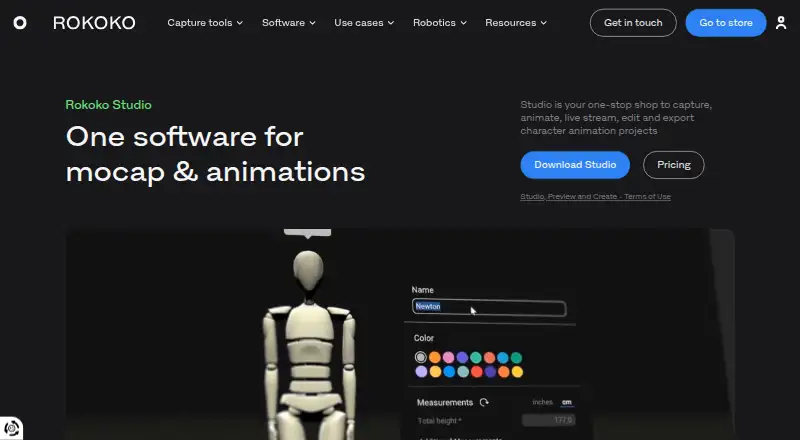
Rokoko Studio is software for capturing, editing, streaming, and exporting character animation projects.
What Rokoko Studio is
Rokoko Studio is software for capturing, editing, streaming, and exporting character animation projects. It connects Rokoko body, finger, and face capture tools, and can also turn video into animation through Rokoko Vision AI motion capture. Editing options include importing custom characters, retargeting motion, correcting poses, and applying filters such as root and foot locking and knee-pop smoothing. The product lists FBX export for Starter, BVH export for paid plans, and CSV export for Pro and Enterprise. Real-time plugins are listed for Blender, Houdini, Unity, Unreal, Maya, Cinema 4D, Reallusion, and MotionBuilder. Starter is free and includes 30 seconds per month of Vision AI processing, five Studio imports per month, and one month of cloud storage. Rokoko Studio runs on Windows and macOS; listed minimums are Windows 10 64-bit or macOS Big Sur and 8GB RAM.
Good
- Connects body, finger, and face capture tools
- Includes retargeting and pose correction
- Offers real-time plugins for listed animation tools
- Starter plan is free
- Supports FBX, BVH, and CSV exports by plan
Watch out
- Starter allows 30 seconds of Vision AI monthly
- Starter allows five Studio imports monthly
- Minimum listed memory is 8GB RAM
- CSV export is limited to Pro and Enterprise
Who it suits
It suits animation, VFX, game development, and education creators who need character-motion capture and editing. It is also relevant to users who want real-time plugins or video-to-animation processing.
Verdict
Rokoko Studio combines motion capture, cleanup, retargeting, and export in one character-animation workflow. Check the plan-specific limits and exports against the capture volume and output formats you need.
Plans and prices
From Rokoko Studio's own pricing page, checked 14 Oct 2026.
| Plan | Price | What it gives you |
|---|---|---|
| Starter | Free | Record/export mocap · cleanup filters · FBX export · Vision AI 30s/month · unlimited text-to-motion · 5 Studio imports/month · 1 month cloud storage · free forever |
| Basic (annual) | $10 a month | Starter features · custom character import and retargeting · BVH export and advanced options · Vision AI processing: 600s/month · 100 Text-to-Motion imports/month · unlimited cloud storage · billed annually |
| Basic | $12 a month | Starter features · custom-character import/retarget · BVH export · smoothing/loop segments · Vision AI 600s/month · 100 Studio imports/month · billed monthly |
| Basic (monthly) | $12 a month | Starter features · custom character import and retargeting · BVH export and advanced options · Vision AI processing: 600s/month · 100 Text-to-Motion imports/month · unlimited cloud storage · billed monthly |
| Plus (annual) | $20 a month | Basic features · live stream to third-party tools · unlimited team members and user management · custom skeleton presets · chat and email support · Vision AI processing: 3000s/month · 1000 Text-to-Motion imports/month · billed annually |
| Plus | $28 a month | Basic features · third-party livestreaming · unlimited team members · custom skeleton presets · chat/email support · Vision AI 3000s/month · 1000 Studio imports/month · billed monthly |
| Plus (monthly) | $28 a month | Basic features · live stream to third-party tools · unlimited team members and user management · custom skeleton presets · chat and email support · Vision AI processing: 3000s/month · 1000 Text-to-Motion imports/month · billed monthly |
| Pro (annual) | $50 a month | Plus features · Face Capture · advanced Command API · UDP trigger messages · CSV export · designated Customer Success Manager · Vision AI processing: 15000s/month · unlimited Text-to-Motion imports · billed annually |
| Pro (monthly) | $70 a month | Plus features · Face Capture · advanced Command API · UDP trigger messages · CSV export · designated Customer Success Manager · Vision AI processing: 15000s/month · unlimited Text-to-Motion imports · billed monthly |
| Pro | $70 a month | Plus features · Face Capture · advanced Command API · UDP triggers · CSV export · customer success manager · Vision AI 15000s/month · unlimited Studio imports · billed monthly |
| Enterprise (annual starting price) | $100 a month | Pro features · local storage with no cloud sync · extra offline days · custom support hours · custom onboarding · custom SLA · starting from; contact sales |
| Enterprise (monthly starting price) | $150 a month | Pro features · local storage with no cloud sync · extra offline days · custom support hours · custom onboarding · custom SLA · starting from; contact sales |
| Enterprise | $150 a month | Pro features · local storage/no cloud sync · extra offline days · custom support hours · custom onboarding · custom SLA · starting from; contact sales |
The facts
Each one read from Rokoko Studio's own pages, with the date it was checked.
What it does
- API access tier
- Command API documentation identifies Pro and Enterprise as the eligible plans.checked 14 Oct 2026
- Capture hardware and AI
- It accepts Smartsuit Pro II body, Smartgloves finger, Face Capture facial and Rokoko Vision video-to-animation inputs.checked 14 Oct 2026
- Cleanup filters
- Built-in filters include root locking, foot-lock changes, elevation tracking and knee-pop smoothing.checked 14 Oct 2026
- Cloud security statement
- Rokoko says synced data uses Amazon Web Services in US-East-1 and EU-Central-1.checked 14 Oct 2026
- Cloud storage
- Rokoko says Studio syncs data and content using Amazon Web Services infrastructure.checked 29 Sep 2026
- Command API
- The HTTP Command API can start or stop recording, calibrate, reset actors, return scene information and attach trackers.checked 14 Oct 2026
- Documentation
- The help center contains setup guides, filters, character import, retargeting, export, offline mode, API and integration documentation.checked 14 Oct 2026
- Editing
- Studio provides retargeting, custom character import, pose correction, and filters including root locking, foot locking, and knee pop smoothing.checked 29 Sep 2026
- Export formats
- FBX,BVH,CSVchecked 20 Sep 2026
- Exports
- Studio exports FBX and BVH with skeleton presets, mesh export and custom overrides; CSV is available on Pro and Enterprise.checked 14 Oct 2026
- Funding
- Crunchbase lists five venture funding rounds and nine investors, while the displayed funding amounts are obscured.checked 14 Oct 2026
- Integrations
- Native real-time integrations are provided for Unreal Engine, Unity, Blender, Maya, Cinema 4D, Houdini, MotionBuilder and iClone.checked 14 Oct 2026
- Intended users
- Rokoko says it serves creators across animation and VFX, game development, and education.checked 29 Sep 2026
- Known issue
- Rokoko recommends keeping most recordings to five minutes and not exceeding 30 minutes per scene.checked 14 Oct 2026
- Legal name
- Crunchbase lists the legal name as Rokoko Electronics ApS.checked 14 Oct 2026
- Licence
- The EULA treats Studio as licensed proprietary software, grants a non-exclusive worldwide licence and permits installation on unlimited computers of the licensee.checked 14 Oct 2026
- Limit: cleanup workload
- Reviewers say usable results can require substantial manual cleanup, especially for fingers, elbows, feet and drifting.checked 14 Oct 2026
- Limit: connectivity and tracking
- Independent commenters report Wi-Fi disconnections, magnetic interference, drift, foot sliding and difficult lower-body or fast-motion capture.checked 14 Oct 2026
The company
- Company founding
- LinkedIn lists the company as founded in 2014.checked 14 Oct 2026
- Company headquarters
- Rokoko identifies Copenhagen, Denmark as headquarters, with offices or teams in Denmark, Greece and the United States.checked 14 Oct 2026
- Company size
- LinkedIn lists Rokoko as privately held with 51–200 employees.checked 14 Oct 2026
- Founded
- 2014checked 23 Sep 2026
- Headquarters
- Copenhagen, Denmarkchecked 23 Sep 2026
Money
- Free plan
- Yeschecked 20 Sep 2026
The full review of Rokoko Studio
Rokoko Studio is character-animation software for capturing movement, editing it, and sending it to other tools. It suits animation, VFX, game-development, and education workflows that need capture and retargeting together.
Overview
Studio combines Rokoko body, finger, and face capture with Vision, its video-to-animation AI mocap option. It also supports editing, live streaming, and export, making it a practical hub for moving from captured performance toward a usable character animation.
The strongest case is for teams already working with Rokoko capture tools or needing retargeting and cleanup before handing animation to a 3D application or game engine. It runs on Windows and macOS, rather than as a browser-based editor, and its monthly Vision processing and import allowances make plan choice important for frequent use.
Key features
Capture, cleanup, and retargeting
Rokoko hardware can supply body, finger, and face capture; Vision adds video-to-animation AI mocap. Custom character import and retargeting are included from Basic, while editing tools include pose correction, root and foot locking, and knee-pop smoothing. Those correction options address common cleanup needs before an animation is passed downstream, though the product’s value depends on whether its capture routes and processing allowances fit the work.
Output and integrations
Starter includes FBX export. Paid plans add BVH, and Pro and Enterprise include CSV export, so users with a required handoff format should check the tier before committing. Real-time plugins are listed for Blender, Houdini, Unity, Unreal, Maya, Cinema 4D, Reallusion, and MotionBuilder. Plus adds live streaming to third-party tools; this is the more relevant step for workflows that need a live feed rather than only exported files.
Pricing
Starter is free forever, with 30 seconds of Vision AI processing per month, five Studio imports per month, and one month of cloud storage. It is useful for occasional or preliminary work, but the small processing and import quotas are restrictive for regular production.
Basic costs $10 a month billed annually, or $12 a month billed monthly. It adds custom character import and retargeting, BVH export, advanced options, 600 seconds of monthly Vision processing, 100 Text-to-Motion imports, and unlimited cloud storage. Basic is the entry point for users who need custom rigs and BVH, but its quotas remain finite.
Plus costs $20 a month billed annually, or $28 a month billed monthly. It includes Basic features, live streaming, unlimited team members and user management, custom skeleton presets, chat and email support, 3,000 seconds of Vision processing, and 1,000 Text-to-Motion imports. It makes more sense for collaborative workflows or heavier monthly capture than Basic.
Pro costs $50 a month billed annually, or $70 a month billed monthly. It adds Face Capture, advanced Command API, UDP trigger messages, CSV export, a designated Customer Success Manager, 15,000 seconds of Vision processing, and unlimited Text-to-Motion imports. This is the fit for higher-volume work or workflows that need those advanced controls and CSV output.
Enterprise has custom pricing, starting from $100 a year. It offers local storage without cloud sync, extra offline days, custom support hours, custom onboarding, and an SLA. That package is aimed at organizations with deployment or support requirements beyond the self-serve tiers.
New accounts can try Plus or Pro free for seven days. The free Starter tier is not the same as that trial: it has much lower monthly allowances and only one month of cloud storage. All paid annual prices above are monthly rates billed annually; monthly billing costs more on Basic, Plus, and Pro.
Platforms
Studio runs on Windows 10 64-bit and macOS Big Sur, with 8GB RAM minimum on either system. That makes it a desktop workflow rather than a browser-first option.
Who it's for
Studio is best suited to creators in animation and VFX, game development, or education who need capture, character retargeting, cleanup, and downstream output in one workflow. Teams needing live streaming, shared user management, or chat and email support should consider Plus; high-volume Vision use, Face Capture, or CSV export points toward Pro. It is less compelling for occasional users whose needs fit Starter’s tight caps or for anyone whose required output format is not covered by their intended tier.
Pros and cons
- Pros: Body, finger, and face capture options plus Vision AI give users multiple routes into motion capture.
- Pros: Retargeting, custom character import, pose correction, and dedicated cleanup filters support a fuller capture-to-animation workflow.
- Pros: Plugins for major 3D tools and engines, alongside FBX, BVH, and tier-dependent CSV export, provide several handoff paths.
- Cons: Starter limits Vision processing to 30 seconds monthly and Studio imports to five, making sustained use difficult without upgrading.
- Cons: Key capabilities and formats are tier-gated: retargeting and BVH start at Basic, live streaming at Plus, and Face Capture and CSV at Pro.
- Cons: Enterprise requires custom pricing and is the only plan with local storage and no cloud sync.
Alternatives
For a broader comparison, see Motion Capture Software, Game Motion Capture Software, 3D Character Animation Software, 3D Animation Software, and Animation Software.
- DeepMotion Animate 3D is a freemium, web and API option with a free tier capped at 25 credits per month and 20 seconds per clip.
- QuickMagic offers a free web and API tier with 50V Coins, two queued videos, a 30-second video limit, and FBX export.
- Move AI has a free tier with 30 credits that do not expire and supports videos up to 30 seconds.
- Autodesk Flow Studio is a web option whose free tier includes 300 monthly credits, AI motion capture, and Maya and Blender scene export.
- AIMoCap has a free web and API tier with 100 monthly credits, one concurrent upload, and a 30-second video limit.
- Plask Motion is a browser-based option with a free tier limited to 15 seconds daily and 1 GB storage.
- FreeMoCap is a free option for users who want software with no subscriptions or licenses, and it supports Linux, macOS, and Windows.
- mimem.ai is a web and mobile option with 50 free tokens daily, 2 GB storage, and three monthly FBX exports on its free tier.
Verdict
Choose Rokoko Studio if your work needs a desktop capture-to-animation workflow with retargeting, cleanup, and integrations into established 3D tools. Its main advantage is the breadth of that workflow, while its main drawback is that useful formats, features, and processing headroom depend on paid tiers. Look elsewhere if you need a browser-first workflow, a different platform, or a free plan with room for sustained capture.
Alternatives to Rokoko Studio
- 1

Cascadeur
Free planAndroidiOSAPILinux8.9From $96 a year - 2
Rive
Free planAndroidiOSWebLinux8.7From $9 a month - 3

Powtoon
Free planAndroidiOSWebExtension8.6From $8 a month - 4

Animation Desk
Free planAndroidiOSmacOSWindows8.6From $2.49 a month - 5

Houdini
Free planWindowsmacOSLinux8.4From $95 a year - 6
iClone
Free planiOSAPIWindows8.4Free plan