Motion Transfer AI
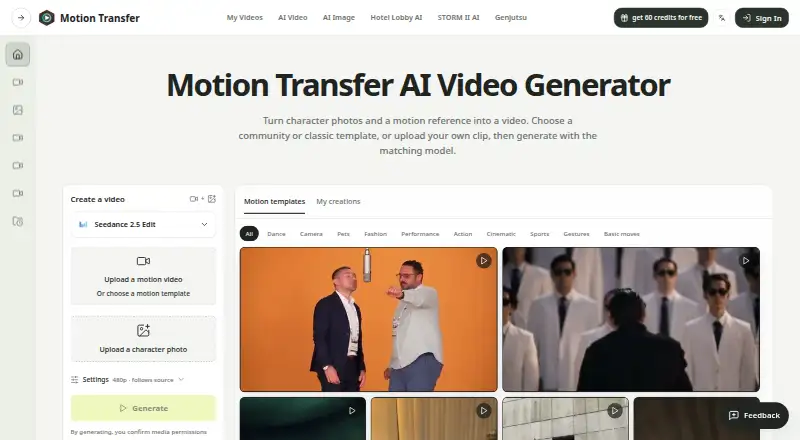
Motion Transfer AI animates a character photo by applying movement from a reference video, including gestures, expressions and body movement.
What Motion Transfer AI is
Motion Transfer AI animates a character photo by applying movement from a reference video, including gestures, expressions and body movement. Users can upload a motion video or choose a template before adding a character photo; the studio also indicates support for up to 30 reference images. Listed models include Kling 2.6 Motion Control, Kling 3.0 Motion Control, Wan 2.2 Animate Move, Wan 2.2 Animate Replace, Seedance 2.0 and Seedance 2.5.
Users can preview clips in My creations, download them and reopen available results from account history. Reference videos are described as 4–30 seconds; the FAQ gives limits of up to 10 seconds for Kling Match photo and up to 30 seconds for Match video. Model, resolution and clip length affect credit use, with an estimate shown before generation. The free Basic plan includes 18 one-time signup credits, but previews and downloads are watermarked. The service warns that facial details, clothing edges, lighting and background objects can shift during movement.
Good
- Accepts uploaded motion videos or templates.
- Offers several listed motion models.
- Shows an estimate of credit use before generation.
- Provides previews and account history.
- Privacy policy describes encryption in transit.
Watch out
- Free plan has 18 one-time signup credits.
- Free previews and downloads are watermarked.
- Watermark-free downloads require payment.
- Generated visual details can shift during movement.
Who it suits
Motion Transfer AI suits people who want to animate a character photo from a reference video or template. Users should be prepared to inspect outputs for visual changes and to pay for watermark-free downloads.
Verdict
Motion Transfer AI offers photo animation with a choice of listed models and reference-video workflows. The free plan is limited and watermarked, and generated clips may alter visual details.
Plans and prices
From Motion Transfer AI's own pricing page, checked 15 Oct 2026.
| Plan | Price | What it gives you |
|---|---|---|
| Basic | Free | 18 one-time signup credits · generation history · watermarked previews/downloads · up to 3 images or 1 video · watermark-free downloads require payment |
| Starter | $100 a year | 2,400 credits/year · up to 400 images · up to 133 videos · up to 4K images and HD video depending on model · image editing, video creation and motion transfer · watermark-free downloads · generation history · $100.0 charged yearly |
| Business | — | 48,000 credits/year · up to 8,000 images · up to 2,666 videos · up to 4K images and HD video depending on model · image editing, video creation and motion transfer · watermark-free downloads · generation history · shared credits across image and video models · $599.0 charged yearly |
| Pro | — | 21,600 credits/year · up to 3,600 images · up to 1,200 videos · up to 4K images and HD video depending on model · image editing, video creation and motion transfer · watermark-free downloads · generation history · shared credits across image and video models · $360.0 charged yearly |
The facts
Each one read from Motion Transfer AI's own pages, with the date it was checked.
What it does
- API
- The pricing page lists API access as coming soon for Business.checked 3 Oct 2026
- API scope
- The privacy policy explicitly includes APIs among the service components, but the opened site navigation provides no public API reference or SDK documentation.checked 15 Oct 2026
- Commercial rights
- The terms say users retain rights in lawful inputs and own outputs generated for their account, subject to applicable law and the terms.checked 15 Oct 2026
- Credits
- Model choice, resolution, and clip length affect credit use, and the workspace shows an estimate before generation.checked 3 Oct 2026
- Data collected
- The privacy policy lists account, billing, prompts, portrait uploads, reference videos, model settings, generated outputs, support data and technical-security data as collected categories.checked 15 Oct 2026
- Data handling
- The privacy policy says generation data can include prompts, portrait uploads, reference videos, model settings, task metadata, and generated outputs; AI model-processing providers may receive data as needed to run generations.checked 3 Oct 2026
- Developer restrictions
- The terms prohibit reverse engineering, scraping, model extraction and bypassing rate limits or access controls.checked 15 Oct 2026
- Google Play availability
- The Android listing shows 1K+ downloads, in-app purchases and an Everyone/3+ content rating.checked 15 Oct 2026
- Google Play data safety
- Google Play states that no data is shared with third parties, the app may collect personal and financial information plus four other data types, and data is encrypted in transit.checked 15 Oct 2026
- Google Play features
- The Android listing describes Steady Dancer, Kling Standard and Kling Pro models, 480p/576p/720p output, custom and negative prompts, audio controls and a built-in gallery.checked 15 Oct 2026
- Google Play update
- The Android listing says it was updated on October 4, 2026 and includes improved performance and error handling.checked 15 Oct 2026
- Google sign-in privacy
- Motion Transfer says it does not sell Google sign-in data, use it for targeted advertising or use it to train AI models.checked 15 Oct 2026
- History and downloads
- Signed-in users can reopen generated results from history or My creations and download selected clips or images.checked 15 Oct 2026
- Image generation
- The separate AI Image Generator creates still images from text prompts or reference images, with model, aspect ratio, resolution and image-count controls.checked 15 Oct 2026
- Image references
- Supported image models accept JPEG, PNG or WebP references, with model-dependent limits of up to 16 images.checked 15 Oct 2026
- Image variations
- The image generator can request from one to four images in a generation.checked 15 Oct 2026
- Input limits
- Kling accepts one JPEG or PNG image up to 10 MB, Wan also accepts WebP, and Seedance accepts multiple reference images plus motion video.checked 15 Oct 2026
- Inputs
- Users can upload a motion video or choose a template, then add a character photo; the studio also shows support for up to 30 reference images.checked 3 Oct 2026
Where it runs
- AppBrain app details
- AppBrain lists the Android app as free, 133.71 MB, version 1.0.1, suitable for Everyone and containing no ads.checked 15 Oct 2026
- AppBrain downloads
- AppBrain reports about 1.7 thousand total downloads and 620 downloads in the preceding 30 days for the Android app.checked 15 Oct 2026
- Apple app details
- The iOS/iPadOS listing is free with in-app purchases, is 136 MB, and is not verified for macOS.checked 15 Oct 2026
- Apple developer
- The Apple listing names ZEKERIYA KUTAY BEKLERIC as developer.checked 15 Oct 2026
Money
- Free allowance
- New accounts receive 18 starting credits, and weekly check-ins can provide up to 60 additional credits during the reward cycle.checked 15 Oct 2026
The company
- Licence and ownership
- The service software, workflows, interface, branding and documentation are owned by Motion Transfer or its licensors; no open-source licence is stated.checked 15 Oct 2026
Alternatives to Motion Transfer AI
- 1
Move AI
Free planiOSWebAPILinux8.2From $18 a month - 2

Rokoko Create
Free planAndroidiOSWebAPI8.2From $12 a month - 3

Viggle
Free planAndroidiOSWebAPI8.2From $7.99 a month - 4
Krikey AI
Free planAndroidiOSWeb8.1From $10 a month - 5
Melted Crayons TV
Free planAndroidiOSWebAPI8.0From $9.99 a month - 6

Plask Motion
Free planWebAPIExtensionmacOS7.8From $18 a month