
Webcam Motion Capture
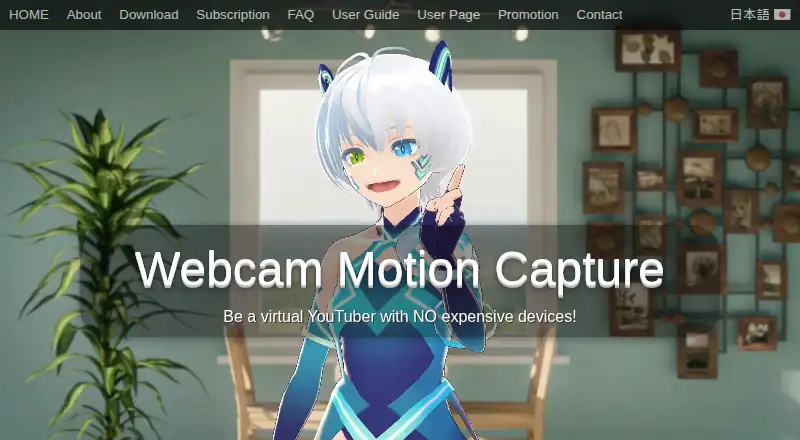
Webcam Motion Capture uses a computer or smartphone camera to control a 3D avatar.
What Webcam Motion Capture is
Webcam Motion Capture uses a computer or smartphone camera to control a 3D avatar. It tracks hands and fingers, the head and upper body, facial expressions, eye gaze, blinking, and lip sync. Tracking data can be sent through the VMC protocol to compatible apps, including VSeeFace and game engines with plugins. The app can save motion capture data as an FBX file for use in software such as Blender, Maya, and 3ds Max. Its maker describes using OBS Studio to record or stream video with an avatar. It can also receive mocopi motion data and combine it with hand and facial tracking. The FAQ lists Windows 10 or later and macOS Catalina or later, and the software is listed for iOS, macOS, and Windows. A free plan is available, but a subscription is required to hide the interface, send tracking data to external apps, or save FBX files. Commercial creation and monetization are permitted; resale or redistribution of the app is not.
Good
- Tracks hands, face, eye gaze, and lip sync
- Sends tracking data to VMC-compatible apps
- Can save motion capture as FBX
- Can combine mocopi data with hand and facial tracking
- Free plan available
Watch out
- Subscription required for external tracking data use
- Subscription required to save FBX files
- Subscription required to hide the interface
- Runs on Windows 10+ or macOS Catalina+
Who it suits
Webcam Motion Capture suits avatar creators who want camera-based tracking for hands, face, and upper body. It may also suit users who need VMC data for compatible apps or FBX motion files, provided they have the required subscription for those functions.
Verdict
Webcam Motion Capture covers a broad set of avatar tracking inputs and offers VMC output and FBX saving. The free plan does not include interface hiding, external app data use, or FBX saving.
Plans and prices
From Webcam Motion Capture's own pricing page, checked 20 Sep 2026.
| Plan | Price | What it gives you |
|---|---|---|
| Free | Free | All tracking features can be tried for free |
| 90 days | Priced on request | Non-recurring prepaid access |
| 360 days | Priced on request | Non-recurring prepaid access |
| Lifetime | Priced on request | Future software updates · Non-recurring license |
| Free download | Free | Tracking features available; UI hiding and external tracking data use require a subscription |
| Prepaid Plan | — | 90 days · 360 days · Lifetime; includes future updates; payment page does not display prices |
| Subscription | Priced on request | Includes future software updates; cancel anytime; payment page does not display a price in the opened page |
The facts
Each one read from Webcam Motion Capture's own pages, with the date it was checked.
What it does
- Animation export
- The app can save motion capture data as an FBX file for use in software such as Blender, Maya, and 3ds Max.checked 3 Oct 2026
- Commercial use
- The user agreement permits commercial creation and monetization of digital content, but prohibits reselling, redistributing, or incorporating the app into another product.checked 3 Oct 2026
- Mobile tracking integrations
- The FAQ lists iWebcamMotionCapture, waidayo, Facemotion3d, iFacialMocap, and VTube Studio as supported face-tracking apps, with VTube Studio via FaceMocap2VMC on Windows.checked 3 Oct 2026
- mocopi integration
- The user guide says the app can receive mocopi motion data and combine it with hand and facial tracking.checked 3 Oct 2026
- Privacy and payments
- The FAQ says Stripe and PayPal handle transactions and that the maker collects only an email address for communication.checked 3 Oct 2026
- Purpose
- The software uses a computer or smartphone camera to control a 3D avatar.checked 3 Oct 2026
- Streaming
- The maker describes using OBS Studio to live stream or record video with 3D avatars.checked 3 Oct 2026
- Support
- The maker lists contact by email and X for users who need help opening the app or resolving camera issues.checked 3 Oct 2026
- Supported operating systems
- The FAQ says Windows 10 or later and macOS Catalina or later are supported.checked 3 Oct 2026
- Tracking
- Features include hand and finger tracking, head and upper body tracking, facial expressions, eye gaze, blinking, and lip sync.checked 3 Oct 2026
- Usage conditions
- The maker recommends a bright, uncluttered room with the user's face and chest visible for stable tracking.checked 3 Oct 2026
- Usage limits
- A subscription is required to hide the user interfaces or send tracking data to external apps or save it as an FBX file.checked 3 Oct 2026
Where it runs
- External apps
- Tracking data can be sent to apps that support the VMC protocol, including VSeeFace and game engines through plugins.checked 3 Oct 2026
The company
- Founded
- 2021checked 28 Sep 2026
- Headquarters
- Tama, Tokyo, Japanchecked 28 Sep 2026
The full review of Webcam Motion Capture
Overview
Webcam Motion Capture uses a computer or smartphone camera to drive a 3D avatar. It is best suited to creators who want face, hand and body input in a single workflow. The key trade-off is that the free plan lets you try tracking but reserves useful output options for paid access.
Key features
Tracking includes hands and fingers, head and upper body, facial expressions, eye gaze, blinking and lip sync. That range can make an avatar feel more expressive than a face-only setup, while full-body tracking and VRM import broaden its use for 3D avatar work. Stable tracking calls for a bright, uncluttered room with the face and chest visible, so a dim or crowded setup may be less dependable.
VMC output connects the app to compatible software such as VSeeFace and game engines through plugins. FBX saving provides a route into Blender, Maya and 3ds Max, making the software relevant to animation as well as live avatar use. Both sending tracking data to external apps and saving FBX files require a subscription, limiting the free plan to trying the tracking itself.
The maker describes recording or streaming with a 3D avatar through OBS Studio. The app can also combine mocopi motion data with its hand and facial tracking. Listed face-tracking integrations include iWebcamMotionCapture, waidayo, Facemotion3d, iFacialMocap and VTube Studio; the VTube Studio workflow uses FaceMocap2VMC on Windows.
Pricing
The Free plan costs nothing and allows all tracking features to be tried. It does not include interface hiding, external tracking data use or FBX saving, so it is a trial-like starting point rather than a complete workflow for streaming or animation output.
Paid access comes in subscription and prepaid forms. The subscription includes future software updates and can be cancelled anytime. Prepaid access is offered for 90 days, 360 days or a lifetime license, with future updates included; the prepaid options are non-recurring. Each paid plan has custom pricing.
There is no free trial. Choose subscription if cancellation flexibility matters; prepaid access may suit someone who prefers a fixed term or a non-recurring license, but the 90-day and 360-day options expire. The free plan remains the sensible choice for assessing tracking before paying, provided output restrictions are acceptable.
Platforms
The app is available for iOS, macOS and Windows. Its FAQ supports Windows 10 or later and macOS Catalina or later. The mobile integrations offer additional face-tracking input routes, while the VTube Studio integration requires FaceMocap2VMC on Windows.
Who it's for
Choose Webcam Motion Capture if you want camera-driven 3D avatar tracking with VMC output, mocopi support or an FBX route into animation software. It also fits creators who plan to record or stream an avatar through OBS Studio. It is a weaker fit if you need a free way to send tracking data to another app, save motion files or hide the interface.
Commercial creation and monetization are permitted. Reselling or redistributing the app, or incorporating it into another product, is prohibited. The maker says Stripe and PayPal handle transactions and that it collects only an email address for communication. Support is offered by email and X for app-launch or camera issues.
Pros and cons
- Pros: Broad face, hand and upper-body tracking, with full-body tracking and VRM import for a wider 3D avatar workflow.
- Pros: VMC output, FBX saving and mocopi integration serve both live-avatar and animation use cases.
- Cons: The free plan blocks external data use, FBX saving and interface hiding, so key workflow steps require paid access.
- Cons: Stable tracking depends on a bright, uncluttered room and visible face and chest.
Alternatives
VTube Studio is a better fit for creators focused on Live2D models, webcam or smartphone tracking and voice-based lip-sync. Animaze is another freemium option for creators who want its free items or a paid plan that removes the watermark and adds original content.
XR Animator is worth considering if a free option across web and desktop platforms is the priority. nizima LIVE offers a free plan with a 40-minute continuous camera-use limit and a displayed logo, making it an option for short sessions where those constraints are acceptable.
veadotube suits creators looking for a free mini version across desktop platforms. PNGtuber Plus is a free alternative for PNG avatar customization and sprite-sheet workflows. vTuber Kit is another free option for desktop users. VRL Cam is an iOS option with a free app for personal, non-commercial use and individual creators below US $100,000 annual gross revenue.
For broader category browsing, see VTuber Software, AI Motion Capture Software and Motion Capture Software.
Verdict
Webcam Motion Capture is a strong choice for creators who want varied camera-based tracking, VMC connections or FBX output for a 3D avatar workflow. Its tracking breadth and mocopi support are the main reasons to choose it; the subscription gate on external output and file saving is the clearest reason to look elsewhere, especially if you need those features at no cost.
Alternatives to Webcam Motion Capture
- 1
XR Animator
Free planOpen sourceAndroidWebLinuxmacOS8.5Free plan - 2
Move AI
Free planiOSWebAPILinux8.2From $18 a month - 3

Rokoko Create
Free planAndroidiOSWebAPI8.2From $12 a month - 4

Rokoko Studio
Free planAndroidiOSWebAPI8.2Free plan - 5

Animaze
Free planAndroidiOSAPImacOS8.1From $19.99 a year - 6

Plask Motion
Free planWebAPIExtensionmacOS7.8From $18 a month