Move One
Move One turns single-camera iPhone video into 3D motion data for animation.
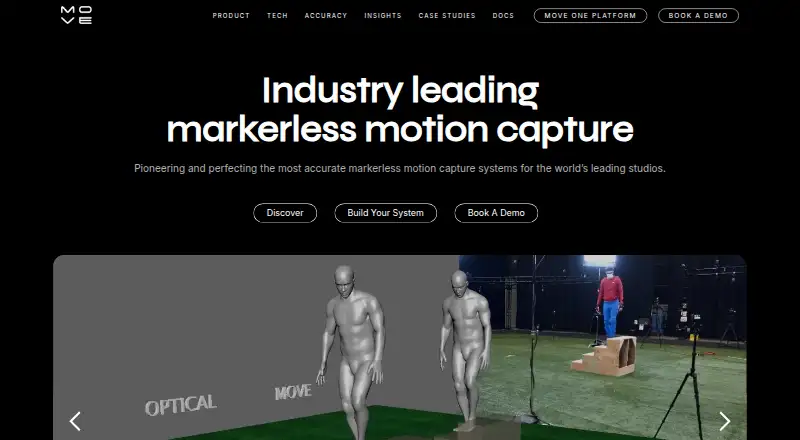
What Move One is
Move One turns single-camera iPhone video into 3D motion data for animation. Move.ai describes the technology as AI-powered and markerless, aimed at studios and creators. Processing uses credits: Gen 1 consumes one credit per person-second, while Gen 2 consumes two. The free plan includes 30 one-time credits that do not expire and supports videos up to 30 seconds; paid plans allow recordings up to 60 seconds. Move One accepts MP4 input and exports FBX, USDC, BLEND, USDZ, MP4, and biomechanics output. That output includes per-frame joint positions, rotations, torques, and reaction forces. Single-camera uploads also support MOV and AVI files up to 1GB, with 60fps Full HD recommended for best results. A Chrome extension sends captured motion data to a PC using a code generated on the iOS device. A Blender plugin imports Move One animations directly but supports FBX files only. Documentation covers importing or retargeting animations in NVIDIA Omniverse, Unreal Engine, Unity, Maya, and Cinema 4D.
Good
- Free plan includes 30 credits that do not expire.
- Exports several animation and biomechanics formats.
- Accepts MP4, MOV, and AVI uploads.
- Chrome extension sends data directly to a PC.
- Documentation covers multiple animation tools.
Watch out
- Free recordings are limited to 30 seconds.
- Gen 2 uses two credits per person-second.
- Blender plugin currently supports FBX files only.
- Paid plan prices include VAT.
Who it suits
Move One suits studios and creators who want to make 3D animations from single-camera iPhone video. It may also suit users who need biomechanics output or workflows involving Blender and other documented animation tools.
Verdict
Move One offers a free entry point and paid plans with longer recording limits. Check the credit usage and format support for the workflow you need.
Plans and prices
From Move One's own pricing page, checked 30 Sep 2026.
| Plan | Price | What it gives you |
|---|---|---|
| Free | Free | 30 one-time credits · 30-second videos · credits do not expire |
| Starter | $18 a month | 60 credits/month · 60-second videos · $18/month + VAT |
| Standard | $48 a month | 180 credits/month · 60-second videos · $48/month + VAT |
| Plus | $225 a month | 240 credits/month · 60-second videos · $225/month + VAT |
| Advanced | $490 a month | 700 credits/month · 60-second videos · $490/month + VAT |
The facts
Each one read from Move One's own pages, with the date it was checked.
What it does
- AI motion capture
- Move.ai describes its technology as AI-powered, markerless motion capture for studios and creators.checked 30 Sep 2026
- Biomechanics data
- Biomechanics output contains per-frame joint positions, rotation values, torques and reaction forces.checked 30 Sep 2026
- Blender integration
- A Move AI Blender plugin imports Move One animations directly into Blender and currently supports FBX files only.checked 30 Sep 2026
- Chrome extension
- The Move One Downloader Chrome Extension sends mocap data directly to a PC using a code generated on the iOS device.checked 30 Sep 2026
- Credit processing
- Credits generate 3D motion data from 2D video; Gen 1 uses one credit per person-second and Gen 2 uses two credits per person-second.checked 30 Sep 2026
- Engine integrations
- Move One documentation covers importing or retargeting animations in NVIDIA Omniverse, Unreal Engine, Unity, Maya and Cinema 4D.checked 30 Sep 2026
- Export formats
- The product exports FBX, USDC, BLEND, USDZ, MP4 and biomechanics output, and accepts MP4 input.checked 30 Sep 2026
- Privacy and compliance
- Move AI's EULA says personal data is handled under its privacy policy and requires appropriate technical and organisational measures, including compliance with applicable data protection laws such as the GDPR and UK GDPR.checked 30 Sep 2026
- Single-file upload
- Single-camera uploads support MP4, MOV and AVI files up to 1GB, with 60fps Full HD recommended for best results.checked 30 Sep 2026
- Support
- The Move One Acceptable Use Policy lists [email protected] as the support contact address.checked 30 Sep 2026
- Video length
- Paid users can record videos up to 60 seconds, while free users can record up to 30 seconds.checked 30 Sep 2026
- What it does
- Move One is a single-camera motion capture iPhone app for capturing and creating 3D animations.checked 30 Sep 2026
The company
- Founded
- 2019checked 28 Sep 2026
- Headquarters
- London, United Kingdomchecked 28 Sep 2026
Alternatives to Move One
- 1
XR Animator
Free planOpen sourceAndroidWebLinuxmacOS8.5Free plan - 2

Move AI
Free planiOSWebAPILinux8.2From $18 a month - 3

Rokoko Create
Free planAndroidiOSWebAPI8.2From $12 a month - 4

Plask Motion
Free planWebAPIExtensionmacOS7.8From $18 a month - 5

Mocai
Free planAndroidiOSWebAPI7.6From $10 a month - 6
FreeMoCap
Free planOpen sourceAPILinuxmacOSSelf-hosted7.5Free plan