
MeetingNotes by SmartKit
MeetingNotes by SmartKit helps teams prepare agendas, record discussion notes and decisions, assign follow-up work, and share meeting summaries.
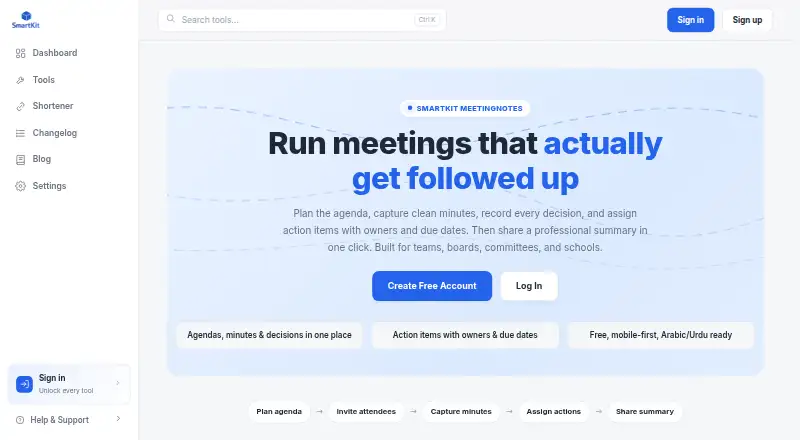
What MeetingNotes by SmartKit is
MeetingNotes by SmartKit helps teams prepare agendas, record discussion notes and decisions, assign follow-up work, and share meeting summaries. Agendas can divide a meeting into timed topics with owners, and notes can be captured against those topics as the meeting proceeds. A decision register records who made each decision and when. Action items can include an owner and due date; unfinished items can carry forward automatically to the next meeting. Users can also track invitees, attendees, and apologies. MeetingNotes supports Arabic and Urdu text with right-to-left layouts and Unicode-safe rendering. Teams can share summaries and create printable PDFs. SmartKit presents the tool for teams, boards, committees, schools, standups, and recurring reviews. The product is mobile-first and available through SmartKit; its page does not identify a separate downloadable app. SmartKit says meeting content stays in the creator’s workspace and is shared through that workspace’s selected access controls. The free plan is listed as free, with no specific usage limits stated.
Good
- Agendas support timed topics and owners.
- Decisions record who made them and when.
- Open action items can carry forward automatically.
- Arabic and Urdu support right-to-left layouts.
- Summaries can be shared as printable PDFs.
Watch out
- No separate downloadable app is identified.
- The page lists no specific usage limits.
Who it suits
It suits teams, boards, committees, schools, and groups running standups or recurring reviews. It may also fit teams that need right-to-left Arabic or Urdu text in meeting records.
Verdict
MeetingNotes brings agenda planning, minutes, decisions, and follow-up tracking together in a free plan. Its workspace-based sharing controls and support for Arabic and Urdu are useful details for teams choosing a meeting record tool.
Plans and prices
From MeetingNotes by SmartKit's own pricing page, checked 9 Oct 2026.
| Plan | Price | What it gives you |
|---|---|---|
| Free | Free | Free to use; page states no specific usage limits |
The facts
Each one read from MeetingNotes by SmartKit's own pages, with the date it was checked.
What it does
- Action-item tracking
- Yeschecked 20 Sep 2026
- Action tracking
- Action items can have an owner and due date, and open items can carry forward to the next meeting automatically.checked 9 Oct 2026
- Attendance
- Users can track invitees, attendees, and apologies.checked 9 Oct 2026
- Decision register
- The tool records decisions with who made them and when.checked 9 Oct 2026
- Format
- MeetingNotes is described as mobile-first and available through SmartKit; the page does not identify a separate downloadable app.checked 9 Oct 2026
- Intended users
- The product is presented for teams, boards, committees, schools, standups, and recurring reviews.checked 9 Oct 2026
- Languages
- MeetingNotes supports Arabic and Urdu text with right-to-left layouts and Unicode-safe rendering.checked 9 Oct 2026
- Minutes
- Discussion notes can be captured against agenda items during a meeting.checked 9 Oct 2026
- Privacy
- SmartKit says meeting content stays in the creator's workspace and is shared only through that workspace's selected access controls.checked 9 Oct 2026
- Purpose
- MeetingNotes helps teams plan agendas, capture minutes, record decisions, assign action items, and share meeting summaries.checked 9 Oct 2026
- Sharing
- Users can share a professional meeting summary and create a printable PDF.checked 9 Oct 2026
- Structured agendas
- Users can create agendas with time-boxed topics and owners.checked 9 Oct 2026
- Support
- SmartKit provides a Help & Support link in its site navigation.checked 9 Oct 2026
Money
- Free plan
- Yeschecked 20 Sep 2026
The full review of MeetingNotes by SmartKit
MeetingNotes by SmartKit is a structured meeting workspace for teams that need agendas, minutes, decisions, attendance, and assigned follow-up in one record. It fits boards, committees, schools, standups, and recurring-review groups especially well. Its strongest case is a free, repeatable process that keeps unfinished actions connected to the next meeting.
Overview
MeetingNotes treats a meeting as a workflow rather than a blank note page. Before a session, users can build an agenda from templates, give topics time boxes, and assign owners. During the meeting, discussion notes are captured against those agenda items, preserving the context of each point instead of producing one undifferentiated block of minutes.
After the discussion, a decision register records what was decided, who made the decision, and when. Action items carry an owner and due date, and open items can move automatically into the next meeting. That continuity is valuable for recurring reviews and committee work where accountability between sessions matters more than simply archiving notes.
Attendance records distinguish invitees, attendees, and apologies, which gives formal groups a fuller record. SmartKit says content stays in the creator's workspace and is shared only through that workspace's selected access controls. Teams should therefore set those permissions carefully for confidential meetings. Summaries can be shared professionally and exported as printable PDFs.
Key features
Structured preparation and minutes
Time-boxed agenda topics and named owners make preparation explicit and give meetings a visible structure. Capturing notes against each topic makes the resulting minutes easier to follow and review than free-form notes.
Decisions and follow-up
The decision register preserves responsibility and timing, while owner and due-date fields turn conclusions into accountable work. Automatic carry-forward of open actions is the standout feature for teams that hold meetings on a regular cadence; it reduces the risk of unresolved work vanishing between sessions.
Sharing and language support
Printable PDF summaries suit teams that need a formal record or a document to circulate after a meeting. Arabic and Urdu text support, with right-to-left layouts and Unicode-safe rendering, makes the tool more practical for multilingual groups than a system that treats those scripts as an afterthought.
Pricing
MeetingNotes has one published plan: Free at no cost. It is free to use, and the page states no specific usage limits. That makes it a straightforward choice for teams wanting the complete meeting workflow without a subscription or a trial deadline.
The absence of stated quotas is helpful for small organizations, schools, committees, and recurring operational groups, but larger teams should confirm how the workspace and sharing model fit their governance needs before standardizing on it. There are no paid tiers described that add seats, capacity, or advanced controls, so buyers seeking a graduated commercial plan will need to look elsewhere.
Platforms
MeetingNotes is available on Android, iOS, and the web. It is described as mobile-first and accessed through SmartKit; a separate downloadable app is not identified. That broad device coverage suits people moving between phones, tablets, and browsers, while teams that require a distinct native desktop client should consider the web experience against that requirement.
Who it's for
Choose MeetingNotes for teams, boards, committees, schools, standups, and recurring reviews that need a consistent record from agenda through follow-up. It is particularly well matched to groups that want decisions and attendance documented alongside minutes, and to multilingual teams working in Arabic or Urdu. It is less compelling for buyers focused primarily on a standalone note pad, a dedicated desktop application, or a paid plan with explicitly published scaling tiers.
Pros and cons
Pros
- Complete meeting chain: agenda topics, minutes, decisions, attendance, and action items remain connected.
- Automatic follow-up continuity: open actions can carry into the next meeting with their owners and due dates.
- Useful formal-record tools: attendance categories and printable PDF summaries support boards and committees.
- Strong language coverage: Arabic and Urdu right-to-left, Unicode-safe text supports multilingual records.
- No subscription cost: the free plan has a 0.00 USD price and no stated usage limits.
Cons
- Native-app ambiguity: mobile access is presented through SmartKit rather than a separately identified downloadable app.
- Limited plan choice: no paid tiers or published upgrade path are described for organizations that outgrow a free workspace.
- Permission responsibility: sharing depends on workspace access controls, so administrators must configure them appropriately for sensitive content.
Alternatives
For a wider category view, see Meeting Management Software and Meeting Notes Software.
- Fellow is the better fit when you want a freemium product spanning Android, iOS, macOS, Windows, web, API, and browser extension access, with a free plan that includes five AI notes per user for life.
- AgreeDo suits teams comfortable with a basic allowance of four meetings per month, three participants per meeting, and one attachment per meeting.
- Decisions is worth choosing when monthly per-user plans and defined AI-credit allowances are important.
- GovClerk Minutes is preferable for a free plan centered on one meeting of up to 240 minutes, one seat, audio recording or upload, and Word and PDF export.
- Geekbot is an alternative for teams seeking API and web-based standup workflows.
- Parabol is the option for groups wanting self-hosting and an open-source platform.
- 4Minitz fits organizations seeking a free, MIT-licensed, self-hosted meeting tool.
- BoardPAC is aimed at organizations prepared to request subscription pricing based on annual terms and end-user count.
Verdict
MeetingNotes is a strong choice for teams and formal groups that want a free, structured path from agenda preparation to accountable follow-up, especially when recurring meetings and Arabic or Urdu records are involved. Look elsewhere if you need a separately identified native app, a paid scaling ladder, or a different deployment model.
Alternatives to MeetingNotes by SmartKit
- 1

Fellow
Free planAndroidiOSWebAPI8.3From $7 a month - 2
Standup Alice
Free planAndroidiOSWeb8.1From $19.99 a year - 3
AgreeDo
Free planAndroidiOSWebExtension8.0From $7.90 a month - 4

Decisions
Free planAndroidiOSWeb7.9From $8 a month - 5

GovClerk Minutes
Free planAndroidiOSWeb7.9From $59 a month - 6

Boardable
AndroidiOSWebLinux7.8From $20.99 a month