
Maptitude
Maptitude is location-analysis and mapping software for business planning involving territories, routes, site selection, and deliveries.
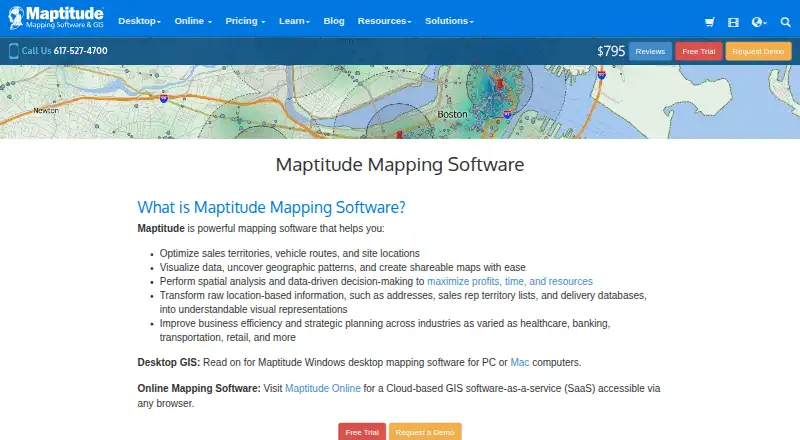
What Maptitude is
Maptitude is location-analysis and mapping software for business planning involving territories, routes, site selection, and deliveries. Its tools include territory balancing, vehicle routing, drive-time rings, facility location analysis, and delivery planning. Users can create heat, thematic, cluster, radius, 3D, and customized maps, then produce PDF or Excel reports. The desktop version supports two-way data synchronization with Excel, Access, SQL Server, Oracle, PostgreSQL, and ODBC, along with more than 70 geospatial formats. Its GISDK provides more than 850 functions callable from Windows applications written in .NET languages, R, and Python. Maptitude Online offers browser-based interactive map sharing, team permissions, and real-time collaboration. The online service supports SAML 2.0 single sign-on with Azure AD, Okta, and Google, with SSO pricing available from Caliper. Desktop Maptitude requires 64-bit Windows; Mac users can use virtualization or the online version in a browser.
Good
- Includes territory balancing and vehicle routing tools.
- Creates customized maps and PDF or Excel reports.
- Desktop supports more than 70 geospatial formats.
- Online supports team permissions and real-time collaboration.
- A no-credit-card 30-day trial is available.
Watch out
- Desktop requires 64-bit Windows.
- Online has no built-in CRM plug-ins.
Who it suits
It suits business users mapping territories, routes, facilities, and other location-based plans. Caliper lists applications across healthcare, banking, transportation, retail, and other industries.
Verdict
Maptitude combines business mapping, desktop data connections, developer tools, and browser-based collaboration. Compare its desktop requirements and online CRM limits with the way your team works.
Plans and prices
From Maptitude's own pricing page, checked 20 Sep 2026.
| Plan | Price | What it gives you |
|---|---|---|
| Maptitude Desktop No Subscription | $1,095, paid once | 1 user · 10 years · 10-Year, 1 User |
| Maptitude Desktop Subscription | $795 a year | Windows PC or Apple Mac · subscription license · 1-Year, 1 User |
| Maptitude Online | $795 a year | Browser access · 900+ demographic variables · unlimited geocoding and territories · drive-time rings up to 10 hours · routes up to 100 stops · Annual subscription after trial |
| Desktop Subscription | $795 a year | Windows PC or Apple Mac · all listed mapping, GIS, routing and API features · one country package · phone/email support · 30-day money-back guarantee · 1-Year, 1 User |
| Maptitude Remote Desktop Subscription | $1,095 a year | Remote access or server use · Windows via VPN, AWS, Azure, Terminal Services, or RDS · 1-Year, 1 User, Remote Desktop License |
| Enterprise Subscription | $1,095 a year | Corporate deployment and packaging · Windows platform options · enterprise licensing · 1-Year, 1 User; tiered larger deployments available |
| Maptitude Desktop (No Subscription) | $1,095, paid once | Windows PC or Apple Mac · no-subscription license · 10-Year, 1 User |
| Desktop (No Subscription) | $1,095, paid once | Windows PC or Apple Mac · offline operation · unlimited offline geocoding · one country package · no cloud upload required · 10-Year, 1 User |
| Maptitude Remote Desktop (No Subscription) | $1,395, paid once | Remote access or server use · Windows via VPN, AWS, Azure, Terminal Services, or RDS · 10-Year, 1 User, Remote Desktop License |
| Maptitude Enterprise Subscription | — | Corporate deployment and packaging · tiered pricing for larger deployments · 1-Year, 1 User |
The facts
Each one read from Maptitude's own pages, with the date it was checked.
What it does
- 2026 release
- Maptitude 2026 added faster territory reassignment, new PDF routing reports, October 2025 HERE street data, 2024 ACS data, projections through 2054 and an AI-powered Online data wizard.checked 15 Oct 2026
- API languages
- The pricing matrix lists a .NET API usable from Python, R and other environments.checked 15 Oct 2026
- Audience
- Caliper describes Maptitude as designed for business users and lists applications across healthcare, banking, transportation, retail, and other industries.checked 29 Sep 2026
- CRM integration limit
- Maptitude Online has no built-in CRM plug-ins, but supports Excel and CSV exchange and desktop automation through GISDK or APIs.checked 29 Sep 2026
- Data integrations
- Official compatibility includes Excel, Access, SQL Server, Oracle, PostgreSQL, ODBC, Shapefiles, KML/KMZ, GeoJSON and MapPoint PTM.checked 15 Oct 2026
- Data visualization
- Users can create heat, thematic, cluster, radius, 3D, and other customized maps and generate PDF or Excel reports.checked 29 Sep 2026
- Demographic data
- Desktop maps include detailed Census demographics down to Census Block Group level.checked 15 Oct 2026
- Desktop and online editions
- Caliper offers a Windows desktop GIS and a browser-based Maptitude Online service.checked 15 Oct 2026
- Desktop data handling
- Caliper says desktop Maptitude stores data locally and that it does not have access to that data; it also provides tools to assist with HIPAA compliance.checked 29 Sep 2026
- Developer API
- GISDK provides more than 850 Caliper Script functions and can create add-ins, custom applications or .NET and COM integrations.checked 15 Oct 2026
- Developer tools
- The included GISDK provides more than 850 GIS functions callable from Windows applications written in .NET languages, R, and Python.checked 29 Sep 2026
- Documentation
- The Online Help guide covers mapping spreadsheets, geocoding, territories, drive-time analysis, routing, demographics and sharing workflows.checked 15 Oct 2026
- Download and support
- Current-license holders download through Caliper's user center with a serial number; download links remain valid for one year after purchase.checked 15 Oct 2026
- Geocoding
- Maptitude supports unlimited batch geocoding by address, postal code or coordinates.checked 15 Oct 2026
- Integrations
- The desktop product supports two-way data sync with Excel, Access, SQL Server, Oracle, PostgreSQL, and ODBC, and supports more than 70 geospatial formats.checked 29 Sep 2026
- Licence
- Maptitude is proprietary commercial software rather than open source.checked 15 Oct 2026
- Limit: advanced analysis
- Reviewers ask for more statistical and geostatistical tools, additional graphics and charting options, and easier API documentation.checked 15 Oct 2026
- Limit: interface complexity
- Reviewers report that some functions are unintuitive, the interface can be slow or cumbersome, and training may be needed.checked 15 Oct 2026
- Limit: sharing and licensing
- G2 reviewers complain about limited internal map-sharing options and needing to release a desktop licence before moving it to another computer.checked 15 Oct 2026
The company
- Company history
- LinkedIn says Caliper Corporation was founded in 1983 and is headquartered in Newton, Massachusetts.checked 15 Oct 2026
- Company ownership
- Caliper Corporation is privately held and lists 51–200 employees on LinkedIn.checked 15 Oct 2026
- Company users
- Caliper states that its software serves more than 100,000 users in over 80 countries.checked 15 Oct 2026
- Founded
- 1983checked 23 Sep 2026
- Headquarters
- Newton, Massachusetts, USAchecked 23 Sep 2026
The full review of Maptitude
Overview
Maptitude is a location-analysis platform for mapping territories, routes, facilities and business markets. It suits organizations that need substantial desktop GIS capabilities alongside browser-based map sharing. Its breadth is a strength, but Windows desktop requirements and the online product’s lack of built-in CRM plug-ins make fit important.
Key features
Territory balancing, vehicle routing, drive-time rings, facility location analysis and delivery planning cover practical sales and operations questions, rather than mapping alone. Heat, thematic, cluster, radius and 3D maps, plus PDF and Excel reports, help teams communicate patterns in different formats.
The desktop product connects in both directions with Excel, Access, SQL Server, Oracle, PostgreSQL and ODBC, and supports more than 70 geospatial formats. That range is useful for teams with established data systems, though it comes with a desktop-focused workflow. Included GISDK exposes more than 850 GIS functions to Windows applications written in .NET languages, R and Python, making Maptitude a stronger fit for technical teams that want to automate or extend analysis.
Maptitude Online adds browser-based map sharing, team permissions and real-time collaboration. It supports Excel and CSV exchange, but has no built-in CRM plug-ins; teams relying on CRM connections will need to work around that through data exchange, desktop automation or APIs. Online security includes AWS hosting, encryption in transit and at rest, login access, sharing visibility controls and administrator-managed permissions. SAML 2.0 single sign-on is supported with Azure AD, Okta and Google, with pricing available from Caliper. For desktop use, Caliper says data is stored locally and inaccessible to the company, and provides tools to assist with HIPAA compliance.
Pricing
Maptitude has no free plan. A no-credit-card 30-day trial lets prospective buyers evaluate it before committing. The plans below are priced for one user, so teams should account for additional seats when comparing costs.
| Plan | Price and term | What it suits |
|---|---|---|
| Maptitude Desktop Subscription | $795 a year; 1 user | Windows PC or Apple Mac users who want a subscription license. |
| Maptitude Desktop No Subscription | $1,095, paid once, billed 10-Year; 1 user | One-user desktop use under a no-subscription license. The stated term is 10 years, not perpetual. |
| Maptitude Online | $795 a year; 1 user, 20 GB storage, 100,000 map loads | Teams prioritizing browser collaboration, provided the storage and map-load caps fit their use. |
| Maptitude Remote Desktop Subscription | $1,095 a year; 1 user | Remote access or server use through VPN, AWS, Azure, Terminal Services or RDS. |
| Maptitude Remote Desktop No Subscription | $1,395, paid once, billed 10-Year; 1 user | Remote or server deployment with a no-subscription license; the stated term is 10 years. |
| Maptitude Enterprise Subscription | Custom pricing | Corporate deployment and packaging, with tiered pricing for larger deployments. |
The cheaper desktop options are not interchangeable with Online: the desktop subscription requires a Windows PC or a Mac running Windows, while Online carries explicit storage and map-load quotas. Complimentary phone and email support lasts 60 days after purchase; extensions are at Caliper’s discretion. SSO pricing is also available from Caliper.
Platforms
Desktop Maptitude requires 64-bit Windows. Mac users can run Windows through virtualization or use Maptitude Online in a browser. Although the product’s platform coverage includes Android, iOS and macOS, the desktop requirements matter for anyone planning to run the installed software directly.
Who it's for
Maptitude is aimed at business users, with applications spanning healthcare, banking, transportation and retail. It is best suited to organizations that need territory or route analysis, connect mapping to existing databases, or want to build GIS workflows with developer tools. It is a weaker fit for buyers who need a built-in CRM plug-in or whose desktop users cannot run 64-bit Windows.
Pros and cons
- Pro: Territory balancing, routing, drive-time and facility analysis address concrete planning tasks in one product.
- Pro: Broad database connections, geospatial-format support and GISDK give data and development teams room to integrate and automate.
- Pro: Online sharing combines team permissions and real-time collaboration with SSO options.
- Con: Desktop use depends on 64-bit Windows, including for Mac users relying on virtualization.
- Con: Online has no built-in CRM plug-ins, so CRM-dependent teams must use exchange or automation workarounds.
- Con: Online’s one-user plan caps storage at 20 GB and map loads at 100,000, which may constrain heavier use.
- Con: Complimentary phone and email support is limited to 60 days after purchase unless Caliper grants an extension.
Alternatives
For a broader shortlist, compare Location Intelligence Software, Sales Mapping Software and GIS Software.
- Smappen is worth considering for web-based territory work on a free plan, which includes 10 active areas, basic population data, one POI search, up to 100 imported pins and shareable saved maps.
- Maptive may suit someone seeking a free plan and trial with a one-time 45 Day Pass; its stated allowance includes unlimited maps, 100,000 locations per data set and 1,500 public map views per day.
- Sitewise Analytics offers a free Market Grid with 70 curated geospatial variables and eight preset trade-area options, but requires a Sitewise account.
- CARTO is an alternative to consider for cloud SaaS or self-hosted deployment; its Enterprise plan is billed annually upfront and has limited location data services and API access.
- Kalibrate Location Intelligence uses pricing that depends on licensed third-party data, user seats and whether analytics are included.
- Mapline is another freemium alternative.
- Locus offers free map browsing and measuring, with a free account adding population, density and gender snapshots.
- Geoplan is another paid, web-based alternative.
Verdict
Choose Maptitude if your organization needs serious territory and route analysis, flexible data connections and developer-level GIS tools, and can work within its desktop requirements or Online quotas. Look elsewhere if a built-in CRM connection is essential or you need an unrestricted desktop platform without Windows.
Alternatives to Maptitude
- 1

Felt
Free planAndroidiOSWebAPI8.2From $199 a month - 2
NASA WorldWind
Free planOpen sourceAndroidWebAPILinux7.9Free plan - 3
Mapbox Studio
Free planAndroidiOSWebAPI7.7Free plan - 4
StatSilk
Free planAndroidiOSWebAPI7.7From $495 a year - 5

GIS Cloud
Free planAndroidiOSWebAPI7.5From $5 a month - 6
DroneDeploy Aerial
AndroidiOSWebAPI7.1From $1,908 a year