Mapline
Mapline is a browser-based mapping platform for turning spreadsheet data into maps and working with locations, territories, and routes.
What Mapline is
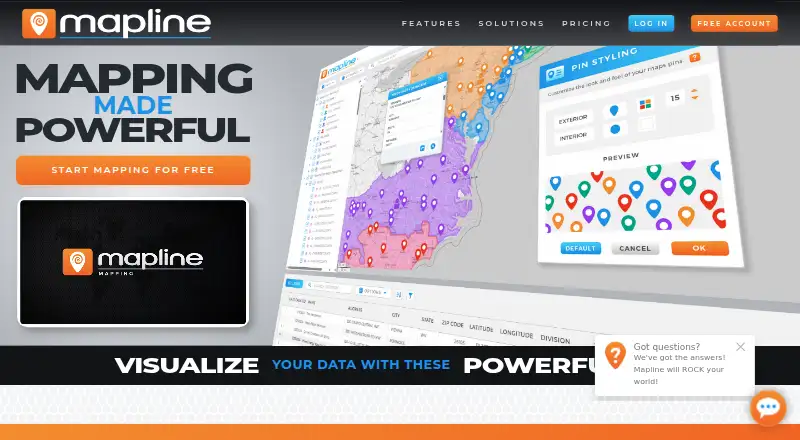
Mapline is a browser-based mapping platform for turning spreadsheet data into maps and working with locations, territories, and routes. Users can copy and paste Excel data or upload Excel and CSV files; datasets can range from 10 to 100,000 locations. Pin appearance can be tied to spreadsheet columns, with options for colors, shapes, sizes, icons, labels, and images. Mapping tools include filters, segments, heat mapping, territory reports, distance analysis, coverage visualization, and trend analysis. Users can draw or import boundaries such as ZIP-code and county areas, then balance territory statistics. Routing tools optimize routes and stop assignments, provide driving directions, and calculate bulk driving distances across thousands of locations. Its product suite includes Geo Mapping, Geo BI, Geo Routing, and Geo Scheduling, and it offers a REST API. Mapping Starter is free with up to 500 locations total, 250 per dataset, one map, two datasets, and five routes of 10 locations each. Geo BI, Geo Routing, and Geo Scheduling offer a 7-day trial. Pricing is on request for other plans.
Good
- Mapping Starter is free and requires no credit card.
- Supports Excel and CSV data uploads.
- Territory tools include ZIP-code and county boundaries.
- Routing can optimize stops and calculate bulk distances.
- Offers a REST API with API-key authentication.
Watch out
- Mapping Starter is limited to 500 locations total.
- The Geo BI, Routing, and Scheduling trial lasts 7 days.
- Paid customer support has weekday hours and eligibility requirements.
Who it suits
Mapline suits teams using spreadsheet location data for maps, territory planning, or route work. It may also fit developers who need a REST API for mapping workflows.
Verdict
Mapline combines spreadsheet mapping with territory analysis and routing, while keeping its Mapping Starter plan free within stated limits. Check the plan details and request pricing for needs beyond that scope.
Plans and prices
From Mapline's own pricing page, checked 20 Sep 2026.
| Plan | Price | What it gives you |
|---|---|---|
| Mapline Starter | Priced on request | — |
| Mapline | Priced on request | — |
| Pro | Priced on request | — |
| Enterprise | Priced on request | — |
| Mapping Starter | Free | 500 locations total · 250 per dataset · 5 routes of 10 locations each · one map and two datasets · no credit card required |
The facts
Each one read from Mapline's own pages, with the date it was checked.
What it does
- Analytics tools
- Mapline provides segments, filters, territory reporting, distance analysis, coverage-network visualization, and trend analysis.checked 30 Sep 2026
- API
- Mapline provides a REST API with API-key authentication, authorization, documented limits, and JSON responses.checked 30 Sep 2026
- Connectors
- Connectors are available for FTP Server, Google Ads, Google Analytics, Google Calendar, Google Sheets, HubSpot, iCalendar, Microsoft Ads, OneDrive, Microsoft SQL Server, Outlook Calendar, and Salesforce.checked 30 Sep 2026
- Pin customization
- Users can set pin colors, shapes, sizes, icons, labels, and custom images based on spreadsheet columns.checked 30 Sep 2026
- Product suite
- Mapline offers Geo Mapping, Geo BI, Geo Routing, and Geo Scheduling products.checked 30 Sep 2026
- Routing
- Mapline can optimize routes and stop assignments, generate driving directions, and calculate bulk driving distances across thousands of locations.checked 30 Sep 2026
- Security assessment
- Mapline states that its application is certified at Level 2 by the App Defence Alliance under the Cloud Application Security Assessment framework.checked 30 Sep 2026
- Security encryption
- Mapline states that stored data has multiple layers of encryption at rest and that communications with its servers are encrypted in transit.checked 30 Sep 2026
- Support
- Eligible paid customers receive chat, phone, and email support Monday through Friday from 5:00 AM to 5:00 PM Mountain Time, with an intended initial response within 24–48 business hours.checked 30 Sep 2026
- Web delivery
- Mapline says its cloud-based product is accessed through a web browser without complex installation.checked 30 Sep 2026
The company
- Founded
- 2010checked 28 Sep 2026
Money
- Free-plan access
- The Mapping Starter plan includes pin plotting, filters, territories, segmenting, heat mapping, and pin customization.checked 30 Sep 2026
- Trial offer
- Mapline advertises a 7-day free trial for Geo BI, Geo Routing, and Geo Scheduling.checked 30 Sep 2026
Where it runs
- Spreadsheet mapping
- Mapline lets users copy and paste Excel spreadsheet data to generate maps, including datasets ranging from 10 to 100,000 locations.checked 30 Sep 2026
- Territory mapping
- The platform supports drawing or importing territories such as ZIP-code and county boundaries and balancing territory statistics.checked 30 Sep 2026
The full review of Mapline
Overview
Mapline brings spreadsheet mapping, geographic analysis and operational planning into a browser-based suite. It is a broader toolkit than a simple pin map, though the free plan’s small quotas and custom pricing for paid plans make scaling a decision to investigate before committing.
Users can paste spreadsheet data to create maps, with datasets spanning 10 to 100,000 locations; Excel and CSV uploads are also supported. That range accommodates everything from a small list to a substantial location inventory, but the free plan is only a narrow sample of that capacity. Geo Mapping, Geo BI, Geo Routing and Geo Scheduling make the suite relevant to teams that need analysis and planning alongside mapping, rather than just a quick visualization.
Key features
Mapping and analysis
Mapline can assign pin colors, shapes, sizes, icons, labels and custom images according to spreadsheet columns. That makes category distinctions visible directly on a map without requiring each marker to be styled individually. Filters, segments, heat maps, trend analysis, distance analysis and coverage-network visualization help users investigate patterns and geographic reach beyond the initial plot.
Territories and routes
Teams can draw or import territories such as ZIP-code and county boundaries, then balance territory statistics. This suits territory planning where boundaries and workload distribution matter; it is more than a basic map-drawing feature. Routing can optimize routes and stop assignments, generate driving directions and calculate bulk driving distances across thousands of locations, which gives operations teams practical tools for planning many stops.
Connections, API and security
Connectors cover FTP Server, Google Ads, Google Analytics, Google Calendar, Google Sheets, HubSpot, iCalendar, Microsoft Ads, OneDrive, Microsoft SQL Server, Outlook Calendar and Salesforce. That breadth can reduce friction for teams already working across those systems. The REST API uses API-key authentication, authorization, documented limits and JSON responses, making programmatic access possible without promising unlimited use.
Mapline says stored data is protected by multiple layers of encryption at rest and that server communications are encrypted in transit. It also states that its application holds Level 2 certification under the App Defence Alliance’s Cloud Application Security Assessment framework. These are relevant security assurances for organizations handling location data, though they do not replace a buyer’s own review of requirements.
Pricing
The freemium structure offers a useful low-cost starting point, but the meaningful trade-off is scale. Mapping Starter costs nothing and includes pin plotting, filters, territories, segmenting, heat mapping and pin customization. Its hard caps are 500 locations total, 250 per dataset, five routes of 10 locations each, one map and two datasets; no credit card is required. That is enough to explore a small workflow, not to assess the stated 100,000-location ceiling or manage a larger ongoing operation.
Mapline advertises a 7-day free trial for Geo BI, Geo Routing and Geo Scheduling, offering a time-limited way to evaluate those paid product areas. The trial is short, so teams should focus their evaluation rather than expect a long pilot.
Mapline Starter, Mapline, Pro and Enterprise have custom pricing. The plan names alone do not establish which tier fits a particular team, and buyers needing more than the free quotas should request pricing and confirm the relevant capacity and terms before budgeting. Eligible paid customers receive chat, phone and email support Monday through Friday, 5:00 AM to 5:00 PM Mountain Time, with an intended initial response within 24–48 business hours.
Platforms
Mapline is available on the web and through an API. Its cloud-based product is accessed in a browser without complex installation, while the API supports teams building programmatic connections. It is not positioned in the supplied platform range as a native mobile app.
Who it's for
Mapline is a strong fit for teams that already manage location data in spreadsheets and need to turn it into maps, analyze territories or coordinate routes. Sales and operations groups can benefit from column-driven pin styling, territory balancing and bulk distance calculations in a shared geographic workflow. It is less compelling for an individual who only needs an occasional simple map, or for a team that must know paid costs before evaluating beyond the free caps.
Pros and cons
- Pros: Spreadsheet-driven mapping supports datasets up to 100,000 locations, giving larger data workflows room to grow beyond the free tier.
- Pros: Territory analysis and route optimization sit alongside mapping, which can serve teams coordinating geography and field operations.
- Pros: The free Mapping Starter plan has no card requirement and includes core map analysis features for small-scale evaluation.
- Cons: Free access is capped at 500 total locations, 250 per dataset, one map and two datasets, so it cannot represent larger workloads.
- Cons: Paid plan prices are custom, leaving teams unable to compare the cost of expanded usage from a published rate.
- Cons: The Geo BI, Geo Routing and Geo Scheduling trial lasts only 7 days, limiting the time available to evaluate those products.
Alternatives
For a location-intelligence shortlist, compare Location Intelligence Software; for route-focused choices, see Route Planning Software. Teams prioritizing sales territories can browse Sales Mapping Software, while users seeking general map-making or interactive maps can compare Map Creation Software and Interactive Map Software.
Sitewise Analytics may suit buyers focused on curated geospatial variables and preset trade areas: its free Market Grid includes 70 variables and eight preset options, but requires a Sitewise account. Choose Locus when simple map browsing and measuring are the priority; its free account adds population, density and gender snapshots. Maptive is another mapping option with a one-time 45 Day Pass at 25045.00 USD for short-term access, one user and unlimited maps, though Mapline is the clearer fit when territory analysis and routing are central to the workflow.
NIQ is an alternative to consider. Smappen suits users who want a free territory-oriented option with 10 active areas, basic population data, one POI search and up to 100 imported pins. Stadia Maps is an alternative to consider. Maptitude is another alternative to consider. Kalibrate Location Intelligence is an alternative to consider.
Verdict
Choose Mapline if spreadsheet-based location data needs to support mapping, territory decisions and route planning in one web suite. Its strongest reason to choose is that breadth, backed by a free starter tier for small datasets. Look elsewhere if the 500-location free ceiling is too restrictive or if your purchase requires transparent paid pricing before you can assess fit.
Alternatives to Mapline
- 1
Foursquare
Free planAndroidiOSWebAPI8.2From $25 a month - 2
Crowd Connected
Free planAndroidiOSWebAPI7.9Free plan - 3

Maptitude
AndroidiOSWebAPI7.8From $795 a year - 4
Mapbox Studio
Free planAndroidiOSWebAPI7.7Free plan - 5
Maptive
AndroidiOSWebAPI7.2From $110 a month - 6

eSpatial
AndroidiOSWebAPI7.1From $499 a year