Smappen
Smappen is a web-based territory mapping tool for planning territories, analyzing markets and evaluating locations without requiring GIS experience.
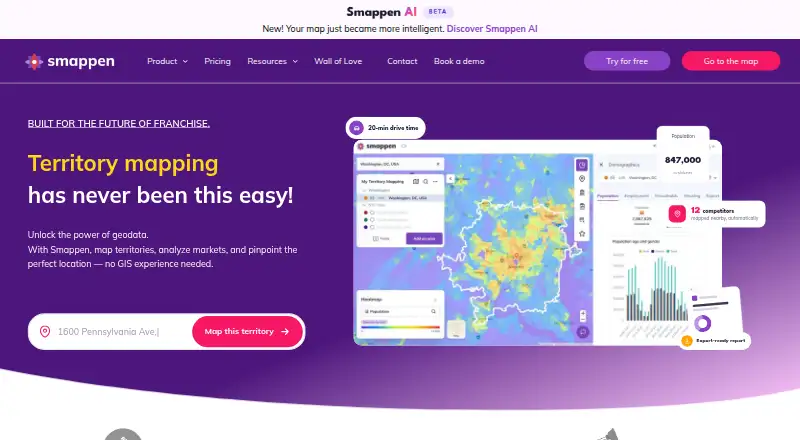
What Smappen is
Smappen is a web-based territory mapping tool for planning territories, analyzing markets and evaluating locations without requiring GIS experience. Areas can be built around travel time, distance or administrative divisions, or drawn manually, then merged or cut. Demographic analysis and points of interest, including businesses and services, help assess mapped areas. Smappen can also produce formatted Word reports with population and business information. Its AI feature takes plain-language questions about where to open locations and responds on the map. You can bring in data from Excel or HubSpot; Excel and KML are listed as upload formats, and API access is an add-on for connecting tools. The listed demographic and business data coverage includes the United States, Canada, Australia, the United Kingdom, France, Belgium and Spain. The Free plan costs nothing and includes 10 active areas, basic population data, one POI search, up to 100 imported pins and shareable saved maps. It is accessed online through a modern browser.
Good
- Build areas by travel time, distance or boundaries.
- Includes demographic analysis and points of interest.
- Generates formatted Word reports.
- AI answers location questions on the map.
- Free plan includes shareable saved maps.
Watch out
- Free plan limits users to 10 active areas.
- Free plan includes just one POI search.
- Free plan caps imported pins at 100.
- Access requires a modern browser.
Who it suits
Smappen suits growing franchise brands and businesses that need to design territories or assess potential locations. It may be useful for teams that want to analyze mapped areas without GIS experience.
Verdict
Smappen brings area design, market data and location analysis together in a browser-based tool. The free plan provides core mapping capabilities, with active-area and data limits to consider.
Plans and prices
From Smappen's own pricing page, checked 30 Sep 2026.
| Plan | Price | What it gives you |
|---|---|---|
| Free | Free | 10 active areas · basic population data · 1 POI search · up to 100 imported pins · saved maps you can share |
The facts
Each one read from Smappen's own pages, with the date it was checked.
What it does
- Access
- The standard license describes Smappen as a SaaS service accessed over the internet with a modern, up-to-date browser.checked 30 Sep 2026
- AI feature
- Smappen AI accepts plain-language questions about where to open locations and responds on the map.checked 30 Sep 2026
- Audience
- Smappen describes itself as built for growing franchise brands and businesses that need viable, defensible territories.checked 30 Sep 2026
- Coverage
- The pricing page lists demographic and business data coverage in the United States, Canada, Australia, United Kingdom, France, Belgium, and Spain.checked 30 Sep 2026
- Integrations
- Users can import their own data from Excel or HubSpot; the pricing page also lists API access as an add-on for connecting tools.checked 30 Sep 2026
- Market data
- Smappen provides demographic analysis and points of interest, including businesses and services, to help analyze mapped areas.checked 30 Sep 2026
- Purpose
- Smappen is a territory mapping tool for designing territories, analyzing markets, and choosing locations, with no GIS experience required.checked 30 Sep 2026
- Reports
- Smappen can generate formatted Word reports summarizing population and business data for an area.checked 30 Sep 2026
- Security and privacy
- Smappen says it complies with GDPR and French data-protection law and uses measures including HTTPS, logging, and connection traceability.checked 30 Sep 2026
- Subscription
- The pricing page says subscriptions have no commitment and can be canceled anytime; the company says maps and data remain saved when a subscription is paused.checked 30 Sep 2026
- Support
- The pricing comparison lists documentation and in-app AI-assisted help, human support via chat, and a dedicated customer success manager across its plans.checked 30 Sep 2026
The company
- Founded
- 2018checked 28 Sep 2026
- Headquarters
- Toulouse, Francechecked 28 Sep 2026
Where it runs
- Mapping
- Users can create areas by travel time, distance, administrative divisions, or manual drawing, then merge or cut areas.checked 30 Sep 2026
Money
- Paid plan limits
- The Free plan limits active areas to 10; the Essential, Pro, and Advanced plans list unlimited areas, while certain exports and data features vary by plan.checked 30 Sep 2026
The full review of Smappen
Smappen is a browser-based territory and market-analysis tool for businesses evaluating locations and defining service areas. It is best suited to growing franchises and other teams that need data-backed territory planning without GIS experience. Its free plan offers a useful starting point, but the 10-active-area cap and limited data tools make it a less convincing fit for sustained, broad-scale work.
Overview
Smappen combines area design with demographic and business information, so users can assess a territory rather than just draw its boundaries. Areas can follow drive time, distance, administrative divisions or a manually drawn outline; users can then merge or cut them. That range suits teams working with different territory rules, though the free plan’s active-area limit may force frequent cleanup as projects accumulate.
Market analysis includes population data and points of interest such as businesses and services. Users can import data from Excel or HubSpot, and Excel and KML are supported upload formats. Formatted Word reports summarize population and business data for an area, while Smappen AI answers plain-language questions about where to open locations and responds on the map. Those tools connect exploration to planning, but the depth of data and export options depends on the plan.
Demographic and business data coverage spans the United States, Canada, Australia, the United Kingdom, France, Belgium and Spain. That is relevant for businesses operating in those markets; teams planning elsewhere should not assume comparable coverage.
Key features
Territory mapping
Drive-time areas help when practical reach matters more than a straight-line radius. Distance, administrative divisions and manual drawing cover other ways of defining a territory, and merging or cutting areas makes it possible to revise boundaries as plans change. Smappen’s browser-based access and lack of a GIS-experience requirement lower the barrier for business users, though they do not remove the need to judge whether the underlying data fits a decision.
Market context and reporting
Demographic analysis and business and service points of interest give mapped areas useful context. Word reports make population and business summaries easier to carry into planning discussions. Excel and HubSpot imports, plus API access as an add-on, provide routes for bringing in business data or connecting tools; the API is not presented as a standard included feature.
Data handling and support
The pricing comparison includes documentation and in-app AI-assisted help, human support via chat, and a dedicated customer success manager across its plans. Smappen says it complies with GDPR and French data-protection law and uses HTTPS, logging and connection traceability. The standard license describes the service as SaaS, accessed through an up-to-date browser.
Pricing
Smappen uses a freemium model, with a free plan and paid Essential, Pro and Advanced plans. The free plan costs nothing and includes 10 active areas, basic population data, one POI search, up to 100 imported pins, and saved maps that can be shared. It is a sensible way to try basic territory work, but the single POI search and basic data can restrict comparisons, while the area and pin caps limit larger projects.
Essential, Pro and Advanced list unlimited areas, but exports and data features vary by plan. The available plan details do not give prices or a feature-by-feature breakdown for those tiers, so the right paid level depends on which exports and data capabilities a team needs. Smappen also offers no free trial. Subscriptions have no commitment and can be canceled anytime; maps and data remain saved when a subscription is paused, which reduces the risk of taking a break from paid access.
Platforms
Smappen runs on the web as a SaaS service and requires a modern, up-to-date browser. Browser access suits teams that want a mapping tool without a GIS installation, but the service is not presented as a native desktop or mobile app.
Who it's for
Growing franchise brands and businesses choosing locations or dividing markets are the clearest fit, particularly when they need to compare territories using travel reach, population and nearby businesses. The free plan can suit an individual or small team with a few active areas and modest data needs. Organizations managing many territories, relying on richer data or needing particular exports should weigh the paid tiers; users planning outside Smappen’s named coverage markets should look for a tool whose data serves their geography.
Pros and cons
- Pro: Multiple area-building methods and merge-and-cut editing support territories shaped by travel time, distance, formal boundaries or custom outlines.
- Pro: Demographic data, POIs, imports and Word reports help connect map boundaries to market assessment and planning.
- Pro: The free plan includes shareable saved maps, making it possible to begin without a subscription.
- Con: Free users are limited to 10 active areas, one POI search and 100 imported pins, which can constrain ongoing or larger analyses.
- Con: Paid plans differ in exports and data features, while prices for Essential, Pro and Advanced are not given here; choosing a tier requires matching needs to those differences.
- Con: Data coverage is named for seven countries, so businesses in other markets should not count on equivalent demographic and business data.
Alternatives
For a broader set of options, browse Location Intelligence Software.
Choose Maptitude instead if you want a paid mapping product with a free trial and desktop and mobile platform options; its listed Desktop No Subscription plan costs $1,095, paid once, billed 10-Year for 1 User.
Maptive is another paid option with a free plan and free trial, and supports web, mobile, Windows and API access.
Choose Sitewise Analytics if its free Market Grid, with 70 curated geospatial data variables and eight preset trade-area options, better matches a focused trade-area analysis.
CARTO may suit teams seeking a paid enterprise platform with SaaS or self-hosted deployment and API access; its Enterprise plan is billed annually upfront.
Kalibrate Location Intelligence is an alternative whose price depends on licensed third-party data, user seats and whether analytics are included.
Mapline is a freemium alternative with a free plan and free trial.
Locus may suit someone who needs a free map with measuring tools and a population, density and gender snapshot, or a one-time location report.
Geoplan is a paid web-based alternative.
Verdict
Smappen is a strong fit for growing franchises and businesses that need to design and assess territories in a browser without GIS expertise. Its blend of travel-based mapping, market context, imports and reports gives location planning a coherent workflow, and the free plan makes a limited start possible. Look elsewhere if your work exceeds its free caps, depends on particular paid exports or requires data beyond its named coverage markets.
Alternatives to Smappen
- 1
Foursquare
Free planAndroidiOSWebAPI8.2From $25 a month - 2
Crowd Connected
Free planAndroidiOSWebAPI7.9Free plan - 3

Maptitude
AndroidiOSWebAPI7.8From $795 a year - 4
Mapbox Studio
Free planAndroidiOSWebAPI7.7Free plan - 5
Maptive
AndroidiOSWebAPI7.2From $110 a month - 6

eSpatial
AndroidiOSWebAPI7.1From $499 a year