Mapbox Studio
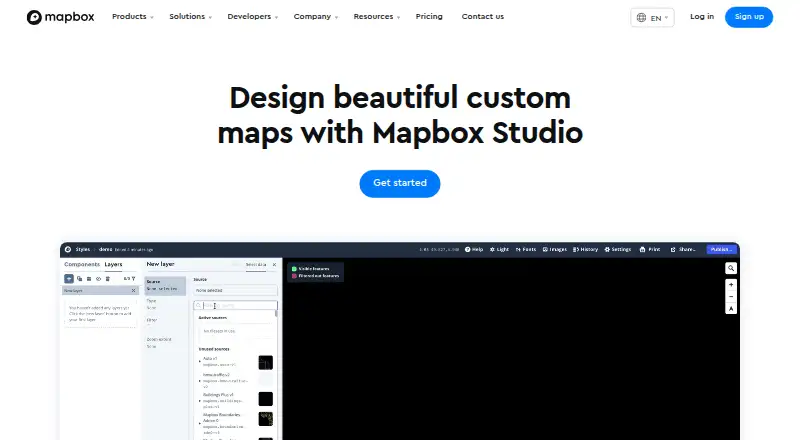
Mapbox Studio is a suite for creating custom map styles and working with location data.
What Mapbox Studio is
Mapbox Studio is a suite for creating custom map styles and working with location data. Upload Shapefiles, GeoJSON, or CSV files and Studio converts the data into vector tiles that can be edited and used in maps. Style controls cover colors, typography, road widths, points of interest, sky, 3D buildings, and terrain. You can build visualizations from point, line, and polygon data, including choropleths and scaled point maps, and add fonts, icons, and textures to match a brand. Published styles can be used through Mapbox SDKs and APIs; you can also download a stylesheet or export a high-resolution image for print. Component styles support Maps SDK for Web v1.0+, iOS v5.0+, and Android 8.0+. The free plan is available to all Mapbox users, though related API and custom tileset usage may be billed separately. Studio is available on web, Android, iOS, and API platforms.
Good
- Accepts Shapefiles, GeoJSON, and CSV data.
- Offers controls for terrain and 3D buildings.
- Creates choropleths and scaled point maps.
- Exports styles or high-resolution print images.
- Free plan available to all Mapbox users.
Watch out
- Related API and custom tileset usage may be billed separately.
- Users cannot author their own Style Components.
- Ejected components cannot be restored.
Who it suits
It suits people creating branded maps, visualizing their own location data, or publishing map styles through Mapbox SDKs and APIs. It may also serve industries such as logistics, delivery, automotive, retail, travel, manufacturing, and enterprise software.
Verdict
Mapbox Studio combines map styling, location-data visualization, and publishing options in one suite. Its free plan has potential separate charges for related API and custom tileset usage, and its Style Components have specific editing limits.
Plans and prices
From Mapbox Studio's own pricing page, checked 15 Oct 2026.
| Plan | Price | What it gives you |
|---|---|---|
| Mapbox GL JS (Map Loads) | Free | Each map load includes unlimited Vector Tiles and Raster Tiles API requests · sessions last up to 12 hours · Up to 50,000 monthly map loads free; then $5.00 per 1,000 loads for 50,001–100,000 |
| Mapbox Studio | Free | Available to all Mapbox users · related API and custom tileset usage may be billed separately |
| Maps SDKs for Mobile | Free | Monthly-active-user billing · iOS and Android SDKs · higher-volume tiers reach $3.20 and $2.40 per 1,000 · Up to 25,000 monthly active users free; then $4.00 per 1,000 for 25,001–125,000 |
| Pay-as-you-go | Free | Free tiers for most products · volume discounts as usage grows · annual-commitment discounts · Monthly usage invoice; free tiers reset each billing period |
| Static Images API | Free | PNG images generated from Mapbox styles · higher-volume tiers reach $0.80 and $0.60 per 1,000 · Up to 50,000 monthly requests free; then $1.00 per 1,000 for 50,001–500,000 |
The facts
Each one read from Mapbox Studio's own pages, with the date it was checked.
Where it runs
- 3D mapping
- The editor supports sky styling, 3D buildings, terrain and 2D or 3D basemaps including Mapbox Standard.checked 15 Oct 2026
- Browser requirements
- Studio requires WebGL and is documented as compatible with Safari 9+, the latest Chrome and Firefox, and Microsoft Edge 13 with current Windows 10 updates.checked 15 Oct 2026
What it does
- Audience
- Mapbox describes its services as serving industries including logistics, delivery, automotive, retail, travel, manufacturing, and enterprise software.checked 5 Oct 2026
- Branding
- Users can add their own fonts, icons, and textures to align map designs with their brand.checked 5 Oct 2026
- Compatibility
- Component styles work with Maps SDK for Web v1.0+, iOS v5.0+, and Android 8.0+.checked 5 Oct 2026
- Custom branding
- Studio lets users add their own fonts, icons and textures and adjust map colors and typography.checked 15 Oct 2026
- Custom data
- Users can upload and edit their own data, which Studio converts into vector tiles; supported formats include Shapefiles, GeoJSON, and CSV.checked 5 Oct 2026
- Data visualization
- Imported data can be used for choropleths, scaled point maps and other styled layers.checked 15 Oct 2026
- Data Workbench
- The Studio workflow includes Data Workbench for uploading, editing, previewing and publishing custom geospatial data.checked 15 Oct 2026
- Developer stack
- Mapbox documents APIs plus JavaScript, iOS and Android SDKs for embedding and customizing maps.checked 15 Oct 2026
- Documentation depth
- The documentation includes interface guides, style specification references, API references, tutorials, pricing guidance and changelogs.checked 15 Oct 2026
- Funding investors
- Crunchbase lists Mapbox as a private Series E company with 13 investors, including SoftBank and Decacorn Capital.checked 15 Oct 2026
- Image exports
- The Studio interface provides 100 free high-resolution image exports per account.checked 15 Oct 2026
- Licence
- Current Mapbox GL JS software is licensed under Mapbox terms for use with relevant Mapbox products and an active Mapbox account; it is not generally open-source software.checked 15 Oct 2026
- Limitations
- Users cannot author their own Style Components, and components cannot be restored after they are ejected from a style.checked 5 Oct 2026
- Limit: geocoding accuracy
- A G2 reviewer says Mapbox geocoding can return less accurate results than Google and omit smaller villages.checked 15 Oct 2026
- Limit: imagery freshness
- A G2 reviewer reports outdated satellite imagery and cloud-covered areas that required sourcing alternate imagery.checked 15 Oct 2026
The company
- Company
- Mapbox says it was founded in 2010 and is headquartered in San Francisco.checked 5 Oct 2026
- Company founded
- LinkedIn lists Mapbox as founded in 2011.checked 15 Oct 2026
- Company headquarters
- LinkedIn lists headquarters at 750 15th St NW, Washington, District of Columbia, United States.checked 15 Oct 2026
- Company legal name
- Crunchbase identifies the legal entity as Mapbox, Inc.checked 15 Oct 2026
- Company size
- LinkedIn lists Mapbox at 501–1,000 employees.checked 15 Oct 2026
- Founded
- 2010checked 28 Sep 2026
- Headquarters
- San Francisco, California, United Stateschecked 28 Sep 2026
The full review of Mapbox Studio
Overview
Mapbox Studio brings map design and location-data work into one suite, making it a strong fit for people who need to shape their own geographic data into branded maps. Its detailed styling and several publishing routes are useful, while manual data refresh and the limits on Style Components call for care.
Available across web, Android, iOS, and API, Studio serves use cases in fields such as logistics, delivery, retail, travel, and automotive. Mapbox was founded in 2010 and is headquartered in San Francisco.
Key features
Studio can turn uploaded Shapefiles, GeoJSON, and CSV into editable vector tiles. This gives teams a way to work with data they already have, but refreshes are manual, so maps will not automatically reflect changes to source data.
Curated styling controls cover color, typography, road width, points of interest, sky, 3D buildings, and terrain. Users can also visualize point, line, and polygon data with choropleths and scaled point maps, and add their own fonts, icons, and textures. These options support distinctive map designs without requiring users to author every component themselves.
That trade-off has a firm boundary: users cannot create their own Style Components, and once a component is ejected from a style it cannot be restored. Published styles can be used through Mapbox SDKs and APIs, downloaded as stylesheets, or exported as high-resolution images for print. Component styles support Maps SDK for Web v1.0+, iOS v5.0+, and Android 8.0+.
Studio supports API access and iframe embedding, with private access control. Mapbox says its APIs use HTTPS and TLS 1.2 or higher by default and that it is SOC 2 Type 2 and SOC 3 compliant. Support options include self-serve resources, account help, and technical assistance.
Pricing
The Mapbox Studio plan is free and is available to all Mapbox users. That makes it accessible for exploring map design and building styles, but related API and custom tileset usage may be billed separately. The free plan does not include custom branding, so users wanting a branded experience should weigh that restriction alongside possible usage charges.
Platforms
Mapbox Studio is listed for web, Android, iOS, and API. Component-style compatibility is version-specific: Maps SDK for Web v1.0+, iOS v5.0+, and Android 8.0+. Teams should check those minimums against the SDKs used by their products.
Who it's for
Studio is best suited to teams with geographic data to shape, a need for control over map appearance, and a route to publish through Mapbox SDKs or APIs. Its visualization tools and print exports also suit organizations producing maps from their own data for digital or print use. It is a weaker fit where automatic data refresh, custom-authored reusable components, or predictable all-included usage costs are central requirements.
Pros and cons
Pros
- Accepts Shapefiles, GeoJSON, and CSV and converts them into editable vector tiles, supporting work with existing data.
- Combines detailed map styling, thematic visualizations, and custom fonts, icons, and textures.
- Offers several publishing paths: SDKs and APIs, stylesheet downloads, and high-resolution print images.
- The free plan is available to all Mapbox users.
Cons
- Data refresh is manual, which adds upkeep when source data changes.
- Related API and custom tileset usage may be billed separately from the free plan.
- Style Components cannot be authored by users, and ejected components cannot be restored.
- The free plan does not include custom branding.
Alternatives
For a focused look at the category, compare the Location Intelligence Software, Interactive Map Software, Map Creation Software, and GIS Software directories.
- Sitewise Analytics is worth considering for curated geospatial variables and preset trade areas; its free Market Grid requires a Sitewise account.
- Locus is an option for browser-based map browsing and measurement, with a free account adding population, density, and gender snapshots.
- Mapline is another freemium mapping option, with web and API platforms.
- Maptive may suit users seeking a one-time access plan; its listed 45 Day Pass costs $25,045, paid once.
- NIQ is another option for readers comparing paid software across web, mobile, and Windows.
- Placer.ai offers a free tier described as a small display of its full platform, with a customized subscription also available.
- Smappen is a browser-based choice for basic area work: its free plan includes 10 active areas, basic population data, one POI search, up to 100 imported pins, and shareable saved maps.
- Stadia Maps is an alternative with a free plan of 200,000 credits per month and no additional usage.
Verdict
Choose Mapbox Studio if you need to transform your own location data into carefully styled maps and publish them across Mapbox SDKs, APIs, or print. Its free entry point and broad design controls are compelling; look elsewhere if you need automated refresh, full control over reusable components, or a plan without possible separate API and custom tileset charges.
Alternatives to Mapbox Studio
- 1

Felt
Free planAndroidiOSWebAPI8.2From $199 a month - 2
NASA WorldWind
Free planOpen sourceAndroidWebAPILinux7.9Free plan - 3

Maptitude
AndroidiOSWebAPI7.8From $795 a year - 4
StatSilk
Free planAndroidiOSWebAPI7.7From $495 a year - 5
GIS Cloud
Free planAndroidiOSWebAPI7.5From $5 a month - 6
DroneDeploy Aerial
AndroidiOSWebAPI7.1From $1,908 a year