StatSilk
StatSilk provides tools for building interactive dashboards and data visualizations for web and desktop use.
What StatSilk is
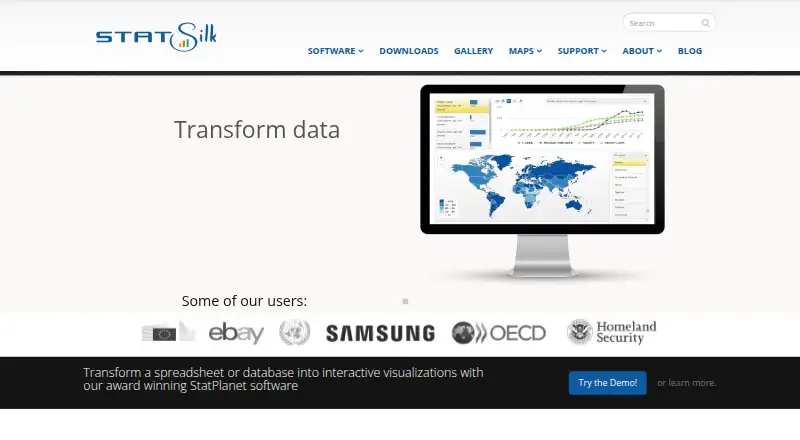
StatSilk provides tools for building interactive dashboards and data visualizations for web and desktop use. Its StatPlanet and StatTrends products can present data as maps, bar charts, line graphs, scatter plots, and bubble charts. StatPlanet Cloud can import spreadsheet data and connect to online databases that support SDMX, including OECD, UNESCO, and World Bank sources. Dashboard makers can arrange movable, resizable panels and add filters, embedded text or web pages, and interactive stories. The StatPlanet Cloud API can set dashboard parameters such as indicators, graph type, time, map areas, region, and data file. Data and maps can be hosted by StatSilk or self-hosted, and the software can run on a customer's server. StatSilk says information is sent from its cloud or servers to the user's device, not uploaded back or otherwise recorded in the cloud. It offers a free plan; StatPlanet Cloud Non-commercial costs $495 a year, and Commercial costs $595 a year, both for unlimited users. The maker is based in Sydney and was founded in 2011.
Good
- Visualizes data with maps and several chart types
- Imports spreadsheets and supports SDMX data exchange
- Dashboards support filters and interactive stories
- Cloud plans include unlimited users
Watch out
- Commercial cloud costs $595 a year
- Desktop feature add-ons are separate
- Commercial desktop costs $695 a month
Who it suits
StatSilk suits nonprofits, government agencies, research and educational institutions, and multinational companies that need interactive data dashboards. Its hosting options may suit teams choosing between StatSilk's cloud and self-hosting.
Verdict
StatSilk combines interactive visualizations, data import, and dashboard customization for web and desktop. Buyers should weigh its hosting options and plan terms, including separate Desktop add-ons.
Plans and prices
From StatSilk's own pricing page, checked 20 Sep 2026.
| Plan | Price | What it gives you |
|---|---|---|
| StatPlanet Cloud Non-commercial | $495 a year | Unlimited users · From 495 USD per year |
| StatPlanet Cloud Commercial | $595 a year | Unlimited users · From 595 USD per year |
| StatPlanet Desktop Non-commercial | — | Free for non-commercial use |
| StatPlanet Desktop Commercial | $695 a month | Desktop license · From 695 USD, depending on the number of users; excluding add-on modules |
| StatPlanet Desktop (non-commercial, government, educational and academic use) | Free | Free for non-commercial, government, educational and academic use |
| StatTrends Desktop | Free | Free for commercial and non-commercial use |
The facts
Each one read from StatSilk's own pages, with the date it was checked.
What it does
- API
- The StatPlanet Cloud API can set dashboard parameters such as indicators, graph type, time, map areas, map region, and data file.checked 7 Oct 2026
- Dashboard customization
- StatPlanet Cloud dashboards use movable, resizable panels and support filters, embedded text or web pages, and interactive stories.checked 7 Oct 2026
- Dashboard type
- interactivechecked 20 Sep 2026
- Data flow
- StatSilk says information flows from its cloud or servers to the user's device and that no information is uploaded or otherwise recorded in the cloud.checked 7 Oct 2026
- Data import
- StatPlanet Cloud automatically imports spreadsheet data and supports SDMX data exchange.checked 7 Oct 2026
- Data sources
- Spreadsheets,databases,Excel,XML,SDMX,OECD,UNESCO,World Bankchecked 20 Sep 2026
- Data visualization
- StatPlanet and StatTrends can display data as maps, bar charts, line graphs, scatter plots, and bubble charts.checked 7 Oct 2026
- Desktop limits
- StatPlanet Desktop feature add-ons are available separately and are not included by default.checked 7 Oct 2026
- Embedded dashboards
- Yeschecked 20 Sep 2026
- Hosting
- StatPlanet Cloud data and maps can be self-hosted or hosted in StatSilk's cloud, and the software can also be hosted on the customer's server.checked 7 Oct 2026
- Integrations
- StatPlanet Cloud can integrate with online databases that support SDMX, including OECD, UNESCO, and World Bank sources.checked 7 Oct 2026
- Intended users
- StatSilk describes use by nonprofits, government agencies, research institutions, educational institutions, and multinational companies.checked 7 Oct 2026
- Privacy
- StatSilk says it does not share personal information with other organizations and does not use it for marketing.checked 7 Oct 2026
- Purpose
- StatSilk makes tools for creating dashboards with interactive data visualizations and maps, for web and desktop use.checked 7 Oct 2026
- Support
- StatSilk provides getting-started guides and resource documentation, and offers training workshops and software customization services.checked 7 Oct 2026
The company
- Founded
- 2011checked 28 Sep 2026
- Headquarters
- Sydney, New South Wales, Australiachecked 28 Sep 2026
Money
- Free plan
- Yeschecked 20 Sep 2026
Where it runs
- Platform
- web_and_desktopchecked 20 Sep 2026
The full review of StatSilk
Overview
StatSilk makes dashboard and visualization tools for organizations presenting data through maps and charts. It is strongest for teams that need interactive, embeddable dashboards and control over where data is hosted. The trade-off is a split between cloud and desktop products, with desktop commercial licensing and add-ons requiring particular scrutiny.
Key features
StatPlanet and StatTrends display maps, bar and line charts, scatter plots, and bubble charts. That mix suits geographic reporting as well as comparisons and trends, though the map emphasis makes StatSilk a more natural fit for location-based data than for a dashboard built only around conventional charts.
StatPlanet Cloud automatically imports spreadsheet data, supports SDMX, and connects to online SDMX databases such as OECD, UNESCO, and World Bank sources. Spreadsheets, databases, Excel, and XML are also among its data sources. For organizations working with those formats and institutions, this reduces the gap between existing data and a published visualization; the SDMX integrations are specific to Cloud.
Cloud dashboards have movable, resizable panels, filters, embedded text or web pages, and interactive stories. Dashboards can be embedded, while the API can set indicators, graph type, time, map areas, map region, and data file. These options are useful when a public-facing dashboard needs explanatory context or another application needs to control what it displays.
StatPlanet Cloud data and maps can be hosted in StatSilk's cloud or self-hosted, and the software can also be hosted on a customer's server. StatSilk says information flows from its cloud or servers to the user's device without being uploaded or recorded in the cloud. It also says it does not share personal information with other organizations or use it for marketing. Those are relevant assurances for organizations weighing deployment choices, but hosting and privacy statements are not substitutes for evaluating an organization's own requirements.
Pricing
StatSilk has free options alongside paid cloud and desktop licenses. The cloud plans stand out for their unlimited users, so their annual price is not multiplied by the number of dashboard viewers.
- StatPlanet Cloud Non-commercial: $495 a year, with unlimited users. This is the paid cloud option for non-commercial use.
- StatPlanet Cloud Commercial: $595 a year, with unlimited users. Commercial users pay more than the non-commercial rate, but the listed seat allowance remains unlimited.
- StatPlanet Desktop Non-commercial: free for non-commercial use. It is a no-cost desktop route for eligible users; feature add-ons are sold separately and are not included by default.
- StatPlanet Desktop Commercial: $695 a month, depending on the number of users, excluding add-on modules. The monthly starting point and user-dependent price make this a much larger commitment than the annual cloud plans, and add-ons can add to the cost.
- StatTrends Desktop: free for commercial and non-commercial use. This is the clearest free desktop choice for users whose needs fit StatTrends.
- StatPlanet Desktop for non-commercial, government, educational, and academic use: free. Its free use is tied to those categories, rather than being a general commercial license.
The cloud plans are the more predictable paid choice for organizations that need broad access; desktop users should check eligibility, user counts, and required add-ons before committing. StatSilk also provides getting-started guides and documentation, along with training workshops and customization services.
Platforms
StatSilk's platform coverage includes web and desktop, with Android, iOS, macOS, and Windows also listed, as well as API and self-hosted options. The product is described as web and desktop software, so buyers should distinguish that core positioning from the broader platform list when planning deployment.
Who it's for
StatSilk describes use by nonprofits, government agencies, research and educational institutions, and multinational companies. It is a plausible fit for these organizations when they need interactive map-led reporting, embed dashboards, or choose between vendor and self-hosting. It is less compelling for a buyer seeking a low-cost commercial desktop license: the listed desktop commercial plan is monthly, varies by user count, and excludes add-ons.
Pros and cons
- Pros: Cloud plans include unlimited users, making access broad without a per-user limit in the stated plan terms.
- Pros: Map and chart visualizations, embedding, filters, interactive stories, and SDMX connections support data-rich presentations rather than static reporting alone.
- Pros: Cloud and customer-server hosting choices give organizations a deployment decision instead of a single hosting route.
- Cons: StatPlanet Desktop commercial use starts at $695 a month and excludes add-on modules, so total licensing needs checking.
- Cons: Cloud integrations and API parameter controls are specific to StatPlanet Cloud, so desktop buyers should not assume they receive them.
Alternatives
For a map-first workflow, the Felt Personal plan is free forever with unlimited maps and sharing, but it prohibits own data file uploads and is for personal use only. That is a better fit for personal map sharing than organizational data publishing. QGIS Cloud offers a free plan and may suit buyers comparing cloud mapping options. QGIS is free and open source under GNU GPLv2+, making it the alternative to consider when an open-source GIS is the priority.
GIS Cloud has a free plan and a Track plan priced at $5 a month per asset; consider it when that tracking price structure fits the need. GPXSee is free, open-source software under GPLv3. GRASS GIS is free and open source under GPL (>=v2), with no warranty. MapServer is a free, open-source geographic data rendering engine. NASA WorldWind is a free open-source SDK and APIs with free run-time and development licenses and unencumbered use on any number of applications.
Browse the GIS Software and Data Visualization Software directories to compare by category.
Verdict
Choose StatSilk if your organization needs interactive, map-rich dashboards with embedding, SDMX connections, and hosting flexibility; its unlimited-user cloud plans are the clearest paid proposition. Look elsewhere if you need a straightforward low-cost commercial desktop license or depend on desktop add-ons, since the commercial price is substantial and modules cost extra.
Getting started
- Open the StatSilk website
- Choose StatPlanet Cloud, StatPlanet Desktop, or StatTrends
- Select a free or paid plan appropriate to your use
- Import spreadsheet, database, Excel, XML, or SDMX data
- Configure dashboard panels, filters, charts, maps, or stories
- Host through StatSilk’s cloud, self-hosting, or your server
Limits worth knowing
Free desktop options do not include separately sold feature add-ons. The commercial desktop license excludes add-on modules, while cloud plans begin at $495 a year.
Questions
What platforms does StatSilk support?
It supports Android, iOS, macOS, Windows, web, API, and self-hosted use.
Is there a free plan?
Yes. StatTrends Desktop is free for commercial and non-commercial use, and StatPlanet Desktop is free for non-commercial, government, educational, and academic use.
How much do cloud plans cost?
StatPlanet Cloud Non-commercial costs $495 a year. StatPlanet Cloud Commercial costs $595 a year; both list unlimited users.
Can dashboards be embedded?
Yes. Embedded dashboards are supported, and StatPlanet Cloud dashboards can include embedded text or web pages.
Which data sources can it use?
Sources include spreadsheets, databases, Excel, XML, SDMX, OECD, UNESCO, and World Bank data.
Who makes StatSilk?
StatSilk makes the software and is headquartered in Sydney, New South Wales, Australia.