
Infogram
Infogram is a web and API platform for building interactive data visualizations.
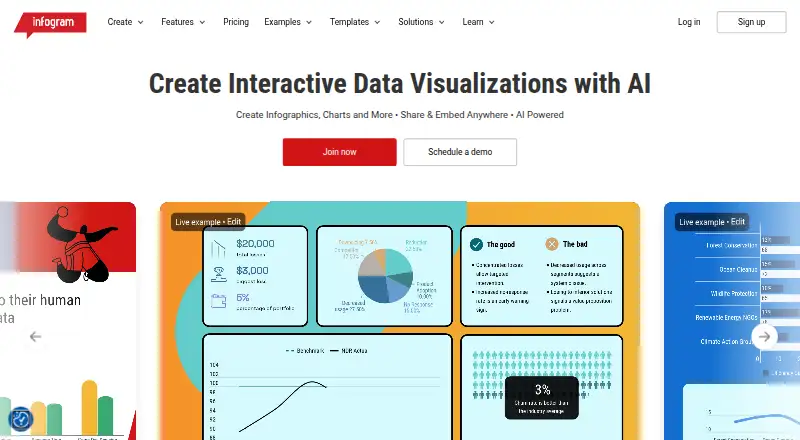
What Infogram is
Infogram is a web and API platform for building interactive data visualizations. It supports infographics, charts, maps, reports, dashboards, slides and social media graphics, with projects that can incorporate custom tooltips, clickable elements, videos, GIFs and animations. Its chart library includes more than 35 customizable types, and the platform lists more than 800 maps. Infogram’s AI can create visuals, suggest charts, adjust content and turn images into data.
Projects can be published online, shared, or embedded in websites, blogs and presentations without coding; an embedded visual updates when its source project is edited. Connections range from media services such as YouTube, SlideShare, Flickr and Giphy to data sources including Google Drive spreadsheets, Dropbox, JSON feeds and several database systems. Infogram lists WCAG 2.2 Level accessibility and SOC 2 Type 2 compliance, and describes safeguards including firewalls, intrusion detection and encryption for data in transit and at rest. A free Basic plan is aimed at personal use; paid plans are directed at businesses, organizations and professionals. The company was founded in 2012 and is part of Prezi.
Good
- Create infographics, charts, maps, reports, dashboards, slides and social graphics.
- Add tooltips, clickable elements, videos, GIFs and animations.
- Connect to media services, spreadsheets, JSON feeds and databases.
- Share and embed projects without coding; embedded visuals update after edits.
- Lists WCAG 2.2 Level accessibility and SOC 2 Type 2 compliance.
Watch out
- Basic is limited to 10 projects and five pages per project.
- Pro, Business and Team prices are billed annually.
- The Basic plan is described as suited to personal use.
Who it suits
Infogram suits people who need to turn data into interactive charts, maps, reports or presentation visuals and publish them online or embed them without coding. Its Basic plan is positioned for personal use, while businesses and teams can consider paid options with brand controls, collaboration or analytics.
Verdict
Choose Infogram if you want to build and publish interactive data visuals with a wide range of chart types, maps and data connections. Personal users can start with Basic, while brand controls, expanded project capacity and team collaboration require paid plans.
Plans and prices
From Infogram's own pricing page, checked 15 Oct 2026.
| Plan | Price | What it gives you |
|---|---|---|
| Pro | $19 a month | Up to 100 projects · up to 10 pages per project · 100+ premium templates · 800+ map types · 1 million images and icons · AI image maker · HD image/video downloads · privacy controls · live data connections · billed yearly |
| Business | $67 a month | Up to 1,000 projects · unlimited pages · branding assets · basic analytics · SQL connectors · iframe integrations · version history · custom links · tooltip customization · presenter notes · billed yearly |
| Team | $149 a month | 1 team · 3-10 users · up to 3,000 projects · real-time collaboration · commenting · engagement analytics · tracking links · custom and local map upload · billed yearly |
| Basic | Free | 1 user · 35+ interactive chart types · up to 10 projects · up to 5 pages per project · 13 map types · online publishing · data import · object animations |
| Enterprise | Priced on request | Multiple teams · 10+ users · custom branded theme · account manager · training · branded pages and subdomain · 10,000+ projects · priority support · SSO · 99.9% uptime SLA · API support · HTML export |
The facts
Each one read from Infogram's own pages, with the date it was checked.
What it does
- Accessibility
- Infogram lists WCAG 2.2 Level accessibility among its features.checked 29 Sep 2026
- AI
- Infogram says its AI can create visuals, recommend charts, adjust content, and convert images into data.checked 29 Sep 2026
- AI features
- Infogram says its AI can create visuals, recommend charts, revise content and turn images into data.checked 15 Oct 2026
- Animated charts
- The interactive-content feature page describes animated bar, line, pie and scatter charts with hover and scroll effects.checked 15 Oct 2026
- API
- Infogram advertises a developer API, and Enterprise includes API support.checked 29 Sep 2026
- API authentication
- API requests use bearer tokens created in account settings, and tokens can be scoped to selected operations.checked 15 Oct 2026
- API capabilities
- The public API supports listing, copying, reading, updating, publishing, unpublishing, deleting, downloading projects and uploading image assets.checked 15 Oct 2026
- API documentation depth
- The API documentation includes endpoint parameters, JSON schemas, curl examples, server-sent-event task status and a Node.js/TypeScript periodic-report walkthrough.checked 15 Oct 2026
- Chart and map library
- The home page advertises more than 35 customizable chart types and more than 800 maps.checked 15 Oct 2026
- Charts and maps
- Infogram lists more than 35 customizable chart types and more than 800 maps.checked 29 Sep 2026
- Collaboration
- The Team plan includes real-time collaboration, commenting, one team and three to ten users.checked 15 Oct 2026
- Confidentiality limitation
- Its terms say Infogram does not guarantee confidentiality for information entered into charts, including content marked private or confidential.checked 15 Oct 2026
- Developer libraries
- The developer portal lists official infogram-node, infogram-php, infogram-java and infogram-ruby libraries.checked 15 Oct 2026
- Export formats
- The API documentation lists PNG, JPG, PDF and HTML-related project export or publishing workflows.checked 15 Oct 2026
- Integrations
- Official integrations include Google Drive, YouTube, Vimeo, Giphy, iframe, Excel, Dropbox and JSON feeds.checked 15 Oct 2026
- Interactive content
- Projects can include custom tooltips, clickable elements, videos, GIFs, and animations.checked 29 Sep 2026
- Interactive maps
- Interactive maps can include tooltips, clickable legends and zooming for exploring geographic data.checked 15 Oct 2026
- Licence status
- The terms identify site and service content as copyrighted by Prezi, Inc. and grant no general trademark or service-mark licence, indicating a proprietary service.checked 15 Oct 2026
The company
- Company founding
- Infogram says it was founded in 2012 by Uldis Leiterts, Raimonds Kaze and Alise Semjonova.checked 15 Oct 2026
- Company history
- Infogram says it was founded in 2012 by Uldis Leiterts, Raimonds Kaze, and Alise Semjonova.checked 29 Sep 2026
- Company scale
- The press page reports 30 employees across San Francisco and Riga and more than 4.8 million infographics and charts created.checked 15 Oct 2026
- Founded
- 2012checked 23 Sep 2026
- Headquarters / offices
- Infogram says its team works together in Riga, Latvia; Budapest, Hungary; and San Francisco, California.checked 29 Sep 2026
Money
- Free plan
- Yeschecked 19 Sep 2026
The full review of Infogram
Infogram is a web and API platform for turning data into interactive charts, maps, infographics, dashboards and presentations. It fits professionals, publishers and teams that need connected data and embeddable visuals rather than static graphics alone. The free tier is a useful personal starting point, but sustained business work quickly runs into project and collaboration limits.
Overview
Infogram combines infographics, charts, maps, reports, dashboards, slides and social-media graphics in one publishing workflow. A project can include custom tooltips, clickable elements, video, GIFs and animation, then be published online or embedded in a website, blog or presentation without coding. Embedded visuals update when the source project is edited, which makes the platform particularly suitable for dashboards and recurring reports.
The company was founded in 2012 by Uldis Leiterts, Raimonds Kaze and Alise Semjonova, and is now part of Prezi. Its offices are in Riga, Budapest and San Francisco. Infogram describes SOC 2 Type 2 compliance, firewalls, intrusion detection and encryption for data in transit and at rest; that security positioning is more relevant to organizational buyers than to occasional personal use.
Key features
Infogram offers more than 35 customizable chart types and more than 800 maps overall. Basic narrows that to 13 map types, while Pro opens the larger map library. This is a strong range for varied data stories, although users on the free tier will encounter a meaningful selection limit.
Its AI can create visuals, recommend charts, adjust content and convert images into data. Pro additionally includes an AI image maker. These tools can speed up preparation, but the core value remains the breadth of charting and publishing options rather than AI alone.
Data connections cover Google Drive spreadsheets, Dropbox and JSON feeds, plus MySQL, PostgreSQL, Amazon Redshift, Oracle and Microsoft SQL Server. Named media integrations include YouTube, SlideShare, Flickr, Giphy and IFrame. Business adds SQL connectors and IFrame integrations, making that tier a better fit for organizations that need live or managed data sources.
Infogram also advertises a developer API, with API support included in Enterprise. Enterprise support adds priority assistance, a dedicated account manager and personalized training, benefits aimed at larger deployments rather than individual creators.
Pricing
Infogram uses a freemium model. Basic has no published price and supports one user, more than 35 interactive chart types, up to 10 projects, up to five pages per project, 13 map types and online publishing. It is appropriate for personal experiments or a small number of finished visuals, but the 10-project ceiling and five-page limit make it a poor long-term workspace for an active content team.
Pro costs $19 a month, billed annually. It raises capacity to 100 projects, adds more than 100 premium templates, more than 800 map types, an AI image maker, HD image and video downloads and privacy controls. This is the sensible upgrade for an individual professional who needs export quality, privacy and a wider visual library.
Business costs $67 a month, billed annually. It allows up to 1,000 projects and unlimited pages per project, with brand logos, colors, fonts and image assets, basic analytics, SQL connectors and IFrame integrations. Those controls justify the higher price for branded communications and data-connected publishing, but they are unnecessary for occasional personal work.
Team costs $149 a month, billed annually, for one team of 3–10 users. It includes up to 3,000 projects, real-time collaboration, commenting and content-engagement analytics. Choose it when several people must build and review content together; it is difficult to justify for a solo creator.
Enterprise has custom pricing and supports multiple teams, 10+ users, a custom branded theme, SSO, API support and HTML export. It is the tier for larger organizations with identity, deployment and account-management requirements.
Platforms
Infogram is offered on the web and through an API. Its browser-based publishing model suits teams sharing links and embeds, while the API provides a route to developer-led workflows on Enterprise.
Who it's for
Basic suits personal users making a limited set of interactive visuals. Pro is aimed at independent professionals who need downloads, privacy controls and more projects. Business fits organizations managing branded, data-connected output, and Team is designed for collaborative production across 3–10 users. Enterprise is appropriate when multiple teams, SSO, API support or dedicated assistance are requirements.
Pros and cons
Pros
- Broad visual coverage: More than 35 chart types and more than 800 maps support many kinds of data storytelling.
- Strong publishing workflow: No-code embeds and automatic updates keep published visuals current.
- Serious data connectivity: Spreadsheet, feed and database connections extend beyond simple manual uploads.
- Clear progression for teams: Business, Team and Enterprise add branding, collaboration, analytics, security and API capabilities in distinct steps.
Cons
- Free capacity is tight: Basic stops at 10 projects, five pages per project and 13 map types.
- Key business functions cost more: Branding, SQL connectors and unlimited project pages begin with Business at $67 a month billed annually.
- Collaboration is expensive for small groups: Team starts at $149 a month billed annually and requires 3–10 users.
- Several prices are custom or undisclosed: Basic and Enterprise do not have published prices, complicating upfront budgeting.
Alternatives
Visme is a broader web, Windows, macOS and iOS option; choose it when cross-platform availability and presentation storage matter more than Infogram’s database connections.
MilleMots is better for mobile-first infographic creation on Android and iOS, with a free allowance of three infographics per month.
Piktochart suits web users who want a free tier with team support, storage and AI credits before moving to its paid plans.
Datastory is an alternative for web-based visualizations with a free Starter plan that includes up to three team members and monthly AI credits.
GetInfographic is an API, extension and web alternative focused on credit-based generation.
InfographicMaker.org is a web option centered on infographic drafts, templates and brand kits.
Jeda.ai is a web-based AI workspace with a free trial and free White Belt plan.
MakeInfographic.ai is a web alternative built around monthly generation credits and infographic quotas.
For more options, browse AI Infographic Makers, Infographic Makers, Data Storytelling Tools, Data Visualization Software and Infographic Software.
Verdict
Choose Infogram when you need interactive, embeddable data visuals backed by varied charts, maps and live data connections. Its strongest case is professional or team publishing, where Business, Team or Enterprise features support branding, collaboration and governance. Look elsewhere if you only need occasional static infographics, a generous free project allowance or a lower-cost collaborative plan.
Getting started
- Visit https://infogram.com/.
- Use Infogram on the web or through its API.
- Start with the free Basic plan for one user and up to 10 projects.
- Choose Pro, Business or Team if their listed project, brand or collaboration options fit your needs.
- Publish projects online, share them, or embed them on a website, blog or presentation.
Limits worth knowing
Basic allows one user, up to 10 projects, up to five pages per project and 13 map types. Pro is listed at $19 a month billed annually; Business is $67 a month billed annually, and Team is $149 a month billed annually.
Questions
Is Infogram free?
Yes. Its freemium offering includes a Basic plan with no price listed.
How much do the paid plans cost?
Pro costs $19 a month billed annually, Business costs $67 a month billed annually, and Team costs $149 a month billed annually.
Which platforms does Infogram support?
The listed platforms are web and API.
What integrations and data connections are available?
Media integrations include YouTube, SlideShare, Flickr, Giphy and IFrame. Data connections include Google Drive spreadsheets, Dropbox, JSON feeds, MySQL, PostgreSQL, Amazon Redshift, Oracle and Microsoft SQL Server.
Who makes Infogram?
Infogram is made by Infogram. It was founded in 2012 and is part of Prezi.