MilleMots
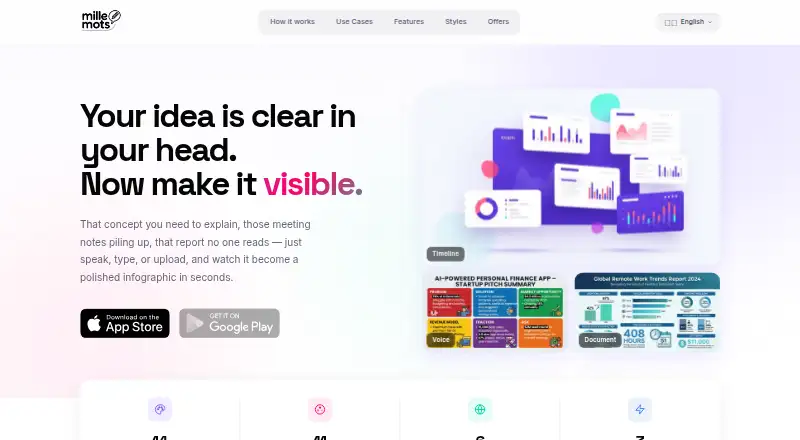
MilleMots turns spoken ideas, typed text, and uploaded documents into AI-generated infographics.
What MilleMots is
MilleMots turns spoken ideas, typed text, and uploaded documents into AI-generated infographics. It accepts PDF, Word, and text files, with OCR support, and voice input provides speech-to-text transcription described as supporting any language. Users can browse generated visuals in a gallery with search, style filters, favorites, sharing, and editing. The visual options include 14 layouts and 11 color themes. Listed uses range from explaining complex ideas and preparing work instructions to reports, project pitches, study or teaching materials, and social content. The site lists English, French, German, Spanish, Italian, and Finnish. MilleMots is available on Android and iOS; its App Store listing includes iPhone and iPad and requires iOS 15.1 or later and iPadOS 15.1 or later. The free plan allows three infographics and one edit per month. The privacy policy says text is sent to OpenAI and Google Gemini to create summaries and layouts, while voice recordings and uploaded originals are deleted after transcription or extraction.
Good
- Accepts PDF, Word, and text files.
- Voice transcription supports any language.
- Offers 14 layouts and 11 themes.
- Gallery supports search, favorites, and editing.
- Free plan includes three infographics monthly.
Watch out
- Free plan allows only one edit monthly.
- Starter Monthly costs $4.99 a month.
- Pro Monthly costs $11.99 a month.
- Not intended for children under 16.
Who it suits
MilleMots suits people who want to turn spoken notes, text, or documents into visual explanations, reports, lessons, or social content. It is available to Android and iOS users.
Verdict
MilleMots combines document, text, and voice input with a searchable gallery and multiple visual styles. Its free plan has monthly generation and editing limits, while paid plans raise those allowances.
Plans and prices
From MilleMots's own pricing page, checked 15 Oct 2026.
| Plan | Price | What it gives you |
|---|---|---|
| Free | Free | 3 infographics / month · 1 free edit / month · all 14 layout styles · voice, text & documents · 6 languages · forever |
| Credits pack | $2.99, paid once | Additional generation credits · one-time in-app purchase |
| Starter Monthly | $4.99 a month | 10 infographics / month · all 14 layout styles · 5 free edits / month · 5 extra generations · no watermark · monthly |
| Pro Monthly | $11.99 a month | 30 infographics / month · all 14 layout styles · 15 free edits / month · 5 extra generations · no watermark · priority generation · monthly |
| Starter Yearly | $49.99 a year | 10 infographics / month · all 14 layout styles · 5 free edits / month · 5 extra generations · no watermark · yearly |
| Pro Yearly | $119.99 a year | 30 infographics / month · all 14 layout styles · 15 free edits / month · 5 extra generations · no watermark · priority generation · yearly |
The facts
Each one read from MilleMots's own pages, with the date it was checked.
What it does
- Age limit
- MilleMots is not intended for children under 16.checked 15 Oct 2026
- AI accuracy limitation
- The terms warn that AI outputs can contain errors or unintended interpretations and require user review before reliance or publication.checked 15 Oct 2026
- AI providers
- The privacy policy says text is sent to OpenAI and Google Gemini to produce structured summaries and visual layouts.checked 15 Oct 2026
- API and SDKs
- The official home, terms and privacy pages opened for this research do not describe a public API, SDK or plugin framework.checked 15 Oct 2026
- Authentication
- MilleMots uses a device-generated identifier instead of a conventional username-and-password account.checked 15 Oct 2026
- Color themes
- The site lists 11 color themes: Minimalist, Dark, Corporate, Colorful, Pastel, Neon, Earth, Ocean, Sunset, Monochrome Blue and Vintage.checked 15 Oct 2026
- Data deletion
- Voice recordings are deleted after transcription, and uploaded originals are deleted after text extraction rather than stored on the servers.checked 15 Oct 2026
- Data retention
- Generated infographics and usage history are retained while the account is active and may be deleted after 12 months of inactivity; transaction records are retained for 7 years.checked 7 Oct 2026
- Documentation and support
- The official material opened consists of marketing pages, terms and a privacy policy; no separate developer documentation or help center was identified.checked 15 Oct 2026
- Document input
- Users can upload PDF, Word and text files; the service extracts their key information and lists OCR support.checked 15 Oct 2026
- Extra generations
- One-time extra-generation packs may be offered; the terms say credits do not expire, are non-refundable and cannot be transferred between devices.checked 15 Oct 2026
- GDPR rights
- The policy lists access, deletion, correction, portability, restriction, objection and consent-withdrawal rights, with responses targeted within 30 days.checked 15 Oct 2026
- HQ
- The maker and company pages place Giscard Consulting in Luxembourg.checked 15 Oct 2026
- Input methods
- The homepage describes three input methods: voice recording, typed text and document upload.checked 15 Oct 2026
- Intended audience
- The privacy policy says MilleMots is not intended for children under 16.checked 7 Oct 2026
- International processing
- The policy says text, subscription data and cloud-stored account content may be processed in the United States under safeguards such as Standard Contractual Clauses.checked 15 Oct 2026
Where it runs
- App framework
- The privacy policy says Expo may collect anonymous crash reports and usage analytics.checked 15 Oct 2026
- Apple App Store listing
- The iOS listing identifies Mille Mots as a free Productivity app with in-app purchases, 43.4 MB size, English language and iPhone/iPad support.checked 15 Oct 2026
- App Store developer
- Apple identifies Mounir Lakhdari as the developer and lists copyright as Giscard Consulting by Mounir Lakhdari.checked 15 Oct 2026
Money
- Billing
- Subscriptions renew automatically unless cancelled at least 24 hours before the current billing period ends.checked 15 Oct 2026
The company
- Company profile
- Giscard Consulting describes itself as a Luxembourg-based, vendor-neutral process-consulting and digital-transformation company.checked 15 Oct 2026
- Company registration
- The maker site identifies the business as Giscard Consulting by Mounir Lakhdari and gives Luxembourg address 46a Rue Maximilien, 6463 Echternach, with RCS A43893.checked 15 Oct 2026
- Generated-content ownership
- The terms say users retain ownership of their inputs and generated infographics and may use the generated visuals commercially without restriction.checked 15 Oct 2026
- Headquarters
- Luxembourgchecked 28 Sep 2026
The full review of MilleMots
MilleMots is a mobile app for turning spoken ideas, typed text, and documents into AI-generated infographics. It suits people who want a visual explanation from material they already have, especially for study, work instructions, or reports. The monthly generation and editing caps make it a better fit for measured use than high-volume production.
Overview
You can start with a voice recording, typed text, or a PDF, Word, or text file; document input includes OCR support. Voice transcription is described as supporting any language, while the site lists English, French, German, Spanish, Italian, and Finnish for the product. That broad input mix is useful when ideas are easier to speak or already sit in a document than to rewrite for a design tool.
Generated infographics are saved in a gallery with search, style filters, favorites, sharing, and editing. This makes the app practical for finding and revising work later, although the account is also where generated infographics and usage history are retained. They may be deleted after 12 months of account inactivity; transaction records are kept for seven years.
Text content is sent to OpenAI and Google Gemini to produce structured summaries and visual layouts. Voice recordings and uploaded originals are deleted after transcription or text extraction and are not stored on MilleMots servers. Transfers use HTTPS/TLS, and transfers outside the EEA, including to US-based services and infrastructure, use safeguards such as Standard Contractual Clauses where required. The privacy policy says the service is not intended for children under 16 and gives [email protected] for inquiries; GDPR rights requests receive a response within 30 days.
Key features
Fourteen layouts and 11 color themes offer a defined set of ways to present an idea without starting from a blank page. The gallery’s editing and sharing options help carry a generated infographic into follow-up work, but the stated feature set is centered on turning material into visual explanations rather than a broad design or publishing workflow.
The product presents use cases including complex ideas, work instructions, reports, project pitches, study or teaching, and social content. AI generation, data import, and a chart builder are included. Those capabilities make it relevant to both personal learning and workplace communication, though the monthly quotas determine how much iteration is practical.
Pricing
The free plan costs nothing, billed forever, and allows three infographics and one edit per month. It includes all 14 layout styles, voice, text, and document input, and six languages. It is a sensible way to see whether the input-to-infographic workflow fits, but one monthly edit leaves little room to refine several results.
Starter Monthly costs $4.99 a month, billed monthly, for 10 infographics, five free edits, five extra generations available, all 14 layouts, and no watermark. Starter Yearly costs $49.99 a year, billed yearly, with the same monthly generation and editing allowances, extra generations, layouts, and watermark removal. Starter suits occasional users who have outgrown the free cap; the yearly option lowers the listed cost over a year but commits payment annually.
Pro Monthly costs $11.99 a month, billed monthly, and Pro Yearly costs $119.99 a year, billed yearly. Both include 30 infographics per month, 15 free edits per month, five extra generations available, all 14 layouts, no watermark, and priority generation. Pro is the better fit for regular work that needs more monthly capacity or faster generation. The paid plans still have defined quotas, and the free plan is the only one whose listed inclusions explicitly name voice, text, and document input and six languages.
Platforms
MilleMots is available on Android and iOS. The App Store lists iPhone and iPad support and requires iOS 15.1 or later and iPadOS 15.1 or later.
Who it's for
MilleMots is a good match for students, teachers, and professionals who want to turn notes, reports, spoken thoughts, or instructions into an infographic, then retrieve or edit it later. Its mobile availability also suits people who prefer capturing ideas on a phone or tablet. It is less suitable for teams seeking a shared production workflow or anyone whose output needs regularly exceed the monthly generation and editing allowances.
Pros and cons
- Three ways to start: voice, typed text, and PDF, Word, or text files let users work from material they already have.
- Useful retrieval and revision tools: search, filters, favorites, sharing, and editing keep generated work accessible beyond the first result.
- Modest free allowance: three infographics and one edit per month can be restrictive for users who need to compare or refine several versions.
- Fixed capacity on paid tiers: even Pro is capped at 30 infographics and 15 edits per month, so it is not aimed at continuous high-volume creation.
- External AI processing: text is sent to OpenAI and Google Gemini, a relevant consideration for sensitive source material.
Alternatives
Browse AI Infographic Makers for more options in the category. Choose Visme if a web, Windows, or macOS option matters alongside mobile access; its free Basic plan includes 500MB storage and 50 slides or pages per project. Infogram is the alternative to consider for interactive chart types and online publishing, with its Basic plan including 35+ chart types and up to 10 projects. Pick Piktochart when team membership and downloads matter: its free plan allows 1–4 team members and two downloads, alongside 1 GB storage and 60 AI credits.
Datastory is worth considering for web-based data visualizations and open data downloads; its free Starter plan includes 10 visualizations, up to three team members, 100 AI credits per month, and unlimited open data downloads. GetInfographic offers API, extension, and web access, making it a candidate when those access routes are useful. InfographicMaker.org has a free plan with five infographic drafts, community templates, and PNG export. Jeda.ai is another web-based freemium option with a free trial. MakeInfographic.ai offers a free plan with 20 monthly credits and five 1K infographics per month.
Verdict
Choose MilleMots if you want a mobile-first way to turn speech, notes, or documents into editable infographics and the monthly caps suit your workload. Its range of input methods and searchable gallery are the strongest reasons to use it. Look elsewhere if you need heavier monthly production, a team-oriented workflow, or more control over data-heavy publishing.
Getting started
- Open https://www.millemots.app/
- Use MilleMots on Android or iOS
- Provide spoken input, typed text, or a PDF, Word, or text file
- Choose a layout and color theme for the generated infographic
- Save and manage the result in the gallery
- Use the Free plan or select a paid monthly or yearly plan
Limits worth knowing
The Free plan provides three infographics and one free edit per month. Starter plans provide 10 infographics monthly, while Pro plans provide 30; paid plans include additional editing allowances and no watermark.
Questions
Is there a free plan?
Yes. Free costs nothing and includes three infographics and one free edit per month.
Which platforms are supported?
MilleMots is available on Android and iOS. The App Store listing requires iOS 15.1 or later and iPadOS 15.1 or later.
What paid plans are available?
Starter Monthly costs $4.99 a month and Pro Monthly costs $11.99 a month. Yearly options cost $49.99 a year for Starter and $119.99 a year for Pro.
What files can I import?
The app accepts PDF, Word, and text files and lists OCR support. Voice input provides speech-to-text transcription.
What happens to uploaded originals?
The privacy policy says voice recordings and uploaded originals are deleted immediately after transcription or text extraction and are not stored on its servers.
Alternatives to MilleMots
- 1

Visme
Free planAndroidiOSWebAPI8.4From $12.25 a month - 2

Infogram
Free planAndroidiOSWebAPI8.1From $19 a month - 3

Mind the Graph
Free planWeb7.5From $99 a year - 4

Piktochart
Free planWeb7.5From $39 a year - 5

GetInfographic
Free planWebAPIExtension7.4From $9 a month - 6

Jeda.ai
Free planWeb6.9From $8.33 a month