
GetInfographic
GetInfographic turns text, articles, and blog posts into branded visuals, including infographics, carousels, quote cards, calls to action, featured images, a…
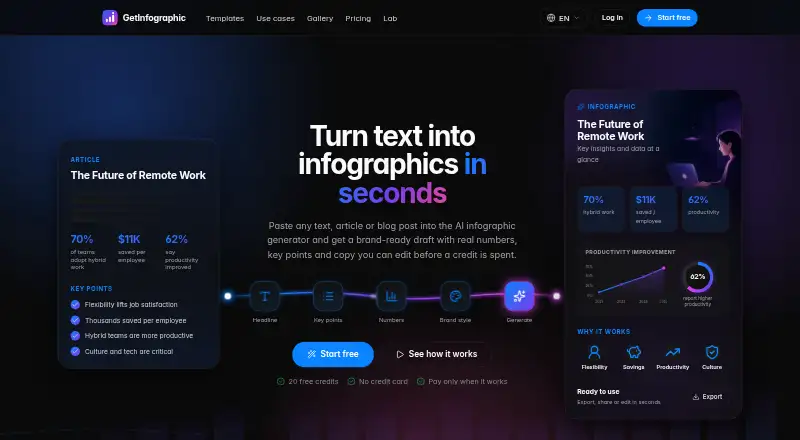
What GetInfographic is
GetInfographic turns text, articles, and blog posts into branded visuals, including infographics, carousels, quote cards, calls to action, featured images, and product shots. It pulls out a headline, key points, and statistics for you to review and edit before image generation. A Brand Kit applies your colors, fonts, and logo. You can use the service on the web, through a browser extension, or via an API; the maker also says visuals can be generated in the WordPress editor. It supports content in any language, including right-to-left scripts such as Persian and Arabic. A free plan includes starter credits, every tool, instant generation, and no card requirement. Business costs $49 a month and includes 1,500 monthly credits, webhooks, and multiple sites. Plans are month-to-month and can be cancelled anytime without a contract. Credits are charged only for successful image generations.
Good
- Review and edit extracted headlines, points, and figures.
- Brand Kit applies colors, fonts, and logo.
- Supports infographics, carousels, quote cards, and more.
- Credits are deducted only after successful image generation.
- Month-to-month plans can be cancelled anytime.
Watch out
- Monthly plan credits refresh each billing period.
- Business costs $49 a month.
Who it suits
GetInfographic suits people who want to turn written content into branded visuals, including teams that publish through WordPress or use an API. Its language support includes right-to-left scripts.
Verdict
GetInfographic combines text extraction and editing with several visual formats and brand controls. The free plan offers a way to try its tools, while recurring credits and paid plans may matter for ongoing use.
Plans and prices
From GetInfographic's own pricing page, checked 14 Oct 2026.
| Plan | Price | What it gives you |
|---|---|---|
| Free | Free | Try every tool · instant generation · no card required |
| Creator | $9 a month | 200 credits/month · up to 4K, no watermark · Brand Kit and logo · WordPress and API access · monthly |
| Pro | $19 a month | 500 credits/month · up to 4K, no watermark · Brand Kit and logo · WordPress and API access · monthly |
| Business | $49 a month | 1,500 credits/month · lowest credit price · batch backfill at half price · webhooks and multiple sites · monthly |
The facts
Each one read from GetInfographic's own pages, with the date it was checked.
What it does
- Account sharing
- The web app, WordPress plugin, browser extension, and API share one account's brand settings and credits.checked 14 Oct 2026
- API keys
- The setup guide says dashboard API keys can be named, revoked, and regenerated.checked 14 Oct 2026
- Article extraction
- The service extracts a headline, key points, and only statistics that appear in the supplied text.checked 14 Oct 2026
- Branding
- The Brand Kit applies the user's colors, fonts, and logo to generated visuals.checked 8 Oct 2026
- Brand Kit
- Saved colors, fonts, and logos are automatically applied to generated visuals.checked 14 Oct 2026
- Cancellation
- Subscriptions are month to month and can be cancelled at any time.checked 14 Oct 2026
- Commercial rights
- Terms say users retain ownership of submitted text and generated images and may use generated images commercially.checked 14 Oct 2026
- Credit charges
- Credits are deducted only when an image generates successfully; one-off top-up credits never expire, while monthly plan credits refresh each billing period.checked 8 Oct 2026
- Credit charging
- Credits are deducted only after a successful render, while failed renders are free.checked 14 Oct 2026
- Credit expiry
- Monthly credits refresh each billing period, while one-off top-up credits do not expire.checked 14 Oct 2026
- Data controls
- Users can access, correct, export, or delete their data, and can delete accounts from the dashboard.checked 14 Oct 2026
- Data handling
- The privacy policy says account passwords are stored as hashes, payment card details are handled by Stripe, and users can request deletion of generated images and job data.checked 8 Oct 2026
- Developer fact
- The WordPress developer profile identifies deepwp24 as a Germany-based WordPress developer who joined in May 2026.checked 14 Oct 2026
- Documentation depth
- Public guidance covers plugin setup, API-key handling, brand settings, generation defaults, output settings, and bulk tools.checked 14 Oct 2026
- Editing
- Users can review and edit the headline, key points, and figures before generating an image.checked 8 Oct 2026
- Editing workflow
- Users can edit the extracted headline, figures, and points before image generation uses credits.checked 14 Oct 2026
- Formats
- The product supports infographics, carousels, quote cards, calls to action, featured images, and product shots.checked 8 Oct 2026
- Integrations
- The maker says users can generate visuals in the WordPress editor, through a browser extension, or through its API.checked 8 Oct 2026
- Languages
- The maker says it supports content in any language, including right-to-left scripts such as Persian and Arabic.checked 8 Oct 2026
- Language support
- The site says content can be generated in any language, including right-to-left Persian and Arabic, without machine translation.checked 14 Oct 2026
- Launch date
- The developer profile records the initial GetInfographic plugin release in June 2026.checked 14 Oct 2026
- Layout types
- Built-in formats include pros-and-cons, comparisons, how-to steps, statistics, lists, and timelines.checked 14 Oct 2026
- Limit: AI accuracy
- Terms warn that AI output can contain errors and should be reviewed before publication.checked 14 Oct 2026
Where it runs
- Browser extension
- A browser extension lets users select text on a webpage and create an image through a right-click action.checked 14 Oct 2026
The full review of GetInfographic
GetInfographic converts articles and other written content into branded visual assets, with editing controls before rendering. It is best suited to publishers and marketing teams that repeatedly repurpose text across channels. The service is less compelling for buyers seeking a broad, free-form design suite rather than an extraction-led workflow.
Overview
Submit text, an article, or a blog post and GetInfographic identifies a headline, key points, and statistics. You can revise those elements before creating the image, so editorial teams retain control over wording and figures instead of accepting an automatic summary unchanged. The workflow is designed for turning existing content into publishable graphics rather than building every design element from scratch.
Key features
Supported outputs include infographics, carousels, quote cards, calls to action, featured images, and product shots. That range lets one source article serve social, editorial, and promotional needs, although all formats remain tied to the text-extraction process.
The Brand Kit applies your colors, fonts, and logo to generated visuals. For organizations producing assets repeatedly, this is more practical than restyling each image manually. Generation can happen in the WordPress editor, through a browser extension, or via API, which suits teams embedding visual production in publishing and integration workflows. The maker says content in any language is supported, including right-to-left scripts such as Persian and Arabic.
Credits are deducted only after an image generates successfully. One-off top-up credits do not expire, while credits included with a monthly plan refresh each billing period. That protects against paying for failed generations, but ongoing high-volume work still depends on the monthly allowance.
Pricing
| Plan | Price | What you get |
|---|---|---|
| Free | free | Starter credits, every tool, instant generation, and no card required |
| Creator | $9 a month, billed monthly | 200 credits/month, up to 4K, no watermark, Brand Kit and logo, WordPress and API access |
| Pro | $19 a month, billed monthly | 500 credits/month, up to 4K, no watermark, Brand Kit and logo, WordPress and API access |
| Business | $49 a month, billed monthly | 1,500 credits/month, lowest price per credit, half-price batch backfill, webhooks, and multiple sites |
The free tier is a useful way to try the tools without entering payment details, but it does not provide a stated recurring credit quota. Creator is the entry point for a single workflow that needs clean, high-resolution output and integrations. Pro more than doubles the monthly allowance for regular production; it otherwise retains the same listed output and access terms. Business is aimed at teams managing multiple sites or large archives: batch backfill and webhooks justify the higher fee when volume is substantial. Plans are month-to-month, cancellable at any time, and carry no contract. Paid subscriptions renew each billing period, with included credits refreshing then.
Platforms
GetInfographic is offered as a web service, browser extension, and API. WordPress editor generation is included with paid plans, making it a natural fit for sites that publish through WordPress. The API and extension broaden deployment options beyond a standalone browser tab.
Who it's for
Choose it if your team already has written content and needs repeatable, on-brand derivatives for websites and social channels. Editors who want to correct extracted copy before rendering will value the review step, while international teams benefit from stated support for right-to-left languages. It is a weaker fit for occasional users who need only a few manually designed graphics or for organizations that cannot work within credit quotas.
Pros and cons
Pros
- Editable extraction: headlines, points, and statistics can be corrected before generation.
- Broad output mix: infographics, carousels, cards, calls to action, featured images, and product shots cover several publishing needs.
- Brand controls: colors, fonts, and logos carry across generated assets.
- Workflow integrations: WordPress, browser extension, and API access support embedded production.
- Privacy commitments: submitted content is not used to train models, personal data is not sold, and deletion of generated images and job data can be requested.
Cons
- Credit-based capacity: monthly allowances can constrain frequent generation, especially on Creator.
- Recurring-plan economics: unused monthly credits refresh rather than accumulating, unlike non-expiring top-ups.
- Business-only scale features: webhooks, multiple sites, and discounted batch backfill require the $49 plan.
Alternatives
For a wider comparison, see AI Infographic Makers and Infographic Makers.
Visme is the better choice when you want a broader multi-platform design workspace, including Windows, macOS, and iOS, with slide/page projects and storage limits on its free and Starter plans.
Infogram suits users prioritizing interactive charts and maps, with API and web access and a Basic tier supporting 35-plus chart types.
MilleMots is aimed at mobile creators who want Android and iOS apps, voice, text, and document input, and a free monthly infographic allowance.
Piktochart is a web alternative for teams needing shared membership, downloads, storage, and AI credits.
Datastory is focused on data visualizations and open-data downloads rather than article-to-image conversion.
InfographicMaker.org offers a template-led web workflow with draft limits on its free tier and brand kits on Studio.
Jeda.ai is another web-based freemium visual-creation option with a free trial.
MakeInfographic.ai is worth considering when a low-cost web plan with monthly credits is the priority, though its free tier omits PNG/PDF downloads and support.
Verdict
GetInfographic is a strong recommendation for content teams that need to turn existing writing into consistent visuals across WordPress, extensions, or API workflows. Its decisive advantage is editable extraction paired with brand controls and multiple output formats. Look elsewhere if you need unconstrained design authoring, interactive data work, or usage that does not fit recurring credit limits.
Alternatives to GetInfographic
- 1

Visme
Free planAndroidiOSWebAPI8.4From $12.25 a month - 2

Infogram
Free planAndroidiOSWebAPI8.1From $19 a month - 3
Animaker
Free planAndroidiOSWebAPI7.8From $15 a month - 4
Drawtify
Free planWebAPImacOSWindows7.8From $99.99 a year - 5

Piktochart
Free planWeb7.5From $39 a year - 6

Napkin AI
Free planAndroidiOSWebAPI7.3From $9 a month