Drawtify
Drawtify is an online vector graphic design app and SVG editor with editable design templates.
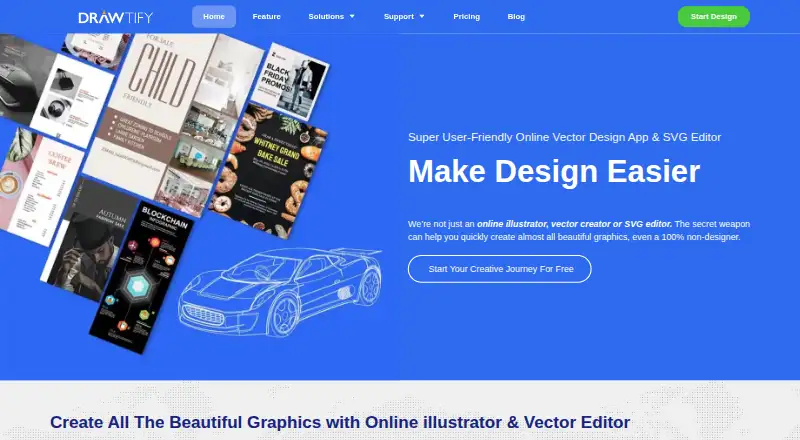
What Drawtify is
Drawtify is an online vector graphic design app and SVG editor with editable design templates. It combines vector drawing, photo editing, animation, layout and typography tools, with a template library aimed at graphic creators and beginners, especially people without design experience. Its motion editor offers up to 27 basic movement instructions and 14 text movement instructions. Built-in plugins cover barcodes, QR codes, charts and maps. Drawtify supports JPG, PNG, PDF and SVG imports and exports graphics in those formats; animation exports include SVG, GIF, APNG, MP4 and WebM. The resource library includes high-definition pictures from Pixabay and Unsplash. The online version supports autosave, online storage and folder editing for free and PRO users. Drawtify says its design resources and editable templates may be used commercially. It is available on the web and as desktop apps for Windows and macOS. The Free plan costs nothing, billed monthly, and includes 40 MB of image uploads, SD image exports, and limited templates and design elements. Monthly costs $9.99 a month, billed monthly; Monthly Pro costs $14.99 a month, billed monthly.
Good
- Editable templates and illustration tools support design work.
- Includes vector drawing, photo editing, animation, layout and typography.
- Built-in plugins make barcodes, QR codes, charts and maps.
- Supports common image, document and animation export formats.
- Online storage, autosave and folder editing are available.
Watch out
- Free plan limits uploads to 40 MB and exports to SD images.
- Free plan has limited templates and design elements.
- Monthly plan lacks some pro features.
- Desktop use has stated system requirements.
Who it suits
Drawtify suits beginners and graphic creators looking for a template-based vector editor, including users who want browser access or a Windows or macOS desktop app. Its motion tools, plugins and multiple image and animation export formats also serve people creating varied graphic assets.
Verdict
Choose Drawtify if you want a vector design app with templates, illustration and animation tools, and web or desktop access. The Free plan has limited resources and SD image exports; users who need the fully functional plan can consider Monthly Pro at $14.99 a month, billed monthly.
Plans and prices
From Drawtify's own pricing page, checked 14 Oct 2026.
| Plan | Price | What it gives you |
|---|---|---|
| Free | Free | Vector editor · chart tools · barcode generator · photo editor · animation tools · 20K+ icons/shapes · limited templates/elements · 40 MB uploads · SD exports · watermark removal · Monthly |
| Monthly | $9.99 a month | Vector editor · chart tools · barcode generator · photo editor · animation tools · 20K+ icons/shapes · 3,000+ templates · 1,000+ elements · 1 GB uploads · HD/vector exports · Monthly |
| Monthly Pro | $14.99 a month | Fully functional · vector editor · chart tools · barcode generator · photo editor · animation tools · 3,000+ templates · 1,000+ elements · 1 GB uploads · HD/vector exports · Monthly |
| Logo Maker & Animator lifetime | $29.99, paid once | Mac/Windows desktop app · 7-day free trial · Lifetime license |
| Drawtify Designer lifetime | $39.99, paid once | Mac/Windows desktop app · 7-day free trial · Lifetime license |
| Infographic Creator lifetime | $49.99, paid once | Mac/Windows desktop app · 7-day free trial · Lifetime license |
| Yearly Pro | $99.99 a year | Fully functional · vector editor · chart tools · barcode generator · photo editor · animation tools · 3,000+ templates · 1,000+ elements · 1 GB uploads · HD/vector exports · $179.88 list price, shown discounted to $99.99 yearly |
The facts
Each one read from Drawtify's own pages, with the date it was checked.
What it does
- Animation
- Its motion editor advertises 27 basic movement instructions plus 14 text movement instructions.checked 14 Oct 2026
- API and SDKs
- The official documentation describes built-in design plug-ins and Google Drive API usage but does not publish a developer API or SDK reference.checked 14 Oct 2026
- Asset libraries
- Official documentation lists about 1,000 design elements, 20,000 vector icons and shapes, 100,000 HD backgrounds, 200 color schemes and about 1 million HD pictures sourced through Unsplash and Pixabay.checked 14 Oct 2026
- Commercial use
- The feature page says design resources and editable templates may be used commercially.checked 8 Oct 2026
- Design tools
- The product includes vector drawing, photo editing, animation, layout, and typography tools.checked 8 Oct 2026
- Documentation
- The documentation site covers the product, interface, resources, workflows and tutorials, and links to a complete documentation index.checked 14 Oct 2026
- Illustration tools
- Yeschecked 19 Sep 2026
- Import and export
- The software imports JPG, PNG, JIF, SVG and PDF assets and exports JPG, PNG, PDF, SVG, GIF, APNG, MP4 and WebM outputs, with direct printing.checked 14 Oct 2026
- Integrations
- The privacy policy states that Google and Dropbox OAuth are used for sign-in or saving work, and Google Drive API access can create folders or save files after authorization.checked 14 Oct 2026
- Integrations and resources
- Drawtify says its resource library includes high-definition pictures from Pixabay and Unsplash.checked 8 Oct 2026
- Intended users
- The feature page says the editable templates are intended to help graphic creators and beginners, especially non-designers.checked 8 Oct 2026
- Layers and 3D
- The product advertises unlimited layers, layer locking/hiding and built-in 3D effects.checked 14 Oct 2026
- Layout
- Layout functions include guides, scaling, layers, alignment, grouping and drag-and-drop replacement of images, icons and shapes.checked 14 Oct 2026
- Licence
- Drawtify’s terms grant use of its software but prohibit copying site code or assets and reverse engineering, indicating a proprietary product rather than open-source software.checked 14 Oct 2026
- Limit: colour coverage
- A Capterra reviewer says not all colours are available and asks for broader colour selection.checked 14 Oct 2026
- Limit: dated content
- A Capterra reviewer says many templates and elements feel dated and need redesign, and that the editor is difficult to learn compared with other online editors.checked 14 Oct 2026
- Limit: performance
- G2 and TrustRadius reviewers mention occasional slowness or lag, especially with high-end graphics or while uploading images.checked 14 Oct 2026
- Motion graphics
- Its motion editor offers up to 27 basic movement instructions and 14 text movement instructions.checked 8 Oct 2026
- Multi-page editing
- Multi-page documents can show facing pages, isolate the first page and reorder pages.checked 14 Oct 2026
Where it runs
- App status
- The Mac App Store listing shows version 1.27.5 dated December 2023 and requires macOS 10.15 or later.checked 14 Oct 2026
- Desktop app
- Yeschecked 19 Sep 2026
The company
- Company size
- LinkedIn lists Drawtify, Inc. as a privately held software-development company with 2–10 employees.checked 14 Oct 2026
Money
- Free plan
- Yeschecked 19 Sep 2026
- Limit: free tier
- TrustRadius reviewers report that the free version limits vector-format downloads, layers and font choices, while free outputs carry watermarks.checked 14 Oct 2026
The full review of Drawtify
Drawtify is a vector graphics and SVG editor that pairs editable templates with drawing, photo, layout, typography, and animation tools. It suits beginners and graphic creators who want static and animated designs in one app. Its broad toolkit is appealing, but the free plan’s small upload allowance and SD-only image exports limit its usefulness for finished work.
Overview
Drawtify combines vector drawing and SVG editing with photo editing, layout, typography, and animation. Templates offer a starting point for non-designers, while illustration tools let users make or refine artwork rather than relying solely on presets. That range makes it a practical option for varied design tasks, though users who need unrestricted access to templates, elements, or export quality will need to weigh the paid plans.
The motion editor provides up to 27 basic movement instructions and 14 text movement instructions. Built-in plugins create barcodes, QR codes, charts, and maps, which can save a switch to another tool when those components belong in a design. Drawtify also says its design resources and editable templates may be used commercially.
Key features
Drawtify imports and exports JPG, PNG, PDF, and SVG graphics. Animation exports add SVG, GIF, APNG, MP4, and WebM, giving users several formats for moving designs. Its resource library includes high-definition pictures from Pixabay and Unsplash.
The online version supports autosave, online storage, and folder editing for both Free and PRO users. That is useful for keeping browser-based work organized, although desktop access is also available for Windows and macOS. Support resources include tutorials, FAQs, a user guide, and a contact page.
Pricing
The Free plan costs nothing, billed Monthly. It allows 40 MB of image uploads, SD image exports, and limited templates and design elements. That is enough to explore the editor or make modest projects, but the upload and export restrictions make it a poor fit for users who regularly work with larger images or need high-definition output.
Monthly costs $9.99 a month, billed Monthly, and raises image uploads to 1 GB while including 3000+ templates and 1000+ design elements. It still lacks some pro features, so it suits users who need more resources than Free provides but do not require the fully functional plan.
Monthly Pro costs $14.99 a month, billed Monthly. It includes the same 1 GB upload allowance, 3000+ templates, and 1000+ design elements, with the fully functional plan. For users who need the complete feature set, it is the clearest option, though it costs more than Monthly.
Yearly Pro is a fully functional plan with 3,000+ design templates, 1,000+ design elements, 1 GB image uploads, HD and vector exports, and AI background removal; it has custom pricing. Those export options make it the relevant plan for users who need higher-quality output, but the price is not given here. The Free plan is billed Monthly, and paid monthly plans renew on a monthly billing term.
Platforms
Drawtify is available on the web and as desktop software for Windows and macOS. The download page gives desktop requirements of Windows 7 or later, macOS High Sierra or later, at least 2 GB RAM, and a 2.2 GHz CPU. The web version’s autosave and online storage suit browser-based work, while the desktop app gives users another way to access the editor.
Who it's for
Drawtify is best suited to beginners and graphic creators who want templates, illustration, and motion tools together, especially if their work spans formats such as SVG, PDF, and video. It is less compelling for someone who needs generous free uploads or HD exports without moving to a paid plan. The pricing page describes the service as “256-bit SSL encrypted, 100% safe.” Its privacy policy says it may collect a name and email address and describes Google and Dropbox OAuth access for account identification or saving work.
Pros and cons
- Pros: Combines vector drawing, photo editing, layout, typography, and animation in one editor, reducing the need to switch between tools for different design tasks.
- Pros: Supports graphic and animation imports and exports across JPG, PNG, PDF, SVG, GIF, APNG, MP4, and WebM, providing flexibility for different outputs.
- Pros: Templates and design elements scale up on paid plans, with Monthly Pro offering a fully functional plan.
- Cons: Free uploads are capped at 40 MB and image exports are SD, limiting the free plan for larger or higher-quality work.
- Cons: Monthly at $9.99 a month still omits some pro features, while Monthly Pro costs $14.99 a month.
- Cons: Yearly Pro includes HD and vector exports, but its price is custom pricing, making cost comparison difficult.
Alternatives
Choose Inkscape if you want a free, open-source vector graphics editor for Linux, macOS, or Windows rather than Drawtify’s template-led mix of design and animation tools.
Lunacy is another freemium option, with Linux, macOS, web, Windows, and self-hosted availability; its Free plan allows up to 10 cloud documents, 10 document editors/exporters, and 30 days of version history.
For a free and open-source option, Graphite offers a forever-free plan and runs on Linux, macOS, web, and Windows.
Amadine is worth considering if you want an iOS or macOS app and are comfortable with a free version that requires a purchase for exporting, printing, and image tracing.
Gusta Draw offers its drawing tools, effects, starter designs, and SVG, PNG, and PDF exports for free across Android, iOS, and web; its AI copilot uses granted tokens during open beta.
Vecteezy is a web-based alternative with a free plan and image- and video-download plans.
Dotgrid is a free, open-source drawing app for Android, Linux, macOS, and Windows.
Linearity Curve is a freemium alternative for iOS and macOS with a Free plan that includes 250 lifetime credits, one basic brand kit, and 5GB cloud storage.
Browse Vector Graphics Software, Infographic Makers, Infographic Software, and Graphic Design Software for more options by category.
Verdict
Drawtify is a good fit for beginners and graphic creators who want templates, vector illustration, animation, and web or desktop access in one place. Its strongest case is the breadth of tools and export formats; its main drawback is that the free tier is sharply limited and the fully functional Monthly Pro plan costs $14.99 a month, billed monthly. Choose it if that combination suits your workflow, and look elsewhere if free high-quality exports or a free open-source vector editor matter more.
Getting started
- Visit https://drawtify.com/ to use the online version.
- Choose the Free plan at no cost, billed monthly, or a listed paid monthly plan.
- For desktop use, choose the Windows or macOS app.
- For Windows desktop use, the download page lists Windows 7 or later, at least 2 GB RAM and a 2.2 GHz CPU.
- For macOS desktop use, the download page lists macOS High Sierra or later.
Limits worth knowing
The Free plan includes 40 MB image uploads, SD image exports and limited templates and design elements. Monthly costs $9.99 a month, billed monthly, and is listed as lacking some pro features; Monthly Pro is described as fully functional at $14.99 a month, billed monthly.
Questions
Is Drawtify free?
Yes. The Free plan costs nothing, billed monthly, with 40 MB image uploads, SD image exports, and limited templates and design elements.
What are the listed monthly prices?
Monthly is $9.99 a month, billed monthly. Monthly Pro is $14.99 a month, billed monthly.
What platforms does Drawtify support?
It is available on the web and as a desktop app for Windows and macOS.
What file formats can it import and export?
It supports JPG, PNG, PDF and SVG imports and graphic exports. Animation export formats include SVG, GIF, APNG, MP4 and WebM.
Can its resources and templates be used commercially?
Drawtify’s feature page says its design resources and editable templates may be used commercially.
What desktop requirements are listed?
Windows use requires Windows 7 or later, at least 2 GB RAM and a 2.2 GHz CPU. macOS use requires macOS High Sierra or later.
Alternatives to Drawtify
- 1

Concepts
Free planAndroidiOSWindows8.0Free plan - 2
Lunacy
Free planWebAPILinuxmacOS8.0From $4.99 a month - 3

Boxy SVG
AndroidiOSWebAPI7.8From $9.99 a month - 4

Linearity Curve
Free planiOSmacOS7.7From $8 a month - 5

Tilda
Free planWebAPI7.6From $120 a year - 6

Adobe Illustrator
iOSWebmacOSWindows7.5