Dotgrid
Dotgrid is grid-based vector drawing software for making logos, icons, and type.
What Dotgrid is
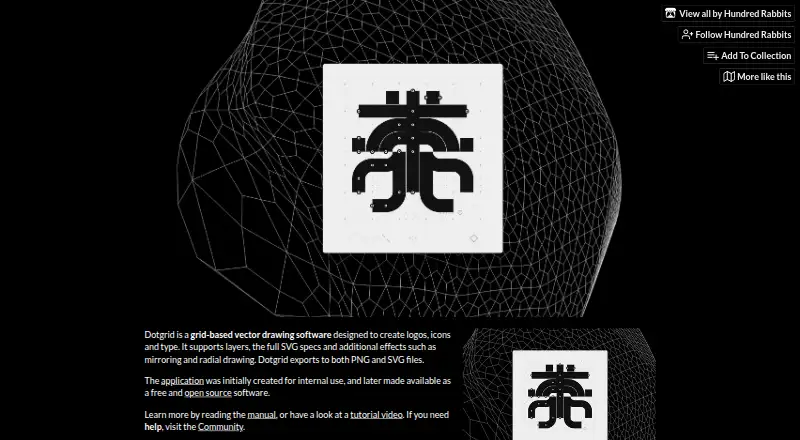
Dotgrid is grid-based vector drawing software for making logos, icons, and type. It supports layers and the full SVG specification, with mirroring and radial drawing effects for creating and editing artwork. Finished work can be exported as PNG or SVG files. Its guide documents segment dragging, vertex deletion, and keyboard controls for drawing and editing. Dotgrid is described as free and open source; its source code is licensed under MIT. Images, text, and other repository assets have a separate BY-NC-SA 4.0 license. It is available for Android, Linux, macOS, and Windows, and is identified as a desktop app and downloadable tool. The product page links to a manual, tutorial video, and community for help. A separate Hundred Rabbits Themes repository provides themes. The maker, Hundred Rabbits, describes itself as an artist collective documenting low-tech solutions for a more resilient future. The “Name your own price” plan is free; there is no free trial.
Good
- Supports layers and the full SVG specification
- Exports artwork as PNG or SVG
- Includes mirroring and radial drawing effects
- Available for Android, Linux, macOS, and Windows
Watch out
- No free trial is available
- Repository assets use a separate BY-NC-SA 4.0 license
Who it suits
Dotgrid suits people creating logos, icons, or type who want a grid-based vector tool with SVG export. It is available on Android, Linux, macOS, and Windows.
Verdict
Dotgrid provides vector drawing, editing controls, and PNG or SVG export for logo, icon, and type work. Check the separate asset license alongside the MIT license for its source code.
Plans and prices
From Dotgrid's own pricing page, checked 9 Oct 2026.
| Plan | Price | What it gives you |
|---|---|---|
| Name your own price | Free | Downloadable tool · Windows, macOS, Linux, Android |
The facts
Each one read from Dotgrid's own pages, with the date it was checked.
What it does
- Asset license
- The repository says images, text, and assets are licensed under BY-NC-SA 4.0.checked 9 Oct 2026
- Documentation
- The product page links to a manual and a tutorial video.checked 9 Oct 2026
- Drawing effects
- It includes mirroring and radial drawing effects.checked 9 Oct 2026
- Editing controls
- The guide documents segment dragging, vertex deletion, and keyboard controls for drawing and editing.checked 9 Oct 2026
- Export
- It exports to PNG and SVG files.checked 9 Oct 2026
- Layers and SVG
- It supports layers and the full SVG specification.checked 9 Oct 2026
- Open source
- The application is described as free and open source, and its source code is licensed under MIT.checked 9 Oct 2026
- Purpose
- Dotgrid is grid-based vector drawing software for creating logos, icons, and type.checked 9 Oct 2026
- Support
- The product page directs users to its community for help, and the repository lists Patreon support.checked 9 Oct 2026
- Themes
- The guide links to a separate Hundred Rabbits Themes repository for themes.checked 9 Oct 2026
- Who it is for
- The maker describes the intended work as creating logos, icons, and type.checked 9 Oct 2026
The company
- Maker
- Hundred Rabbits describes itself as an artist collective documenting low-tech solutions for a more resilient future.checked 9 Oct 2026
Where it runs
- Platforms
- The downloadable tool is listed for Windows, macOS, Linux, and Android.checked 9 Oct 2026
The full review of Dotgrid
Dotgrid is a focused, grid-based vector editor for logos, icons, and type, aimed at designers who prefer direct path work over a broad design suite. It runs on desktop systems and Android at no cost, with especially useful tools for symmetrical or repeated shapes.
Its SVG coverage, layers, and export options make it a practical specialist tool; the narrow creative scope means people needing page layout, photo work, or a larger production ecosystem should look elsewhere.
Overview
Dotgrid builds its workflow around vector drawing on a grid. Layers provide basic project organization, while support for the full SVG specification helps keep artwork usable as scalable vector files rather than locking it to a proprietary format. Mirroring and radial drawing effects are meaningful advantages when a mark depends on symmetry or repetition, but they offer little benefit for organic illustration or mixed-media design.
Editing is path-focused. Segment dragging and vertex deletion give you direct control over geometry, and keyboard controls are documented for drawing and editing. That approach can be efficient for constructing clean marks, although it is deliberately more specialized than an all-purpose graphics environment. A manual and tutorial video support the learning curve, and a separate Hundred Rabbits themes repository provides additional visual customization.
Key features
- Layers and SVG support: Layers help separate parts of an illustration, while full SVG specification support suits logos, icons, and type that must remain editable and resolution-independent.
- Mirroring and radial drawing: These effects speed up symmetrical badges, emblems, and repeated motifs. They are not a compelling reason to choose Dotgrid for designs without that geometry.
- PNG and SVG export: PNG handles raster delivery for screens and previews; SVG preserves vector output for continued editing or scalable production use.
- Direct path editing: Segment dragging, vertex deletion, and keyboard controls let experienced vector users refine shapes precisely instead of relying only on automated transformations.
- Themes and learning resources: The linked themes repository, manual, and tutorial video give the otherwise focused application a clearer starting point and customization path.
Pricing
Dotgrid uses a free “Name your own price” plan at free. The downloadable tool includes Windows, macOS, Linux, and Android versions, with no separate free trial because the product itself is free. There are no paid tiers or seat quotas to weigh, making it suitable for individual creators, students, and small teams that can work with a focused vector tool.
The source code is licensed under MIT, while images, text, and other assets use BY-NC-SA 4.0. Those are separate terms: developers can inspect and build on the code under MIT, but artwork and other bundled assets carry attribution, non-commercial, and share-alike conditions that matter when reusing them.
Platforms
Dotgrid offers desktop apps for Windows, macOS, and Linux, plus an Android version. That combination suits creators moving between a computer and an Android device, while people whose workflow depends on iOS, web collaboration, or self-hosted services will need another option.
Who it's for
Choose Dotgrid for logo, icon, and type projects where grid alignment, symmetry, editable vectors, and straightforward PNG/SVG delivery are central. It is also a sensible low-cost choice for learners who want to study vector paths and for developers interested in MIT-licensed source code.
Look elsewhere if you need a broad illustration and layout feature set, cloud document workflows, extensive templates, or an iOS/web-first setup. Dotgrid’s strengths are concentrated in mark-making rather than serving as a complete design department.
Pros and cons
- Pro: Full SVG support and dual export. Projects can stay scalable and still produce PNG files for raster destinations.
- Pro: Mirroring and radial effects. Symmetrical logos and repeated forms take less manual construction.
- Pro: Free across four platforms. There is no subscription or trial conversion to manage.
- Con: Narrow brief. The tool is built around logos, icons, and type, so broader design work may require another application.
- Con: Asset terms differ from code terms. BY-NC-SA 4.0 restrictions on bundled assets require care in commercial or redistributed projects.
Alternatives
Lunacy is the better pick for a freemium workflow with Linux, macOS, Windows, web, and self-hosted availability, plus a free allowance of 10 cloud documents, 10 editors/exporters, and 30 days of version history.
Drawtify suits users who want web and macOS access, templates, and image-upload features; its free tier limits uploads to 40 MB, provides SD exports, and restricts templates and design elements.
Vecteezy is an option for browser-based asset access with image- and video-oriented plans.
Amadine fits iPad and iPhone users who need a fully operational free version, while exporting, printing, and image tracing require purchase.
Graphite is a forever-free, open-source alternative available on Linux, macOS, Windows, and the web.
Gusta Draw provides free drawing tools, effects, starter designs, and SVG/PNG/PDF exports on Android, iOS, and the web.
Inkscape is a free, GPL-licensed open-source vector editor for Linux, macOS, and Windows.
Linearity Curve is aimed at iOS and macOS users who want a freemium plan with credits, a basic brand kit, and cloud storage.
Verdict
Dotgrid is a strong recommendation for anyone making logos, icons, or type who wants grid-based vector control, symmetry effects, and SVG output without paying for software. Its main reason to choose it is the focused combination of direct path editing and cross-platform availability. Its main reason to look elsewhere is the same focus: broader illustration, layout, collaboration, or template-heavy work calls for a more expansive editor.